
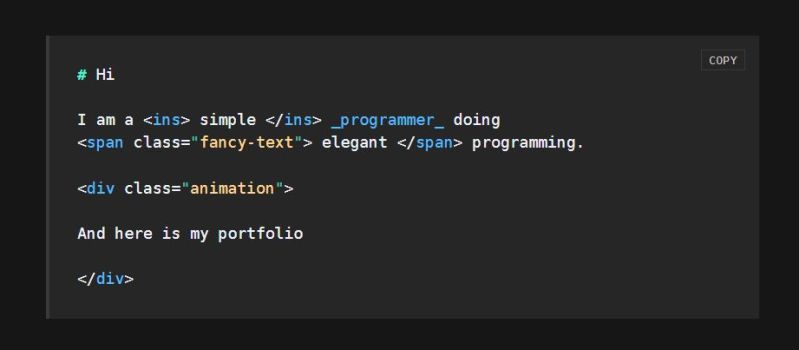
For some reason, Markdown has not just become the format of choice for giving READMEs in GitHub repositories some flair, but also for writing entire websites and documents. In a recent rant, [Burak Güngör] covers all the ways in which Markdown is a good idea as a basic document formatting concept and how its implementation is absolutely atrocious.
Even without straying into the minefields helpfully provided by other Markdown dialects beyond CommonMark, there is already plenty here to indulge in. The very idea of Markdown as a ‘simple text formatting syntax’ breaks down the moment you look at the available formatting styles and how they translate into HTML. Worse, the sheer complexity of parsing Markdown makes it vulnerable to a regular expression denial-of-service (ReDoS) attack.
This is where the question arises of whether Markdown is truly a text formatting aid or trying to be a programming language that just happens to usually spit out HTML documents, as, at some point, you’re basically writing something that approaches a regular expressions engine in its nightmarish implications.
Where things really fly off the rails is with inline HTML in Markdown, as this also means that you have to add an HTML parser to your Markdown parser to be Fully Compliant™. All of which doesn’t even yet take into account the special tags and formatting that things like GitHub-Flavored Markdown add. Yet even without that baggage, we can already enjoy the pleasures that inline HTML-related CVEs bring, including XSS CVEs.
Ultimately, [Burak]’s argument is that Markdown could be a good, simple document formatting tool if it actually tried to be one, which is something with which we can only wholeheartedly agree. When a simple text document is often enough for something like a changelog, and HTML is better suited for more than the most basic of formatting, Markdown seems to have trouble picking what it wants to be.
Considering that it’s often much easier to use HTML tags in a ‘Markdown’ README file for things like tables and images, it’s hard to say exactly where Markdown fits. The skeptic might say that if you’re going to add inline HTML as a feature, you may as well skip the ‘Markdown’ part.
What do you think? How do you generate simple documents? Love Markdown? Hate it? Let us know in the comments. For real fun, try using Markup for graphics.












Well the problem is that people keep extending it. Keep it dead simple. The entire goal of markdown is that it should convey the same semantic meaning (and minimal formatting) in a text editor, or rendered.
If you have to resort to things like inline HTML, images, or anything beyond the simplest of tables, then you are breaking that.
If only. Kids these treat markdown like source code. Who cares that humans read MD, ‘the forge will render it’. Dumb things like ‘whad do you mean two new lines between paragraphs, that’s not markdown. Reading disability is for losers. Likewise with ‘a new line must be after the title, because this broken parser can’t deal with it otherwise!!’ Or endless lines, because HTML doesn’t care about line endings bro.
Because of that, we now have blurps of nearly unreadable markdown…
I’m old, forgive me
Exactly.
Feature creep by people who do not understand the original idea.
I use markdown to write short notes and build my static website, and yes, the cmark command has the –html flag turned on for little things like hrefs with target blank.
For real writing: TeX in the LaTeX flavor. Because that was designed to be a proper programming language and behaves like one. As a bonus there will be no new features: one can learn it now and use the same in 5 years or 50 or 500. Beautiful!
I used to be a big fan of LaTeX but it’s a real bloaty thing. Have you tried Typst? It looks promising but I don’t want to invest the effort in it yet.
I looked at Typst but it offers no significant advantages – so I’d rather stay with tech that JustWorks™.
By the time I liked Typst LaTex became legible to my eyes so it’s really depending on the weather but typst is very clean and highly hackable…even supports wasm plugins for computable stuff.
There’s also Asciidoctor, which does support references.
You mean, better than the current web?
Oi, wrong place. Is there a mod, that can delete the above comment?
Or a pseudo-XML, with pseudo-Lua inline?
I prefer unicode notes. Also, markdown sucks a basic
lists
Agreed. At some point it will grow out of its pants and we will just call it something else. xml is just sitting in the corner playing gameboy…. I dunno I am still a txt file kinda person and if the need for extra is required then I just sort things so it makes sense. Then again the projects are just for me and I could care less if someone has issues reading or finding things in it lol they will just ‘fork’ it anyway and provide a markdown file of their own creation. I just personally dont like it as a thing… Same with rust and lua. Can code for them just dont like the crowd that champions them very much so I use other tools/code. More markdown files for others though I guess.
much like HTML in the 90’s
Hahaha ha
Exactly.
If you do not like markdown, then you will hate liascript that extends markdown and turns it really into a programming language.
https://liascript.github.io
There is nothing easier or more readable in html. I don’t know what are you guys talking about. Nobody is forcing you to use the basic stuff only. And I am glad it has everything else. I use exclusively MD for everything including diagrams, trello and other functionality and never had a single issue. As for security I mean if someone is retarded enough to host a website in MD then whatever he uses he will stumble upon security issues. I hope you are not suggesting to use XML instead.
Why not XML as an unambiguous and extendable base format, and MD as the practical human-consumable format? so long as you keep a healthy MD -> XML convention, and only extend the XML for anything extra (and/or utilise SGML!), should be all good!
Why not YAML with JSON blocks and Lua scripting thrown in for good measure? /s
Why not exporting to BMP, used since before Windows 3.1 that a guy got running on his Ryzen 9 one of those days?
/s
why not run doom via the font’s hinting virtual machine? /s
Or a pseudo-XML, with pseudo-Lua inline? Also named HTMl and JavaScript.
Why not a self-bootstrapping LISP interpreter parsing obfuscated S-expressions into React VDOM nodes?
If the markdown formatting visually resembles in ASCII what it would look like in graphical WYSIWYG presentations, then it is a good markdown extension. Otherwise, it is not. Markdown sgould always look like plain readable text, never like a programming language.
Markdown is something that is easy to read whether or not you have a parser. A markdown parser merely makes it look better on a graphical screen, but should never be necessary to readily grasp what is being presented. If a markdown parser beautifies without adding ANY clarity, then it is a good markdown. Otherwise it isn’t.
Markdown is so you know how to consistently format your ASCII notes so that they always are consistently translated to graphical format IF for some reason you should ever want to do that. But markdown should always be built for creating and reading ASCII text, with graphical translation an afterthought.
That being said, there is so much more that markdown could do that it does not. For years, I have kept my notes in ASCII, and those notes use more visual structure, especially complex tables and diagrams, than any markdown recognizes.
But that is usually okay, because the primary purpose, afterall, is displaying ASCII. It only becomes a problem when you MUST convert it to a standard graphical presentation, and the parser breaks down because it doesn’t recognize what you are doing.
That’s why in the more technical notes written in markdown I make a lot of use of the three backtick code blocks. It is the big “No Trespassing” sign for parsers.
+1 this
Otherwise you might as well use ntroff….
runoff, rather.
+1 yourself, but runoff, rather.
Or just leave it plain text.
I kinda agree. I’d like a simple-ish markup language based on HTML. I hate the xml part of HTML. I’d rather use something like div{content} or a[href=test.org]{test}. It’s not really better for the link, but closing all the time is plenty annoying.
Then I’d need some CSS with support for paper pages. Sometimes I have to create print stuff… With support for page numbers, headers/footers and stuff like that. Ideally CSS only, but not to the point of abusing CSS for stuff that is 10x simpler in JS. Last time I checked this was not properly supported across browsers though.
And a small framework that tied it all together. Editor, live-preview, … maybe I should vibe-code a prototype…
Then most annoying thing (by far) for me is how quickly it becomes unsharable when you want to add images. There is no longer one file you can drop somewhere. It is now a bunch of external files and references. Collab is now impossible.
And yes, sometimes you need to drop some image in markdown file.
I quite like Asciidoc. It is a format similar to markdown, but a bit more “modern”. I use it to make the documentation for DIY projects. It’s easy to add pictures and links and such. It can be exported (compiled) into standard HTML, or PDF files or postscript. Maybe some other formats too, but it’s already plenty for me. I also make use of the “Asciidoctor.js Live Preview” plugin for Firefox. It understands asciidoc without having to compile it first, and it watches for file changes. So I write asciidoc in a text editor, and as soon as I save it, firefox reloads the page with the latest edits added.
One of the reasons I started working with asciidoc is because KiCad’s documentation also uses it. You can view both the online html and download the pdf’s from: https://docs.kicad.org/ The asciidoc sourcecode is on gitlab, where all of KiCad’s development is coordinated.
Asciidoc is indeed a superior solution for more complex long-form documents. I’m working on a new Python parser for the format focused on adhering to the formal spec (which, unfortunately, is not yet complete).
I like Markdown a lot but I also explicitly don’t use HTML with it. I’ve also used a number of extensions, like strike through and additional attributes in situations I need them.
It would have been nice if CommonMark had gone with different modules for support with a PEP or FEP semi standard but I don’t think that was thought about at the time (mostly it was coming up with a more standard version than “whatever markdown.pl did”. It would have been cool if browsers could have done a WYSIWYG based on an attribute or additional attributes.
The main thing I’ve cared about is that it is readable while browsing. Having quotes text, italics, and bold for my writing. Links for my post and backticks for literals and code.
But I don’t think a lot would have considered how far Markdown was going to be accepted and how those little differences (Like Teams only accepting underscores for italics) continue to hang on.
Yes, markdown, because it is cheap and dirty. The rest of the documentation I have to endure around my work is PDF exported from MSWord. Which is awful.
I use the code ticks and
<
pre> tags. Eventually it gets rendered to HTML and I use the monolith program to embed the pics right in the html file. I have some custom CSS to have a ‘copy to clipboard’ button on the code blocks. and I have custom Table of contents methods so a reader can jump back and forth to the sections.
The PDF is egregious. If there are commands to have the user copy out, PDF breaks multi-line versions of that. On long lines it either truncates the text off the right OR doesn’t display it. THere is no need for page breaks in 2026 documentation. Nobody is going to print it.
Djot is the best alternative I’ve seen that prioritizes easy parsability and retains the minimalist markup.
The annotation system in particular provides easy hooks for extension instead of just tacking on shortcodes like Hugo or MDX.
I used to have sort of a home made cms that stored content as html. Content could be edited using a couple of different javascript based wysiwyg html editors or by editing raw text. (I guess I still do have it but it needs a lot of work to run on a modern server)
I found it was kind of a PITA. Getting the html in the WYSIWYG to look the same in the designer as it does on the site. The WYSIWYG editor has it’s own CSS and it is embedded in an admin site which has it’s own CSS only to be displayed on a site with it’s own theme and CSS… That kept me using a pretty small subset of html features most of the time not unlike a markdown language.
So then I tried Gemini… I don’t see myself switching entirely from web to Gemini. Some things I want to do require javascript and/or complex forms. But I tried documenting a couple of projects in Gemtext and it was kind of nice not fighting with css and browsers for once. Of course… there are things I would like to add to Gemtext. But then… I’m sure that’s how every markdown language becomes bloated. I want to add my 2 things, you want yours and so on…
I’m in the process of writing a book (fiction) using a writer’s deck. The writer’s deck supplies no distractions and little or no friction to writing – it’s text only, no E-mail or IM’s, and boots quickly.
When you are “in the zone” you sometimes end a chapter and start a new one.
I found myself putting a flag of sorts at that point, noting the name of the new chapter.
Then I found myself putting in flags for “finish this” and other semantic content. Sometimes you don’t want to finish a passage, because it’s obvious, and want to skip forward to the next passage, for which you have this great idea.
…and flags for “check this” (look it up and verify the information), epigram, literal (non flowed into paragraphs, such as computer dialogue), and so on.
And then transferring the text into a formatting/layout program (such as LibreOffice Writer) and setting the styles everywhere was a PITA, and you do that many, many times, and so I wrote a quick processor to do that and…
Now I’ve got a complete system “WriteDown” which defines six commands you can put inline with the text to identify different semantic parts of a novel. No formatting, just the various semantic sections you might find in a book.
And an app that reads all the text (in all the files) and adds style information for each section, generates chapter cards for storyboarding, and publishes the book in RTF format that can be imported into a word processor for formatting. Each type of semantic section has it’s own style, change this once and every section updates.
The idea of separating semantics from formatting is a good one, and the idea of “keep it simple” is also a good one. Something that’s easy to learn (six commands) and covers most of what you really want in a document.
I like MarkDown, and the concept of separating semantics from formatting can be extended to other use cases.
Congratulations on your wheel.
Thank you.
Although I don’t think anyone else has such a thing, so calling it a “wheel” is misleading.
Markdown doesn’t have processors that will put named styles on the various block types, and it certainly doesn’t have processors that will selectively show different blocks depending on the use case, and it doesn’t have processors that will recurse through a directory.
Oh, and each block of markdown uses a different special character, which makes learning more difficult and using those characters in text more difficult. And Markdown has lots of commands that writers don’t need, and doesn’t have some commands that we do need.
But other than that, yes… it’s just like something someone else did somewhere.
A lot of work going into those Sonic slash fics.
Have you put this online? If its shared freely and documented so others can use it, I think it might be worth a writeup. It’s a very particular niche you’re filling, but a useful one.
This is why I write all my notes in JSON
Why use Markdown if you have Org mode?
For me, if its simple, use markdown.
What is simple? Bold, Italic, Bold & Italic,
Strikethrough,Heading 1
to
Heading 6
Unordered Lists
Ordered Lists
Link
Image
print("code block" )Horizontal Rules
The jurey is still out about tables in markdown.
For everything else use something else.
Project Guttenberg ( https://en.wikipedia.org/wiki/Project_Gutenberg ) started with plain text files. Sadly they went to full html, understandably. They had defined a very good rule set to work with plain text, of course nowhere to be found these day. But markup should be readable in text form and they have been wasting format options on duplication, 3 ways to make a header.
Markup came from it at the wrong way, wanting to make easy-to-write html, not wanting to make easy-to-read text.