
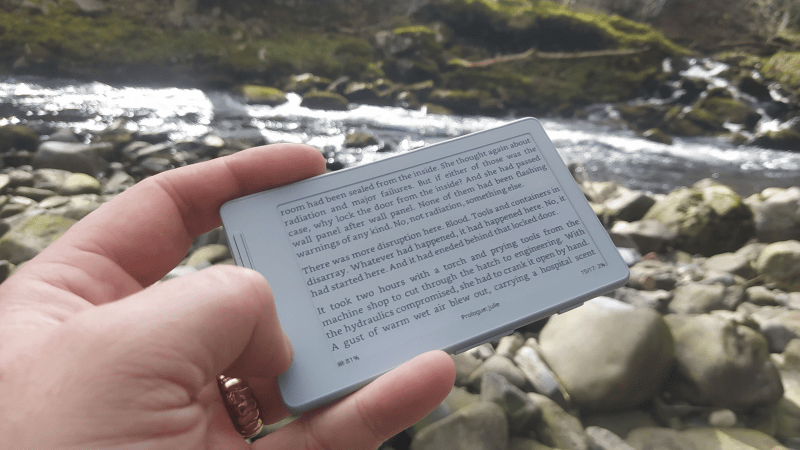
Not so long ago, e-ink devices were rare and fairly pricey. As they have become more common and cheaper, some cool form-factor devices have emerged that suffer from subpar software. [Concretedog] picked up just such a device, and that purchase led to the discovery of a cool open-source firmware project for this tiny gadget.
[Concretedog] described the process of loading the firmware, which is just about as easy a modification as one can make. You plug the e-ink display into your computer, visit a website, and can flash it right from there. Once the display is running the CrossPoint Reader firmware, it unlocks some new tricks on this affordable reader. The firmware lets you turn the device into a WiFi hotspot and upload books wirelessly, or it can connect to an existing network to add files that way. It also enables rotating the display and KOReader syncing if you have multiple devices you read from.
We love seeing the community step in and improve devices that are hardware-wise good, sometimes great, but come up lacking in the software or firmware department. Thanks [Concretedog] for sharing your experience with this device and the cool open-source firmware. Be sure to check out some other projects we’ve featured where a firmware swap breathed new life into the hardware.












Supermarket price tags?
not with the aluminium shell and the multiple buttons + TF slot…
but yeah, I can definitely imagine that the e-ink panel in it is cheap thanks to price tags…
Great article. More like this please.
Nope.
Nope it’s an xteink x4 which are 50 bucks and this is old news. Tell me when someone has the TRMNL software running in it at the same time so when it goes Into sleep mode, it shows a wifi weather btc stocks news calender clock when its on your fridge (it has a magsafe magnet on the back)
Sadly tho, even as a great ereader, you’ll lust after a $180 bigme m6 android color e ink tablet so you can just read websites and browse books online from a chrome browser . It can even play youtube videos just at like 15 frame a second lol bur it works.
But for the xteink yeah it’s esp32! I programmed for it using google gemini and android ide to compile a .bin file ! I need it to run actual writer deck software like a simple word processor …then connect it’s bluetooth to a keybaord
You didn’t “program” for it.
You asked a search engine to cobble together bits of other people’s closed/open source code, and it vomited up something.
Don’t be proud of your zero effort theft.
So reading documentstions about code someone other built like libraries is not stealing that code? Learning to and using code isn’t the same LLMs do? They where trianed on existing code and so are human programmers…
lol, funny thing, I bought that 2 weeks ago and yes, with crosspoint it’s awesome for a cheap device, had it for 48$ of the usual sources…
Don’t Americans go to school? You are taught at age 12 that under no circumstances can you put a currency symbol AFTER the number. It ALWAYS MUST come before the number. What is wrong with you all.
Well Phil, you might not know this but it’s not always like that…
https://en.wikipedia.org/wiki/Currency_symbol
When writing currency amounts, the location of the symbol varies by language. For currencies in English-speaking countries and in most of Latin America,[a] the symbol is placed before the amount, as in $20.50. In most other countries, including many in Europe and Francophone Canada, the symbol is placed after the amount, as in 20,50 €.
I guess they didn’t teach that in your school? 😉
Recently I have purchased 40pcs 2.13 eink displays £0.3 each. I needed 2 for the project but when I did see the price, I have ordered “some” spares. :)
That’s pretty cool. Where did you find that deal?
You can find those on ebay usually when searching for like “electronic price tag bulk”
Taobao is your friend :)
Please share🤤🤤🤤
You might want to look at OpenDisplay. I also got some of the ones you likely got and writing firmware for them currently.
You forgot to mention that th device is esp32 based…
If it’s just wifi hotspot to upload files and to rotate display when reading, the current firmware for xteink supports it. My version I got 2 weeks ago have all this inbuilt.
I switched to the CrossPoint firmware early on, the advantages at the time included:
* Better font rendering, including rendering bold, italics, actual paragraph spacing (this was the biggest point to me, the “native” fonts were hard to look at, hopefully XTOS has fixed this!)
* Better UI for browsing books / chapters – you can actually see the entire name, the native firmware only gave you the first part then chopped it off.
I don’t know if the XTOS has improved since then, but I’m not changing back for now. https://github.com/crosspoint-reader/crosspoint-reader/blob/master/docs/comparison.md has comparisons from earlier versions of both firmware – hopefully XTOS has improved these points.
I have an X4 and I quite like it, I really like that it’s distraction free compared to my phone, so I actually read books without having anything else pop up (even though I’ve tuned notifications on my phone, they still engage me).
There’s a calibre crosspoint plugin… You can send books from calibre wirelessly like that!
obody is reading your AI-generated nonsense. If you know nothing about a subject and have therefor NOTHING to contribute, why do you assume we’d all want to read whatever some stupid LLM shat upon you regarding ‘sbc instructions’? Literally this is the stupidest thing I’ve ever seen: you know nothing, the LLM knows (virtually) nothing, yet you both have so much to say! Incredible! The response doesn’t even make sense in context of the article. And who is researching purchasing 20 or 28 TB NAS drives for a tiny e-reader display? At least pay for the pro model, and spend a little more time understanding how to write a comment that makes sense.
Seconded. And where is the “report comment” link when you need it… (though to be fair, its disappearance here could be a side-effect of my various adblockers etc.)
(Ugh. That was actually posted as a reply to J. Sampson, above. That it appeared elsewhere is yet another quirk of HaD, I guess.)
I never understood why my phone didn’t have an e-ink display on the back for the clock and notifications. Even as a cover of a phone case would be nice.
I dream about offline social media https://ssbc.github.io/scuttlebutt-protocol-guide
The XTEINK X4 with CrossPoint flashed into it makes for an excellent reader. The manufacturer firmware is pretty bare bones and lacked some important features when I first got it (like decent font rendering). But CrossPoint fixes all that and more. The form factor of the XTEINK is also perfect.
Someone mentioned that they bet the display was trash. That couldn’t be farther from the truth. In fact, it’s got a better refresh rate and it’s faster to change pages than many more expensive readers.
I’ve been very satisfied.