
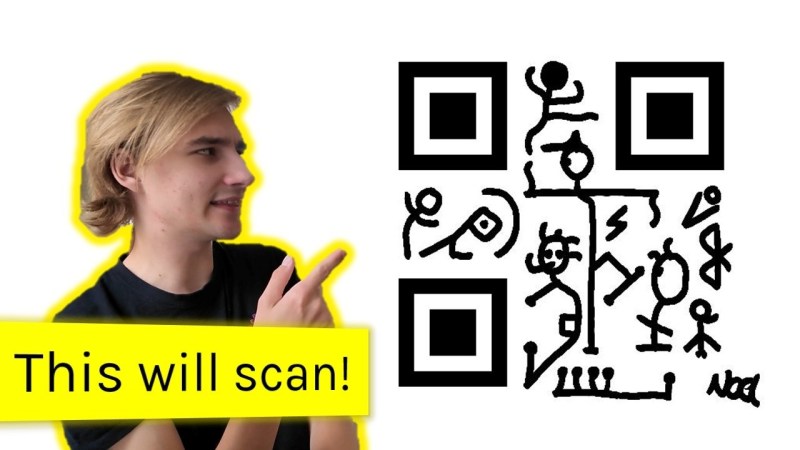
QR codes can be a handy way to send a link or contact details without all that tedious mucking about with typing in a link, but they aren’t very useful without a smartphone to decode them. [Noel Friedrich] wondered if there was a way to do it by hand.
If it all seems a bit daunting at first, [Friedrich]’s write-up helps you work through copying a QR code to paper and then decoding it, as long as it’s version 1-5. Slashes in the template tell you where error correction has been applied to the code and you need to flip the bit back to what it was.
[Friedrich] then goes into some more details with a practical example of how the error correction works and how to exploit the ways QR codes are generated and read to make artistic QR codes. This even works to make human readable codes (without the worksheet), although the quality of the text still makes it somewhat challenging.
This isn’t the first time we’ve featured reading QR codes without a computer, but once you learn, maybe this QR code clock will be a bit more useful!
Thanks to [InstantArcade] for the tip via Discord!











I’m kind of dissapointed that the QR-code in the thumbnail is not a Rickroll.
Neither is it Goatse 😪
Oh God. I’d forgotten about that. I did not need to be reminded of it.
My favorite are the ring codes:
https://www.fhnw.ch/plattformen/computervision/rd-projects/codecs/ring-codes/
You could use that instead of the aztec patterns used to paint plates of the Refit Enterprise from ST: TMP.
I had to go down this rabbit hole a while back when dealing with a company (who will remain unnamed) anyway it took me forever to figure out why i was having trouble with the QR codes and the video does not go over this part. The QR codes they were generating had ZERO ECC and this was done intentionally by them i came to find out later. They were doing this so that if it were damaged the end user would have zero recourse but to repurchase the item to verify that they owned it via the QR receipt.
Funny that QR codes were built purely to have ECC built into them (iirc their history correctly)
That’s cursed! I don’t have anything professional I can say about that sort of practice.
Hmm, 15 years ago when I did the same in a spreadsheet program, I didn’t feel the need to make a video about it. Neither when I played with microQR codes.
Still, didn’t find out how to spread data into several linked QR codes.
Why being dismissive about people sharing what they’ve learned?
I am not dismissive, but just presenting (bassically only 10% or less of the entire process) the (en/de)coding in a very easy case and with less details is not useful.
There is missing information like what size of QF code and encoding should you use for some data, how do you apply the masks, which mask to apply when encoding and why, how to compute recovery info and how to use it, and so on. That without showing how a decoding software take a skewed image, poor contrast, and other issues, and struggles to find enough information from the QR code to present the content. How much and which part of the info can you recover if 100% cannot be recovered? What is different about the new standard which allows rectangle shape QR code (used mainly as markings of cylindrical pieces). And perhaps something new.
Everything he presented is 10-15 years old information packed in an app doing less than 10% from already existing apps/functions on every mobile phone and as computer programs. Not a hack.
If I had shown how to change the lightbulb in a 100 years old portable torch, not mentioning that there are 5 types of quasi identical lightbulbs yet incompatible between them (but that is not important in our video), and you really needed that information, how would you feel about my video masterpiece? What if I would start the video by explaining why there are 5 type of bulbs and when you had to use each one of them (depends on the battery voltage and where you use the torch – there’s a special bulb that stays cold because something bad will happen if it is hot) and if you should or should not have ultraviolet light component from that torch based on where you are using it and what type of lens the torch has (just to make up some examples).
I know is not a hack, it is a information repository which in the context of this site could also be very usefull. Yet I do not have such info to present, so I did not made a video.
These are my 2, 4, 6, 8, 12, 20, .. the whole dollar in cents, on this matter.
I don’t think there actually is a need to read a QR code when you have no computing device, I mean what are you going to do with it? The bigger issue for me is first that you don’t know where it leads and you might not want your device to got here obviously, and second if you have devices that connect to desktop computers that have no camera/QR reader but the instructions are behind a QR code.
And often there is plenty of room and opportunity to include the link in readable form; and they just don’t as part of the global effort in making sure smartphones are a scourge.
The slashes on the template marking which bits you need to flip back is a clever bit of worksheet design; it makes the error correction step feel much less abstract. Working through a version 1 code on paper also shows why the four-module quiet zone matters: without that white border you can’t reliably find the finder patterns, and a camera has the same problem. I’m going to print one of the worksheets to check my own module counting.