Wireless EMate

emate

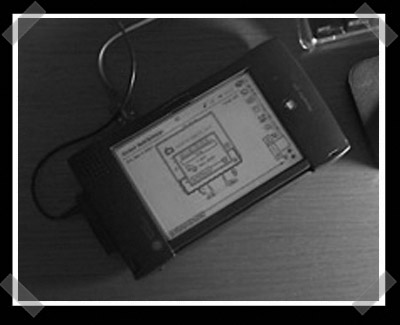
Our friend [Markie] keeps insisting on dragging all of his old tech into the new millennium. In his recent article about cramming a non-airport WiFi card in his old iBook he hinted at another wireless project coming up. Well here it is: a wireless eMate. eMates were sold to the education sector as durable computers for classroom use. Markie had to build a serial cable to transfer the necessary software to the machine. With only 3MB of RAM and a 25MHz processor the machine isn’t up for much, but it seems to work fairly well as a terminal.

Continue reading “Wireless EMate”

Apple // Game Server

apple II game server

Feeling a bit nostalgic, reader [blurry] decided to write this Apple Game Server in Java using the rxtx library. The server eliminates the need for a floppy drive on your Apple //. You just need to connect the Apple // to your computer using a null modem cable and you will have access multiple games. To get started you tell the Apple // to accept serial commands. Then the Java program takes over, typing the loader program one line at a time. It takes about 15 seconds. Once that’s done you’re presented with a menu to boot whatever game you want.

Continue reading “Apple // Game Server”

The Mac Minitosh

minitosh

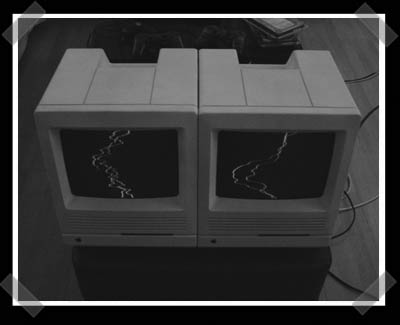
Hack-A-Day reader [Lee Olivares] stuffed a Macintosh Plus full of new hardware without butchering the case. From the original test fit he could see that the Mac Mini’s DVD slot lined up well with the original floppy slot, so it just needed to be widened a little bit for clearance. The monitor is black and white, but a separate VGA port has been split off for an external monitor. The original motherboard was cut down so that the original power switch and ports could be used. Any new ports were hidden behind the battery cover.

[thanks Lee and Adam]

Continue reading “The Mac Minitosh”

Powerbook Compact Flash Drive

powerbook

This Powerbook 150 was purchased as a simple media reader. Once the hard drive failed the owner decided to replace it with a compact flash card since IDE adapters were available. There was a problem: the ATA device driver would probe the device and then immediately shutdown because the “identify device” bit wasn’t the expected value. The device driver had been written before more recent changes to the ATA spec. Greg solved the problem by constructing a daughter card that plugs into the adapter board’s 40-pin header and then flips the identifying bit when the device is initially probed.

[thanks iamdigitalman]

Continue reading “Powerbook Compact Flash Drive”

Optical ADB Mouse

adb optical

Here’s an easy hack compared to our usual craziness. Reader [Alex Dawson] was having issues with his Apple Pro Optical mouse. The new mouse had broken its USB cable connection internally due to insufficient strain relief. Cases for these mice are epoxied together and working on them is a one-way trip, never to return to their original state. He salvaged an ADB mouse and disassembled it with ease. The optical circuit board fit into the ADB case without any trouble. The button switch on both mice is exactly the same and almost in the same position. The optical sensor does not line up with the hole though. Once the ball ring was fused in place, Alex cut a new slot for the sensor. That’s all it took to end up with modern performance and old school flavor.

Continue reading “Optical ADB Mouse”

Mac MAME Cabinets

mac mame

[calhoun] has been scratch building some great mac based MAME cabinets. His first one was a cocktail (pictured above) built from a Powerbook and using an I-PAC to interface with the arcade controls. The motherboard and hard drive are mounted to a fold down plexiglass tray. The speakers come from the Apple “globe” speakers. This is just the first model, he’s built several bar-top cabinets and is constantly trying to improve the design.

Continue reading “Mac MAME Cabinets”

How-To: Upgrade The Processor On An Older Macintosh G4

proc19

Yes there’s still a how-to this week, even though we pretty much how-to’ed a hack-cake yesterday for our HADA01 celebration.  Here’s the low down on today’s how-to up on engadget:

I bought an older graphite 400 mhz G4 tower from ebay.de (germany is a great place to buy tech here in europe) a while back. The motherboard and the manufacturing of the AGP G4 series, codenamed “Sawtooth”, are really good (i.e. there weren’t huge amounts of AGP G4’s that failed in weird ways over time). After doing some preliminary reading I learned that doing a processor upgrade for a G4 can sometimes require messy heat sink paste. Some other mac proc upgrades use the same heat sink provided with your original proc. I decided on a choice that does not require thermal paste and has a larger new heat sink and fan included: the PowerLogix PowerForce47 G4/2.0GHz with 512K 1:1 L2 Cache Per Processor. (note: I was not payed by Powerlogix nor did I receive free merchandise for this how-to nor is this article a review of comparable mac proc upgrades). After having a really hard time getting this proc upgrad to work, I just  wanted to put this information out there to help who it may as clearly as possible, after all I never enjoy seeing macs in the trash (unless I get to take them home and adopt them!)

Click to read “How-To: Upgrade the processor on an older macintosh G4” on engadget

Continue reading “How-To: Upgrade The Processor On An Older Macintosh G4”