
Today, we take office software suites for granted. But in the 1970s, you were lucky to have a typewriter and access to a photocopier. But in the early 1980s, IBM rolled out PROFS — the Professional Office System — to try to revolutionize the office. It was an offshoot of an earlier internal system. The system would hardly qualify as an office suite today, but for the time it was very advanced.
The key component was an editor you could use to input notes and e-mail messages. PROFS also kept your calendar and could provide databases like phonebooks. There were several key features of PROFS that would make it hard to recognize as productivity software today. For one thing, IBM terminals were screen-oriented. The central computer would load a form into your terminal, which you could fill out. Then you’d press send to transmit it back to the mainframe. That makes text editing, for example, a very different proposition since you work on a screen of data at any one time. In addition, while you could coordinate calendars and send e-mail, you could only do that with certain people.
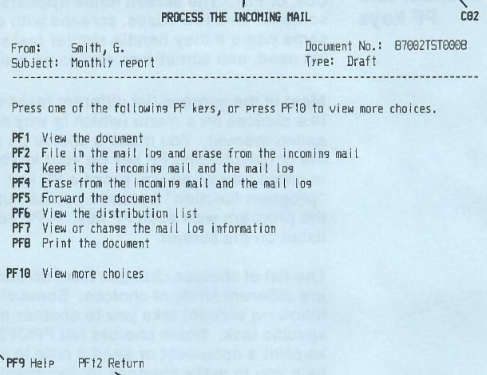
In general, PROFS connected everyone using your mainframe or, perhaps, a group of mainframes. In some cases, there might be gateways to other systems, but it wasn’t universal. However, it did have most of the major functions you’d expect from an e-mail system that was text-only, as you can see in the screenshot from a 1986 manual. PF keys, by the way, are what we would now call function keys.
The calendar was good, too. You could grant different users different access to your calendar. It was possible to just let people see when you were busy or mark events as confidential or personal.
You could actually operate PROFS using a command-line interface, and the PF keys were simply shorthand. That was a good thing, too. If you wanted to erase a file named Hackaday, for example, you had to type: ERASE Hackaday AUT$PROF.
Styles
PROFS messages were short and were essentially ephemeral chat messages. Of course, because of the block-mode terminals, you could only get messages after you sent something to the mainframe, or you were idle in a menu. A note was different. Notes were what we could call e-mail. They went into your inbox, and you could file them in “logs”, which were similar to folders.
If you wanted something with more gravitas, you could create documents. Documents could have templates and be merged with profiles to get information for a particular author. For example, a secretary might prepare a letter to print and mail using different profiles for different senders that had unique addresses, titles, and phone numbers.
Documents could be marked draft or final. You had your own personal data storage area, and there was also a shared storage. Draft documents could be automatically versioned. Documents also received unique ID numbers and were encoded with their creation date. Of course, you could also restrict certain documents to certain users or make them read-only for particular users.
More Features
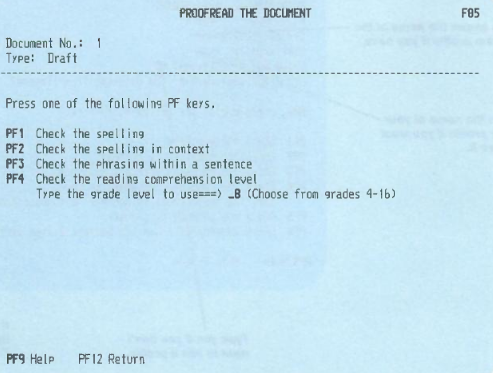
PROFS could remind you of things or calendar appointments. It could also let you look up things like phone numbers or work with other databases. The calendar could help you find times when all participants were available. PROFS could tie into DisplayWrite (at least, by version 2) so it could spell check using custom or stock dictionaries. It also looked for problematic words such as effect vs. affect and wordy phrases or clichés.
The real game changer, though, was the ability to find documents without searching through a physical filing cabinet. The amount of time spent maintaining and searching files in a typical pre-automation business was staggering.
You could ask PROFS to suggest rewrites for a certain grade level or access a thesaurus. This all sounds ordinary now, but it was a big innovation in the 1980s.
Of course, in those days, documents were likely to be printed on a computer-controlled typewriter or, perhaps, an ordinary line printer. But how could you format using text? This all hinged on IBM’s DisplayWriter word processor.
Markup
Today we use HTML or Markdown to give hints about rendering our text. PROFS and DisplayWriter wasn’t much different, although it had its own language. The :p. tag started a paragraph. You could set off a quotation between :q. and :eq. Unnumbered lists would start with :ul., continue with :li., and end with :eul. Sounds almost familiar, right? Of course, programs like roff and WordStar had similar kinds of commands, and, truthfully, the markup is almost like strange HTML.
The Whole Office
IBM wanted to show people that this wasn’t just wordprocessing for the secretarial pool. Advanced users could customize templates and profiles. Administrators could tailor menus and add features. There were applications you could add to provide a spreadsheet capability, access different databases, and gateway to other systems like TWX or Telex.
It is hard to find any demonstrations of PROFs, but a few years ago, someone documented their adventure in trying to get PROFS running. Check out [HS Tech Channel’s] video below.
History and Future
Supposedly, the original system was built in the late 1970s in conjunction with Amoco Research. However, we’re a little suspicious of that claim. We know of at least three other companies that were very proud of “helping IBM design PROFS.” As far as we could ever tell, that was a line IBM sales fed people when they helped them design a sign-in screen with their company name on it, and that was about it.
The system would go through several releases until it morphed into OfficeVision. As PCs started to take over, OfficeVision/2 and OS/2 were the IBM answer that few wanted. Eventually, IBM would suggest using Lotus Notes or Domino and would eventually buy Lotus in 1995 to own the products.
Scandal
One place that PROFS got a lot of public attention was during the Iran-Contra affair. Oliver North and others exchanged PROFS notes about their activities and deleted them. However, deleting a note in PROFS isn’t always a true deletion. If you send a note to several people, they all have to delete it before the system may delete it. If you send a document, deleting the message only deletes the notification that the document is ready, not the document.
Investigators recovered many “deleted” e-mails from PROFS that provided key details about the case. Oddly, around the same time, IBM offered an add-on to PROFS to ensure things you wanted to delete were really gone. Maybe a coincidence. Maybe not.
On Your Own
If you want to try to build up a new PROFS system, we suggest starting with a virtual machine. If anyone suggests that wordprocessing can’t get worse than DisplayWriter, they are very wrong.











Back in the day I made a conversion program that would take an 8-inch DisplayWriter floppy (from the desktop, PC-like DisplayWriter 6850 system) and convert it into something my customer’s Linotype typesetter could use. I had made a number of conversion programs for my customer for the more well known word processors, but DisplayWriter was definitely the most difficult as it used EBCDIC (it could use ASCII, but my customer lived in a Nordic country with extra characters, so their customers used EBCDIC), and because the file format and disk layout was undocumented. I tried contacting IBM, but they were (as expected) not interested in providing any documentation.
It took some trial and error to get everything into place, but ultimately it worked.
Forgot to say, EBCDIC in itself was not a problem but handling all the codepages was, although they at least were documented.
Such legacy keeps living in places the least expected : -] Banks, among other places, making mega-jiga-giga-para-uber-profits and sure as **** can afford rewriting and upgrading these, yet still rely on unknown millions of such hacks to prop up their endless management totem poles reaching the Sun.
I imagine with JavaScript being almost defacto browser-based programming, and SQLite being de-facto backend databasing, it is a matte of time someone makes PROFS JavaScript library :-]
It is kind of funny watching certain things reinvented over and over again, just to become a bloatware and veer off elsewhere. Right now I am observing MS Outlook gradually morphing into a kind of lightweight MS Office integrated with MS Teams – and basically repeating the same pattern that has been seen before (as a side note – MS Outlook can be forced into HTML-mode, though, not terribly good one, full of all kinds of bugs and idiosyncrasies, some probably unintentional, but it the ideal MS world those are Good Enough for Average Sam’s use – heh, as if).
I was a developer at IBM while PROFS was still in use. The PF keys were different than the PF assignments in the developer tools. It caused a lot of frustration and many of the developers used the older internal email system that could mostly exchange messages with PROFS.
The company that brought you the IBM Common User Access standard failed to follow consistent and already well-used defaults for PF keys? Shock, horror.
At least WE know that PF1 should be the help key, PF3 should be save and exit, PF5 should be find, PF6 change …
“But in the 1970s, you were lucky to have a typewriter and access to a photocopier.”
IBM Selectric and the mimeograph.
Oh, puuullleease.
I started full-time professional employment in 1977. We had IBM 3270 displays, a choice of computer systems to connect to, IBM 2741 selectric terminals, a range of golfball typewriters and several photocopiers on every floor.
Now, choosing which computer system your terminal was connected to, did involve calling the local Terminal Switching Bureau and telling them you wanted terminal D74 on VM, please …
IBM loaned my employer a PROFS system in the early 1980’s, hoping we’d buy it. As the mainframe systems programmer, it somehow became my job to install the thing. I spent a half a day feeding it 8″ floppies, one after another after another…
The secretaries hated it. Typing a memo took much longer than just banging it out on a Selectric. After some early interest, it just gathered dust until IBM took it back.
Funnily enough, I built the only PROFS instance in the known world, and it’s on pubvm.org; I also have the last iteration of it, OfficeVision/VM, running on a descendant OS of pubvm.org (which runs VM/SP 5.0), z/VM 4.4. It’s got full SMTP email support on both instances (with the PROFS SMTP support being a clever proxy, which I also used in lieu of OV/VM’s native SMTP support such that DMARC passes, SPF works, and DKIM signing happens)!
PROFS and OV/VM (mainly OV/VM though) literally run my entire life, like it’s impressive how much I rely on it for scheduling, document handling, mail, and all sorts of stuff.
If you want to see it in action, pull up pubvm.org:24 on a TN3270 client (x3270, PCOMM, Vista, etc) and have fun!
Oh yeah, I’m the one that made that video you showed off! The video of me building that system (albeit with a horribly-built mic and awful room acoustics) directly resulted in the system now running on pubvm.org!!!
Thank you for sharing it with the world wide world, and it is appreciated.
There’s also dm3270, after a quick search.
PF keys were sort of “what we would call function keys”, but they were actually EXTRA function keys that ran down the left edge of the keyboard. (You can see them in the thumbnail of that YouTube video, even.) The regular F1-F12 keys above the keyboard were also there. IBM keyboards had a lot of functions!
Digital Equipment Corporation had a competitor, All-in-1
ALL-IN-1 – Wikipedia https://share.google/6Xjyr28dUg4UG0ySR