Illustrated Kristina with an IBM Model M keyboard floating between her hands.

Keebin’ With Kristina: The One With The Ball-Joint Keyboard

Get a handle on this bad boy! Okay, so those voids are really more for airing out your palms, I’d imagine, because palm sweat sure is real — you should see the pads of my Kinesis. This kind of looks like two sawed-off machine guns kissing, and I mean that in the best possible and non-violent way.
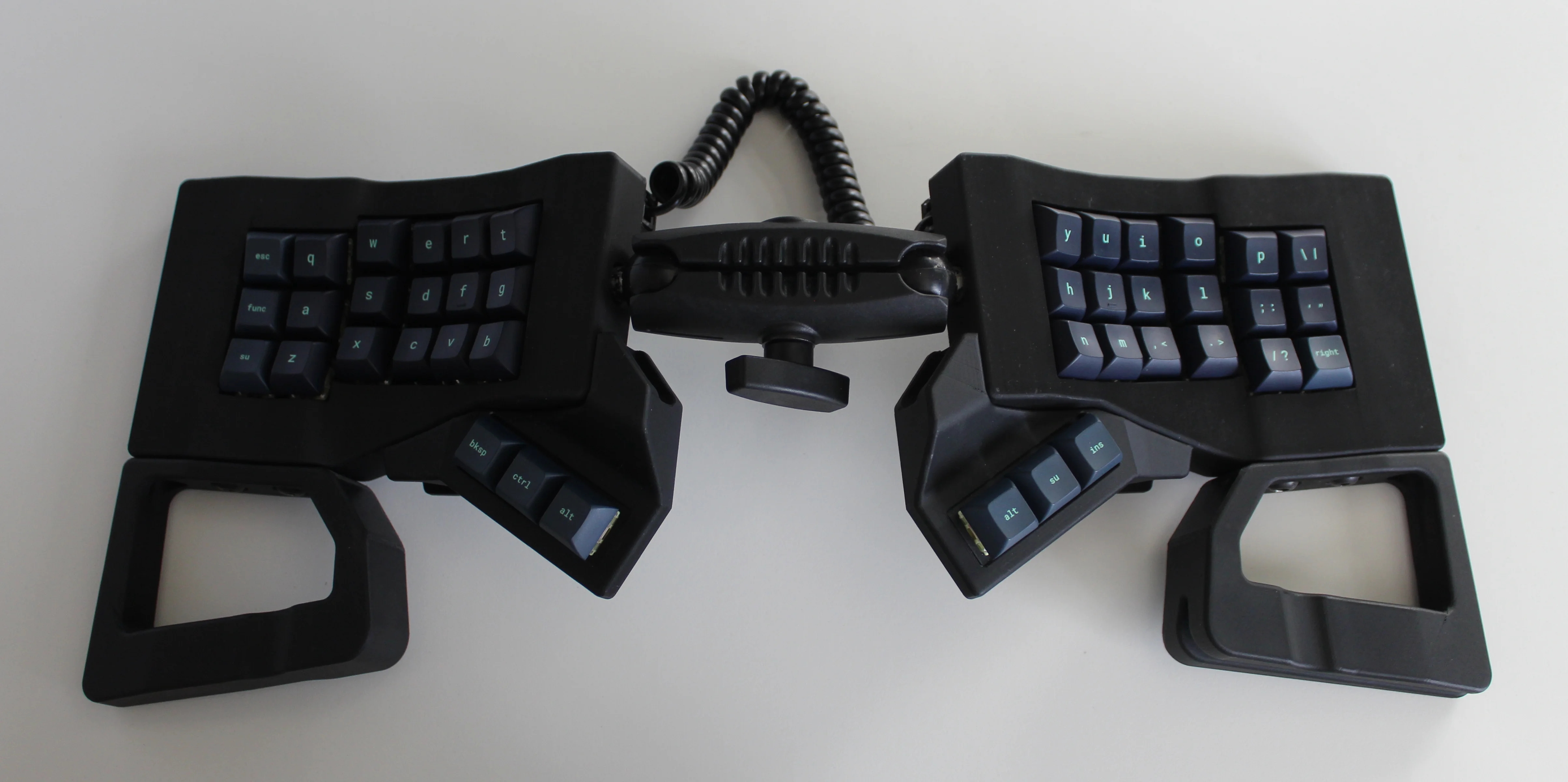
Image by [ntc490] via reddit
So, [ntc490] has been on Team Special Keyboard for eight years now and decided it was time to design one. The goal was to make something semi-portable, super ergo, and as easy/cheap to build as possible, which, honestly, that sounds like one of those pick-two situations.

And yet, pricing (oh yeah, this is gonna be A Thing You Can Buy) will be around $115-155, depending upon whether you want the base kit, or the add-ons, too, minus switches and key caps.

So let’s get into the particulars here. As you can see, there are key wells and thumb clusters, inspired by other keyboards including your bog standard Maltrons, Kinesis Advantages and more modern, open-source takes like the Dactyl. [ntc490] loves the key well-thumb cluster combination, and I do, too (hello from the Glove80). And miraculously, the keys are hot-swappable via sockets.
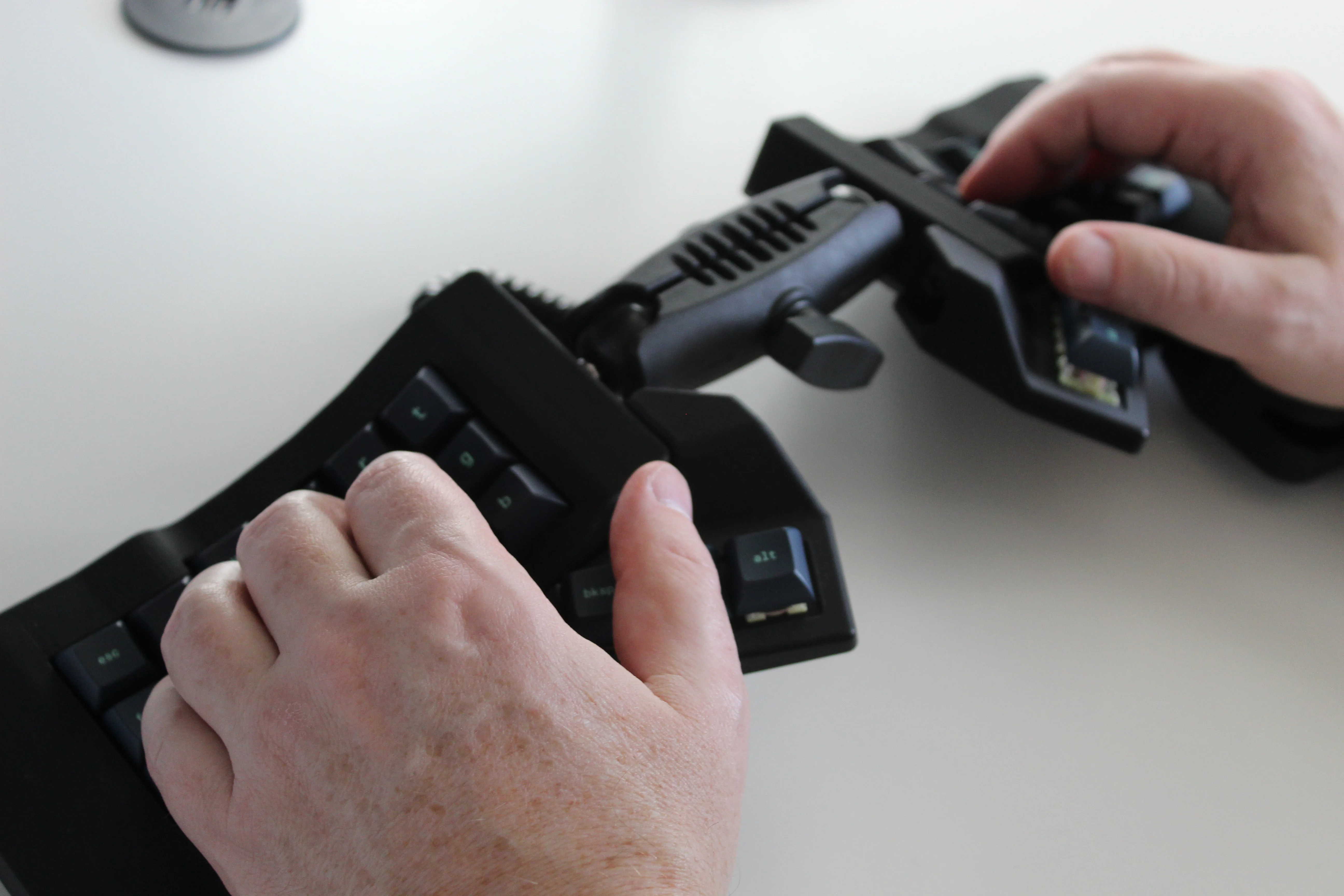
Two hands rest on a joined split keyboard with keywells and tenting. The two halves are on ball joints and connect in the middle.
Image by [ntc490] via reddit
That novel tenting mechanism is adjustable, rugged, and portable. You can tent it near-vertical, lay it flat, or take it apart if you wish. The thing is modular for future expansion options such as wrist rests and displays.

Inside, you’d find direct wiring to the GPIOs, so I’m gonna guess that those are RP2040 clones in there. There’s no PCB, no diodes, no matrices to debug.

So please do go visit the thread if this keyboard appeals to you at this price point. I love it, but I would need more rows of keys, personally. The top reddit comment mentions this as well, and [ntc490] says that because the thing is modular, it can easily accommodate more keys in both the wells and the thumb clusters. I seriously want one of these. Just with a few more keys.

Continue reading “Keebin’ With Kristina: The One With The Ball-Joint Keyboard”
Illustrated Kristina with an IBM Model M keyboard floating between her hands.

Keebin’ With Kristina: The One With The Keyboard-Mouse, Again

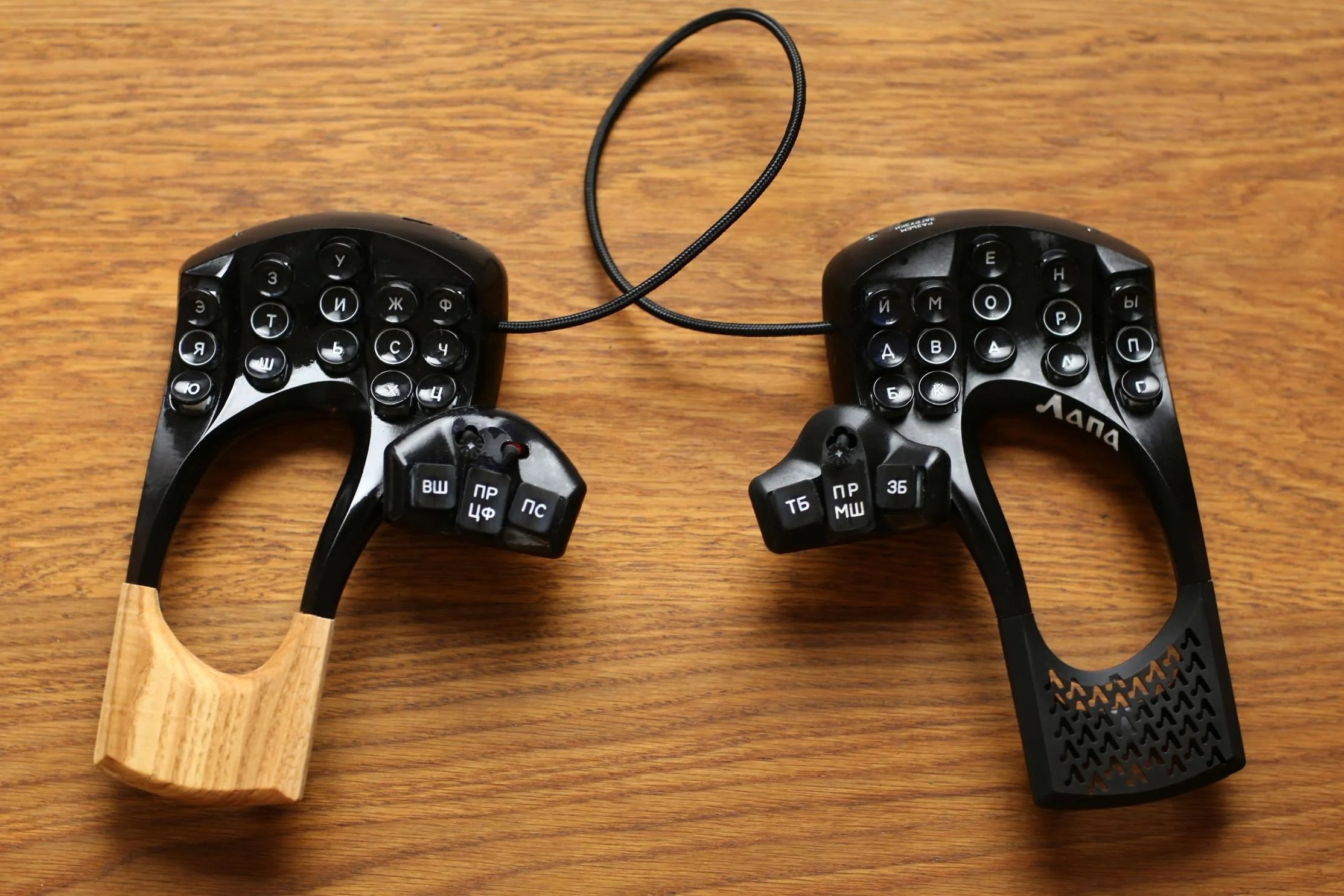
The astute among you may remember an earlier version of this Russian beauty, the Lapa, which I featured last year around this time. Creator [lemosbor] claims that the worry was less about visual beauty and more about ergonomics. Way more. Well then, let this serve rather nicely as a textbook definition of that old form-follows-function principle.

A splendidly ergonomic split with few keys, large openings under the palms and wrists, and mouse control on the thumbs.
The lovely Lapa.

See, [lemosbor] believes that the keyboard must adapt to the hands and not the other way around. The main goals were to minimize hand and finger movement as well as the visual attention required of the keyboard itself. No, there were never going to be any screens or RGB, and there likely never will be.

But I refuse to sidestep the obvious beauty in this keyboard, which from the side resembles a stylish and expensive pair of slightly-heeled shoes that were tailored to the contours of the human hand. And let’s not forget those handmade, oval keycaps, which again are a product of form-follows-function.

Continue reading “Keebin’ With Kristina: The One With The Keyboard-Mouse, Again”

Illustrated Kristina with an IBM Model M keyboard floating between her hands.

Keebin’ With Kristina: The One With The Gaming Typewriter

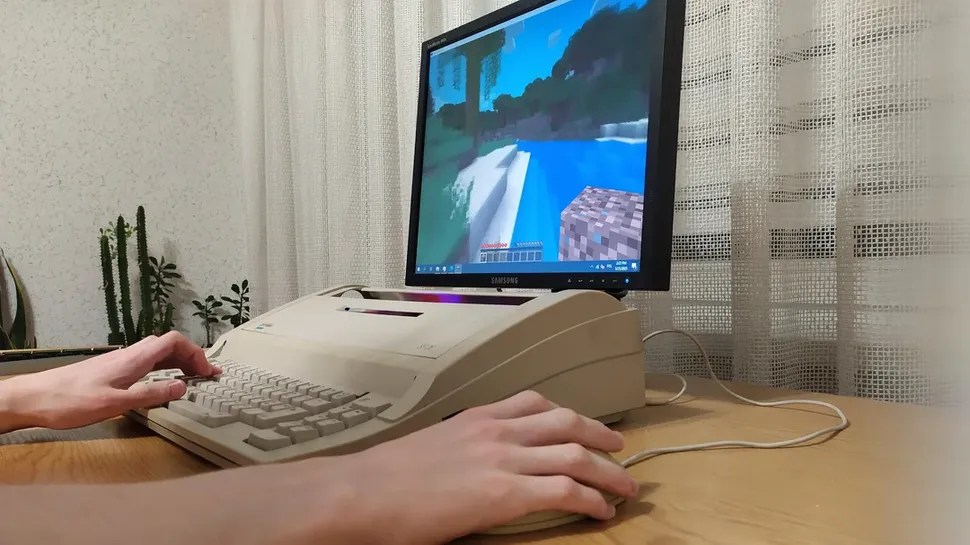
Can you teach an old typewriter new tricks? You can, at least if you’re [maniek-86]. And a word to all you typewriter fanatics out there — this Optima SP 26 was beyond repair, lacking several internal parts.

A sleek typewriter with a monitor and a mouse.
Image by [maniek-86] via reddit
But the fully available keyboard was a great start for a gaming typewriter. So [maniek-86] crammed in some parts that were just laying around unused, starting with a micro-ATX motherboard.

But let’s talk about the keyboard. It has a standard matrix, which [maniek-86] hooked up to an Arduino Lenoardo. Although the keyboard has a Polish layout, [maniek-86] remapped it to English-US layout.

As you’ll see in the photos of the internals, this whole operation required careful Tetris-ing of the components to avoid overheating and ensure the cover could go back on.

The graphics were a bit of a challenge, since the motherboard had no PCI-E x16 slot. To address this, [maniek-86] used a riser cable, probably connected to a PCI-E x1 slot with an adapter, in order to use an NVIDIA GT 635 GPU. It can’t run AAA games at 4k, but you can bet that it’ll play Minecraft, Fortnite, or Dota 2 just fine.

Continue reading “Keebin’ With Kristina: The One With The Gaming Typewriter”

Illustrated Kristina with an IBM Model M keyboard floating between her hands.

Keebin’ With Kristina: The One With The Copycat Keyboard

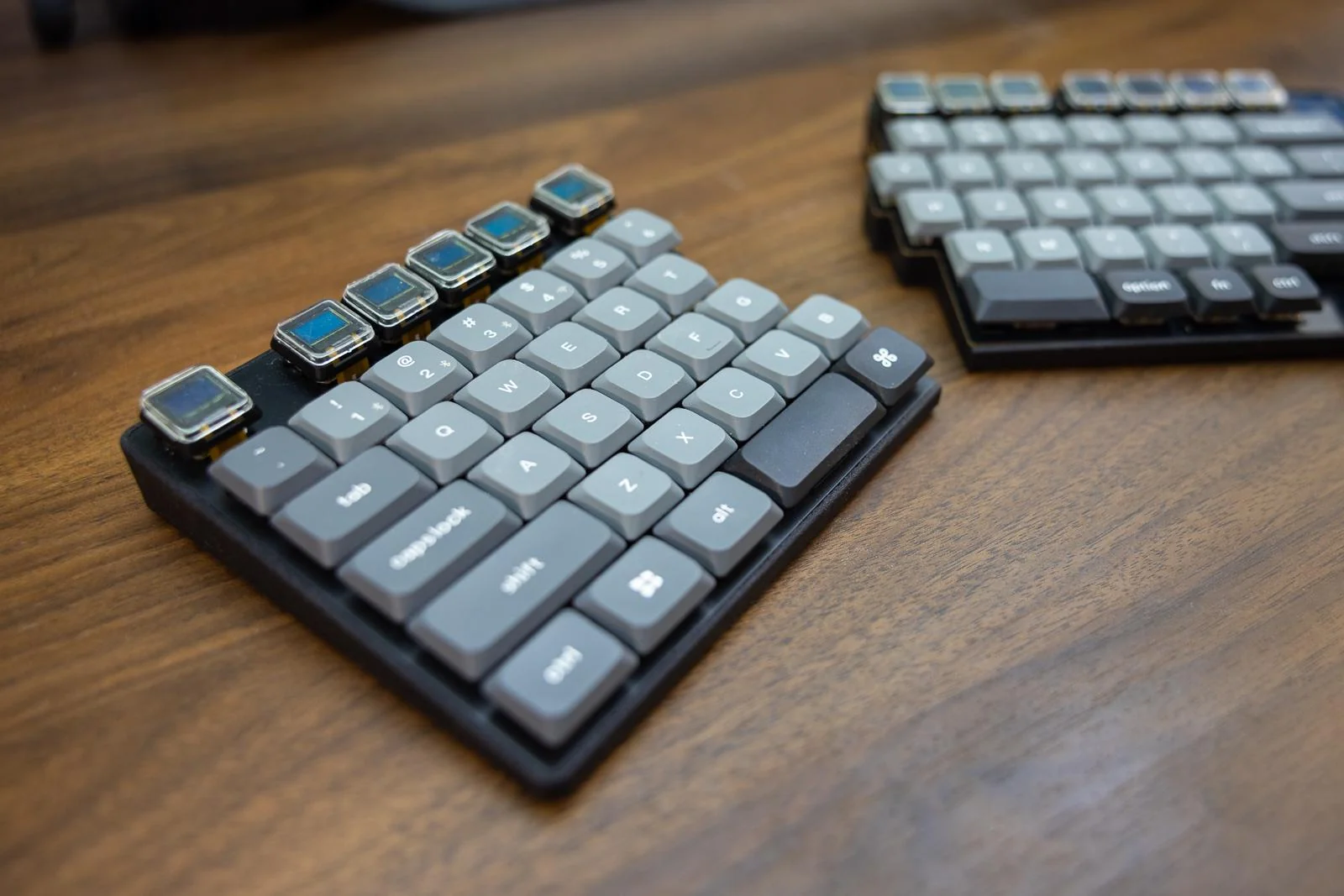
This is Crater75, an almost completely from-scratch row-staggered wireless split board that [United_Parfait_6383] has been working on for a few months. Everything but the keycaps and switches is DIY.

The Crater75 split keyboard, which features OLEDs on the Function row.
Image by [United_Parfait_6383] via reddit
As cool as a keyboard full of screens might seem, can you imagine what it would be like to type at speed on a sea of slick surfaces? Not very nice, I’m thinking. But having them solely on the Function row seems like the perfect compromise. Here, the Function row keys interact with foreground applications, and change with whatever has focus. For the curious, those are 0.42″ OLEDs from Ali with a resolution of 72×40.

I’m not sure what’s going on internally, but the two sides connect with magnets, and either side’s USB-C can be used to charge the board. Both sides have a 2100 mAh Li-Po battery, and the average current of the OLED displays is low enough that the board can run for months on a single charge.

The switches are Gateron low-profiles and are wearing keycaps recycled from a Keychron, which add to the professional finish. Speaking of, the enclosures were manufactured by JLC3DP using the Nylon Multi-Jet Fusion process, but [United_Parfait_6383] says the left side feels too light, so the next revision will likely be CNC’d aluminium. Be sure to check out this short video of Crater75 in action.

Continue reading “Keebin’ With Kristina: The One With The Copycat Keyboard”

Illustrated Kristina with an IBM Model M keyboard floating between her hands.

Keebin’ With Kristina: The One With The Breadboard Macropad

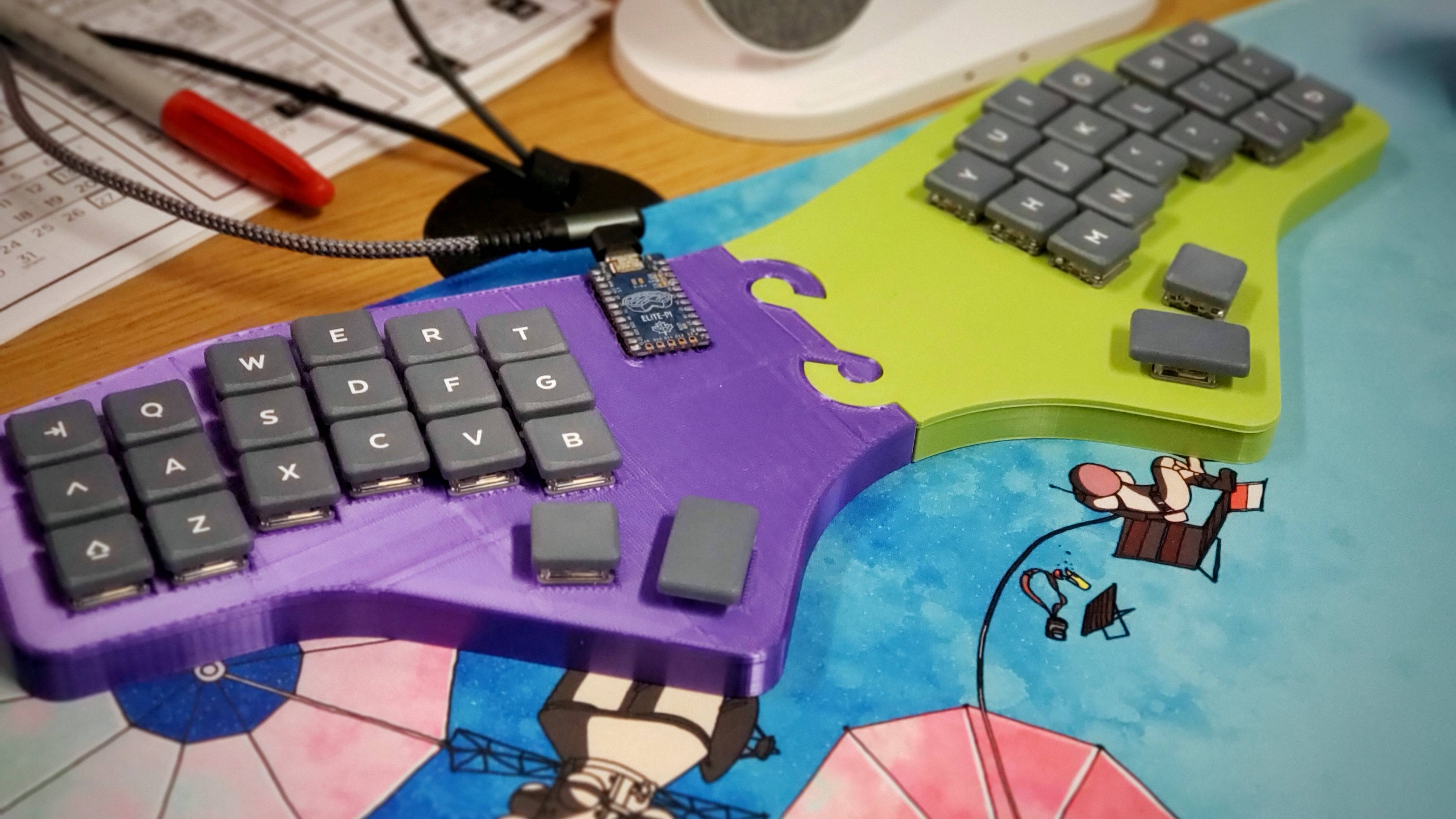
For their first custom, hand-wired keyboard, [terryorchard] aka [70rch] didn’t want to mess with making a total split, and we don’t really blame them. However, as you can see, they ended up with a monoblock split, which aside from being our own personal preference, looks fantastic, and also happened to be what fit on the print bed.

What you’re looking at is a 40% remix of the Alice layout with a columnar stagger. It’s also a bit 6×3 Corne-inspired on the ergonomic front. Brain-wise, it’s got an exposed Elite Pi driving a matrix of Kailh Choc pinks and an EC11 encoder. The encoder scrolls by default, and then becomes a volume knob on the numbers and symbols layer. One super cool thing about this keyboard is the secret third layer, which is unlocked by pressing the rotary encoder. This leads to some home row mods and disables the outside columns, culminating in a test 3×5 with two layers.

Via KBD #112

Continue reading “Keebin’ With Kristina: The One With The Breadboard Macropad”