
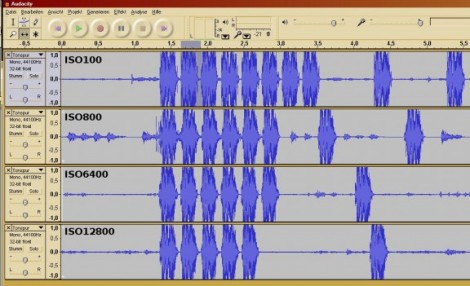
[Jaroslav’s] camera didn’t have a feature to measure the speed of its response in different modes so he figured out his own method. Using the microphone on his webcam he recorded the sound made by the mirror and shutter movements, then used Audacity to analyze the camera’s performance.
When you get right down to it, this is a fantastic idea. Audacity, the open source audio editing suite, has the ability to show each captured audio track next to each other. That makes it easy for you to precisely align the clips, and has in-build time measuring features with fantastic resolution.
He tested a whole bunch of different settings on a Canon EOS600D DSLR camera. In the image above you can see him comparing performance between different ISO settings. He also looks into different brands and sizes of SD storage cards, as well as the time difference when storing raw image data versus JPEG encoded data.












Doesn’t sound to me as it’s quite the DSLR performance, rather the SD performance. I’m guessing as he gets the fastest SD card, we’ll start testing for the data transfer performance.
But I got confused with the headline and the ISO word related. I thought it was actually reading the image and saving it in a sequential way to read it as audio and make the noise more quantitative.
Cool idea though. Just not what the headline lead me to believe
For those confused (as I was) what the heck “DSLR performance” is in this context (the ISOs in the screenshot made me thing it might be talking about noise performance?) it’s shot-to-shot speed in burst mode.
Count me among the confused. But now that I realize what he was recording, I am more confused by the results. The camera has to be doing something extra to the RAW files to account for the added time and file size. It’s an 18mp camera, something is going on if the RAW is 32megs at a high iso. What it’s doing, I have no idea.
RAW files are direct non-compressed saves from the CMOS hence the larger file sizes. The longer time would be due to the slowness of writing to SD cards vs memory. Or to put it another way JPG would be faster to save since it is compressed in memory (quick) and then written to SD card (slow), however since JPG’s are compressed they save quicker to SD due to the fact that there is less data to save on the SD card due to the compression.
hm, if 1/44100 of a second is fantastic resolution, i want to know what adjective 1GS/s scopes deserve. :)
For this here purpose? The word is “overkill”.
What do you mean his own method? It’s been used by some camera review sites for years. They even let you download the file to listen to it.
what will be causing the continous mode slowdown as the iso is cranked up is noise reduction will be turned on… which will take up more processing power and memory inside the camera and thus not allowing the camera to use all of its memory buffer to store the taken photos before writing to the card, but after spending so much money on a camera its really not a bad thing to buy a decent class 10 sdhc card which more or less cures these issues.
If you read his site, he says that noise reduction is turned off. This apparently means that either there is a second noise reduction option somewhere, or that the camera regards “noise reduction on/off” as a mere suggestion. No word on whether the RAW file compression was turned off (Canon’s have that option?).
I may have to test my cameras in this same way. Would be interesting to compare.
Interesting approach, however if you really want good performance AND you’re shooting raw, then noise reduction should be performed in post-processing.
Using a standard PC mic and a long cardboard tube (sealed at one end) you can use this technique to measure the speed of sound; just click your fingers and use audacity to measure the speed of the echo. Great for kid’s science fair experiments :)
Another fun thing to do is play a sinewave into stereo speakers, then move the microphone around measuring the ampitude and then plotting a graph of wave interference
I understand that using Audactiy gives him the ability to view the data in a GUI, and present it factually, but couldn’t he have just counted the number of shots taken in a given amount of time? Obviously you can’t technically prove to other people that the data is true by word of mouth, but if you are just trying to figure it out for yourself, counting seems like an easier method.
Also, there isn’t any information on what his test subject was. A photo of a white wall is going to have less data to be processed than something busier, which will have an effect on the transfer speed. And if he didn’t shoot the same thing every time, or if the lighting or other variables changed, including temperature of sensor, it would also influence the results.
Then again, this probably isn’t to be used in any scientific analysis of true performance, so as a proof of concept it seems useful.
I used this method to measure the bullet speed of a pellet rifle a while ago.
Im a photographer, so im going to break this down for you. As the iso increases so does the file size. On my 50d an image at iso 100 is around 16 MB and a image at iso 3200 is around 22 MB. I just took some pictures to get these numbers. At iso 100 my camera calculates that i can take 16 burst photos and at iso 3200 i can take only 13.
There are a few things that play a role in how photos you can take in burst. The first thing is what the format the images are in. Obviously raw files are larger. What image processors are used, high iso noise reduction is going to take more time to process. The processor in the camera also play a role. The 600d has a DIGIC 4 processor. The final thing is how fast the data can be written or the speed of the memory card. A faster card could increase the burst by 1 to 2 photos.
All in all this was an interesting little project but with a little research all of this work wasn’t needed
This is a pretty sweet method. A few camera review sites like Digital Photograph Review (dpreview) have been doing this for quite a few years. Never the less, still cool.