

I must confess that my mouth froze in an O when I saw [Jeff]’s Typeframe PX-88 Portable Computing System, and I continue to stare in slack-jawed wonder as I find the words to share it with you. Let me give it a shot.
[Jeff] tells us that he designed Typeframe for his spouse to use as a writer deck. That’s good spousing, if you ask me. Amazingly, this is [Jeff]’s first project of this type and scope, and somehow it’s an elegant, yet easy build that’s quite well documented to boot. Whatever Typeframe’s design may borrow, it seems to give back in spades.
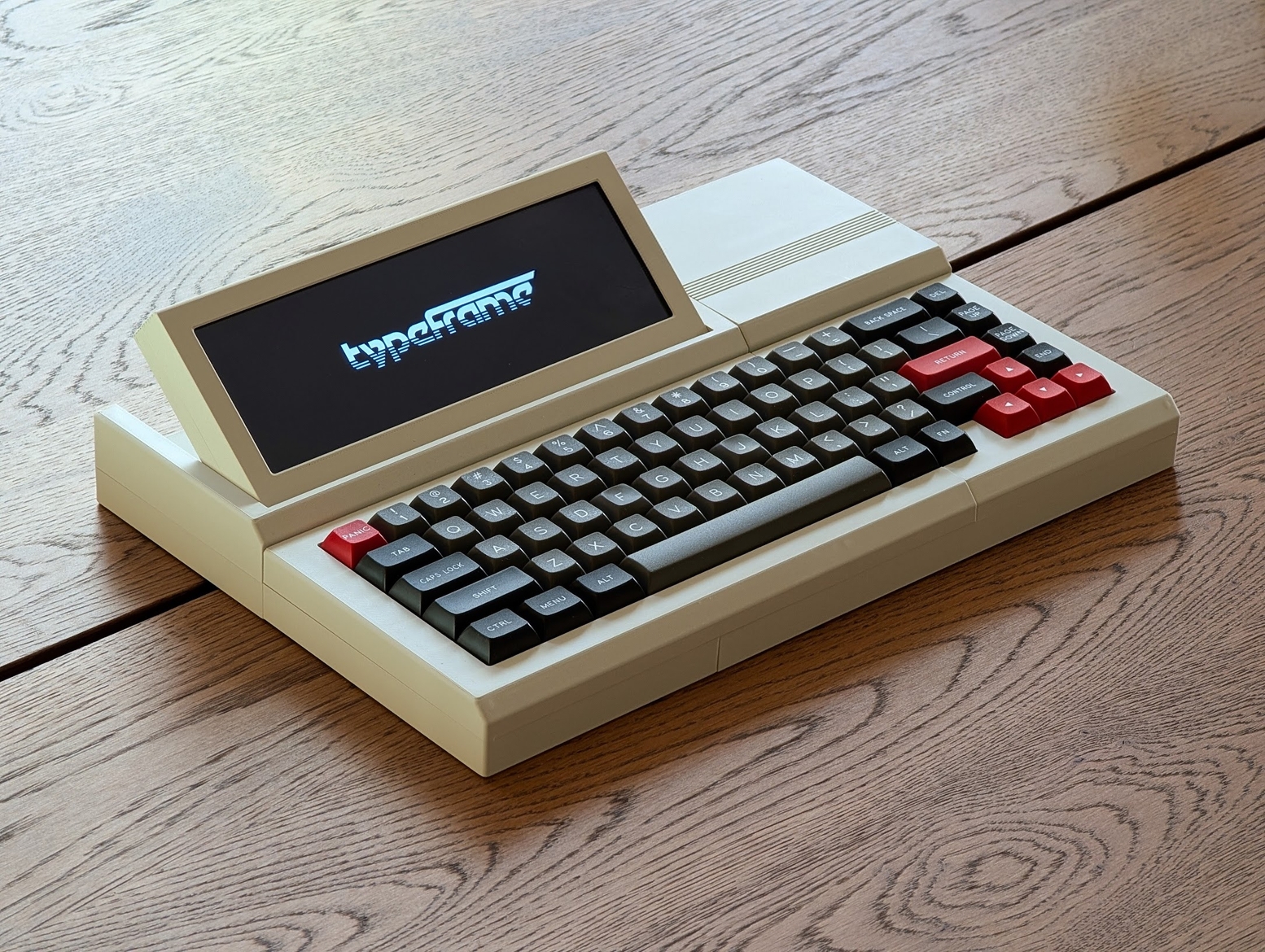
This Raspberry Pi 4B-based productivity machine has all sorts of neat features. The touch screen flips upward at an angle, so you don’t have to hunch over it or carry a mouse around. Want to sit back a bit while you work? The aesthetically spot-on keyboard is detachable. Yeah.
If that’s not enough to get you interested, Typeframe is designed for simple construction with minimal soldering, and the sliding panels make maintenance a breeze.
A little more about that keyboard — this is Keebin’, after all. It’s an MK Point 65, which boasts hot-swap sockets under those DSA Dolch keycaps. See? Minimal soldering. In fact, the only things you have to solder to make the Typeframe your own are the power switch and the status light. Incredible.
Decktility Goes Where You Go
Need something even more portable than the Typeframe? Something that might even fit in your cargo pocket? Decktility could be your answer. You’re gonna have to use your thumbs to type on this one, but that’s the price you pay for ultra portability.
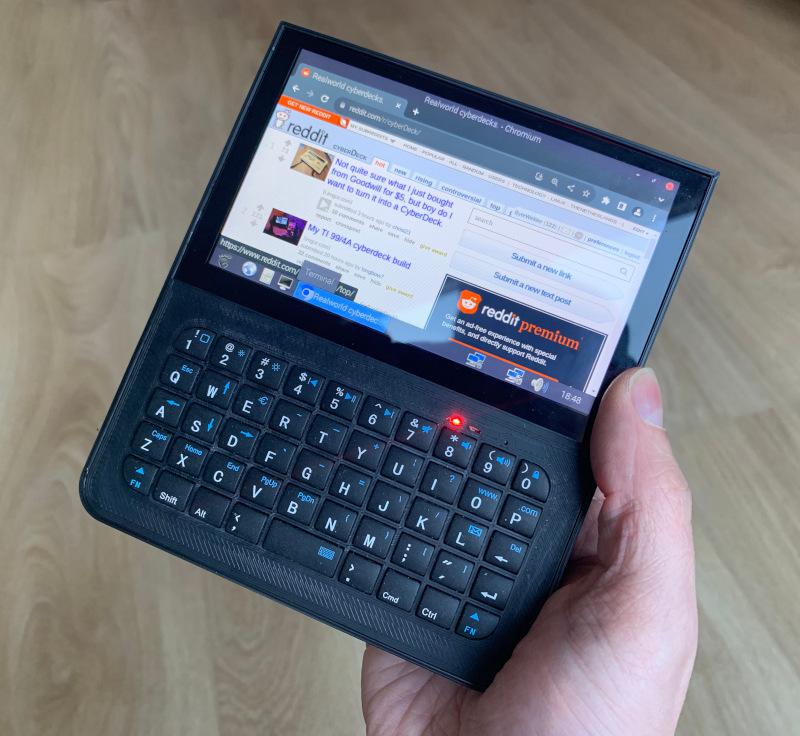
The tricky part about using your thumbs is that the experience can be somewhat lacking. But the Bluetooth keyboard [Ken] used actually looks pretty good, and I say this based on this close-up from GitHub. The keys look responsive and the caps aren’t too shallow.
One of the design challenges centered around the batteries — 18650s, because as [Ken] says, flat Li-Pos get spicy when they short-circuit. Both the 18650s and the screen are somewhat heavy, so everything is balanced with the batteries acting somewhat as handles.
This is a great project, and it seems as though [Ken] learned a lot in the process. Be sure to check out the build log for all the gory details.
The Centerfold: Party Like It’s Nineteen Nine-T9
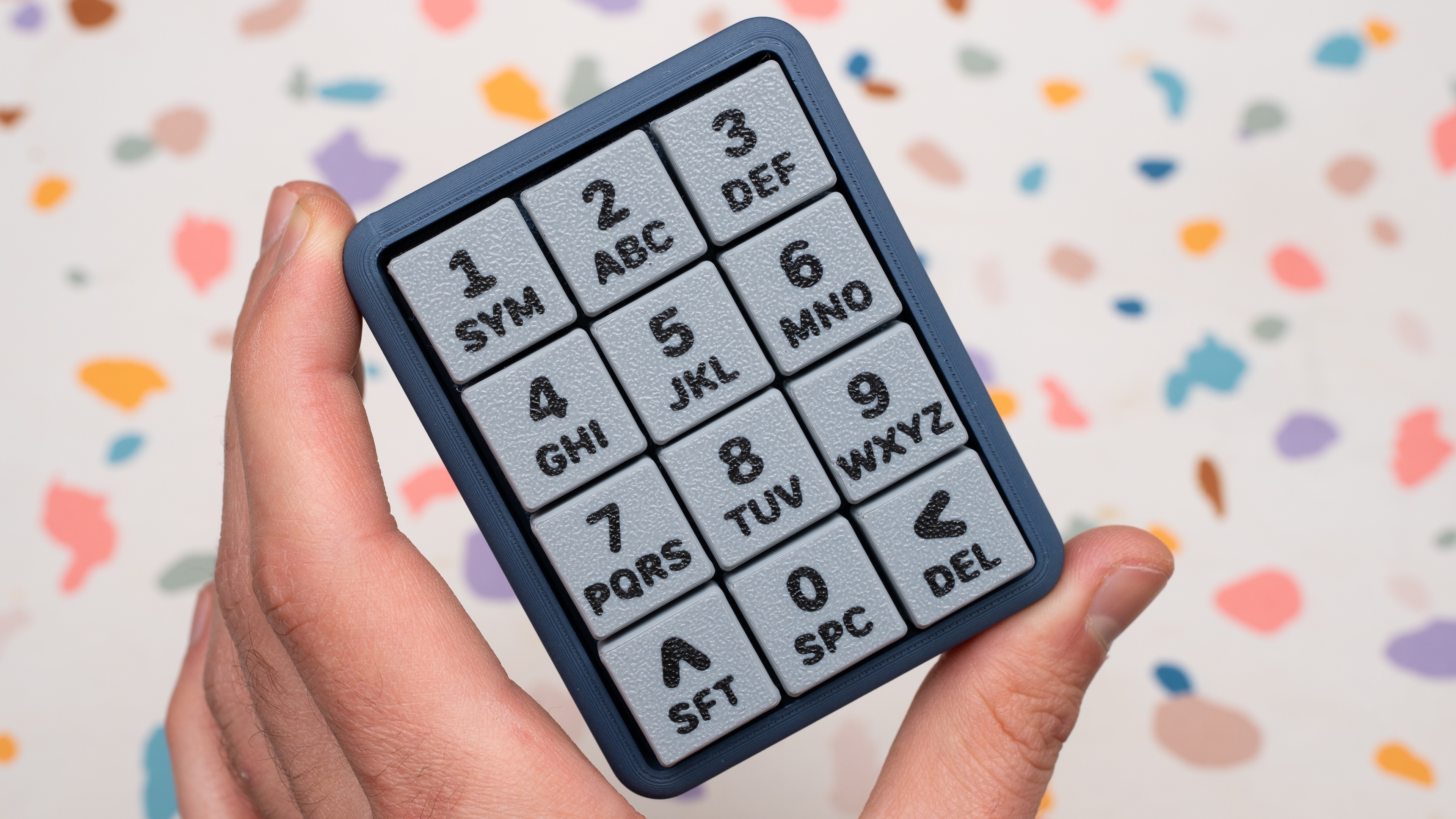 Yeah, I know, not your conventional centerfold. The cuteness factor of this 12-key macropad got me, as did the terrazzo party background. But there’s slightly more to [Joe Scotto]’s latest build than meets the eye.
Rather than using predictive typing, the ScottoT9 uses QMK tap dance, wherein a single key can do ‘3, 5, or 100 different things’ depending on how many times you hit it in quick succession. [Joe] reports that it’s surprisingly easy get up to speed on the thing.
This RP2040 Pro Micro-based build is completely open source, including those lovely keycaps. But if you want them to look this good, you may want to just buy some.
Do you rock a sweet set of peripherals on a screamin’ desk pad? Send me a picture along with your handle and all the gory details, and you could be featured here!
Historical Clackers: the Diskret Code Typewriter
The Diskret (discreet) code typewriter from 1899 is a stunning German beauty of an index typewriter, far removed from the neon-accented see-through plastic label-maker from the late 80s that I often use.
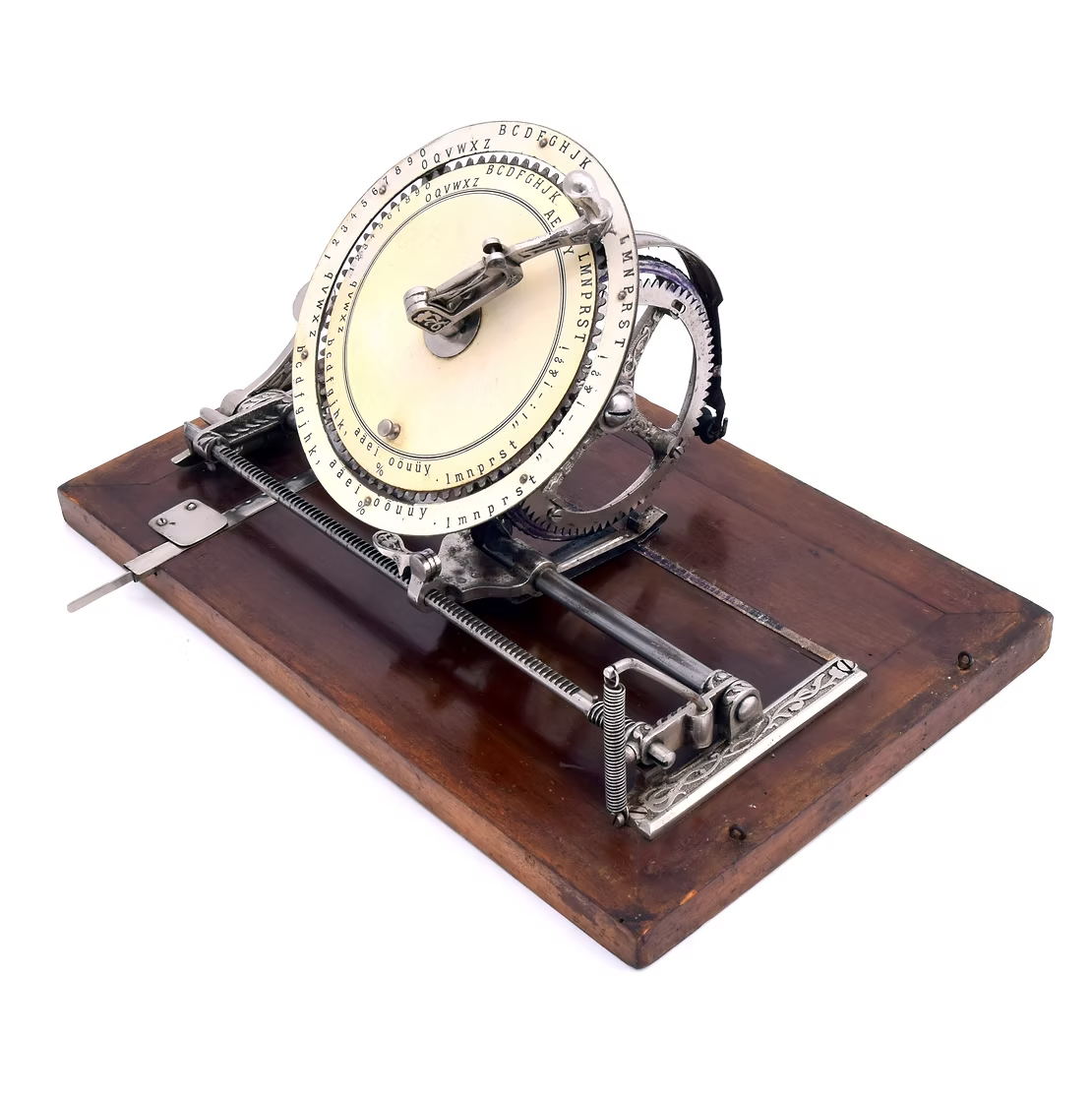
Yet they are of the same spirit: choose a letter with some pointing device, imprint it with some lever action, and repeat.
Stark aesthetic differences aside, the Diskret does far more than my newfangled index typewriter. Designed with two concentric rings, the inner ring can be spun to allow the user to type in code.
For normal typewritering, the typist chose a letter from the outer ring of characters with a lever, which turned the typewheel mounted behind it. Then they would press down to print, and the carriage would advance by one character width to get ready for the next impression.
To use the Diskret as a cipher machine, the typist would spin the inner ring to create a false index, generating a coded letter. The recipient would have to have a Diskret in the same position in order to read the message. Yes, it’s basic, but it was one of the first code typewriters.
Most of this beautiful machine’s metal components were engraved with Jugendstil, or German Art Nouveau embellishments. It came mounted to a thick wood base, and featured a top with handle. A Diskret cost 75 marks, and, at the time, one mark equaled about $4. So, not exactly cheap, but it’s two typewriters in one.
Finally, Will Gen Alpha Cancel Keyboards Altogether?
No, of course not. But a study by the London School of Economics seems to think that the office drones of 2030 or so will skirt future first-draft keyboard use with AI voice typing tools, like everyday, all the time. And yeah, but they’ll have to use a keyboard to edit. Or, get this — they’ll just send voice notes to their bosses all the time. You know, good old unsearchable audio files that will be a pain to sift through later. Sure.

Did I mention that the study was done in collusion with Jabra, an audio-video technology company? They make highfalutin’ headsets and such. Ahem.
Now, I have a little secret — Y.T. has used powerful (and not-so-powerful) dictation tools here and there, especially after the surgery, and I could swear I’ve heard others talk-typing around the Hackaday Dungeon, although I can’t be sure. But I really like the act of typing, especially now that it doesn’t cause me intense, weird pain.
If I may cherry-pick a quote from the Fortune article, I choose this one: “speaking replaces typing because it matches how we think: fast, iterative, conversational.” I say all of that depends on your level of written wit, something that gets refined throughout the course of one’s life by, you know, writing or typing, and then reading, editing, removing, replacing, and so forth until it appears flowy and conversational.
And no, I didn’t speak-type a bit of this column. I missed typing on my Kinesis Advantage too much. See you next week-ish.
Got a hot tip that has like, anything to do with keyboards? Help me out by sending in a link or two. Don’t want all the Hackaday scribes to see it? Feel free to email me directly.










i was hoping it was over …
Same, 80% of articles of her about the podcast and keebing up with Kristina.
Not me. I was missing my dose of “keebin'”.
Have you tried just not reading things you don’t like and moving on?
LOVE the Typeframe! VERY nice build and great docs! Thank you for sharing!
Well, yes, but from the homepage: “The case is split into parts that can be printed on an FDM printer with at least a 232mm x 130mm bed.”
Ouch, 232mm? That’s wider than my printer can manage. I’ll have to figure something out, maybe extend the build plate in the y direction. It’s a cool project, and goes on the stack of “Joe wants this and will eventually build one” – after I build more than the three modules for my synth that I have built so far. At least the USB to CV needs to be finished.
232mm isn’t vast, it’s close to many popular 3D printers capabilities – you can always tilt the print to gain a few mm.
Seems like coding via voice typing would be a non-starter.
maybe python and probibly in a vibe coding context. in other words, bad code.
wasn’t forth about to be like speaking english?
Still my favorite HaD series. Please continue on in this fashion.
i used to know a small time politician around the time i was learning how to type. when a man who talks for a living tells you you can type faster than you can speak, you know typing will always have value over voice input. he also knew how to speed read (another thing you have to do when holding office).
Why the keeps the reference like “Gen Alpha”, “Gen-X”, etc. keep popping up everywhere (as seen here in the subscript by the image of the person in front of a window). It’s not an intuitive term, it’s not obvious what it means and it’s a term that in the long run is unsustainable, in the meanwhile we have a perfectly fine system and that is mentioning the age of the person in question. Very intuitive, dear author: you should try it. As a reader, I find it very confusing to see this constant “alphabet soup” of names just to refer to a generation. Please stop it, it’s usage is so 2025 (please read this next year, it will make more sense).
It’s funny that the terms now seem stuck in time and become more and more inaccurate.
Eventually they will call gen-x ‘boomers’ I expect, and then millennials.
But it’s not like we can expect people to know what the hell they are saying anyway – I suppose..
The term “baby boomer” has been in use since 1970. Douglas Coupland pretty much defined “generation X” in 1990. Strauss and Howe published their generational theory of Western culture in 1993.
You’re shouting at the clouds, old man.
Age changes over time, being part of a cohort does not. It’s the correct way to reference a certain generation.
Back in the day I knew a kid (who probably now has his own kids) who could fire off text messages almost as fact as he spoke on his T9 phone… without taking it out of his pocket. So yes, I believe you can get up to speed on that one…
I’m just admiring the Epson Vibes this one is throwing off, from the name right on to the “could have been ripped from the pages of Byte” fake advertisement. Color scheme, fonts… yeah. Nice!
Has anyone priced out the Bill of Materials for the TypeFrame yet? This is so well done!!!
$371 before shipping and tax for the main parts. That does not include the PLA or screws. I think it would be worth building. Just having it on my desk would be cool.
Working 40 hours in a cubical farm where people dictate rather than type… That is not a life worth living. The noise!
I’ve not experienced the luxury of a cubicle only the idiotic “open office”. The noise is already too much for me.
I’ve just re-read this comment and it didn’t even make sense to me. There should be a comma between “cubicle” and “only”.
I’ve not experienced the luxury of a cubicle, only the idiotic “open office”. The noise is already too much for me.