
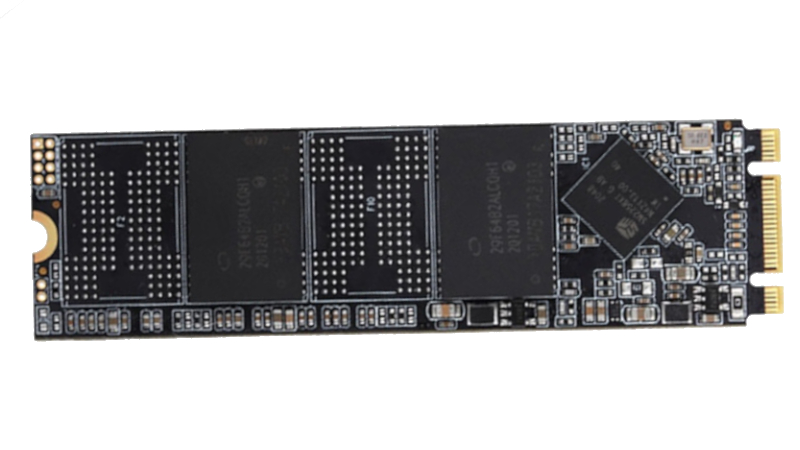
Save a bunch of files on a good ol’ magnetic hard drive, leave it in a box, and they’ll probably still be there a couple of decades later. The lubricants might have all solidified and the heads jammed in place, but if you can get things moving, you’ll still have your data. As explained over at [XDA Developers], though, SSDs can’t really offer the same longevity.
It all comes down to power. SSDs are considered non-volatile storage—in that they hold on to data even when power is removed. However, they can only do so for a rather limited amount of time. This is because of the way NAND flash storage works. It involves trapping a charge in a floating gate transistor to store a single bit of data. You can power down an SSD, and the trapped charge in all the NAND flash transistors will happily stay put. But over longer periods of time, from months to years, that charge can leak out. When this happens, data is lost.
Depending on your particular SSD, and the variety of NAND flash it uses (TLC, QLC, etc), the safe storage time may be anywhere from a few months to a few years. The process takes place faster at higher temperatures, too, so if you store your drives in a warm area, you could see surprisingly rapid loss.
Ultimately, it’s worth checking your drive specs and planning accordingly. Going on a two-week holiday? Your PC will probably be just fine switched off. Going to prison for three to five years with only a slim chance of parole? Maybe back up to a hard drive first, or have your cousin switch your machine on now and then for safety’s sake.
On a vaguely related note, we’ve even seen SSDs that can self-destruct on purpose. If you’ve got the low down on other neat solid-state stories, don’t hesitate to notify the tipsline.












Hmm. Should probably power up that laptop I haven’t used in a while….
I find this sad in an unexpected way… I recently uncovered several hardrives from computers that i had used between 10 and 20 years ago. I had a lot of fun plugging them in and seeing a snapshot of my digital life from that time, and even recovered a few files that had been lost.
To think that a similar thing wont be possible 10-20 years from now is rather disappointing.
There should be a sci-fi movie about someone from the year 3000 plugs in a harddrive and releases a virus that tears through their society.
Emails probably not still in use so maybe it should be SQL SLAMMER?
I keep reading about the possibility of data corruption on SSD drives due to charge leakage. The recommendation is to keep the drive powered, for example, by turning on the computer. But surely this doesn’t refresh the charge in the flash memory. To refresh the charge, the cell must be erased and then rewritten. Can anyone point to a datasheet for a flash controller that actively does this?
Otherwise, it sounds like magic. Unless there’s some spell I don’t know about. :D
Yes. This.
Unless the OS or the drive itself does a refresh in the background, how does simply powering the drive keep it from leaking bits?
“During normal operation, the flash drive firmware routinely refreshes the cells to restore lost charge.” From: https://www.ni.com/en/support/documentation/supplemental/12/understanding-life-expectancy-of-flash-storage.html
Thanks. I was asking myself that too.
Yeah, nice but… I will believe when I will see a datasheet for a flash memory controller that has a section on “data refreshing”.
That’s somethin’ I think I’ll investigate myself. It will be a nice article proposal.
It isn’t implemented in the controller itself, but rather the firmware of the controller. As is basically everything else, including the book-keeping of the flash translation layer. In fact the FTL firmware EXPLICITLY needs to know about this, because more worn cells need to be refreshed more often, and refreshing them requires doing a whole read-and-copy, which means writing, which means more wear that needs to be accounted for.
And it’s worth mentioning, that firmware isn’t provided in finished form by the controller vendor. It’s up to the manufacturer of the SSD.
And now I’m imagining the 4TB SSD in my laptop as a gigantic array of 4164 DRAM chips then wondering how large a car I’d need to travel with it
The drive controller does al that stuff transparently all the time it’s powered – the PC/OS doesn’t have any real input although it does show up in the SMART stats.
Powering the drive up also risks cells wearing out if the controller is continuously working to refresh and test so there’s got to be some sweet spot between power on time, risk of damage to drive from power cycling and charge leakage.
I had some involvement with long term data storage a couple of decades ago but do wonder what true archival data storage looks like these days
Controller firmware is generally written to only refresh cells as infrequently as needed, both because it has costs that have to be tracked in the wear leveling, and because it takes away from performance.
Just leave it powered on.
I am guessing that it is enought to read a drive. Because every internal sector has also data for hamming distance. The internal controller should know that a sector is close to fade away and write it new in this case. At least this is my hope.
I think someone should made a device with a raspberry that switch on every month, read the disk and compare the checksum.
The parity SSDs offer is typically small block LDPC and isn’t as robust as one would assume at dealing with charge decay since entire pages that are much larger than the block length tend to decay all at once, overwhelming LDPC.
Most SSDs do have a read disturb algorithm in place though which has a counter of how many times a particular page has been read and after it reaches a sufficient number, the page is rewritten, protecting itself from the extra fact charge decay caused by the read operation siphoning off charge.
You are absolutely correct that simply plugging in a SSD to power does not refresh the charge in the NAND cells for 99% of consumer flash. The lack of this charge refresh can be observed by measuring the read speed of data written months or years ago, it will not be as fast as freshly written data.
However Enterprise SSDs do typically have this charge refresh algorithm implemented as part of their GC. The downside to doing this is that the SSDs wear our noticeably quicker since the pages rewrite themselves fairly often. The benefit to this is that read speeds of data written long ago are kept high, and data corruption via charge decay on a powered up drive does not happen.
There are a couple of caveats to this dynamic like read disturb and to a much lesser degree TRIM that can keep consumer SSDs NAND pages topped off, but they don’t offer much coverage in typical use cases against charge decay.
This is true also for SD and other memory cards, memory sticks, etc.
Does anyone knows a “device” in which you can connect “many” SSDs M.2 in order to use it as storage? Got a bunch of small capacity SSDs and this would be the only way to not throwing them out. Thanks.
You can get enclosures for them and use them as external drives. Some of the enclosures even support USB 4 and Thunderbolt. They perform significantly better than a normal flash drive, even if they are only connected over USB 3.
If you want to put a bunch inside a computer, there are adapter cards that connect 4 drives to a PCIe x16 slot. The motherboard must support 4×4 lane PCIe bifurcation though.
I have a few test systems that I rarely power up, but so far they haven’t corrupted enough to cause any problems. But apparently corruption in just two years does occur: https://www.tomshardware.com/pc-components/storage/unpowered-ssd-endurance-investigation-finds-severe-data-loss-and-performance-issues-reminds-us-of-the-importance-of-refreshing-backups
Flash memory is really quite inconvenient. From not deleting data you want gone, or losing data you want to keep!
There are many areas where spinning platters and magnetic storage is better.
How about a 10Wh 18650? SSD use about 0.5W iirc and typically run off 5V? I wonder how long that could keep a SSD going by powering it for an hour every 6 months or so? 5 years?
Won’t the LiPo be flat by self-discharge faster than the SSD dies?
Ah yes for sure.
It would likely mean charging the battery annually between self-discharge and draining. only marginally better than unpowered bitrot.
Since self discharge will be significant we can actually power multiple SSDs from the same battery without much issue I guess.
Thats why I use my own patented storage mechanism for important documents and photos
Permanent Access Proprietry Enhanced Reader…
Permanent? Pfft. Don’t exaggerate. That’s only going to last 4 or 5 thousand years at most.
I love storing all my videos in that format, even if playback is inconvenient
I don’t know, flip books are fun
So, who’s going to design a little SSD carrier that allows it to be powered up externally while the PC is off?
Well, KiCad, PCBWay and YOU! :D
Kidding aside, I wonder whether it’s sufficient just to apply power to the supply pins for the controller to start its refresging mechanisms. A simple PCB with lots of .m2 slots would’nt be complicated or expensive to make….
Plug in or battery powered? I wonder how little power would be needed to just refresh the memory, could you get away with a CR2032 or would it need a full 5v?
Actually, I wonder if that explains the bitrot on that WinXP system I retrofitted with a SSD but now fails to boot properly after 9 months in storage.
This is a PITA for us that keep old systems just to run specific hardware as rarely needed. Need to rethink the storage strategy.
Jeez, I even have a couple of 1 TB SSDs with big VMs in cold storage. One of those is a couple of years old now. Yikes. I’ll go hit that ‘on’ switch right now.
The first Windows OS to properly support SSD was version 10. If the SSD manufacturers driver for your XP system is Generic, than it will fail much sooner. Tuning the OS with a large RAM install is also wise, as several background services and swap will burn your expected 4 year MTBF to a few months.
Qemu with read-only KVM COW backing OS images are a great idea for older OS like Win7 or WinXP, and a host system running /home on F2FS can almost double the drives 5 year lifespan. Also, older or industrial rated SLC flash memory (like CF Cards) has write limits >200k, unlike modern TLC flash <20k writes and some QLC chips <2k writes.
Most modern drives hide degradation with wear-leveling and spare sector-replacement pools. Note too, that sudden power failures can also damage SSD on older systems, as the energy normally stored in the spinning media is missing. Thus, some used capacitor or batteries as power rail conditioners… to buy enough time for the drive to finish its last write buffer flush, and enter a safe state.
Also, if you cook flash its >10 year rated memory retention can rapidly degrade. People do run chips hot on purpose to increase performance, but there is a trade off.
lmao whatever man. what. ever. I am not even gonna worry about this one. I back up the important stuff so old machines and hard drives are usually just a fun walk down memory lane of what projects I was working on at the time and the shithub one-off apps used to accomplish silly tasks. I luckily learned 20+ years ago when a hard drive failed, that this data storage thing is fleeting. And you have a LOT more faith in old platter mechanical hard drives than I do lol. It is generally pretty easy to forensically recover data from these memory bricks vs dealing with a mechanical drive and the multiple failpoints there. To each their own and back up your important stuff in triplicate and in more than one location. Finally, if it was super important, ya might have needed it at least once in a decade lol. I guess also being Thanksgiving, we here should all be thankful that worrying about ssd rot is a concern and not where we are going to sleep or eat tonight.
While it’s a nice reminder I had to laugh when I saw this on HN. Like, you didn’t know this electrically charged system loses charge as time goes on? I’ve even heard it on Reddit, but the script kiddies at HN thought it was some new breaking glitch in reality or something. Guess that’s what happens when you’re looking to abstract the hardware as much as possible: you forget it’s even there.
While this is certainly a thing, I think the risk is somewhat exaggerated. User ‘SID’ in the comment section of the original article summarizes it well: the 1-year retention period (in JEDEC standard) is for heavily worn drives (which will show up as “0% health” on your SSD health check utility, like CrystaldiskInfo), and most drives will retain the data much longer.
I mean, after all, your smartphones and tablets have same NANDs in them and they do usually turn on after a few years of negligence… if the battery hasn’t gone bad, that is.
That said, the risk is still very real and you do have to make regular backups. It is just that… I don’t trust hard drives much either. Those things do also go bad occasionally. Sure, you are more likely to get data out from a dead hard drive than from a dead SSD, but that is about it.
hmm… regarding: “after all, your smartphones and tablets have same NANDs in them and they do usually turn on after a few years of negligence…”
Do they have the same NANDs, I can imagine that multi-level cell data storage is a bit more sensitive and that a modern SSD is comparable to a 10 year old phone.
https://en.wikipedia.org/wiki/Multi-level_cell
But honestly, you have a drawer full of old phones you don’t use for years and then occasionally turn them on? Interesting, but that it seems to work doesn’t mean it isn’t partially corrupt. Now I’m sure it isn’t all that bad, but regarding phones and tablets, the battery will most likely fail much sooner as you already mentioned.
Child phonography? Like those old 45 records with pedantic unoffensive tunes such as “High Hopes” or “The Name Game”?
I’ve had this happen even with regularly powered systems, had to do a full os + software reinstall after 2 years. I will be avoiding them in future.
What about USB flash drives and portable SSDs? I imagine people storing pictures and documents on flash drives somewhere in a safe for years.
I think it would be the same.
Apparently, we should be applying the ‘3-2-1’ rule where tier one is the dodgy SSD, tier 2 a spinning HDD and tier 3 is cloud such as google drive. Use all tiers simultaneously. Personally, I just used tiers 1 and 3.
PSA: if you have an HDD that is over 12TB (I believe this is the correct capacity), then data will also vanish if unpowered too long (about a month). The magnetic bits destabilize. Now this should not happen on the upcoming HAMR/MAMR HDDs, but we’ll see.
A tradeoff was made in the HDD design to go to a higher density on the traditional architecture that requires power-on to consistently re-write the bits before they fade. This decision made sense as the majority of these drives go into always-on enterprise data centers.
This information about data loss for both SSDs and high-capacity HDDs is a dirty little secret that is not told to consumers. BTW, QLC and higher densities will lose data on USB thumb drives and microSD cards the same way.
The physical effect is called the superparamagnetic limit.
https://en.wikipedia.org/wiki/Superparamagnetism#Effect_on_hard_drives
Well I guess spinning rust does have a future after all.
A lifetime of digital memories, all those bits, lost in time, like tears in rain
I wonder how hard it would be to make a box with just a power supply and a bunch of ssd slots. One would keep their SSDs in this when not in use. Is it not that simple? Or does such a device already exist?
I wonder just how much is required. If not much then maybe it could have a small solar panel on it. Just set it near the window or in a room that frequently has the lights turned on. Don’t cover it up but otherwise forget about it.
I remember doing a retention test a while back. Took a bunch of flash drives, all of them with 2D TLC (which is arguably the worst, when it comes to retention).
Tested each one every month or so. All of them experienced degraded read speeds 1 month in. After 7 months, i already got currupted data on some of them; after about a year, all of them had degraded data. And read speeds kept dropping.
Horrible.
I find the whole ‘the controller refreshes the data’ to vary massively by SSD and it seems to be something that rarely occurs. A QLC crucial BX drive (WORM workload, dataset added to) I have has 500/MB sec read speeds, when just written. Laptop used daily (this is a secondary drive, two in the system). Within a year, read speeds had slowed to a paltry 50 to 70MB/sec. A refresh of all data using BTRFS balance restored the speed back to 500MB/sec. I have seen this issue on other SSDs as well. QLC fanxiang (chinese brand) also had data that decayed in the same way but actually corrupted; it was fine on rewrite. This one was in a PS3, and one day Black ops II would not load; was powered a few times a year for LAN parties. Another PS3 with an MLC drive is showing no signs of issues yet.
Kingston Canvas Select 128 Gb MicroSD (QLC?). Used in partners’ phone as a music card, WORM workload, adding new songs as time went on. Within a year, many files had corrupted with read speed slowing down when imaging the card to 2MB/sec. Rewriting the card refreshed the data. This again took about a year. Reviews on Kingston USB sticks on Amazon have mentioned the data being unreadable a year later when it had copied fine to begin with. Another exact same card decayed in a similar way.
I have had a TLC one decay in a similar way, in a similar timespan (Transcend). Not had the issue with MLC drives, nor have I observed it with samsung drives (I believe samsung made the firmware changes in their 840?? model involving data refresh (But this does add wear). SLC data even years later seemed to read at spec. I believe samsung was one of those who did a firmware adjustment that refreshes blocks but I am not sure. Many manufacturers do not do this, as it adds writes to the SSD and entire blocks have to be re-written which is several pages. The SSDs I referred to above were ALL were regularly powered with WORM workloads apart from 1 OS drive. I now figured to either buy TLC samsung or go home, but for large volumes of data I prefer server HDDs on my NAS over SSDs, simply because I know I won’t have to rewrite the data anywhere near as much, and regular BTRFS scrubs check its integrity.
Note that older cards held data much better regardless of NAND type as the transistors / gates were far bigger, thus had far more electrons in said gate PLUS the thicker gate means the data is less likely to leak out via quantum tunneling.
SSDs are good (the BEST) for boot/game/scratch drives, not for anything that you want to last and many consumer SSDs get slower than decent server hard drives once time has passed since writing that I have reverted to hard drives for some applications. Note all the examples of fading I had above were powered drives, and all QLC apart from one. I figured QLC would have been fine for my application given the WORM workload, but be ready to run a BTRFS balance or rewrite the data yearly to keep its access speed up. For offline storage, HDDs or stable quality burn verified optical media are the way to go.