
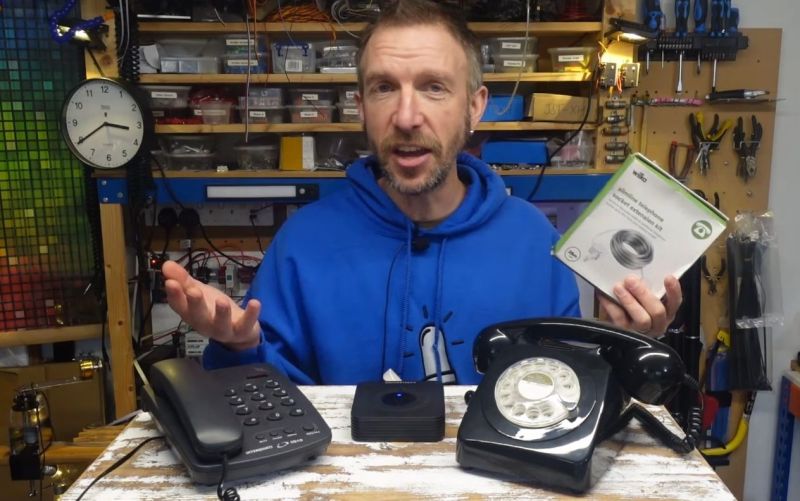
An analog telephone adapter (ATA), or FXS gateway, is a device that allows traditional analog phones to be connected to a digital voice-over-IP (VoIP) network. In addition to this, you can even create a local phone exchange using just analog phones without connecting to a network as [Playful Technology] demonstrates in a recent video.
The ATA used in the video is the Grandstream HT802, which features one 10/100 Mbps Ethernet port and two RJ11 FXS ports for two POTS phones, allowing for two phones to be directly connected and configured using their own profiles.
By using a multi-FXS port ATA in this manner, you essentially can set up your own mini telephone exchange, with a long run of Cat-3 possible between an individual phone and the ATA. Use of the Ethernet port is necessary just once to configure the ATA, as demonstrated in the video. The IP address of the ATA is amusingly obtained by dialing *** on a connected phone and picking 02 as menu option after which a synthetic voice reads out the number. This IP address gets you into the administration interface.
To configure the ATA as an exchange, the local loopback address is used, along with a dial alias configured in the ‘Dial Plan’ section. This way dialing e.g. 102 gets internally converted to dial the other FXS port. By setting up a similar plan on the other FXS port both phones can call each other, but it’s also possible to auto-dial when you lift the handset off the hook.
The rather hacky configuration ought to make clear that the ATA was not designed to be used in this manner, but if your use case involves this kind of scenario, it’s probably one of the cheaper ways to set up a basic, small phone exchange. There are even ATA models that have more than two ports, opening up more possibilities. Just keep in mind that not every ATA may support this kind of tweaking.












The Grandstream Gateways are cheap and good! Documentation just OK in my opinion.
You can combine this device with a small PC running PBXware, and have your own system with voicemail and all the other features of a “real” phone system. I’ve used the HT813 to let anyone on my VOIP system dial out via my single POTS line. The 813 has an FXO port as well as an FXS port . Similar to the 802.
I’m using the free PBXware license, the HT813, and a couple of IP phones to simulate the PBX in my apartment running PBXware Business.
We use Grandstream GXW4248’s to provide dial tone to POTs phones in each apartment.
With a cheap VOIP provider we get a complete full featured system for $3 a month.
The FXS gateways are also a simple way to get IP Lines for emergency services as well, bypassing the PBX straight to to the county’s 911 Emergency Services Office via VOIP — for the elevators and emergency phones here and there. Our fire control system dials straight to the fire station via the GXW4248’s via an IP Line as well.
Can these devices generate the appropriate voltage needed to operate a ringer (from a modernish connairphone from the 80’s, with an actual ringer inside)?
Yes. They ring my old AT&T 500 phones just fine and will even accept dial pulses.
I didn’t see a mention of free license for PBXWare – can you share where that’s available from?
I have one of these devices in the junk pile somewhere, for some reason the second line/number would fail to register with the server after a while. I ended up transitioning to two of the single-port models. I suspect it was a configuration issue on my part, but they were cheap enough and I wanted the reliability.
This sounds like the perfect project for it and some of the various phones I’ve got lying around.
I’ve had great luck using old Cisco V224 voice gateways to do this. Less than $50 on ebay (I’ve seen as low as $20) and you get 24 lines. Can be set up in a standalone mode that doesn’t need any network or server. You can set full phone numbers for each port, pulse and touch dialing work, modems (seem to) work, you even can set caller ID. Can all be configured through the console serial port.
Main downside is the 50-pin telco connector it uses for all 24 lines, but probably not that big of a deal for anyone reading here.
Also, of the ones I’ve gotten from ebay, they can have burned out ports. Of the 5 that have come through the shop, 2 have had at least one bad port.
burned diode or something like that? is it fixeable?
Not sure, I haven’t attempted a fix yet. I was able to send it back for a replacement, so I did that.
Hm, not a single mention of Asterisk software (https://www.asterisk.org/), which was my go-to solution for a PBX system to connect callers spread around the world with call handlers spread around the world. A bit iffy to set up at first.
Asterisk works well with quite a few hardware boxes/components supporting FXS (Foreign Exchange Subscriber) lines, i.e. pretending to be the PBX, and FXO (Foreign Exchange Office) lines, i.e. pretending to be a telephone, including the Grandstream products and many more.
Concur. I’m running Asterisk (under FreePBX) and it’s working great. There is a bit of a learning curve, so I’d suggest getting a separate computer just for Asterisk (plenty of cheap Dell Latitudes on Goodwill right now) and installing a basic version of Debian. The O’Reilly Asterisk book is a good reference to have and will orient you to the terminology.
Have what’s now Polycom version of the ATA. Rather handy too.
I put one of these ATA’s to use in my Homelab last year. It’s a fun thing to play and experiment with alongside a PBX systems.
Connecting the intercom system on other VoIP phones set up is possible over standards like Powerline. You could also use any old home’s existing lines if they’re in good shape.
If you want to set up a home dial-up service however, you’re best looking into RAS systems and modem cards. I had this idea in my head early on and never quite understood the hardware parity until trying to put an old Dreamcast on the PBX.
Did this over 15 years ago, the place I worked for was upgrading their phone system from a Samsung PBX to VOIP based system.
I asked what they were doing with the old system and saved it from the dumpster.
Got the PBX controller and 16 desk stations
Traded 8 desk stations to a supplier for two 4 channel RJ-11 cards so I could connect standard telephones I had to system too.
The system used the existing 4 wire system for even the stations so just a bit of rewiring at the demarcation point and hanging the PBX controller nearby.
Even have some old school rotary phones in the system as the PBX converts pulse to DTMF
Google Voice had at the time an ATA VOIP Adapter that worked with their service made by OBI which provided dial-tone and ring to PBX
The PBX passed the line through to the other phones per the PBX configuration and also boosted the ring current.
Had multiple OBI ATA’s with different numbers by different accounts (family members)
Google quit allowing new ATA connections after Polygon bought out OBI but active connections stayed live and still are. Except one my daughter had, if you don’t use the email or line over a period of time your sent an email but no response ends that associated voip line and number.
So as long as my wife and I keep using the lines and emails we have two VOIP numbers indefinitely until Google decides too end it …… Fingers Crossed they don’t 😁 Google Voice is FREE 😁
Cellular Service is fair to poor where I live and cellphones work in only a few locations so there I placed 2 Bluetooth to RJ-11 adapters to tie into PBX. Put the phone on the desk by window that has best cell signal to charge and it connects via Bluetooth to the PBX bringing the total PBX telephone line count to 4
Have a rotary wall phone in the kitchen and the Grandkids actually now know how to use a rotary phone after much entertainment at first 🤣
Nerds will be Nerds 🤓
Now I’m guessing what data sources they use to train their robot callers.