
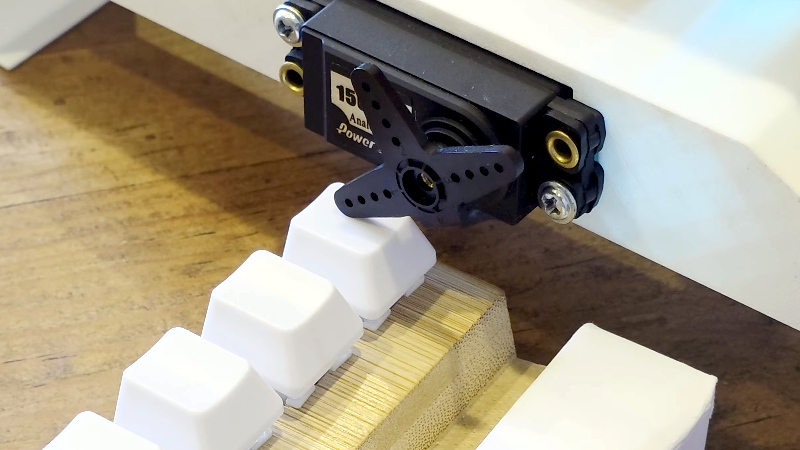
Remote control is a wonder of the age, we press a button, and something happens as if by magic. But what happens if there is no remote control, and instead a real physical button must be pressed? [What Up TK Here], who regular Hackaday readers might just recognize, had just this problem, and made a remote control button presser.
It’s a 3D printed frame which we’re told is designed for a specific item, on top of which is mounted a hobby servo. Rotating the servo brings the lever down on the button, and the job is done. At the user end there’s a button in a printed enclosure that’s definitely not a knock-off of a well-known franchise from a notoriously litigious console company.
This is all good, but the interest for other projects lies in how it works. It’s using a pair of ESP32 microcontrollers, and instead of connecting to an existing WiFi network it’s using ESP-NOW for simplicity and low latency. This is a good application for the protocol, but as we’ve seen, it’s useful for a lot more than just button pressing.












Why doesn’t the button have feedback if the remote actuator is online and worked correctly?
Has it got a web configuration page? Can it work across the internet?
So, like the Fingerbot?
https://www.aliexpress.com/item/1005005884658912.html
But you don’t have to deal with Tuya’s ecosystem!
They have a Zigbee flavor, so you don’t need any tuya hub or app.
Unfortunately, Tuya Zigbee is equally terrible – instead of using the actual standard zigbee clusters so everything can interoperate automatically, they use the same proprietary protocol as their wifi products, just tunnelled through a custom zigbee endpoint.
It’s manageable if you’re running zigbee2mqtt or another computer-based zigbee setup which has custom converters for many Tuya devices, but they are completely incompatible with non-tuya hubs.
It’s not as bad as it sounds. I have a coffee machine sitting in a cabinet but with the on-off button near the rear of the machine (what was Jura thinking?). This finger robot switches it on every morning at 6, that’s all. When unused for 5 hours the machine switches off automatically so this is the only function I needed as Jura omitted a clock function.
So depending on the purpose, these cheap finger robots can do their job very well.
Thumbnail photo shows “Anal Power” label on servo 😂
( ͡° ͜ʖ ͡°)
“Connected” my coffee maker to homeassistant like that, works great (until the double sided tape lets go).
You’re good! Thank you!
Reminds me of building one of these out of Lego about 2 decades ago to get a little more life out of a dying 4GB hard drive because I didn’t know Scandisk had an /autofix parameter.
Now I need to build another button presser to press the button. It’s turtles all the way down…
For when an optocoupler or relay just won’t do.
Awfully complicated way to get a contact closure.
Yeah, but that’s kinda the fun of it.
I built one a few years ago which used a plastic nail art finger to press the button and open the card secured door to my office.
My thoughts exactly. I used an SSR and soldered two leads to the microswitch. ESP32 signals the SSR to connect, which, presumably grounds the signal on the target microcontroller (I really don’t have to care!), and button pressed. I don’t need ESPNow, it triggers via a local MQTT server. There is a slightly perceptible lag. Very little. Means I only use 1 ESP in my button presser setup, but my phone becomes my trigger, and it works from anywhere in the world assuming you have satelite internet! Not only my phone though, anything that can speak MQTT can be a trigger. Homeassistant can now easily automate this button press so I don’t need a remote trigger. Homeassistant is the remote trigger, and it happens automatically based on other devices connected to homeassistant.
Now, if for some reason you cannot access the underlying switch Maybe ok… but I’ll bet there is a switch, an interface, or something else that can be hacked in a way that uses no mechanical parts…
Sometimes you do not have access (physically or legally) to the inside of the thing you’re trying to push the button of.
Remote Control Finger… https://www.whiskeytangohotel.com/2024/05/remote-control-finger-for-flexradio-or.html
This sort of thing is (sadly) state of the art for new US garage door openers. Chamberlain really really wants you to use their monetized remote app, so they have encrypted even the simple physical button on the wall to prevent DIY control.
The no-solder solution is a fingerbot attached to an official remote
While yes, they’re undoubtedly being customer hostile, encrypting the physical signalling to a critical security system is a good idea. Sometimes those wires can be more easily accessed from outside than the motor or the button.
I’ve opened a garage more than once by reaching through a grate, cutting a wire and shorting it. Now it was my garage and there was a homebrew access system that was misbehaving that locked me and others out, and I was using my knowledge of how it was cobbled together to get back in… but the security implications weren’t lost on me.
Normally the wired button is only inside the garage. The outdoor keypad uses a rolling code transmitter like the remote control.