
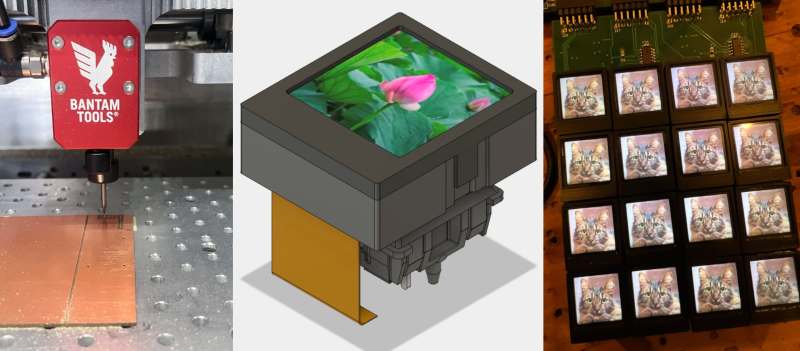
Although arguably redundant on a typical computer keyboard, the idea of embedding small screens into the buttons on devices like audio production gear that often have so many buttons can make a lot of sense. As exemplified by devices with a UX that regularly degrades into scrolling through options on a tiny screen. This was basically the impetus for [Craig J Bishop] a few years ago to set out on a design project called the SoundSlab audio sequencer/sampler/synthesizer and slab that would make those buttons much more functional.
Obviously, the right way to start the project is to bulk buy hundreds of 0.85″ 128×128 LCDs so that you’re firmly locked into that choice. Fortunately, it turned out that the most annoying part of this LCD was the non-standard 0.7 mm pitch on its flat flex cable (FFC). This was worked around with an PCB adapter milled out of some copper-clad FR-1, which gave it a convenient PMOD interface for straightforward hook-up to a Xilinx Artix-7 FPGA board.
The buttons themselves were designed as 3D printed key caps for the LCDs that clipped onto typical Cherry MX-style mechanical keys. This also revealed that the original FFCs were too short, so they had to be replaced with new FFCs, that also adapted it to a standard 0.5 mm pitch. With this a 4×4 button prototype board could be constructed for testing.
Since that prototype [Craig] has built a full-sized SoundSlab grid, with a custom FPGA board and HDMI input, of which a preview can be seen in the post, along with a promise by [Craig] to soon post the rest of the SoundSlab development.
Thanks to [JohnS_AZ] for the tip.












Worth noting that if you absolutely need buttons with screens, they have been around for a while.
I got to play with some of these recently: https://www.digikey.com/en/products/detail/nkk-switches/ISF15ACP4/360-3378-ND/5056758
Pretty neat, and properly rated to be a button (1 million cycles) but very expensive ($80/switch even in quantity)
Almost $100 each? I won’t be designing a keyboard with these any time soon.
.. and if you need a basic grid of buttons with screens that connects via USB and can be customized using Linux (as well as PC or Mac), Elgato’s Stream Deck series of devices is substantially more affordable, at less than $150 for something with 15 buttons.
(I’m in no way suggesting that a Stream Deck is comparable to this impressive project – it’s a closed source, medium-sized usb macro pad, not an extensible fpga-powered synth – but it’s handy for other hacks well beyond its intended audience)
I suspect that bc the stream deck is basically just a touch screen with a cover that the latency of the touch input is a deal breaker for those wanting to play “tight music” as the dude from wintergarten would put it.
certainly stream decks also seem to fail at trying to press the same button very quickly. the rubber springs or whatever it uses to provide the return force is very weak, and there is basically no tactile indication the switch has activated.
I can see it being handy when making gangsta rap.
There’s the recent waveshare mk10 and mk20 devices which look interesting. They are dual MCU devices, one running QMK and the other running Linux. Weirdly the config software is not available for Linux.
I’m hoping they drop a bare key module, or at least release the source for the tooling.
Something like a pair of the mk20’s could be awesome as a split keyboard.
I really like the buttons. I’m just worried about their durability. How long will they last? Moving parts, and displays is a combo that I just don’t trust very much
I have a few elderly family members who will be well served by a TV remote control with very clear labels on each button
Those (remotes) should have had eInk buttons since mid-2000s, but the main remote industry pretty much had already collapsed before that. Now there are maybe a dozen variants left for the average Sam (obviously, upscale uppitysuper wares have their custom-made kinds – unrelated to the few mass-made ones that survived mostly by chance).
Seeing tiny eInk boards NOT measurably dropping in price, even though millions of them are made and sold to the stores (price tags) makes me think it won’t happen. The best bet I have is chasing bulk orders of those and 3D printing what I want/need myself.
Unrelated, but related in a different way.
Clicker remotes were ingenious invention that was drowned in the runaway success of IR remotes, but the technology moved forward leaps and bounds, too, and average $3 MCU board can now have enough computing power to tell clicker sounds from dangling keys or loud whistle. The original Zenith clicker remote I have (and its original color TV – both work, btw, to this day) is only four buttons, one for each rod, and what I think as an engineer is four bits. Even if I restrict it to two rods struck at a time, and one of each struck reserved for the original design, thats still 4 individual rod strikes + 6 dual strikes = 10 combinations, so that will about cover all the important things.
Something like that.
I’m also not sure about their durability. The design tries to minimize any movement at critical points though. The flat flex has stiffeners where it goes into the connector and also underneath the solder joints. That makes sure the only flexing happens in the part wrapped over the key footprint. Well, rev 2 does that anyway. The first rev on the 4×4 grid in this post has a terribly sharp angle on the FFC to the connector. For extra durability, I’d also consider gluing the LCD and FFC to the top portion of the key cap, preventing any flexing of the FFC to LCD display connection. Also, I’ve just used Kapton tape around the FFC junction here, but some sort of glue or epoxy would be much better.
Overall, I decided to just make the keys easy to replace. Right now you just flip up the clip on the FFC connector and pull the key cap off. It’s not bad at all. We’ll see how well they fare long-term. I actually think the LCD displays themselves may fail before the connections to them do. Some of the LCDs have been flakey out of the box.
Thanks for responding, very cool. Always good to know what’s happening behind the scene
Yes small LCDs for whatever reason do seem to have rather high failure rates. I have noticed this as well