
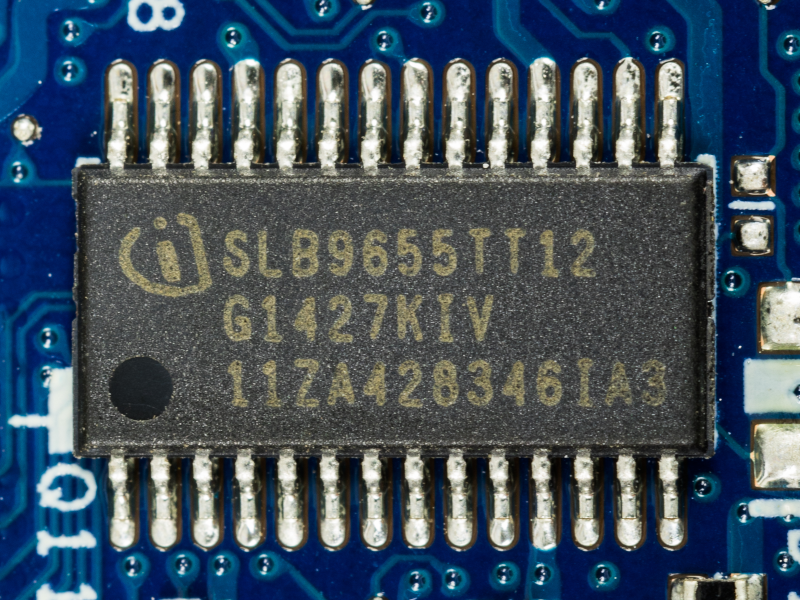
Today’s PCs are locked up with Trusted Platform Module (TPM) devices so much so that modern Windows versions insist on having a recent TPM to even install. These have become so prevalent that even larger embedded boards now have TPM and, of course, if you are repurposing consumer hardware, you’ll have to deal with it, too. [Sigma Star] has just the primer for you. It explains what TPM does, how it applies to embedded devices, and where the pitfalls are.
The TPM is sometimes a chip or sometimes secure firmware that is difficult to tamper with. They provide secret storage and can store boot signatures to detect if something has changed how a computer starts up. The TPM can also “sign off” that the system configuration is the same to a remote entity. This allows, for example, a network to prevent a hacked or rogue computer from communicating with other computers.
Embedded systems, usually, aren’t like PCs. A weather station at a remote location may have strangers poking at it without anyone noticing. Also, that remote computer might be expected to be working for many more years than a typical laptop or desktop computer.
This leads to a variety of security concerns that TPM 2.0 attempts to mitigate. For example, it is unreasonable to think a typical attacker might connect a logic analyzer to your PC, but for an embedded system, it is easier to imagine. There is a session-based encryption to protect against someone simply snooping traffic off the communication bus. According to the post, not all implementations use this encryption, however.
Motherboard has a slot for TPM, but no board? We’ve seen people build their own TPM boards.
Title image by [] CC BY-SA-4.0












Bitlocker is probably the most notable example of a technology not using session encryption. Because of this, it is susceptible to bus sniffing attacks.
From the article “it is unreasonable to think a typical attacker might connect a logic analyzer to your PC” Indeed the article emphasizes how a “security feature” might be a big hindrance, as an example in re-purposing consumer hardware. I can’t help but think after this that a lack of session encryption can be a feature, rather than a bug.
I had the same thought about this, as I was expecting this article to point it out more clearly..
In the context of “the right to repair”, or how to reduce e-waste (by repurposing old tech).. I’m sure this isn’t a great evolution..
One of the nicest feature of a TPM plugin is I believe it can maintain the keys between motherboard (within same TPM compatibility) and OS updates.
Changing your CPU or Motherboard or even flashing the bios on your motherboard invalidates your fTPM.
I’m not sure how much change a dTPM can stand but that alone is worth it.
All your windows hello, bitlocker, passkeys etc are gone the moment you sneeze at a fTPM.
I never understood this TPM stuff, it can’t protect against the usual vector (sales rep clicking on a fishy email link, crypto locker etc), it only protects against bootloader or firmware modification… Which literally no maleware ever targets.
What is it for really?
My simplistic understanding is it ties the storage media, the encryption of that media, and the mobo together. It supports UEFI too. From a information assurance perspective, it prevents easy hijacking of hard drives from systems and subsequent exploitation of that media on a different host computer without knowledge of the full bitlocker keys. It has no role to play in endpoint protection or preventing malware, it’s only involved in detecting significant change to the operating environment that suggests that the media may have been stolen or compromised.
I believe it’s very good at telling windows that you’ve changed your computer too much and therefore should buy a new license…
TPM also contains encryption engine hashing your passwords in windows vault, so snooping on them is much harder as encryption key is embedded in Tom and by design you canno retrieve it. You can reprogram it but nearer read. Bitlocker defies the purpose of this by storing your key in MS account for “recovery” purposes…
I have the same license on 7th moherboard starting on windows 7 and ancient core2 duo. Just reactivate using ” changes hardware” option. Once I had to get a call back from MS support and show eBay purchase of mobo and CPU
More likely than most other appraisals. Money, money, money, money!
Meh, I doubt that was a motivating factor. Microsoft has never put much effort into stopping personal users from using Windows illegally. Their bread and butter is pre built pcs and businesses.
That isn’t exactly true, in that yes it can be a part of the chain to protect against those things, even if Windows does not avail itself of that by default.
For example, the tpm can ensure my bootloader of choice is the only one that can load. My bootloader can ensure my choice of kernel/os is the only one that can boot. I can lock down that OS so only executables of my choice can run.
I would not take the time to obtain some malware exe and sign it with my private key or add its hash to the allow list. Thus, it won’t run.
I can even hand the computer over to you and be mostly assured of this.
You can’t boot from usb to access the disk, so you can’t get at the OS files nor modify the system by adding malware to it.
You can’t transfer my computers boot disk to another computer and do anything with it, as half the encryption key to the drive is in the tpm.
It’s even a decent block to keep you from simply wiping the HD (which you can do putting it in another pc) and installing a fresh copy of windows. It won’t boot it, only a bootloader and kernel signed by me can be installed.
This and in the case of Apple, preventing legitimate repairs of hardware.
These things can help with user security, but they are not designed to.
Every day at work I receive multiple computers with TPM locked drives, and I just sanitize the SSD, deploy an image of Windows 11 to the drive, and the PC boots right up into Windows. Maybe I’m reading your comment wrong, but TPM locked drives can be wiped and re-used.
One thing to always remember:
Security does not exist without respect to parties. There is no such thing as security in the abstract. There is only security FOR WHOM and AGAINST WHOM.
The lock on my front door is security FOR ME, to protect my home from neighbors walking in and hanging out in it when I’m not around. This security does not help them, it helps me.
The badge I swipe at work to get in is security FOR MY EMPLOYER. It is to protect the company from not knowing when or if employees are on the premises, and from random people entering. This security does not help employees, it helps the employer.
When you hear “this call is being recorded for security purposes”, it is not for the purposes of your security, it is for the purposes of the security of the company you are calling.
So — back to the topic of TPMs — who is this security for? Is it for the user, to protect the personal information that they care about, and their documents?
No, I believe it is security for businesses, so that their apps which only function with TPM presence, can keep data away from the users and owners of the PCs. Similar to how mobile phones will not let you get at your own data, or will not let you skip ads on the device, or will not let you screenshot certain apps, or will not let you install a modded/rooted OS and have your apps still work.
They want to take away admin privileges from users of PCs the same way they have already for mobile phones.
Spot on. This really makes my blood boil with how no one is doing something about it from a legal perspective to bring these companies to order. Banking apps, media content apps, etc all now block users from taking screenshots or accessing information on their own phones which is ridiculous. Is there anything that can be done in terms of right to repair to reign in these bogus “security features” taking away user rights?
Your answer, in a nurshell!
Its to force consumer to rent the physical device.
Yes, it’s not to protect against users clicking on dodgy links. That’s what Anti Virus is for. But Anti Virus can be compromised by something loading during the boot process to intercept disk calls and return “all is well”.
TPM is part of a suite of measures to protect the boot process.
Back in the day it used to be standard that if a virus was suspected, you boot the PC from some other media (floppy / CD / USB) to run a virus scan, so that you could be assured of a clean boot.
Recently I had ended the contract I had doing warranty repair work and since one of the companies we did was HP we had a bunch of little programs that you would boot into and one of them was for complete control of the TPM module where I could change it wipe it upgrade it. It was a real benefit that it turned out to work for every computer that I used it on and not just HP.
Except none of that is actually good. The user wants to be able to change their hardware or have someone do , without worrying about having the correct serial number.
It’s an implementation that only makes sense for vendor lock-in, not even enterprise use gains anything from this other than security theater.
Regarding: “What is it for really?”
TPM combined with the end of Windows 10 ensures that (at least) millions of people are required to throw perfectly fine hardware onto the trashheap effectively forcing them to buy new hardware with only the promise of creating a safer system. So in short, TPM will ensure a short term boost of sales. And when everybody has bought this TPM supported hardware and sales decline they introduce a “better” TPM and everything starts all over again… keep repeating for max. profit.
Maybe people will be “required” to install Linux in the same manner? And for those not aware you can install Windows 11 in a VM providing a virtualized TPM. So, no not everyone is “forced” to buy new hardware.
I am surprised nobody has released a low profile hypervisor which has the sole purpose of bootstrapping windows 11 with a vTPM. Too much work for too little gain Insuppose
MS Hyper-V. Unfortunately no hardware TPM pass thru like some flavors of Linux.
My employer provided a laptop with the typical end point protections installed. Of course these prevented me from actually using the machine for my job. Stuck a 2nd ssd, loaded Windows LTSC and booted the original drive as a VM for access to company VPN and services. Only needed bitlocker keys and mostly everything works.
Solid protection MS, dont ever change.
I think KVM offers TPM pass thru. Might try that next.
Maybe not actually forced, but for many people what is barely an inconvenience for this community is insurmountable.
You can also just install Windows 11 without a TPM, with some minimal and automated tweaks. There’s no way in hell I ever enable that piece of insecure anti consumer crap on any of my machines.
Case in point: I managed to break into a company machine with the bitpixie exploit in 15 minutes. MS has fixed the exploit now, but it’s only a matter of time.
I suspect that the compatibility edge cases would be a real hassle. vTPM itself is widely supported by most hypervisors at this point(I think vmware gates it to ESX systems connected to vcenter servers; and hyper-v only offers it on the server version not the desktop variant; but if you are trying to run win11 on hardware that doesn’t meet its requirements you probably don’t care about either of those; and your odds of getting PCIe passthrough working are surprisingly good even on random consumer gear(though often not that good; in the futzing I did with the unscientific sample of hardware I was able to get my hands on easily the odds were excellent that at least something would PCIe passthrough just fine but, especially on laptops, certain passthrough arrangements would freak the system out and bring it down hard.
If you just wanted a virtual GPU windows VM that only supported USB devices of types that had a passthrough abstraction that was no problem. If you wanted just a dedicated GPU and one USB expansion card so that the wintendo could share a motherboard and CPU and RAM with other stuff; normally doable; but it was not a fiddling-free process and the closer you tried to get to passthrough of all NICs, webcam, USB controllers, etc. the higher the odds that you’d break something a user might expect.
What I would be very, very, curious to know is how MS, and others, would respond to nontrivial numbers of vTPMs. TPMs, behaviorally, aren’t super complex and prodution-ready vTPMs are available; but you can’t fake the embedded certs: not an issue if Google’s VM orchestration is using vTPMs that they expect to have Google-issued certs for boot attestation stuff; but ‘normal’ equipment is implicitly assumed to have a TPM with an embedded cert from one of the companies that makes TPMs, or Intel or AMD for fTPMs.
If your TPM use case is genuinely about your hardware proving things about its state to you; that’s one case: vTPMs with your own certs are fine; but if you are dealing with someone whose ‘trust’ in TPMs is substantially derived from the fact that the ones you can buy from TPM vendors follow TCG specs; they will probably be unimpressed if the EKcert chains to some self-signed thing that’s not on the list.
I don’t believe MS has said anything about their stance on things like “Hello” authentication or intune enrollment of devices with atypical platform certificates; but I suspect that anyone interested in DRM or anti-cheat is, whether implicitly or explicitly, expecting the (unsystematic; but fairly limited) list of roots you’ll find among people who actually ship TPMs to OEMs in some quantity; and will react poorly to oddballs.
They already have, by chasing licencing and increasing costs. You haven’t noticed because they haven’t hit the point where they care about the consumer end yet, but they have even involved police when servers were found abusing licenses in Europe.
Yes, they are. Why? Because your suggestion isn’t an out of the box configuration,and some licences forbid it, meaning a business cannot risk doing it.
Don’t confuse possibility for availability.
TPM can be connected to the SMBus often found on the M2 Wifi connector,
so upgrading older hardware is not impossible.
But Windows 11’s minimum CPU requirement is a recipe for e-waste,
The good thing is that there’s no 32-Bit x86 version of Windows 11 anymore! Hurray! 🥳🎉
Back in the 2000s, when XP was still current, some of us programmers wanted to switch to 64-Bit programming (x86_64, not Itanium).
To overcome the increasing limitations of the 32-Bit world.
But Windows Vista and later kept providing x86 versions of Windows, which we had to continue to support. 😥
Unfortunately, if 32-Bit versions of appplications exist, it’s hard to justify the better 64-Bit applications at same time!
Which meant that we threw the towel and had to stay on 32-Bit land.
The problem of both x86 and x64 Windows also meant that development of 64-Bit drivers was slowed down.
Instead of making a switch to 64-Bit, manufacturers of hardware/software simply pointed to 32-Bit editions of Windows.
I’m glad Windows 10is dead. It deserves it. It killed Windows 7!
It really didn’t. Windows 7 64 bit installs were very common. XP64 is what was killed by incompatibility, but it was entirely artificial, a product of attempted licence controls.
Thanks. You don’t have to educate me, though, I lived through that time frame myself.
What I meant was the Windows XP and Vista era (2000s).
By that time, Athlon 64 computers got mainstream and some of us programmers were excited to move on to 64-Bit computing. That was in 2004 or so.
Windows 7 was out somewhere in 2009, basically starting in the 2010s.
By that time, many of us had given up and resigned, because 32-Bit Windows refused to die.
Also, by end of 2000s and early 2010s there was a time of netbooks and nettops.
Cheap computers without 64-Bit capable hardware or firmware (32-Bit UEFI locked into CSM mode).
Even if the CPU was 64-Bit, the UEFI could only load 32-Bit Windows.
The OS of choice for such compact low-end PCs were Windows XP Home Edition x86 and Windows 7 Home Premium x86, because there were no drivers for other OSes.
Linux ran on such hardware, but sluggish. No accelerated graphics drivers, so VESA 3.0 had to be used.
The only good thing about it was that good old, Windows XP lived a bit longer.
Windows XP was part of 32-Bit era, but it had two 64-Bit ports that served as an early testbed for writing Win64 applications.
What was bad, though, was that Windows 7 still had an x86 release.
If Windows was 64-Bit only from Windows 7 onwards, programmers would have had a clean, sane migration path.
Simpler 32-Bit software for Windows XP platform, powerful 64-Bit software using the new Vista APIs found in Windows Vista/7.
Also in respect of DitectX, by the way. DirectX9/XP were part of the old 32-Bit world, DirectX 10 and Vista+ of the new 64-Bit world.
That way, it would have been sane.
But no, MS decided that the big, bloated Windows Vista/7 and beyond had to have a 32-Bit release, still.
This caused users to have a bad experience.
Because unlike Windows XP, to which 4GB of maximun RAM was huge, it barely was sufficient to Windowy Vista (required about 1GB for itself without anything run yet).
Then there were the limits of 32-Bit computing and 32-Bit (or 36-Bit) address space in general.
The 32-Bit releases of Windows had trouble to access hard disk drives larger than 2TB.
Unless there was a translation happening (some external USB HDD enclosures did that).
At the time, in the 2010s, PC magazines often wrote about it and recommended using Linux or 64-Bit Windows instead.
And the list goes on.. Using VMs on a 32-Bit Windows was tricky, too, because of 4 GB limit.
Workarounds involved using a PAE enabled kernal to access more memory, but that caused issues with certain drivers and appplications.
So really, 32-Bit editions of Windows should have been discontinued about 2010,
because the storage media, IP v6 protocol and PCs already had exceeded the limits of old 32-Bit age.
It’s simpler than that – Microsoft and the manufacturers wanted to drop their aging security liabilities.
The hardware is “perfectly fine” for you, but inconvenient for them to support.
“security” had no part in this at all. It’s a decision entirely made around licensing and upgrades. They are well aware that using the word security can excuse nearly anything.
Rufus and FLYOOBE take care of that problem and prevent eWaste. Hopefully M$ will learn from this mess and will ease off in Win12. Remember that every other Win O/S is a good one and we are the guinea pigs. What they need to do is stop this update problem of breaking things. However, the tech sector is seeing more corporate controls than ever. M$ wants every computer with an M$ account/cloud/Recall and HP and Epson rolled out firmware updates to block refilled or clone cartridges. The printer industry dynamic has flipped from cheap printers and expensive ink costs to overpriced printers and less expensive ink (ie. Eco Tanks).
Do look into “Flyby” /”Flyoobe” installation systems. They bypass all that and install the identical server version provided there is minimal hardware available. Worked on 3 out of 4 of my machines (#4 was a boat-anchor Pavilion 7 from 2009), though I eventually put another of those into Linux Mint XFCE.
https://github.com/builtbybel/FlyOOBE (Not connected with them at all)
How differs this from the 80s or 90s, exactly?
Back in the 90s my 286 PC could run Windows 3.1x in Standard-Mode just fine,
but I could not install then-new Windows 95 on it because it required i386 instructions set a 32-Bit Protected Mode/V86.
But it I do complain? No! I’ve kept Windows 3.1x on it and accepted reality.
I simply used a different PC if I needed Windows 95 to run certain applications.
With the cost of RAM and SSDs, most people won’t be throwing away perfectly good hardware. Most of them will just keep using windows 10 without support. Some of them will upgrade to Linux or use a workaround to install windows 11.
Most businesses are probably already running hardware that supports windows 11.
“throwing away perfectly good hardware”
Jesus! It’s just the CPU or the mainboard! 😮💨
Back then people switched mainboards and kept the rest of the hardware no problem!
RAM, HDD/SSD, sound card, graphics card, optical drive, floppy drive, PSU, case and mouse/keyboard/monitor could remain as-is!
I’m no fan of Windows 10 or 11, but the users on the internet do dramatize this over and over again!
Also, if needed, TPM requirement can be bypassed by using a custom installation medium.
The utility Rufus does it for everyone with just one click!
WTF is wrong with PC users these days?
Why is it such a big deal to use a custom boot disc or to swap a motherboard?
Especially gamers did that in the 90s and 2000s almost constantly.
They were always tuning their gaming PCs.
Why all the fuss about TPM or Windows 11?
I’m more worried about UEFI firmware and the vendor lock-in (UEFI certificates)!
The removal of CSM (BIOS emulation, support for booting any OS)
and the idea of making secure boot a permant requirement is worse than the presence of a TPM chip, I would say.
Also, security/safety can be compromised since the 90s by using SM BIOS.
The system managed mode can lie to the OS, modify RAM and access data on the HDD,
that’s how things like standby-mode or safe-to-disk (hibernation) on 90s hardware had worked even with primitive OSes such as DOS.
Then we have chipsets like older intel chipsets that have an internal embedded-computer running Minix 3.
These chipsets could monitor any network traffic of the motherboards built-in ethernet port.
So long story short, we live in dangerous times and encryption makes sense as a defense mechanisms.
So there’s a vaild reason for a TPM chip that helps, optionally.
Even if MS and other companies may have second thoughts for requiring it now.
That being said, I’m not a fan if things are being forced.
Default settings are okay, but the users should remain the ones who are in control of their PC and should be allowed to make their own decisions.
The TPM requitement sending hardware to the trash isn’t about the small minority of power users like you and me. I know for a fact that my dad threw out a perfectly good laptop because of it. I suspect that for some large percentage of users its like the mechanic telling them the car is totaled. They just pullout their credit card and move on with a shrug.
Ah, okay, thanks, that makes sense to me.
I have to admit that I haven’t really followed PC development in recent years.
When I was still interested in PCs, when Windows XP/7 were around, upgrading and repairing were more common than buying a completely new one.
In my city, there were PC shops where people could take their PCs, and so on.
Some electronic catalogs also had advertised refurbished PCs and PC components that could be gotten via mail order.
“ WTF is wrong with PC users these days?
Why is it such a big deal to use a custom boot disc or to swap a motherboard?”
To us tech geeks it’s not a big issue (although my wife asks: ”why do you keep messing with the computers? Why not just get a new one?”).
It’s because of users like my wife who don’t have the experience to risk going down the rabbit hole of upgrades and potential incompatibility issues. They just want something that works, and are at the whim of Microsoft.
Outside of professional environments (datacenters, civil infrastructure, billion-dollar businesses), TPM does one functional thing: makes it nearly impossible for you to acquire any of your data if your computer dies greatly incentivizing the usage of a cloud-based backup solution, thereby coercing average users into mindlessly uploading their private data to a cloud where it can then be scraped and sold for profit. It was no coincidence that OneDrive and Recall magically appeared as “features” the same time as TPM was also required – it was planned. They got the idea from cell phones, if you’re wondering.
OneDrive and Recall have nothing to do with TPM.
OneDrive was around in the era of Windows Vista and isn’t dependent on any hardware security features.
It can be used for backup when Bitlocker or full disk encryption are enabled, but those are not enabled by default. So yes, you can lose all your data if you enable full disk encryption.
Microsoft can’t sell user data from OneDrive. That is, quite literally, illegal. I can understand the argument that Microsoft pressures users into a subscription ( who has less than 5gb of data? ) but let’s not waste time pretending Microsoft would risk putting themselves in that legal position.
Recall is dependent on Neural Processing Units ( NPUs ), which are entirely unrelated to TPM. Recall does require that full disk encryption ( or Bitlocker ) be enabled for security so it is dependent on the TPM in that way.
Bitlocker is enabled by default, even on a local account on home edition, on windows 11 now.
To assume the biggest companies in the world are afraid to break the law is pure folly. All they have to do is bury an arbitration clause on page 50 of the eula and you then have no legal right to sue them for anything. And even if you do manage to get any law suit, they’ll lock it up in litigation for 5 to 10 years, making billions from the infraction during that time, just to be fined a couple million, if anything at all. Let’s face facts: there aren’t much in the way of laws for the biggest companies. Everything is legal for a price. Also in line with the TPM discussion, it is also a fingerprinting technology. If you ever login to M$ systems with a tpm active, they know THAT computer is tied to THAT account forever after. Its a back door into your system. Its not for your security, it’s for theirs
Uh, no. Bitlocker is enabled by default now, and your keys are owned by Microsoft provisioning unless you use local workarounds that can break updates.
The intent is, and has always been, vendor lock-in. The only security they care about is their liability.
I don’t use Windows for anything remotely important, but isn’t it enough to write down the recovery key? And does TPM somehow make it impossible to do local backups? I don’t see how the introduction of TPM changed anything with regard to data loss for those who care.
Passkey technology uses a TPM. Other “roots” are possible but TPM is the primary.
Don’t confuse TPM with secure enclaves in general. TPM uses a secure enclave, but a passkey *only” needs the secure enclave to function, not TPM.
I did an article about extracting Bitlocker keys and decrypting a disk using a logic analyzer https://lucasteske.dev/2024/01/tpm2-bitlocker-keys – its sad that its so easy to break disk encryption on windows because they dont think physical access is an attack vector :(
(PS: I already did this attack during a physical pentest on a company, very succesfully, so physical SHOULD be an attack vector)
One reason industry is behind TPM is that it helps support digital rights management (https://www.schneier.com/blog/archives/2008/05/tpm_to_end_pira.html, https://ieeexplore.ieee.org/document/5283799). Just as printers and scanners now can sense attempts to copy currency at a firmware level, TPM can help make a PC that cannot be modified to pirate media.
Whether that is a good thing or not depends on ones point of view. Personally, I was dismayed when Amazon removed already-purchased copies of 1984 from users’ Kindles. Big brother is watching you.
I don’t want to defend Amazon, but they did refund any money spent on 1984, and I don’t know if they could instead have just compensate the publisher who didn’t give permission to distribute the ebook in the first place -certainly that would have been better for the consumer.
I’m a bit dismayed the comments here are mostly about Windows and not the embedded space at all. I suppose few hardware hackers have run into TPM issues yet, and everyone has an opinion on TPM and encryption in PCs, so the thread was doomed to get sidetracked.
You want a pretty good idea how to secure communications with a TPM look at the stuff they added to the 6.10 kernel. It looks like about as good as you can get without running a self test on every boot.
I wish they’d go back to the good old days, where my backups where not encrypted and i could actually browse the folder.
You never had visit of a burglar that stole your external HDD/USB drive or smartphone, right?
I tell you, it’s not fun. It’s not about lost pictures or save files of some games, but about stolen identity.
There are mean guys out there that know no respect and honour.
They take advantage of every bit they can, break in at daylight..
I’d rather that be my choice than a corporation’s for me.
You know this is far less common than corporate data “loss” right? And that affects millions at a time.
That burglar is just hoping to flip your hardware for cash, the only reason they wouldn’t immediately wipe your drive is either they don’t know how (or care), or they’re hoping to find a crypto wallet. They don’t want your personal data, only corporations want that.
Seriously, since this is a concern of yours lol into the actual risks and actual mitigations. And if you have an important external data store encrypt it with something you control, not your vendor’s preferred extortion scheme.
Hi, I was merely trying to respondi to the usefulness of encryption.
Common backup programs such as Acronis True Image have the option for an password protection, too.
I assume the password is used for encryption, too, as it happens to happen with ZIP files, too.
I doubt that. If they snatch a mobile device such as a tablet,
they might try to get into your accounts and use your identity.
Again, there are bad people out there. I know it’s an unpleasant thought that people want to deny. You may not believe it until it happens to you.
“…but for an embedded system, it is easier to imagine.”
If you lose physical security, you are at the mercy of the technical ability and determination of the attacker. A general umbrella term for the risk prevention is “electronic tempest threats.”
A fair understanding of principles to consider:
http://www.gao.gov/products/nsiad-86-132
Ultimately, complete destruction of the hardware/software is the final approach:
emergency destruction procedures (EDP).
Anyone else ex-mil who had the rotating assignment of “sacrificial lamb”?
Never understood why some company, hasn’t designed a way of putting a TPM, on a bus, eg the USB bus, as a plug in thing(like a USB Flash drive) ….I’m sure that such a product has value and if required, could interrupt/force the BIOS, with a update.