
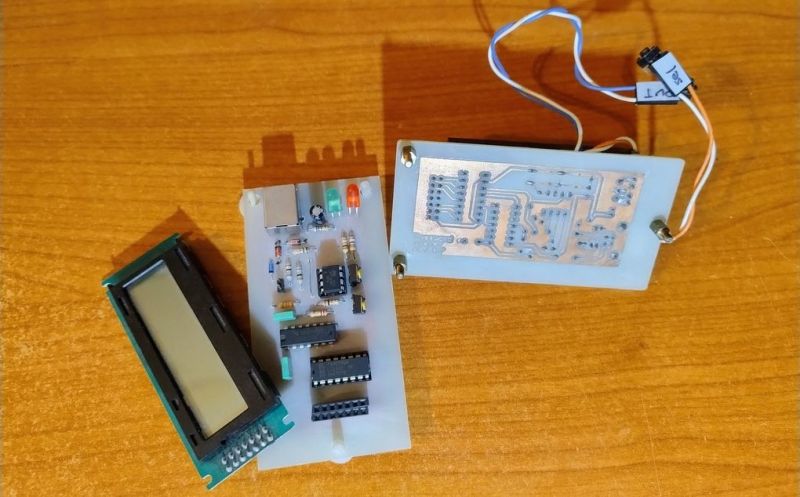
Sometimes you have this project idea in your mind that seems so simple and straightforward, and which feels just so right that you have to roll with it. Then, years later you stumble across the sad remnants of the tearful saga and the dismal failure that it portrays. Do you put it away again, like an unpleasant memory, or write it up in an article, as a tearful confession of past sins? After some coaxing by a friend, [Alessandro] worked up the courage to detail how he set about making a hardware-only password keeper, and why it failed.
The idea was so simple: the device would pretend to be a keyboard and type the passwords for you. This is not that unusual, as hardware devices like the Mooltipass do something similar. Even better, it’d be constructed only out of parts lying around, including an ATtiny85 and an HD44780 display, with bit-banged USB connectivity.
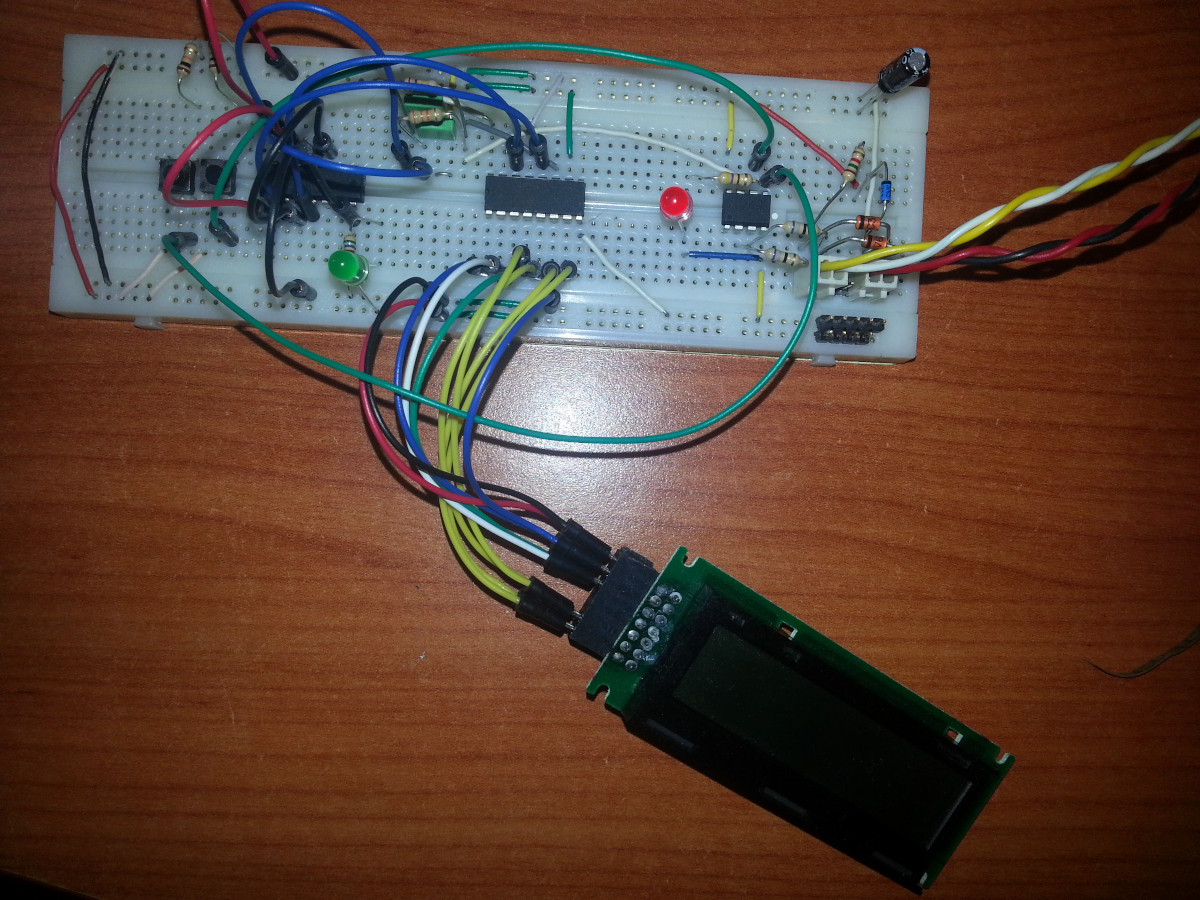
Overcoming the challenge of driving the LC display with one pin on the MCU required adding a 74HC595 demultiplexer and careful timing, which sort of worked when the stars aligned just right. Good enough, but what about adding new passwords?
This is where things quickly skidded off the tracks in the most slapstick way possible, as [Alessandro] solved the problem of USB keyboard HID devices being technically ‘output-only’, by abusing the indicator statuses for Caps Lock, Num Lock, and Scroll Lock. By driving these from the host PC in just the right way you can use them as a sort of serial protocol. This incidentally turned out to be the most reliable part of the project.
Where the project finally tripped and fell down the proverbial flight of stairs was when it came to making the bit-banged USB work reliably. As it turns out, USB is very unforgiving with its timing unlike PS/2, making for an infuriating user experience. After tossing the prototype hardware into a box, this is where the project gathered dust for the past years.
If you want to give it a try yourself, maybe using an MCU that has more GPIO and perhaps even a USB hardware peripheral like the STM32F103, ESP32-S3 or something fruit-flavored, you can take a gander at the project files in the GitHub repository.
We’re always happy to see projects that (ab)use the Lock status indicators, it’s always been one of our favorite keyboard hacks.












Adafruit has a “Feather” RP2040 board with 2 USB ports, I’ve added a display. I have it doing kbd pass through that allows me to toggle a mode where I can use the kbd as input just to the RP2040 or fwd to PC, using a kbd combo to switch modes, and blinking scroll lock to indicate mode on kbd. Handles kbd led status correctly, verified w/ 2nd kbd on PC. No perceptible lag. Many possibilities from here, pwds, monitor / USB switch control, portable notepad, etc.
Tempting; between the dozens of passwords, security codes TOTP/OTP; but it needs to also be secure.
I mocked up some plans, but didn’t run with it.
http://hackaday.io/project/204130-remembering-v-usb
I still have old Atmegas in a drawer that continue to work with V-USB from the early 2012’ish period.
I have two of my old password-typers based on the ATtiny85 sitting around somewhere. On keypress, emulates keyboard and types in username, hits enter, types password, hits enter. All of this hard-coded in the device.
They’ve outlived the online accounts, though. :)
My quick notes for anyone attempting a newer version of this:
– Cheap controllers with USB support exist, they have already been mentioned (you can get a small ESP32 or RP2 board for the same price as an ATTiny85 board)
– USB HID supports vendor specific messages, you can send these with libusb very easily to USB HID devices, no need for using keyboard leds.
– I2C OLED screens cost about the same as HD44780, but give you a lot more to work with visually and form factors.
(The unreliable V-USB implementation for this case could be wrong components, the type of diodes is important, or just the software spending too much time in the LCD code and not giving USB code the time it needs)
“hardware-only” would be heroic. Perhaps pedantic, but since it includes an MCU, it is clearly not “hardware-only”. I guess it means not software running on the same system requesting the password?
V-USB is reliable. I used it relatively recently to build a Dual Shock -> Nintendo Switch controller converter1, which I played through Zelda with, and is still regularly used to provide extra controllers for Mario Kart.
It does rely on the AVR’s clock being precisely tuned, and you absolutely cannot disable interrupts for more than a few cycles. This creates a big gotcha: the Arduino framework’s timekeeping routines will disable interrupts for too long, at least when running at the ‘recommended’ 12.8MHz2!
This helps, perhaps I could look at the code again, or reimplement it without arduino.
One more question: Do you know any V-USB specific issue with any particular USB host?
On some systems it fails to enumerate, and the software MCU side reports no thing.
Nope, haven’t seen that. To be fair, I’ve only tried my projects with a Mac and Switch – although I have tried a variety of hubs and it’s worked with them all.
The other sort-of gotcha I know of with V-USB is that, back in the day, OSes would allow ‘Bulk’ endpoints even at low speed – even though that’s not allowed by the spec – and they just don’t any more. So things like CDC-serial and flash-drive-like filesystems built on V-USB can no longer work.
heh doing PC->peripheral over HID is a hack, for sure! one of the great things with USB, though, is that it has a bunch of features to simultaneously present multiple personalities or protocols at once. And these days, with libusb, it’s super easy to interact with them.