
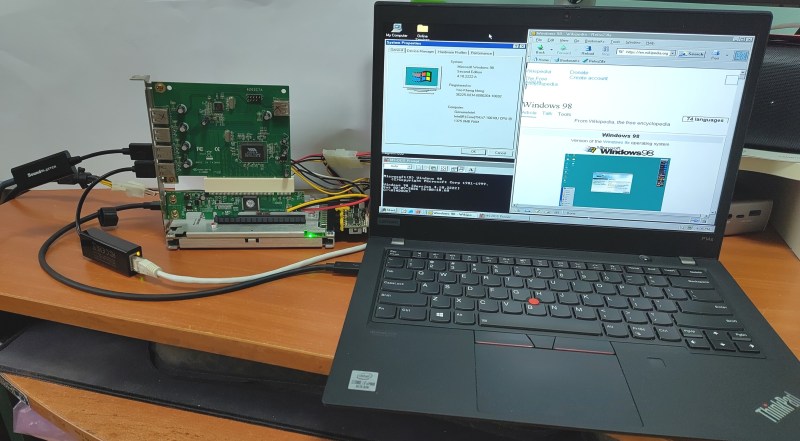
The lovely thing about the x86 architecture is its decades of backwards compatibility, which makes it possible to run 1990s operating systems on modern-day hardware, with relatively few obstacles in the way. Recently [Yeo Kheng Meng] did just that with Windows 98 SE on a 2020 ThinkPad P12s Gen 1, booting it alongside Windows 11 and Linux from the same NVMe drive.
Naturally, after previously getting MS-DOS 6.22 from 1994 running on a 2020 ThinkPad X13, the step to doing the same with Windows 98 SE wasn’t that large. The main obstacles that you face come in the form of UEFI and hardware driver support.
Both ThinkPad laptops have in common that they support UEFI-CSM mode, also known as ‘classical BIOS’, as UEFI boot wasn’t even a glimmer yet in some drunk engineer’s eye when Win98 was released. After this everything is about getting as many hardware drivers scrounged together as possible.
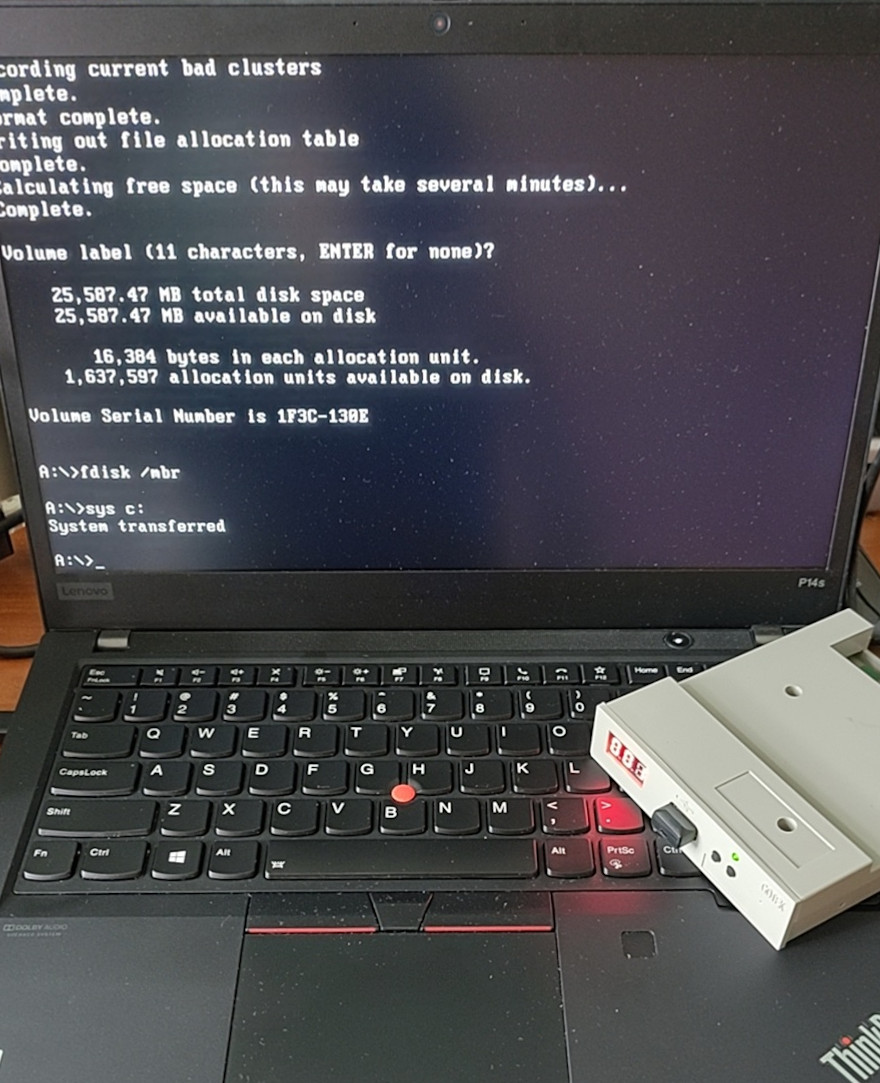 [Yeo] ended up having to bodge on a USB 2.0 expansion card via a Thunderbolt dock as Win98 doesn’t have xHCI (USB 3.0) support. With that issue successfully bodged around using a veritable tower of adapters, installing Windows 98 was as easy as nuking Secure Boot in the BIOS, enabling UEFI-CSM along with Thunderbolt BIOS assist mode and disable Kernel DMA protection.
Because UEFI-CSM implementations tend to be buggy, the CREGFIX DOS driver was used to smooth things over. Another issue is the same that we chuckled about back in the day, as Windows 98 cannot address more than 512 MB of RAM by default. Fortunately patches by [Rudolph Loew] helped to fix this and some other smaller issues.
Unfortunately neither Intel nor NVIDIA have released Win98 drivers for quite some time, so there’s no graphics acceleration beyond basic VESA support and the SoftGPU driver. Disk access goes via the BIOS too rather than using an NVMe driver, so it’s not as zippy as it could be, but for Win9x it’s quite usable.
Finally ACPI wasn’t recognized by Win98, but it’s only fair to blame that on the complete flaming train wreck that is ACPI rather than anything to do with Windows. This particular issue was worked around by configuring the BIOS to support S3 power state and with that making Win98 happy again.
It’s honestly quite a shame that UEFI-CSM is largely ignored by new systems, as it makes installing even Windows 7 basically impossible, and thus creating probably the largest split within the x86 ecosystem since the arrival of AMD64/x86_64.












Ok, that’s badass! love it.
We have a debt of gratitude to those developer who delve into the inner working and provide code that allows us to do such things.
“It’s honestly quite a shame that…”
Shame, but by design?
M$ does not want to deal with the 40+ years of hardware evolution in the x86 space. While Win-xx continues to evolve and the hardware evolves, then backward support becomes simply too iffy and too costly to continue down that commercial road.
A key difference between Windows NT and 9x is, that Windows 9x is a spring-off of the DOS line.
Like Windows for Workgroups, it relies heavily on DOS and BIOS for hardware abstraction.
The very heart of Windows 98 is a manager of V86 virtual machines.
That’s why it can boot on almost any host system that is sufficient DOS or BIOS compatible.
If for example, no supported HDD controller is available, then Windows 98 can access files via DOS services (int21h) or the HDD via BIOS (int13h).
That’s because Windows 98 keeps a DOS VM even after booting up.
Already loaded DOS drivers (CD-ROM, network etc) will remain active.
Actually, the “legacy” parts of Windows are tiny compared to the bloat that was added in the past two decades.
The whole Windows 95 RTM with all the DLLs was 40 MB in size.
Backwards compatibility is often being blamed for no reason other than to have sonething to blame for issues or to enforce changes.
Especially on Windows, which uses dynamic libraries that are only loaded if needed, it makes little sense.
I would go so far to say that the only thing truely good about Windows is its consequent backwards compatibility.
That has to do with philosophy, too. If you want to know your future, you need to know your past.
Because without a good foundation to depend on, things won’t last.
An even easier route is to dig your Compaq Presario out of the basement. What? You guys didn’t keep yours!?!?
I woulds guess that Windows 98SE had its heyday in Pentium III era.
(Maybe also AMD Athlon XP and erarlier Pentium IV.)
We’re talking about a 500 to 800 MHz Pentium III PC with 128MB RAM, 20 GB PATA HDD and 8, 16 or 32 MB video RAM and USB 1.1 ports.
CRT monitor with 17″ was common at the time, users browsed the web using Internet Explorer 5.x or Netscape.
PCs using 512 MB were running unter Windows NT4, 2000 or XP rather.
Because, power-users did tend to avoid Windows 9x, if possible. ;)
In the mid-2000s, Windows 98SE was often seen on eBay.
It was used to demonstrate functionality of various vintage hardware.
Windows 98SE was very useful here, because it could use DOS, Windows 3.x, Windows 95 and latest VDM drivers.
It supported Plug&Pray and non-PnP hardware (ISA cards etc).
It was the ideal OS for Frankenstein PCs built from scrap parts and vibtage hardware.
It is, indeed. The BIOS (CSM=BIOS as payload) was open and unrestricted, it also had evolved over the years.
It was very hacky, but in a good way. It was like a temporary solution that stood the test of time.
Gratefully, there are projects like CSM Wrapper that may keep the BIOS alive.
How much memory does it take to boot?
How long does it take to boot?
Perhaps we need to rethink modern operating systems.
Well, they try to shoehorn in a lot of stuff that people don’t need, want or asked for.
No one asked for cortana or advertising etc. I know I didn’t. I just want something that works.
Windows 7 was great. 10 and 11? Too much garbage no one needs, wants, or asked for.
And now with Linux (or BSD, or…) there is no reason to run Windows anyway. And you can load what ‘you’ want to load as features of your OS… Last Windows I actually bought was Win-7. At work I have to use latest Windows, but at home … Windows free.
Exactly the opposite for me. At work I have to deal with AutismOS wrestled into all kinds of embedded systems. Fortunately at home I can just boot Windows and enjoy games in peace.
“in peace” dealing with Windows waiting to update and reboot all the time isn’t my idea of peace. I’ve not used my Windows 10 box in ages, since GTA V stopped working properly amongst other things and i can’t be arsed to reinstall Windows and all the apps and games i need again.
Speaking about Linux and Windows..
Windows 9x -and 98SE in particular- used to be a tinkerer’s OS before Linux took on/took over.
Thus, 98SE is a bit of a special case, I think.
It wasn’t the “enemy” yet that modern Windows is considered now.
Windows 98SE was still friendly, comparable to Windows 3.1 or WfW.
The user could modify it as needed and had full control over the own PC, still.
In amateur radio, DOS and DOS-based Windows was popular for a long time, too. Well into the 2000s.
Windows 98SE was popular in the shack because it was modern enough to run popular applications of daily life,
browse the internet AND keep DIY interfaces and amateur radio software working.
(It also supported vintage printers and scanners and many many dial-up modems, out-of-box.
Even had ISDN support and DSL/cable modems could be used, too.
Albeit no software firewall was included, sadly.
Windows 98SE also recognized most existing ISA/PCI VGA cards no problem,
even after the original manufacturer was defunct and had offered no drivers anymore.
Ideal for a custom PC built from various parts, old and new.)
Someone could bit-bang serial and parallel ports from Windows 9x,
which was handy for using simple Hamcomm modems (741 opamp working as comparator/data slicer),
for driving a single transistor of a PTT interface (on serial or parallel port pin).
There also was Windows 3.1x software such as WinTNC v1.01 that could simulate an intelligent radio modem (TNC) with BBS by utilizing a simple BayCom modem (aka PC-Com modem).
Or let’s take TFX/TFPCX driver for DOS..
It was a software TNC that ran “The Firmware” on PC, hardware was a BayCom modem or a KISS TNC, often.
DOS Packet-Radio applications such as TOP (The Other Packet) or XPacket used the European TF standard, rather than KISS or TAPR TNC-2.
Or, how about drivers for radio-controlled clocks?
There had been radio-receiver dongles since the 80s who picked up the signal of a time station
and made the pulses available on a serial port pin.
Here in western Europe there was DCF-77 time station on longwave, for example.
The drivers of such dongles were written for DOS and Windows 3.x/95, but not necessarilly ported to Windows NT or Linux.
By contrast, such software still worked fine on a Windows 98SE PC in one or another way.
Either on Windows 98SE or in DOS mode (=plain DOS 7.10).
Looking backwards, there was a lot of classic DOS and Windows 3.x software that had a second-life on Windows 98SE.
Windows 98/98SE also was used in vintage gaming a lot.
Back in the 90s, cheat devices or backup devices had used parallel port for PC connection.
Say, for Super Nintendo (Super Magicom), GameBoy (e-merger, GB Smart Drive, TRANSFERER etc) or Playstation..
The software on PC side either ran on DOS or Windows 9x.
Sometimes requiring the SPP, ECP or EPP configuration of LPT port.
Linux was barely useable for such purposes back then.
It was cool among the geeks, but not so much among the tinkerers (electronic hobbyists, model makers etc) or gamers.
Things like interfaces or ROM patcher utilities were more of a DOS/Windows 9x thing at the time.
So yeah, let’s please give Windows 98SE some love. 🩶
It was a buggy mess, but more kind or forgiving than Windows 95.
Many bugs and limitations were resolved on 98SE, making it almost feel like a real OS.
Also, there was no product activation or telemetry yet.
It also added support for WDM drivers, which became popular on Windows 2000/XP.
But unlike Win Me, it didn’t neglect its existing VXD driver collection. Users had a choice.
VXD sound drivers often featured Sound Blaster compatibility,
while WDM drivers supported simultanous playback/recording (kernel mixer).
(Previously, NT used native *.sys drivers; 95 used Win 3.x *.drv and *.386 drivers and 95 *.vxd VXDs)
PS: The only downside about Windows 9x vs NT or 3.1 that comes to my mind is that it damages unprotected floppy disks.
What I mean is the so-called IHC damage: https://tinyurl.com/mrff8nvm
Windows 9x is not the ideal solution for software archeology, thus.
WinImage 3 on Windows 3.1x is safer on vintage hardware, by comparison.
I forgot to mention.. Windows 98SE can use USB thumb drives via NUSB.
There’s also KernelEx project, which together with gdiplus.dll and unicows.dll can run modern 32-Bit Windows XP/Vista/7 applications.
With some more updates (DirectX 9 runtime, .NET Framework, Visual C++ runtimes, Java SDK etc) it can run pretty recent software! 😃
I got an old workstation at work with Linux and a corpo laptop at work with Windows 11 for the times I need to run a Windows only application. The laptop features a Core Ultra 7 CPU, 32GB of Ram and an Intel Arc GPU. It’s so slow. It feels like I’m running W11 on a P2 with 1GB RAM and a 5400RPM drive. If I put it on performance mode it’s even worse. It just hangs there. No applications open, trying to start a web browser and you can go grab a cup of coffee from the machine. It’s horrible. I need to replace the 8 year old Linux workstation with a SATA SSD, but that’s baby is fast. Blazing fast. Even with benchmarks at a quarter of the speed on the CPU and less RAM, it’s just fast, it’s snappy.
I don’t want cortana or copilot or whatever they put in there next. Just make it fast, make it stable. Make sure I’m not getting anxiety when doing a reboot, not knowing if Windows will boot again. The entire Windows experience is horrible.
Word fastest Windows 98 SE
Ah, the famous “Ballmer Peak” https://xkcd.com/323/