Coffee Table Arcade Hides Its Controls

arcade-coffee-table-with-self-hiding-controls

[Hoogen] did a fantastic job of building arcade hardware into this Ikea coffee table. Sound familiar? We just looked at another Ikea coffee table arcade, but this one goes quite a different route. It uses a Ramvik table which has a very deep drawer in the end where the controls are located. The image to the left shows that you’re going to have a problem with the joystick when you try to close it. [Hoogen] came up with a clever mechanism to overcome this issue.

This is not an emulated system. It uses a JAMMA board called the iCade 60-in-1 to bring sixty classic arcade games to the build. To interface with this hardware [Hoogen] included a JAMMA full cabinet wiring harness. The inset image on the right is pretty small, but it shows the speaker mounted in the back of the drawer, as well as the control surface angled down. This tilting surface is what allows the controls to move out of the way when closing the drawer. This happens automatically as described by [Hoogen] in his write-up.

Coffee Table Arcade Cabinet

ikea-arcade-gaming

Get some Pac-Man fever while sitting on this couch thanks to the arcade rig built inside of the coffee table. The controls are a bit more sparse than more dedicated MAME rigs, but you should still be able to play most of the classics with four buttons and a joystick. After all, you need to reserve some room to put your feet up when you’re not gaming.

[Manny Flores] started the project with a Lack table from Ikea. The top is anything but solid. After tracing the outline of his LCD screen and cutting through the surface he discovered this is more of a beefed of cardboard than it is wood. The honeycomb of paperboard inside the surface of the table makes it really easy to clear out some space. In fact, when it came time to add the arcade buttons he just used a utility knife to cut the openings. Inside you’ll find a Raspberry Pi which interfaces with the buttons and joystick via an iPac USB controller board. A set of powered speakers mounted on the underside complete the design.

[via Adafruit]

Star Wars Themed MAME Cabinet Is Perfect In This Basement Bar

star-wars-themed-mame-cabinet

Fans of the Star Wars series will immediately recognize these illuminated vertical bars as a piece of the style from the original movie. They decorate the MAME cabinet recently installed in this home bar. You’ve got to admit, it looks amazing. But we’re always on the prowl for the build log and this annotated 46 image set has no shortage of goodies.

The project started off as a very ordinary looking plywood frame. But it takes shape quickly as the rounded-over grills were added to the box. Holes were cut behind them to accept the acrylic that serves as a diffuser and to allow the LEDs to shine through from the inside. There are several shelves which will be used to store additional gaming systems in the future. For now all that’s inside is a pretty beefy computer that runs the emulators, allowing games to be played via the arcade buttons or using wireless Xbox controllers.

Make sure you get all the way to the end of the build images. We were delighted by the custom icons in the arcade buttons. Instead of the common player one and player two images there are silhouettes of Star Wars characters and objects. This attention to detail really makes the build something special!

[Thanks Jason]

Frankenstein, An All-tube Home Theater Amplifier

amp

Here’s an exercise in excess if we’ve ever seen one. While working on his undergrad at Michigan State, [Gregory] thought it would be a great idea to build an all-tube home theater system. He calls his seven-foot tall rack of amplifiers ‘Frankenstein,’ and we’ve got to agree this build is an impressive monstrosity of engineering prowess.

[Gregory]’s Frankenstein is a complete 5.1 home theater system. In the interests of sanity, the majority of the equipment in the rack is off-the-shelf gear including a CD player, surround sound processor, and a beautiful McIntosh solid state preamp. The power amps, though, are where this build really shines.

For the sub, [Gregory] built a wonderful monoblock tube amp, able to push nearly 300 watts into a subwoofer. The other channels for this home theater system are amplified with a huge four channel tube amp providing 480 watts per channel. In total, there are 23 tubes in [Gregory]’s amplifier system, enough to consume 20 amps of filament current.

You can check out [Gregory]’s demo video of his system after the break.

Continue reading “Frankenstein, An All-tube Home Theater Amplifier”

Silent HTPC Build Is An Art Piece For The Livingroom

silent-htpc-build

This sexy beast is [DeFex’s] new silent home theater PC. To give you an idea of scale, that motherboard is a Mini ITX form factor. Mounted below it is the solid state drive which is an SLC version chosen because they tend to last longer than the MLC variety. This distinction comes with a price tag that is $100 more expensive.

But we digress. It’s the custom case that really caught our eye with this build. The frame is made of a huge aluminum heat sink. It measures about 7″ by 10″ and sets the final foot print for the computer. An aluminum puck was added to transmit heat from the processor to the heat sink. Holes were drilled and tapped into the heat sink to accept the brass stand offs which hold the motherboard in place.

The near side of the case is a sheet of acrylic. It connects to the rest of the case using 3D printed brackets at each corner. There is an additional bracket on the bottom to hold the hard drive in place. The sides of the case are filled in with bicycle spokes which also find a home in the corner brackets. Now the hard part will be figuring out which orientation looks the best for displaying his fine craftsmanship.

[via Reddit]

Webmote: Control Anything With Web-based Remote

control-anything-from-the-web

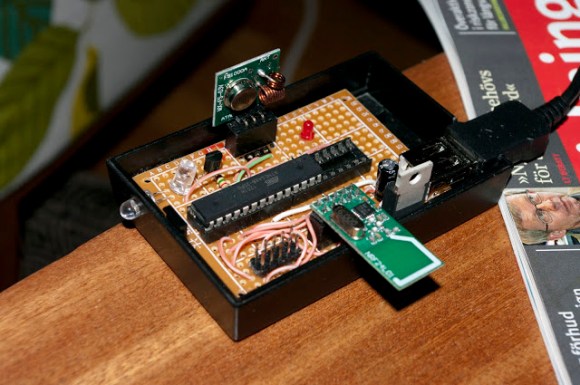
We’ve seen a lot of projects that let you control all of your devices from a smartphone. But this universal web-based remote control system looks like the most versatile we’ve seen yet. The project is called Webmote as the controls are served up as a web interface so that you’re not limited to say an Android device. The UI can be customized by choosing what buttons you will use and where to place them on the display. You can get a good feel for this by viewing this G+ album. Setup is made a bit easier thanks to an add-on system that has predefined layouts for common things like controlling XBMC.

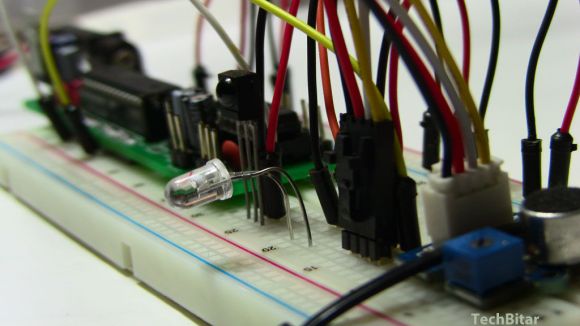
The hardware seen above is the business end of Webmote. It’s an Arduino with an IR receiver, IR LED, and an XBee module. For your common home entertainment devices you can teach the system your codes using the IR receiver. The IR LED is used to transmit those codes back, and the Xbee gives you the ability to control X10 (home automation) devices. Right now the setup requires the hardware be connected to a server via USB, but it shouldn’t be hard to set up some type of wireless alternative.

ODROID-U2 Is Latest Barebones Board Begging To Be Used

odroid-u2

Oh hey, another barebones dev board. Well, that’s what we said to ourselves when we first saw this picture, but the way this is presented is like crack for geeks. It starts with this tiny board, which has a footprint smaller than a credit card. But once you start looking at the add-ons you’ll want to watch out or you’ll cover yourself in drool.

The name of the game here is speed. It’s running a quad-core Cortex-A9 chip with a Mali-400 graphics accelerator. There is no on-board storage, but the microSD slot is meant to be used for OS and storage. A faster option is to use a NAND add-on board offered in 8, 16, and 64 gig capacities ($25-$79). There is a micro type-D HDMI connector and the device is powered by a cellphone charger. It ships with a big heat sink that acts as a case for the board.

After the break you can see it booting Android and immediately loading into XBMC. The menu looks mighty snappy, making us think this is a great alternative to using Raspberry Pi as a media center. But you’ll pay for the faster speed and ability to run Android. The rig they’re showing off, plus the add-ons, comes out to about $132. There are also questions to be answered as to which video formats are supported through hardware decoding.

Continue reading “ODROID-U2 Is Latest Barebones Board Begging To Be Used”