[nickjohnson] has produced an incredibly silly laser wall clock. It was built to test out his PWM servo controller board. He created a wall poster featuring numbers 0-9, hour, minute, AM, PM. The controller points at each symbol in sequence to spell out the time. It changes position every second which creates a nice ticking sound. The clock may be goofy, but you should have a look at his parallel port controller since it’s designed to be simple and uses common components.
Misc Hacks4181 Articles
Quick And Dirty Ferrofluid
When we posted our first ferrofluid story [frogz] threatened to make a video of his own version. Well he did and here’s the video. He uses laser printer toner and suspends it in lightweight SAE10 motor oil. He says that a thinner oil produces shapes quicker. I don’t think the power drill with the spoon attachment is really necessary though.
X10 PIC Based RF Remote
[ned] received a free X10 RF remote. He popped it open to discover that the device is actually based on a PIC. By replacing the PIC with his own he’s able to issue any X10 command using the remote to any device in the system. He did spend a lot of time with a logic analyzer to try and figure out the protocol, but later found some good reference links. He hopes this will make it easier to connect his PIC projects to the X10 system since this remote doesn’t have to be plugged into the wall like the X10 serial interfaces.
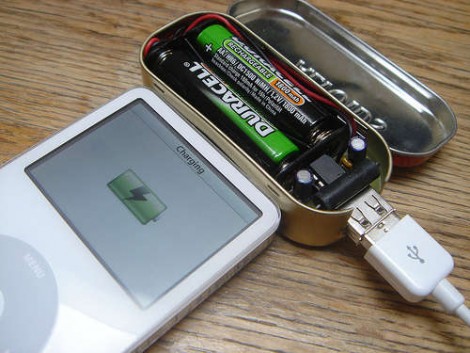
Minty Boost, AA Based USB Charger

Limor a.k.a. Ladyada has been a long standing staple in the Hack-A-Day community and we were more than happy to hear about her latest project. The Minty Boost is an improvement on the idea of building a battery powered USB charger. Most designs (including ours) use a 7805 linear regulator with a 9V battery. Even in the best case the regulator is only about 60% efficient which means you’re losing at least 1/3 of the power to heat. Limor’s design is a much more efficient boost converter design and uses far more common (and rechargeable) AA batteries. She’s got a thorough write up on how to build the converter in an Altoids gum tin. The end result is 82% efficient and can effectively double the play time of a video iPod.
The guide doesn’t end there. Limor actually wrote this as a demonstration on what goes into a making a kittable project. She covers the entire process from component selection, to mass PCB production, to what her final cost break down is. The guide is full of pictures thanks to some good planning as well. Of course the most interesting thing we learned from the guide is this: despite using the tins all the time, Limor finds the taste of Altoids gum disgusting.
[The guide is on her site, but we’re linking to the version on Instructables since we’ve managed to DDOS her site in the past… by announcing that her site was back online.]
PCB Fuser For Toner Transfer Etching
We’ve covered the toner transfer method for creating circuit boards before. Instead of using an iron, Rich uses the fuser out of a laser printer to get consistent results. He wired a dimmer to the power supply to regulate the temperature. The fuser has a built in thermistor, so you can read the temp using an ohm meter. For rate control he built a stepper controller that connects to a parallel port. Using a simple program he’s able to control both speed and direction.
[thanks Fredasp]
Burning Custom Drum Machine Sound ROMs
The Alesis HR-16 was an inexpensive, easy-to-use MIDI drum machine from the early ’90s. [Burnkit2600] had a lot of experience circuit bending the HR-16 and decided to burn some custom sound ROMs for it. The HR-16 has two 32-pin ROMs that are conveniently socketed. He pulled the chips and dumped the image using an EPROM reader/writer. The ROM only contains sound samples, so you can open it up in raw mode using a program like Sound Forge. The samples are separated by short negative regions. All you need to do is place your new samples between the pits and burn a new ROM. You can piggy back the chips using the chip enable line to add even more samples.
3D Video Microscope
Gerald Heine’s stereo microscope uses a field sequential method for generating 3D video. A CRT draws half the screen’s lines with each frame. So, if you send the video from two different cameras on alternating frames you can generate a 3D using shutter glasses. Gerald’s setup uses the sync signal from one camera to control the other. Both video signals are fed into his custom 3D video sync box which combines the frames into a single video feed and also outputs a control signal for shutter glasses.










