
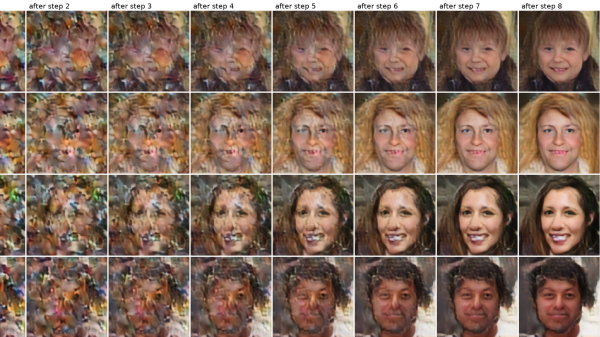
A grid of images shows pictures emerging from patches of random noise. To the left, images are more random, while to the right they become more recognizable.

Running Generative AI On An RP2350

Driven by a desire for privacy, customization, and lower costs, there’s growing interest in AI models which can be run on local hardware. Few of them go as far as [Tim], though, who built an image generation diffusion model which can run on an RP2350 microcontroller.

As might be expected, its capabilities are limited. The resolution is 128×128, it only generates images of human faces, and it takes about twenty seconds per image – still impressive for such limited hardware. It runs on a Waveshare RP2350 development board, and it can output the generated image over USB or display it with the aid of a VGA adapter board.

The generative model doesn’t directly create an image. Rather, it generates a distribution in a latent space, which a variational auto-encoder’s decoder component translates into an image. The auto-encoder was trained in two parts: an encoder which transforms an image into a latent-space distribution, and a decoder to transform that distribution back to an image; once this was trained, only the decoder was used.

The generative portion of the model uses a latent flow diffusion transformer; this takes in noise to start with, then iteratively predicts changes which bring it toward the desired image. It can also take in a output class, which guides the generator’s direction (toward a smiling face, for example). [Tim] trained two models, one larger and one faster, and quantized the weights for both to 8-bit integers. Both models, along with the inference program, then fit into 4 MB of flash memory.

For such a small model, the results are remarkably good; they don’t look quite natural, but they’re quite recognizable. For more on how diffusion image generators work, check out our article on Stable Diffusion.
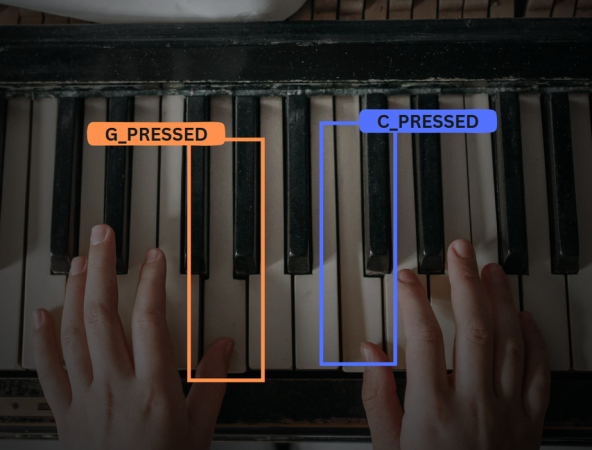
A piano is pictured with two hands playing different notes, G outlined in orange and C outlined in blue.

AI Piano Teacher To Criticize Your Every Move

Learning new instruments is never a simple task on your own; nothing can beat the instant feedback of a teacher. In our new age of AI, why not have an AI companion complain when you’re off note? This is exactly what [Ada López] put together with their AI-Powered Piano Trainer.

The basics of the piano rely on rather simple boolean actions, either you press a key or not. Obviously, this sets up the piano for many fun projects, such as creative doorbells or helpful AI models. [Ada López] started their AI model with a custom dataset with images of playing specific notes on the piano. These images then get fed into Roboflow and trained using the YOLOv8 model.

Using the piano training has the model run on a laptop and only has a Raspberry Pi for video, and gives instant feedback to the pianist due to the demands of the model. Placing the Pi and an LCD screen for feedback into a simple enclosure allows the easy viewing of how good an AI model thinks you play piano. [Ada López] demos their device by playing Twinkle Twinkle Little Star but there is no reason why other songs couldn’t be added!

While there are simpler piano trainers out there relying on audio cues, this project presents a great opportunity for a fun project for anyone else wanting to take up the baton. If you want to get a little more from having to do less in the physical space, then this invisible piano is perfect for you!

The AI Engine That Fits In 100K

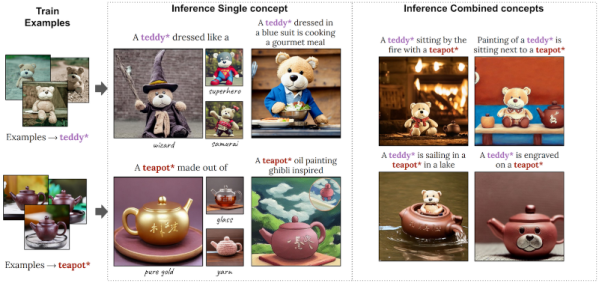
Running your own AI models is possible, but it requires a giant computer, right? Maybe not. Researchers at NVidia are showing off Perfusion, a text-to-image model they say is 100KB in size and takes four minutes to train. The model specializes in customizing a photo. For example, the paper shows a picture of a teddy bear and a prompt to dress it as a wizard. In all fairness, the small size and quick training are a little misleading, we think, because the results are still using the usual giant model. What’s small and fast is the customization of the existing model.

Customizing models is a common task since you often want to work with something the model doesn’t contain. For example, you might want to alter a picture of your face or your pet, which probably isn’t in the original model. You can create a special keyword and partially train the model for what you want using something called textual inversion. The problem the researchers identified is that creating textual inversions often causes the new training to leak to unintended areas.

They describe “key locking,” a technique to avoid overfitting when fine-tuning an existing model. For example, suppose you want to add a specific dog picture to the model. With typical techniques, a special keyword like dog* will indicate the custom dog image, but the keyword has no connection with generic dogs, mammals, or animals. This makes it difficult for the AI to work with the image. For example, the prompts “a man sitting” and “a dog sitting” require very different image generations. But if we train a specific dog as “dog*” there’s no deeper understanding that “dog*” is a type of “dog” that the model already knows about. So what do you do with “dog* sitting?” Key locking makes that association.

Continue reading “The AI Engine That Fits In 100K”









