
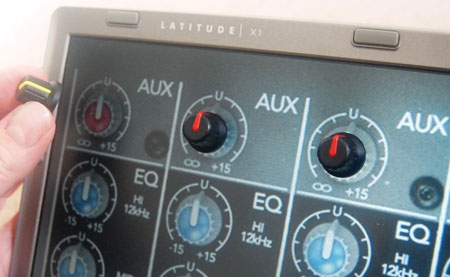
[Lindsay Williams] has come up a novel way of constructing custom physical inputs for your programs. SenseSurface is a viable alternative to building a new interface for each application. Simply place the dials, buttons, and sliders on your screen wherever you want them.
A sensor board, placed behind the display, picks up the signals from the inputs. The only limitation to the number of inputs available is the size of your screen. Inputs are held on magnetically, and have a low friction backing to avoid scratching or gouging your screen.
Here is a demo video showing use with one knob. It doesn’t appear to slip or slide at all while they are turning it. We’d love to play with it a little bit and see what it is like, as well as see more information on what technology is being used.
[via Music Thing]











Now that is what I call a genuine novel approach to increasing interface usability!
No more dremelling to add another knob to your panel, just stick it on!
Great, but i just wish there were more details. Any1 knows how is it supposed to work? does each knob has a battery + transmitter, or are the knobs just dumb passive elements (magnets perhaps) and the whole magic is preformed by the thingie behind screen?
if you read the article you will find that it is all based on mangets..
Just…wow. I want this.
I’m betting, without reading the article yet (as I’m on my way to bed) that this uses similar magnetic resonance technology to the Wacom boards that can sense up to 60 degrees of rotation…but cooler.
I hope to learn more about this, and maybe apply some of it. It would really rock for live performances (DJ, FL Studio, etc.). It just looks so flexible and cool. Sliders and such would be neat, too..and I bet a fair bit more easily doable.
definitely interesting, but not really practical. if you’re doing just one thing you might as well go with a more reliable, solid, permanent interface. if you’re doing multiple things than you’re stuck carrying around a bag of magnets, and having to rearrange them every time you switch apps…
Really usefull and handy :-)
Like this : http://www.arturia.com/evolution/smf/index.php?topic=2108.msg6695#msg6695
Really cool post, highly informative and professionally written..Good Job