
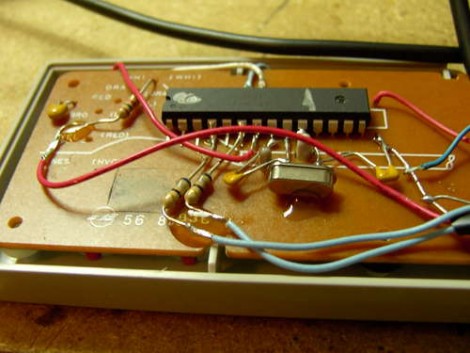
Regular Hackaday reader [Osgeld] is at it again with this USB conversion for an NES controller. This is a ubiquitous hack that we started seeing very early on, sometimes involving an adapter kit, and other times including things like a thumb drive and USB hub. But this time around is truly a bare-bones version. He’s using an Arduino but it’s really just an AVR ATmega168 running the bootloader. We’d wager this can be done with an ATmega8 just as easily. Grab a couple of diodes (we never seem to have the 3.6v zener diodes around when we need them), a couple caps and resistors, a crystal and you’re in business. The hack wires each button to a pin and implements a keyboard HID that can be mapped for any purpose you desire.












Atmega8 can definately do it.
I believe there is an open source project on it (from what i saw, it supports up to 4 controllers at once, including a mix match of snes controllers and also support the 4 port nes adapter on ports 1 and 2 of the chip)
http://www.raphnet.net/electronique/4nes4snes/sch-core.png
HEX: http://www.raphnet.net/electronique/4nes4snes/4nes4snes-1.2.hex
SOURCE: http://www.raphnet.net/electronique/4nes4snes/4nes4snes-1.2.tar.gz
couple notes
its a 328 :)
and it doesnt show up as a HID keyboard, it shows up as a HID Joystick
Bookmarking just for the Joystick HID. Good job, osgeld!
oops! instructables detected! no clicky.
looks nice, but NES isn’t a real OS…
Let me squash the “instructables BOO” crap quickly too
look at it from my side, since I joined they provide me a stable place to post my projects, and I do, for that I also get a large audience that is highly active, I have also gotten T-shirts stickers and other swag along with xmas cards, Halloween cards (more stickers) and have won gift certificates to think geek and enough gorilla glue to last a few years
I am going to post it anyway, it might as well be there since they treat me well (for a website) and have the chance to win a pocket knife at the same time
yes Instructables BOO indeed :p
LOL @ Xeracy
I’d like to see a bluetooth implementation of an [S]NES controller.
Osgeld did it again. Pretty sweet use of the original PCB. I still didn’t get the zener diodes. How does it lower the voltage for the USB?
you hook them up backwards, and they have a very low breakdown point (like 1.2 volts) and thus start to leak current backwards through the diodes to ground, your lower voltages are whats left over
just stolen from here
http://www.raphnet.net/electronique/snes_nes_usb/index_en.php
I too am getting pretty sick of the instructables bashing. What exactly do people have against it?
@tim:
How is it stolen? It’s a similar concept with completely different implementations. I see that one user did a similar thing and posted an image of it, but there’s no documentation of it.
Sorry that everything can’t be a one-of-a-kind masterpiece.
so grats tim, you found one of a couple dozen microcontroller + nes + usb projects and instantly accuse me of stealing
its all based on vusb, I never claim to have written the software, crap page 2 line one states that and goes on to list my references (RTFA)
yes I saw that project, and I tried to get it to compile, which never happened and moved on to one that would work with the stuff I had on hand
their all based off of the avr vusb project anyway
@Memento
I made an NES bluetooth, but it might not be the kind you are thinking of. It’s a bluetooth headset.
http://lowlevelowls.blogspot.com/2010/04/bluetooth-nes-game-pad-headset.html
I made one using an ATtiny44. It’s much smaller, and except for replacing the wiring I didn’t damage the pad in any way. I didn’t bother to post it anywhere since many similar designs have already been published but maybe I will now ;-)
Pic here for the curious : http://i50.tinypic.com/zlcav9.jpg
I have an idea for using this to monitor the input given from a nes controller. as a part of this, I’d like to be able to hide something small, a few small coins in height.
Would it be possible to tweak this project to allow that? I’m not sure of the height and clearance for free room with it.
@vic please do, my “original” idea was to use a attiny84 but was not having any luck getting vusb working with it
@Brett, the controller has a little bit more room in it, but not much, NES pads are everywhere and cheap (paid a buck for that one) so snag one and check it out, worst case they are super easy to hook up to just about anything
Oblig: http://denki.world3.net/retro_v2.html
No need to trash the controller. Since it is hard to get hold of NES connectors what I do is cut the end off and splice a DB9 into the cable. It then still works on a real NES and can also be used via USB.
I love this, was one of the first Arduino projects I started to fiddle with. Instead of vusb I found a nice sketch that sent the data out over the serial port. Copied it over to an atmega8 with no clock and a ftdi usb chip and crammed it all back into the controller with a bit of snipping away at the cover.
I’ve been wanting to dig it back up again and change the ftdi chip with a bluetooth module, this might be the inspiration again :P
i have several that i made just using a usb keyboard. it seems to be a way simpler approach.
I was wonder what would happen if you just unsolder the five wires on the nes controller and just replaced them with a 5 wire usb cord? my theory is it just wouldn’t recognize it, or hopefully it would it take?
I did this, unfortunatly i selected the easy pins to solder and that resulted in one pin not being supported by the software. And i used a Azerty chip for a Querty based software.
That Querty Azerty shit needs to dissapear.
I know this post was ages ago, but my site has modified versions of the 4nes4snes project from Raphnet that compile for ATMega48/88/168/328. Also working on one for ATTiny84.