
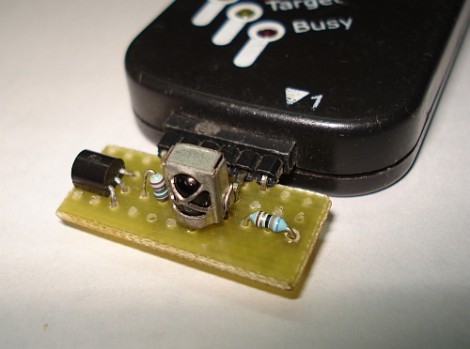
[SpiralBrain] needed to figure out the coding scheme used by an IR remote control so that he could use it with his own project. He built an IR receiver board for the PICkit 2 and figured out how to use some of the Microchip software to measure the timing of the incoming signal.
The hardware’s dead simple; a 38 kHz IR receiver does the heavy lifting by filtering out errant infrared light. When it does detect a signal with the correct frequency the output pin drives the base of a transistor to toggle the input pin on the PICkit 2. The breakout board has a pin header which makes it a snap to detach and store for later use. The PICkit 2 Logic Tool software captures this input, by setting the correct pin as a trigger and choosing a 10 kHz sample rate.
As we discussed in our PIC programming with Linux tutorial, the PICkit 2 really is far superior to its replacement, the PICkit 3. [SpiralBrain] mentions that it is more versatile than the newer version but doesn’t go so far as to tell us whether you can use this hardware with the PICkit 3 or not.











I forget about this tool sometimes. It’s a great addition to the programmer.
Never thought about it as IR decoder as of yet… Good idea!
Anyway, why the transistor for the inverter?
I’ve noticed that a lot of IR remotes tend to cause interference with audio equipment (sensitive mics, pickups, etc). I’ve never worked with IR before personally, but I’ve always wondered if you could just use an inductor and a sound card to figure out IR codes.
You can use an AM radio connected to a sound card. The AM radio will pick up the crystals output that most IR remotes use internally.
Oh great, the post made it! Thanks HAD!
It will not work with PICKit 3 for sure because it does not support signal capture. Microchip never released the source for the PICKit 3. PICKit 2 however is an open source project and a lot of people contributed to add the additional features.
@Bogdan A transistor makes the visualization easier, a high level represents an IR reception. It would however work without the transistor too but a low pulse would indicate IR reception in that case.
I wish they would open up the pickit3. I had to get one to support some of the newer chips but wish I could still use the pickit2 instead. There is no reason for them not to open up the pickit3.
Yeah that would be pretty cool. Same here I had to get the PICKit 3 for that reason. If its open source, clones would surface hitting sales, Microchip must be afraid of that.
kind of useless unless you know the IR protocols. Measuring by hand can be a hassle.
Ive done this so many times with the pickit 2, nothing new… you should include this link to help users decode the Protocol
http://www.sbprojects.com/knowledge/ir/index.php
On the left hand side are protocols and the user can simple go through them to find one that matches.
Would make creating a decoder easy!
Good point Jason. This would however come in handy if one wanted to duplicate IR remotes using bit banging.
Yeah thats true. All in all its a good post! I wish i could get some of my older post on here.
Hey in fact, ill try making something neat today and see if it can be placed on HAD! Would be cool!
Jason i’ve seen your work and you have done quite a lot. It would be nice to see your work on HAD, we could all learn from you.
Thanks SpiralBrain, i couldnt find your real name anywhere :(
Someday i hope to be on HAD, just thinking of something cool to create… Going to make a post on my blog for idea suggestions.
If you have one feel free to post it..
I like this very cool project, i own a pickitIII and that doesnt work, but i think my buspirate will do the job.
HI,ALL
i have one doubt…
at witch time , i have to capture it??
i have press one key at time and hit RUN and get one waveform,but by pressing that key when i again hit RUN the waveform did not same….
so i have confusion that witch waveform i have to consider?
and why all time different waveform occur.