

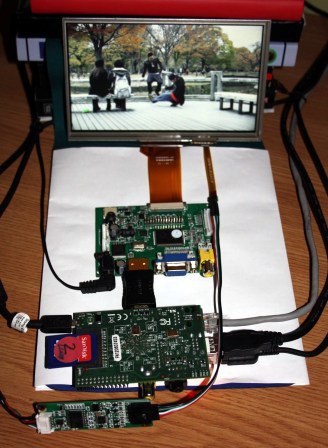
[Andrei Istodorescu] has been hard at work building a 7″ touch-screen rig which runs XBMC. It may be upside-down, but the Raspberry Pi board which is front and center is still easily recognizable. There’s a lot of stuff connected to it in order to pull this off, and even more software configuration. But as you can see in the clip after the break he did get it working!
The screen is an eGalaxy 7″ touch sensitive module he picked up on eBay. It sounds like it was meant for a backup camera in the dashboard of a car. He compiled his own Linux kernel to add support for the screen. It uses HDMI for the video interface with the driver board, and the touchscreen connects to one of the USB ports. The rest of the setup involves compiling XBMC with touchscreen support and calibrating the screen to accurately sense input.













Nice build. What’s the estimated cost of the whole thing?
The post isn’t exactly clear about that, but here’s a parts breakdown:
1) 7″ Display with resistive touchscreen (~$60 and higher)
2) Some kind of HDMI to LVDS converter (Price unknown)
3) 4 wire resistive touchscreen controller to USB (~$20)
In the post, below the pictue, you can see the estimated price, which was, at the momemnt of building:
30$(Raspberry PI) + 80$(display with touchscreen and touchscreen controller) + 2$(hdmi to hdmi) = 112$.
You should add the SD card(which I don’t know how much it costs) and the power adaptors(which I also don’t know how much they cost). I already had these parts around my house.
Chalkboard Electronics sells whole bundle with everything included: http://www.chalk-elec.com/?page_id=1280#!/~/category/id=3094861
Got it working right out of the box.
Yes, but this will not work with XBMC on Raspberry PI, unless you build XBMC with my patches.
Are your patches availeble for download? Cause I bought a 10″ inch screen from chack elec but the touch doesnt work in xbmc.
I got that exact hdmi display, touchscreen controller and hdmi display pcb from a Chinese eBay seller for about 36 GBP delivered.
The resolution is low but quality is okay if not a bit washed out. I’m in the process of coming up with an enclosure because it’s very delicate with those ribbon cables.
I used a 0.15m hdmi cable from cpc (Farnell) instead of the coupler.
The touchscreen worked well on windows so I’m glad to see someone got it working on the pi
let me know what you did for enclosure. i am trying to figure something out myself
I bought a similar screen, and the resolution is great. The image is very nice when the Pi is operating at the native resolution of 1280 x 800 pixels. You must have a different display, and/or a scaled image.
I love XMBC but am looking for recommendations on touchscreen compatible skins…. I know there are a lot out there, but am looking for one that is really good.
Also sidenote…. whats the best way to use XBMC as a home jukebox (while still having XBMC remote work)
Hi!
Please have a look at my XBMC skin for touch screen devices:
video: 0GrIyGGTRj4
link to skin: http://code.google.com/p/andrei-development/downloads/detail?name=skin.CarPC-touch-v1.zip
The touch screen controller is eGalax, not eGalaxy.
Regards,
Andrei
I have almost the same parts to make almost the same thing :) I’ll have to improvise to make it to hackaday ;)
show!
You could use something like this for Home Automation, have a Raspberry PI mounted to the back of the screen, and build this into a wall, to control lights, home audio and a bunch of other things – Might be something I may try….
This is a great idea – Gave me a idea to use this in a Home Automation install, having the Raspberry PI mounted to the rear of the screen, and coding it to activate things like lights, music, heating…. possibilities are endless.
Could you post how he modifyd the kernel?
Hi!
Please have a look at my latest post(Complete CarPC solution using Raspberry PI)
http://www.engineering-diy.blogspot.ro/2013/08/car-pc-project.html
This link is broken, could you post the link to your carpc img file?
The fixed link is this:
http://www.engineering-diy.blogspot.ro/2013/08/car-pc-projectaugust-2013-update.html
A link to the image is at the begining of the post.
Thanks,
Andrei
Thanks for that Andrei.
I’m using a USB soundcard, I have disabled the PI sound device. I get sound from mplayer and mpg123 but not from xbmc videos or music. I have audio 2.0 set in xbmc. What is the default output device you have set? In the PC version of xbmc there is a option to change the sound device but in your build there isn’t :(. My device is card 0…
Thanks for your good work
Graeme
Hi!
I don’t know much about usb audio in Raspbian OS, also tried with a usb audio card, but the sound was not very good.
The solution for me is to use http://www.ebay.com/itm/281035186817?ssPageName=STRK:MEWNX:IT&_trksid=p3984.m1497.l2649.
Andrei
Stumbled upon this old HaD post loking for info on that touch screen controller…. I got an old 10″ intel atom netbook and wanted to create a little touchscreen media player for my car. essentially take it apart and add in a 10in touch panel (found here: http://www.ebay.com/itm/281199397174), remove the keyboard and make a tablet.
anyways, im pretty sure my touch screen uses that same controller. does anyone know if it will auto detect in ubuntu etc, or will i need to rebuild the kernel as Andrei did? any tips are welcome.
Hi!
I am pretty sure that this has eGalax touch controller and Ubuntu has this module in the kernel s you don’t have to rebuild it.
Could you use any touchscreen to connect to a raspberry pi? ie could you dismantle an old phone/ebook with a touch screen and adapt it to use with a paspberry pi? And if so what additional parts would you need?
I have a question please.. On the controller board what is the name of the 4 wire adapter that goes from the black plug on the board to the 4 flat wire connection on the lcd screen? i have an lcd screen with the 4 flat wire connection but cannot find another controller board that will accept it without having some sort of an adapter. Thanks in advance.
Hi!
This is a resistive touch screen controller. You can find them on eBay:
http://www.ebay.com/sch/i.html?_sacat=0&_from=R40&_nkw=eGalax+touch+screen+controller&_sop=15
Hello Andrei. Great work, and thanks for your helpful examples! I have ordered components to duplicate your nice system. I’ll be using audio from HDMI with my Alpine PXA-H701 audio processor (especially for DD, DTS 5.1 audio).
Question: how are you handling shutting down the Raspberry Pi when turning off the ignition?
I saw one solution here: http://www.mausberrycircuits.com/collections/car-power-supply-switches/products/2a-car-supply-switch
Thanks!
Could run on a 7″ tablet for less I guess