
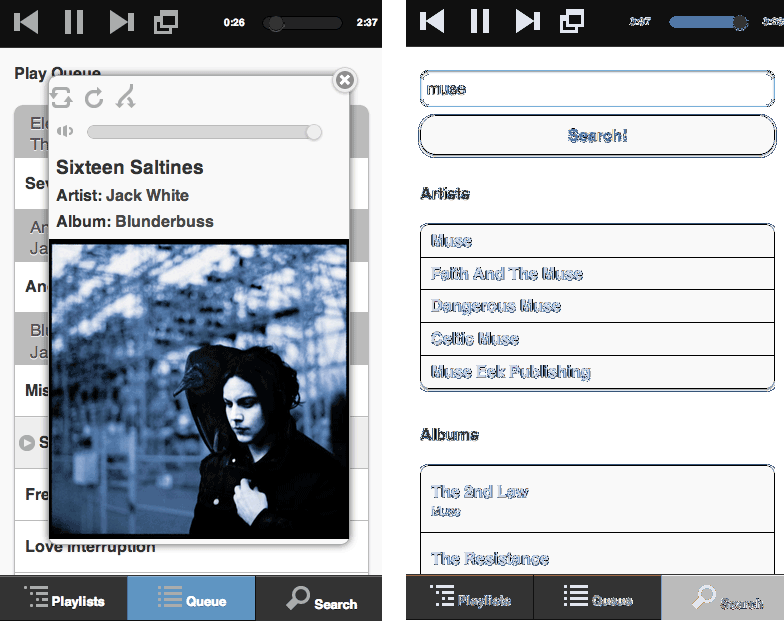
The Raspberry Pi has been very popular as a streaming music player. Sure, the only audio out option on the board is an analog stereo jack, but you can use a USB audio device to improve upon that if you wish. [Wouter van Wijk] wanted to use his RPi as a Spotify server. It’s a bit tricky to get everything configured for this, so he decided to give back by publishing a ready to use Spotify server image for the Raspberry Pi.
The project is call the Pi MusicBox. Like some of the RPi Pandora setups we’ve seen he included the ability to use the hardware as an AirPlay device too. To connect to the Spotify service he uses the Mopidy package. It can also play tracks from local storage (including the home network). It’s even capable of mixing the two sources in the same queue. Possibly the best part is that it can be controlled with any Music Player Daemon (MPD) client like the smart phone screenshots seen above.
If you’re interested, check out his GitHub repo for the project.












> the only audio out option on the board is an analog stereo jack
No, there’s an HDMI output too. My Raspberry Pi + MPD setup uses that connection for a digital audio output into my receiver. It sounds great and leaves the USB ports free for other things.
Eggzactly! I use a HDMI audio breakout box to get toslink out
Meh needs spotify premium.
Got my hopes up for a moment.
Sonos does spotify premium. Just buy one of those and call it done.
this is great… what i was looking for..
i could play it through my reciever or build a stand alone amp with a hdmi or usb input
You can also use Spotify as an app through Raspbmc which is fairly easy to get up and running: http://www.linux-answered.com/2013/02/03/raspberry-pi-raspbmc-media-center-including-spotify/
nice I’m not sure what spotify is, but I like that you kept the image a decent size. If it really fits adn works with the 1gb card bravo sir.
It’s rediclous that most base rasp pi images are 2-4GB. Thats one of things (the various communitys that make the packaged distros) they did majorly wrong.
his web app is very nice. It allows guests to control the music without installing and configuring an app on their phone. I’m usually not one to like preconfigured images, but this is one of the best uses of the raspberry pi i have seen yet.
i just connected this to my reciever but i cannot get audio output through hdmi.. i get audio through the standard crappy audio jack…. do you know how to fix this?
@buton82 https://github.com/woutervanwijk/Pi-MusicBox/issues/2
great work. i would like to run it in xbmc is that posible
I’m using the raspberry pi to play music in my house, controlled by every device around connected to the same network. It uses MPD to play the music and different MPD clients to control the flow (MPoD, MPDroid, etc.).
If you find this as a good ideea you can follow this tutorial: http://bit.ly/1wuoPHn
The whole point of this article is to stream Spotify, not just play local files.
As far as I can tell, MPD doesn’t handle Spotify streams. Am I correct?
Do you know of any MPD clients with a search function? I have set everything up with musicbox on the pi and am controling it through musicbox.local but would like to use an iphone app. MPod doesn’t allow me to search but will let me skip tracks etc, just can’t queue anything else
Spotify connection service in the post like RASPBERRY PI can make users have more devices to play Spotify music. I got an AudFree Spotify Music Converter to save the songs. The files in MP3 format meets my need to play them on my own devices, like MP3 players.