
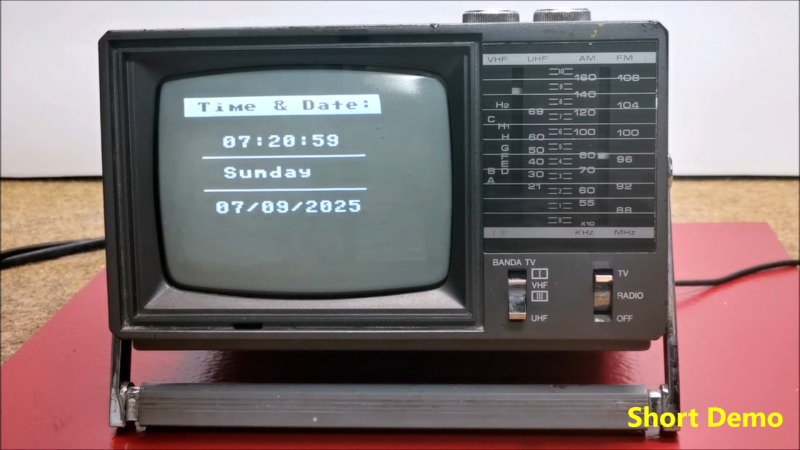
If you’ve got an old black and white TV, it’s probably not useful for much. There are precious few analog broadcasters left in the world and black and white isn’t that fun to watch, anyway. However, with a little work, you could repurpose that old tube as a clock, as [mircemk] demonstrates.
The build is based around an Arduino Nano R3. This isn’t a particularly powerful microcontroller board, but it’s good enough to run the classic TVOut library. This library lets you generate composite video on an Atmel AVR microcontroller with an absolute minimum of supporting circuitry. [mircemk] paired the Arduino with a DS3231 real-time clock, and whipped up code to display the time and date on the composite video output. He then also demonstrates how to hack the signal into an old TV that doesn’t have a specific input for composite signals.
You’ll note the headline says “any old TV can be a clock,” and that’s for good reason. Newer TVs tend to eschew the classic composite video input, so the TVOut library won’t be any good if you’re trying to get a display up on your modern-era flatscreen. In any case, we’ve seen the TVOut library put to good use before, too. Video after the break.












Fun fact: You don’t need to hack your TV for VBS input, you can also use an external RF modulator (aka VHF/UHF modulator).
The positive side is better galvanic insulation,
because historically the antenna jack has a capacitor on the input and there’s no direct electric connection (RF only).
The negative side is more RF noise and a more fuzzy (fuzzier?) picture.
It’s also possible to use a special wideband video transformer for galvanic insulation of video, of course.
What also comes to mind.. That’s a great opportunity to include a atomic clock receiver.
A little longwave or shortwave receiver that picks up a time station signal.
For example, the DCF77 signal is very simple (AM only, not the hidden PM part), it’s just a series of on/off pulses on the receiver side.
Decoding could be done by the Arduino, too. An cool extra would be to show status information of the time signal.
In the 90s, the DOS/Win3 software of such DCF77 radio dongles showed a graphical representation, even.
With all the status bits received. Was very cool to look at.
What’s the fun, then?
That’s going to burn the poor old screen, CRT displays don’t like still images.
Lack of isolation isn’t typically an issue with the small, portable TVs that run from batteries or 12V.
Watch out for mains powered, hot chassis sets though.
That’s a very power hungry clock. Is it really worth it?
Depends on people’s priorities, I guess.
Years ago, another project I do remember, LCARS 24, was meant to run on Pentium era notebooks all day long.
It was very cool looking, though the notebook screen had to stay on in order to be able to display time/date, of course.
And before that, in Win 3.1 era, we used screen savers in offices for our CRT monitors.
They never went off for any power saving reasons, but displayed cool animations.
Except if a “blank” screen was used and the sync coming from graphics card went off.
– That’s when the smarter VGA/VESA CRT monitors out there had switched into standby mode.
But that was by mid-90s already, when newfangled CRT monitors had got an OSD (on-screen display).
Then, we must consider e-waste aspect and power surges, of course.
Computers and monitors which constantly power-up/down do cause spikes on the mains.
If millions of computers do that every day, then it stresses the power grid, causes components of it to age.
Speaking of aging, electronic parts age due to thermal fluctuations..
So maybe we should ask ourselves if it really was so bad to just leave computers running all time.
It might have caused more power consumption, but what about e-waste? If less electronic break in ashort time period due to excessive on/off cycles.
“And before that, in Win 3.1 era, we used screen savers in offices for our CRT monitors.
They never went off for any power saving reasons, but displayed cool animations.”
Not totally true….screen savers were used to prevent the dreaded Burn-in of displaying the same image for long periods which degraded the CRT over a period of time. Back in that era I replaced many displays that had faint ghost images burned into the phosphor making regular images more difficult to read. Also they added a small level of privacy without needing to lock the computer. In those days Flying Toasters were very cool.
Sure, of course they saved the CRTs from burn in! Did I say otherwise? If so, I’m sorry. 😅
I meant the monitors, I meant that back then (let’s say pre-1993, in the 386/486 days of ISA bus PCs) we were running screen savers exactly because the CGA, Hercules or EGA (+early VGA) monitors had no built-in power-savings feature (exceptions prove the rule).
That was before SVGA monitors had gotten luxury features such as EDID/DDC and so on.
They were purely analog, without microcontroller etc pp. So they ran all time.
Some were even plugged to the PC’s power supply, so they got their AC power when the PC was switched on.
Later VGA monitors could enter a standby if no pixel clock or something was sent out via graphics card (black screen).
Btw, I fondly remember Starfield and Flying Windows..
And the line “but displayed cool animations.” was refering to CRT monitors, too, because they had displayed the work done by the screen savers.. The animations.
I did not mean to say that screen savers had the sole purpose to entertain users.
Of course, as you said, they saved he screen from damage. 😃
By “They never went off for power saving reasons” I meant the CRT monitors, not the screen savers.
Sorry for the poor wording.. Depending on how some one reads it it can be understand the other way round.
“Computers and monitors which constantly power-up/down do cause spikes on the mains.
If millions of computers do that every day, then it stresses the power grid, causes components of it to age.”
With all due respect I challenge that this is a problem.
This ^
Being this hackaday, I would like a, perhaps mathematical, demonstration and not a mere “I believe”.
Because I also can believe that the (veeeery little in magnitude, anyway) powers-up and powers-down cancel each other out, so the final effect on the power grid is completelly neligible.
Hi. What I’ve meant to say is that back in the day, up to ca. mid-90s, PCs in offices or agencies ran 24/7.
Back then, many PCs didn’t clock down, didn’t HDD to sleep and didn’t use HLT instruction for the CPU.
The power draw was quite even, so to say. Throughout a whole city, because it was common practice.
(Note: MS-DOS 6 did have power.exe, and Windows 3.1/WfW had some power savings features meant for portable PCs based on 386SL with SMBIOS and so on.
I just meant to say it wasn’t the norm yet.
Or did you guys use power saving features before Windows 95/98 and ATX mainboards with ACPI?)
Nowadays, beginning with 21th century,
the awareness for saving energy and for environmental protection is now much higher.
So it’s the norm that PCs change operating frequency based on load, the TFT monitors now are going off after a certain time of inactivity etc.
Also, PCs are now often shut down when offices and shops close down in the evening, until they open in the morning again.
Either automatically or by the users at the work place.
(At least here in Europe. US might be different with shops being open at night.)
I don’t know what kind of officeplace you worked in at that time, but I was temping, and for bigger offices, there were various methods of energy savings including turning monitors off(not the PC itself) Introduction of APM (Advanced Power Management) was 1994 and launch of ACPI was ’96. https://standby.lbl.gov/history-standby-power I think your perspective, “smarter VGA/VESA CRT monitors out there…”, may partly be just because you had particularly crappy monitors and a lackadaisical management. Because office energy savings can directly be measured by dollars(or whatever currency) on the electric bill. Your last points are valid, but I’ve watched lots of people switch off CFLs “to save energy”, when that on/off switching cut down the product’s lifetime. Thank goodness for LEDs! The average person makes lots of dumb decisions on being “Green”, which is why we need regulations and legislation to encourage savings from industry, not clueless Karens..
Hi there. The monitor was an MCGA/VGA monitor made by IBM.
It was 14″ in size, knobs and had a color CRT.
The PC/AT computer was an 12 MHz 80286 model, with 40 MB Conner HDD and 4 MB of RAM.
It was on the average in the 1988 to 1992 time frame, I think.
A solid office workhorse. Windows 3.1 ran in ordinary Standard-Mode..
Hi, I’m from Germany. And in early 90s, mains power was still cheap compared to now.
We had real light bulbs back then. Atomic energy did still exist here.
At home, we used 230v bulbs rated 100W, for example.
I suppose we didn’t worry about cost per hour yet,
eventhough even back then petrol and energy was waaay more expensive compared to North American standards.
On the bright side, though, things lasted longer when being left on.
We didn’t have to replace bulbs as often as we do have now, I think.
The average lifetime of an energy savings bulb or LED bulb is half a year or year.
If it’s switched on/off regularily, I mean.
(I made the experiment and left one LED bulb running 24/7 for a while in the staircase.
It lasted at least 3 times as long so far as the other bulbs taken from same supermarket shelf that were regularily switched on/off in the same building.)
But why is that? I suspect that on LED bulbs, the internal rectifier diode easily dies or gets damaged quickly if, say, an electric consumer such as a vaccum was used.
Because of the surge/spike happening on the nearby AC outlet.
That’s because modern LED bulbs for AC do not contain any caps that would smoothen/stabilize the power.
Real light bulbs (incandescent lamps) of the past simply used to flicker or get dim/bright when a surge/spike happened.
So we basically traded higher power consumption (light bulbs) vs lower power consumption with high e-waste rate (cheap LED bulbs made to fail).
Anyway, gratefully we nolonger have those stinky power saving bulbs of 90s/early 2000s.
They had poor light quality and consisted of poisonous substances such as lead.
So the environmental damage was higher due to e-waste.
By comparison, an “power hungry” incandescent lamp was made of rather harmless metal, wire and glass.
Sorry for my poor English.
I second that.
Though LED bulbs are still not perfect yet.
Their blue component is still to high and they do flicker due to several reasons.
That’s worse for human health than the warm, slow incandescent lamps used to be.
Incandescent lamps had a certain delay as partbof their construction.
The filament would afterglow a bit, smoothing out the 50Hz/60Hz AC signal.
LED bulbs could be smooth, too, if thdy had included capacitors and a bridge rectifier that would handle both half waves onnthe AC mains.
Unfortunately, the LEB bulbs I took apart merely had a single diode in the middle between the socket and the PCB.
That’s not really prohibititing flicker, sadly. :(
Anyway, still better than those “grave lights” of the past: the energy saving bulbs made people depressed.
I once read an article about increasing suicide rate due to power saving bulbs (not LED bulbs)..
Perhaps I should add to mention that office PCs back then didn’t draw much power under full load, either.
An average 286/386/486 PC ran without heatsink/fan and merely got warm. The only fan was inside the PSU, often.
And AT-Bus HDDs rat at 3600 RPM or so and had a small sector cache for better performance (64 KB or so).
The monitors with a small 14″ tube didn’t require that much power, either.
Usual power supplies in AT class PCs had 150 to 300W..
So they weren’t power hungry beasts like the PCs from late 90s and beyond.
Anyway, I’m probably stating the obvious here.
What I meant point out was that back then:
PCs ran continuously, but also at a lower power consumption under load.
Whereas today’s PCs act more erratic: they go up and down, on and off etc.
Which not only leads to spikes onnthe mains, but also leads to thermal stress.
black and white tv can be beautiful, as long as what you are watt was made with black and white tv in mind A black and white signal has double the horizontal resolution of a color signal, and greater dynamic range. Unfortunately those RF adapters generate a color signal, even if the image is black and white.
Instructions to convert a tv into an oscilloscope, would be fun, then you could do a vector clock.
Hi! The converter doesn’t generate an NTSC or PAL signal but uses the corresponding frequency pairs
intended for NTSC/PAL color TV video and mono audio.
So yes, a modern RF modulator might be limiting the video bandwidth a bit.
Question is if it does matter for such a low resolution signal to begin with.
It surely doesn’t have 800 lines or so. ;)
I did it 50 years ago got an award in HS science-art show. Back then zines ran an ad for 5 bucks! on how to do it yikes. Recently I made a small 12volt TV with radio into a scope in a few hours simply running the radio to the old horizontal coil with the old horizontal dummy loaded, turn the yoke 90degrees. Vertical becomes the new timebase. With micro power FM I have a tabletop visualizer scope, no connection at all.
X-Y is a lot harder without new DC drive amps for both axis’s and maybe different deflection coils as well. Then there is bandwidth, I’ve got a videogame x-y an early 80’s standup with diagrams. They use current control feedback to get the speed needed for sharp lines.
The biggest trick in this hack is putting a inductive load on the old horizontal source otherwise it won’t run at all, no high voltage etc.
There absolutely must be a function to shift the clock position over the screen slowly, otherwise the burn in will be very bad.
Came here to say that. Shift the image when drawing. Maybe modulo % minutes.
True. If a stopped clock is right twice a day how often is a burnt in clock right?
What about Burn-in ? This was the biggest problem of CRTs and static images. This hack will end the TVs life as a clock only with a faint ghost image forever burned into the tube.
every other day, inverse video
Turn down brightness?
Add a screensaver that pops in every couple of seconds or minutes?
In Space: 1999 they had such b/w video monitors, too.
In some scenes thry showed a count down or click, too, if memory serves!
I remember seeing some 70’s sci-fi show where they displayed a clock on a b/w monitor and it was pretty obvious that it was just a video from a camera locked onto a split flap clock with the contrast cranked so all you could see is the numbers, it was actually a pretty effective effect.
It’ll be right twice a day !
I’ve measured a few of those ubiquitous cheap 5-8″ B&W CRTs made in the late ’90s at the end of the era. Most were made in Korea if I recall… They all seem to consume a minimum of 30W or so… Many closer to 50W. As a few have pointed out, that’s a lot of idle power consumption for a clock, and those CRTs are a non-renewable resource at this point.
It’s a fun thought experiment but perhaps some more whimsical and unique purpose?
Either way I agree that consideration of burn-in is critical.
I have one grayscale small tv about 7″ i think it also has radio and its consumes maximum of 12w(on av, it has cinch maybe thats why? Idk but even it has maximum of 1a current written on it) i also have one lcd i think which eats the same so idk but also the crt tv is clatronic
Regarding “was it worth it?”, I say “how dare you ask”.
Regarding the burn-in “problem”, I think a good burn-in might be part of the aesthetic. Maybe when it reaches the appropriate burn-in level you add in something to stop it progressing.
And if it’s amusing and sparks memories and conversation, then 30W is nothing. Power well spent.
I might have to go find an old CRT just to play with now. Maybe not a clock, but something fun. (But I do like a clever clock.)