
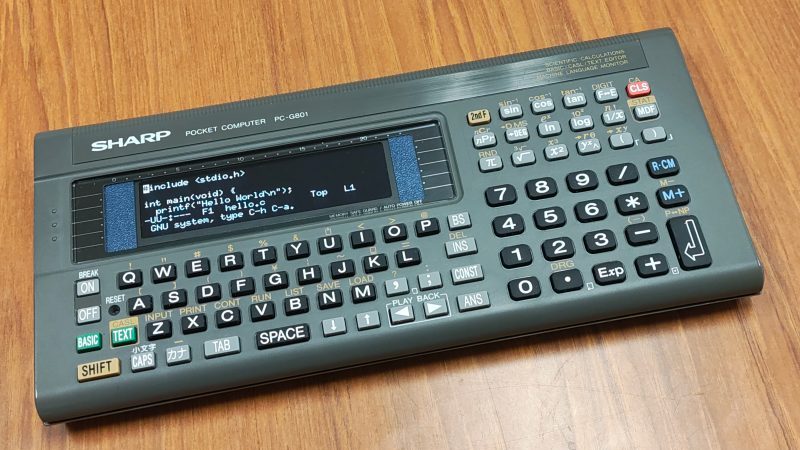
The Sharp PC-G801 was an impressive little pocket computer when it debuted in 1988. However, in the year 2025, a Z80-compatible machine with just 8 kB of RAM is hardly much to get excited about. [shiura] decided to take one of these old machines and upgrade it into something more modern and useful.
The build maintains the best parts of the Sharp design — namely, the case and the keypad. The original circuit board has been entirely ripped out, and a custom PCB was designed to interface with the membrane keypad and host the new internals. [shiura] landed on the Raspberry Pi Zero 2W to run the show. It’s a capable machine that runs Linux rather well and has wireless connectivity out of the box. It’s paired with an ESP32-S3 microcontroller that handles interfacing all the various parts of the original Sharp hardware. It also handles the connection to the 256×64 OLED display. The new setup can run in ESP32-only mode, where it acts as a classic RPN-style calculator. Alternatively, the Pi Zero can be powered up for a full-fat computing experience.
The result of this work is a great little cyberdeck that looks straight out of the 1980s, but with far more capability. We’ve seen a few of these old pocket computers pop up before, too.












Love the idea and especially the mode switch.
For years, hackers and geeks have wanted a small, handy computer. Unfortunately, for years (the last ones were probably the Pocket Vaio and Palm PDAs), no one has wanted to make them.
“Small, handy computer”?
Can’t find any?
There are at least two HP-95LXs on eBay, in what appear to be vg condition, for <USD100—
Lotus 123 built-in
NEC V20 (> 5 MHz)
512K / 1 MB Ram
Accept PCMCIA RAM expansion card
MS-DOS 3.22
…and on, and on…
Do a quick search on “HP-95LX Reviews”, or …”Features”, or …
Hi! The HP 100LX, HP 200LX and the Poqet PC do support CGA graphics, too!
https://www.youtube.com/watch?v=EU48t00OVGY
The HP 95 is more like the Atari Portfolio, I think.
With the latter being famous for its cameo in Terminator 2.
Back when I was in college in the 80s, we had all sorts of wiz machines, from the commodore 64, to trs 80 to various 8080 boxes. But for style and pizzazz, the Sinclair got my vote. It was basically a plastic covered circuit board. Very compact design. Z80 I believe.
This computer form factor was kind of a swing and miss back in the day. It was basically a “programmable calculator” but slightly more, with options for tape storage and thermal printer etc.
The idea was that people would program these with the specific calculation routines they wanted, so they didn’t have to go through the whole process manually. Things like, “calculate the interest rate of X” or “What’s the most suitable wire gauge for an appliance”, etc. But then either the information was already available in pre-computed tables in handbooks, or the task was too complicated to stuff in and required more information than was available at the top of your head, so you’d have to whip out the handbook anyways.
I got to play around with a similar Sharp device when a company that had bought a unit for testing couldn’t figure out what to do with it, and it sat around until they forgot that it existed. The programming examples included a blackjack game, a lottery number generator, etc. but there never was anything truly useful you could do with it beyond entertaining a kid who barely knew BASIC.
Hackers and geeks may have wanted a small handy computer, but without the processing capability and the memory to do much anything at all, nor the IO to interface with anything real, it was basically a nerdy kids’ toy.
Now, if you were a proper geek with years of professional experience, you might have been able to press it into service, making some adapters and glue logic to act as a field-terminal for diagnosing industrial logic controllers or other stuff – but that was above the pay grade and the training of a field technician. It was never going to be the cyberpunk fantasy of writing code on the spot to break into an ATM or hacking into a computer mainframe using a rubber keypad.
The fault of the premise was that the people who would use the device actually had the time, expertise, or the interest to do so.
One might question whether a Palm Pilot or a Vaio was anything more either. What could you actually accomplish with those?
It’s not at all clear why it is being attempted, here, to make a comparison is between the PC-G801 (a very good, programmable calculator), and then two utterly and completely disparate devices: a PDA (a note-taker; an appointment book; a digital Rolodex™©) on the one hand, and a proper, real computer on the other.
And, no: the ‘P’ in “PDA” (Programmable Digital Assistant) in no way means the device can be programmed, as a computer can; it simply means that you can ‘program’ (i.e., save, or write) all your appointments and addresses and phone numbers into it. (There’s a reason PDAs are no longer around: they are—and always were—irrelevant.)
I still own one of the first Sony’s PDAs, pre-Vaio kind, the Clie PEG. It still works, and the only sorry problem is the battery that self-destroyed due to being discharged for too long. When it was working properly, average charge would easily last a month, sometimes more, since I, too, couldn’t figure out what else I would use it for beyond the simple/obvious.
I’ve used it back in the days for the things that it was good at, large addresses/phones repository, time keeping (alarm/timer were okay, too), simple note taking, but beyond these it was a bit cumbersome for anything more. For example, the MP3 player plugin proved to be not terribly easy to use, and I couldn’t get it to play OGG (though, I am sure it was doable – just never had patience to go through entire rabbit hole). Also, listening to MP3 playing was draining the battery, which wasn’t something I expected, of all things considered, playing low-power headphones is NOT something that should do that, likely, it was the MP3 processing that was the culprit.
All PDAs at the time were looking for the use beyond just being fancy rolodecks; one of the first things I got was english vocabulary (english as second language sure has its disadvantages – one needs to have one near at all times) and text reader – it was just good enough to read freebies scraped from Project Gutenberg. Things I always wanted were – 1 – good text reader, ie loud reader that would clearly pronounce things and not do the 1980s robotic monotony – 2 – way to tone-dial a phone number outside the PDA (I was hoping the MP3 player would come with available DAC to do that, no, it was locked away inside the MP3 player) – 3 – some kind of opto-coupled GPIO for home automation – 4 – wireless option for simple things like text-only emails/messaging/IRC, or the Gutenberg Project book scraping, perhaps local news/weather/rumors/classifieds/etc.
Clie was still mostly offline, the only way it would interact with PC was through a data dump using Sony’s proprietary driver (that thankfully was free to download and use, but it only recognized the Sony’s cradle, and only could do data dumps/uploads, and nothing else). That was a bit of a problem, since there was no seemingly easy ways to talk to the data bus; I am sure by now it has been reverse-engineered and one can probably find a use for that.
If I remember right, P in the PDA really stood for “Personal”, since it was “Personal Digital Assistant”. I am quite sure “Programmable” was thought of too.
Sorry, “but wait, there’s more”.
I’d say the modern reincarnation of the 1990/2000 PDA is the M5Stack’s Tab5. As piddly as it may seem, it has what Sony Clie didn’t, proper GPIO access, DAC, etc. I am unsure how long the battery charge could last, though, since ESP32S3 is quite power-hungry when WiFI is used. It is also open source, programmable by average Sam The Programmer, and allows for adding opto-coupled this and that.
Oops, corrected, Tab5 has ESP32-C6 for wireless, not S3. Its main processor is ESP32-C4, quite a powerhouse for most tasks that I am thinking of.
Regardless, both eat up amperes. I am still not exactly sure if one can turn off the P4 completely, and go with the low-power CPU inside C6 to commandeer the bus for simple tasks (like low-power blinkie lights, ie, driving optocouplers – alarms and such).
What a strange question to ask.
The same could be asked about current iOS and Android “PDAs”, too.
Personally, I had a Palm OS PDA for years and it had a huge software library of freeware and shareware applications.
There had been CD-ROMs sold that claimed to have collected over 5000 (?) applications collected for Palm OS.
Personally, I remember how the whole late 90s/early 2000s internet was fully of Palm software.
You had games, but also biorythm applications,
video and music tools, programming languages,
Gameboy and Chip-8 emulator, amateur radio software for APRS, astronomy software, satellite trackers etc.
Rivals of the Palm Pilot were devices such as Casio Pocket Viewer (PV) or the Olivetti daVinci..
Pocket PCs (PPCs) and Handheld PCs (HPCs) running Windows CE 2.11 and 3.0 (later: frameworks such as Pocket PC 2000 and Windows Mobile 2002, 2003, 5.0 and 6) also appeared later on.
Here in Germany, the T-Mobile MDA was an iPhone predecessor, sort of.
Though the principle wasn’t new. PDAs with 2G celluar functionality existed before.
Such as Palm Treo series. Or that Handspring PDA with that springboard module for celluar radio..
If memory serves, the Handspring guys even convinced/inspired Steve J. to make the iPhone.
So Handspring/Palm literally gave birth to the iPhone and the smartphones that followed (yuck).
I personally did take a Palm Pilot (3) with me on a 3 week holiday to Malaysia, in 2001. I only booked a hotel in Kuala Lumpur for the first and last 2 days, and had booked a car. We drove around the country from interesting city/town to interesting city/town. And every time before we would drive to the next city/town, I would connect the Palm Pilot to my cellphone. I had a data plan, and could access the internet that way. And I used it to google for places to stay in the next town, including their phone numbers, so I could book the next place to stay the day before I would arrive.
It was a nice adventure, and minimal risk. There’s always a place to stay somewhere, so can’t go wrong. But for me it was all about finding out how useful mobile internet connectivity and mobile computing was. And it turned out to be completely useful! Nowadays you don’t even think about it anymore, but in 2001 mobile internet was still in its infancy, at least in The Netherlands.
Later, I learned about booking.com, and that it already more or less existed in 2001. ;)
So, to answer your question: a Palm Pilot combined with a GSM phone with a data plan (edge modem, I used a Siemens S35i) was already as useful as any smartphone today. It was just a lot slower, had a low res screen, and no color.
And I might add that Palm OS’s Graffiti handwriting system was also super effective. It did probably help that it is actually close to how I really write (I always write in block letters).
Basically, the Palm Pilot was genius, and it was very regrettable that Microsoft pushed it out of the market with their Windows CE machine, which were way more sexy but far less usable. But well, we all know that sex sells.
That lasted until Apple came along and kicked Microsoft’s butt long, hard and definitive. Because Apple had functional sex, hahahaha. :)
In the late 1980s, this type of device gained recognition for its educational value and was primarily used in technical and vocational high schools. In many cases, all students in the relevant departments were required to purchase one. These devices had numerous advantages: they were inexpensive, highly portable, and caused no issues with power supply even when used simultaneously by an entire class. In fact, the SHARP PC-G801 was a model sold exclusively to schools and was not available to the general public.
Beyond simple programming, the connectors attached to both sides allowed control of various external devices. These included cassette-tape–based external storage units, printers and plotters, as well as experimental apparatus used in student laboratory exercises provided for educational institutions. The PC-G801 itself had a GPIO-like connector on the left side for attaching such external equipment. Additionally, there was a card-edge connector on the right side that directly exposed the Z80 CPU bus. Since the device also included a machine-language monitor, students could engage in low-level programming and learn how the system operated at a fundamental level.
Because it was designed for educational use, the PC-G801 was intentionally made with low specifications (and correspondingly low cost): it had only 8 kB of RAM. A consumer version with an almost identical enclosure, the PC-E200, was also available; it had four times as much RAM and included a backup battery to retain memory even when the main batteries were replaced.
In Germany of the 80s, the Sharp PC series of BASIC calculators were used to calculate/predict the orbits of OSCAR 10 and 13 amateur satellites.
If memory serves, one of the developers even sold the Sharp computers along with the program.
More information here:
https://forum.amsat-dl.org/index.php?thread/3542-vintage-satellite-tracking-software/
Then there also were the Epoc computers made by Psion..
Psion Series 3, 5 and MX for example.
https://en.wikipedia.org/wiki/Psion_Series_5
Those can run Linux. You also can also use a native programming language for the Symbian OS.
Oh, and here’s an important one. Two actually.
Agenda VR3 and Sharp Zaurus SL-5000D, both running Linux..
https://en.wikipedia.org/wiki/Agenda_VR3
https://en.wikipedia.org/wiki/Sharp_Zaurus
In 2025 a pi ina a box is hardly much to get excited about. But props for the pcb to use the keypad
Did not watch the video (why is everything video today, what happened to textual documentation?). But I hope the fine Sharp computer was not in working condition when it got the pi treatment. Not that it is very rare or valuable as such, but I like to see old hardware refurbished and working as it left the factory. At least the original board and display should have been used to repair a non-working device.
I agree. but in this case there is quite a bit of documentation (in Japanese though)
https://shiura.com/dfab/sharp-mod/index.html
Thank you for your support. Yes, I consider text contents to be important. In today’s world, machine translation has surprisingly improved, so I write my documents in Japanese. The modified computer (SHARP PC-G801) is specifically for the JDM (Japanese Domestic Market), which is another reason why I chose to write it in Japanese.
Don’t worry about damaging working computers. I confirmed that it was not in working condition and extremely difficult to repair, so I made the modification. The original PCB remains untouched, so you can restore it to its original state.
The German translation is readable. Some funny wording, but overall ok.
So my conclusion: Well done. Nice work.
Did you even think about trying to click on the very first link in the article before complaining there was no link to a text resource?
In some ways it’s a regression: the original was working on two CR2032 cells for weeks. And the display was larger
i think this highlights the tensions in all portable pi projects.
The original Sharp in museum condition was nearly useless. As in, no one would use it no matter how well it worked.
The portable Pi is nearly useless. As in, no one will use it once the camera turns off.
Very sad state of affairs compared to the dreams i had as a kid when all this stuff was new, but also it is the air we breathe.
I’d want more characters on the screen but something like this is a great pocket SSH to diagnose and identify stuff – touchscreens are just so much more awful to use than a real keyboard (ideally with all the special character at worst just one alt layer deep), pretty much as is could be used to run/control/program your CNC platforms, or add in an audio chip with some decent sound quality and line-in/out its a handy synth/media source/recorder, or some radio equipment for your HAM hobby, as a mesh networking device, etc. The Pi even the oldest model has serious compute compared to the old, and coupled with the ecosystem of Arduino and Pi focused easy to use modules (and just the easier access to quantity 1-2 chips to recycle on your own PCB if you wish) it is so much more capable of conforming to your needs than the original machine…
You might not have a use for something like it, good for you knowing what you need, doesn’t mean others won’t find it very useful.
Though in this case with a micro processor doing most of the heavy lifting I could see it being really handy as just a calculator/keyboard on your space constrained project desk, I’d probably add in a small lookup table and conversion factors for the common problems of identifying a threads, shifting to/from imperial, perhaps that reminder of what all the SI prefix are etc (really just constrained by the storage available). You are not fitting the lovely 122 key terminal keyboard, or even the regular model M full size keyboard on a desk with anything much else, even one of those 60% compacts takes up some significant room, and pairing something like that with a larger display (or just using a laptop for much the same effect) in that space too and suddenly you have no room for the project at all! Yet it is quite handy to have, and touchscreens still suck.
Yeah, I’d personally really want to have a pocket computer with a 3″ 1366×768 screen.
However, I cannot read characters that small, probably not even with a magnifying glass.
So the limit is not the hardware, but me, myself; the user, who cannot even read normal sized text without reading glasses. ;)
I totally disagree. “no one will use it once the camera turns off” -firstly this is a hobby, it’s not meant to be sold, there’s no need to justify it to a marketing dept. It’s art or at least craft, maybe only for the appreciation engineers and tinkerers, but, still. I can only imagine how miserable you’d be decorating an apartment. Hope you find “practical” gifts in this holiday season, and don’t have a “secret santa” exchange at your workplace. Specifically from an Open Hardware view, anyone can build upon other Pi projects to get “useful” things, or at least useful to others. I’m going to finish because I’m actually getting angry. You’re dismissing every Pi project as useless? Merry Xmas to you too. Maybe stay away from Sharp items this holiday season, it may be too tempting!
Building ships in bottle is a hobby as well. The question is, what does it actually accomplish?
It there’s no other use beyond making youtube videos, what’s the point?
Compare and contrast to environmental activists doing protests to “raise awareness” – cool, but when are you gonna do anything about anything?
I think some people that use computers to program daily don’t admit that a machine like the one in the post isn’t very helpful today, because they are very cool projects. But we need to remember that in the days of Psions and HP LX those machines were created do access email and type text, not to help IT “digital nomads” running servers or compiling code. I remember to read some reviews about a sports journalist that covered a event using the HP and sending the texts using a telephone line. Another journalist also astonished how he could use a Psion computer, in the middle of nowhere, during a week (and write at night using the backlight feature) using only two 1.5v small batteries. Others doing crude map surveys connecting the Psion to a gps receptor. Anyone can do much more today using a smartphone. But if those “new” Chinese mini computers (386/486) existed with aePaper display (with backlight) I could image them as distraction free word-processing machines viable option.
i mean “useful” in the lowest sense of the word — is used. This will not be used. They will not turn it on, they will not finish configuring the software, they will not ssh into the server closet with it.
When i was much younger, i was one of those guys who hung up Christmas lights in my room year-round. It wasn’t a practical light source but i “used” it in that i turned them on and marveled at the colors and pattern of bright and shadow cast on the wall. I turned them on every day, or left them on. They were used.
That’s kinda the crux of many “hacker” projects. It’s basically LEGO-engineering. It’s something to show the fundamental principle of, but not useful for applying in the real world. It makes for good Youtube or instructables content, but that’s it.
When it comes to the educational value of things, you can show people how to do things in principle, which helps. But, unless you show them how to do it for real, you’re only helping them a small part of the way. Likewise, noodling on a cyberdeck project on a Raspberry Pi might be a nice hobby, but for doing something that actually matters, you might have a rude awakening.
It is fair to admit that this project was, in a sense, driven by a pursuit of technical romance. While I could have designed a completely new enclosure with a 3D printer, I cannot deny that there was also an intention to fit everything inside the original chassis and surprise anyone who saw it. That said, it is very difficult to find a small keyboard with properly engraved characters (and lining up tactile switches makes labeling problematic), so modifying an old handheld device to build this kind of cyberdeck is, I believe, not a bad approach at all.
While building this device, I also noticed some practical advantages. Although it can of course function like a Raspberry Pi–based IoT device—equipped with sensors for environmental monitoring and so on—you still need a display and keyboard to configure its Wi-Fi settings. You cannot immediately use it when bringing it into a new environment. But with a display of this size, you can quickly configure the network using commands like nmcli. Once the network is set up, you can SSH into the device from outside, or even launch startx and access the desktop remotely via VNC.
I also made the ESP32 built into the device operate as an RPN scientific calculator when booted on its own, precisely because situations like the one you pointed out tend to occur. Aside from surprising people, the device will likely be used as a calculator most of the time. That was also true back when devices of this type were in active use. Raspberry Pi OS takes tens of seconds to boot, whereas the ESP32 calculator starts instantly. In that scenario, the batteries last much longer as well, so I also believe that, in practice, it will most often be used as a calculator.
In any case, running a modern OS in an old form factor is exhilarating. And the ability to use Python instead of BASIC will likely make the device even more appealing to people today.
I opened the project page in Chrome, and used the built-in translater to convert it to English. The translation is definitely usable. You could probably save a copy or print to PDF to have a local copy.
I have some old beehive terminals I was thinking would take a pi. Nice to see interfacing the keyboard and screen is doable.
Love the keypad layout on the original. Cool project!
Why don’t we all just agree that, whatever the motivation and whatever our own particular feelings as to the hardware and how it was used, [shiura] has done a beautiful job.
Great work; we’re all eagerly awaiting your next piece of originality and expertise.
True that.
I need to see this run undertale
We gotta make this run undertale right?
Now..