
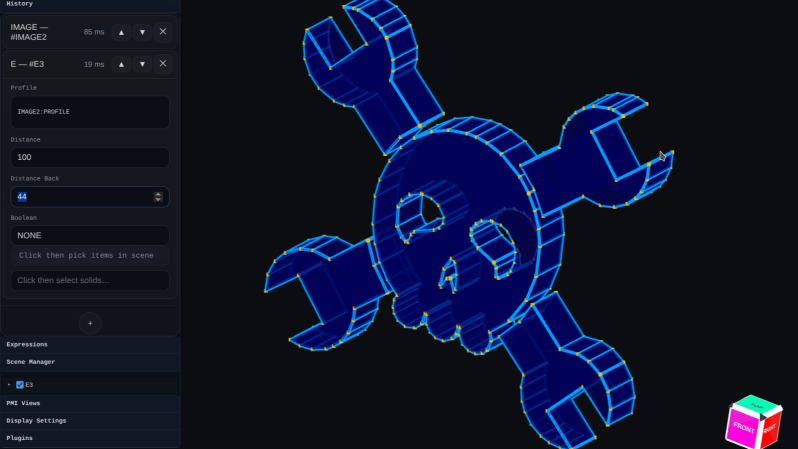
Who’s interested in a brand new, from-scratch boundary representation (BREP) kernel? How about one that has no topological naming problem, a web-native parametric CAD front end to play with, and has CAD-type operations making friends with triangle meshes? If you’re intrigued, check out [mmiscool]’s BREP project.
Functioning (let alone feature-filled, or efficient) CAD systems are not a software project we see a whole lot of. Ones that represent models as genuine BREP structures but cleverly use mesh-based operations where it makes sense? Even less so.
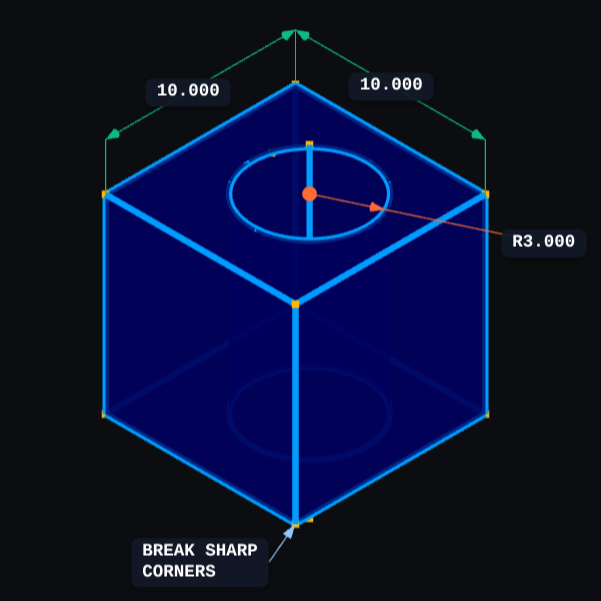 In theory, CAD programs are simple: allow a user to define features, keep track of what they are and how they relate to one another, and perform operations on them as requested. In practice, it’s significant work. Chains of operations and dependencies easily become complex, volatile things and there is really no room for error.
Read [Arya Voronova]’s best practices for using FreeCAD to get a few hints as to what goes on behind the scenes in a modern CAD program, and the kinds of challenges the back end has to deal with, like the topological naming problem (TNP). A problem [mmiscool]’s implementation completely avoids, by the way.
There is a live demo at BREP.io which acts as a playground for the state of the project. You can get started by clicking the + button towards the top on the left panel to add features and operations to the history (like add a cube, then add chamfers or fillets, or extrude a face, and so on).
[mmiscool] points out that all computation is done client-side; even complex operations like fillets, lofts, and multi-body booleans execute directly in the browser with no need to be offloaded to a back end. BREP’s development is being documented on Hackaday.io and there is a video embedded below that gives an overview. Why don’t you give it a spin?









So… it’s browser-based, but if computations are done client-side, can you run it offline?
Yes. You connect to it first to download assets, and as long you don’t refresh the page, you can run it without any internet connection.
You can host it by yourself, so yes.
“What would truly be a novelty is if CAD programs could, through AI, propose the next ‘logical’ step during the construction of a part, in the same way they currently indicate midpoint/intersection or endpoint.
You could do that pretty easily– the catch is that you need a textual representation of the drawing at each step so that it has all the detail to make informed decisions.
The BIGGER catch is that it needs a wealth of examples to draw from to added context to what “next step” means for any given task. This works so well for programming specifically because people post tutorials online that explicitly lay out how a design achieves a goal.
For graphical cad tools, this is usually done with screenshots, so that’s useless for you.
Buuuuut…. What about OpenSCAD? It fits all of the requirements already.
In fact, when without trying, I can guarantee you that right now you can open an openscad file in vscode, get it to describe what the drawing is, tell it what you want, and have it give you a reasonable guess as to your next steps.
s/when without trying/even without trying/
Sadly, I can’t edit existing comments to fix an autocorrect error.
I’m not familiar with the inner workings of CAD programs so can anyone explain why TNP is an issue on freecad while this small web based tool is free from it.
Seems like the only limiting factor to an otherwise perfectly usable piece of software
Take an simple construction, a cube where you want to subtract another cube from. Make the 2nd cube position and size parametric, so user can change it when he want. The next operation is to add a fillet to the edge on the difference of the 2 cubes. You now have a TNP issue.
If the 2nd cube is larger than the first one and only intersecting with the first one, the fillet will apply to a single edge that’s the same size as the first cube side length.
If the 2nd cube is smaller than the first one, thus the subtraction would make a “U” shape on one side of the inner edge of the “hole” in the first cube and as such doesn’t link anymore with the first cube’s own edge. So the fillet can’t apply in that case, and it’s broken.
What should the software do? Apply the fillet to all 4 edges of the hole ? Only select one edge of this hole ?
The software can’t choose for you, the part is now broken, you need to fix the change by hand.
The number of possible geometries with simple basic shape explodes completely (its more than an exponential growth). So it’s not possible to solve the problem, whatever the software. At best, the software can have some heuristics to make some decision for you and it’ll bother you less or more. Previous version of FreeCAD (before 1.0 version line) was particularly bad at this and it’s now way better. This software tries to reuse the same logical ideas as FreeCAD in its topology naming to avoid the obvious case.
I don’t think that’s a good example of TNP. It’s an example of making a change and the edge in question doesn’t exist any more. The “correct” solution is not to apply a fillet any more since the edge it was applied to is gone.
FreeCAD names the faces and edges in numeric order, e.g. “Face1”, “Face2”. This software names them by object they originate from, such as “CU6_NX” (cube 6, negative x).
By itself this is more robust against TNP, and is that natively unlike FreeCAD where the recent TNP fixes just patch the numbers when things change.
However brep.io’s data model seems to have some limitations. It appears that even if another object in boolean union goes fully edge-to-edge over a face, it doesn’t split into two faces. This seems to cause e.g. chamfers act weird: https://i.imgur.com/NvfMbGb.png . But I expect that to eventually get fixed.
Whoa, some one went digging in to the code!
I’m always interested in seeing new open source CAD tools :)
AS soon as I read browser based, I stopped reading.
You should stop using the web entirely, then. There are tons of useful things one can do in a browser – even offline. No need to raise your pitchfork to the cloud
*raise your pitchfork to someone else’s computer
Yeah yeah, the cloud is someone else’s datacenter, and if you ever been part of setting one or run it for a year you’ll gain an appreciation for the proposal. Location (is it close to natural cooling? far from traffic congestion? how about seismicity?), building, redundant power, redundant aircon, fire protection, security… and we’ve not looked at the actual computing hardware and connectivity architectures which also have to be fault tolerant.
Speak for yourself. My cloud is a single NAS sitting on the corner of a desk in an office.
“Speak for yourself” … Same here :) . A home file server(s) (only cloud I need) is the way to go. Everything is store/used in my ‘local’ home network.
Now that is a really silly response.
I use a web browser for browsing the web, and for that it’s adequate.
I have no intention of stuffing the rest of my life (or pc usage) into a web browser.
good, because its not for you
Running your software through the browser is kinda like leasing a car.
It ain’t cheaper, but…. well, I can’t really think of any real upsides except not having to pay the money up-front.
So who’s gonna tell the Dude that this is a literal free car he can download and run on his little NAS or however he wishes?
Why can’t it be just a regular application?
That way I wouldn’t have to bother setting up a web server to run it. Time is money too, you know.
@Dude You’re complaining about a one-time npm install to someone who built the entire thing for free? The setup takes three minutes. Send patches if you want it different, or enjoy the zero dollars you’re spending either way.
Software is free, my time isn’t.
If you can’t write good code then you should not be allowed to write code at all. Simple as that. People from demoscene understood that. Current generation of Electron losers is incapable of writing efficient code.
AFAIR in FreeCad the “topological naming problem” has been resolved since version 1.0.
I don’t understand. This changes model-as-a-code approach from OpenSCAD into some binary format which can be edited using some JavaScript app only? This is stupid and should not be allowed in OpenSource movement.
“I used to be an anarchist, but I quit. Too many rules.”
But no though. It’s making BREPs. Yes that’s a binary file, but so are STLs. BREPs are represented in a bunch of different formats, like STEP, which are essentially universal standards. It looks like it currently only exports to mesh files like STL and OBJ, but since the actual modelling is a BREP, that means that export to files like STEP should be possible to add in the future. And the fact that you can export the files means it’s not vendor locking you. You could export a file and then keep editing in Blender or FreeCAD or whatever. To me, that makes it way more potentially interesting than OpenSCAD, which locks you into mesh files, making it useless for the actual work I would otherwise use it for. Although CQEditor is taking that position for me. But that’s the beauty of open source, people can make whatever they want! I’m really excited to see new geometry kernels in the works. I desperately want a graphical FOSS CAD package that I can use for my job, and FreeCAD unfortunately isn’t it. The OpenCascade kernel just has too many problems, and the actual UI of FreeCAD is just insane. I love the effort and hope they carry on, but it just isn’t there yet.
It’s using the Manifold library for triangle meshes. While those are a boundary representation, they are still triangle meshes and do not support genuine curved surfaces, and probably won’t be exporting STEP any time soon.
I had briefly considered integrating Manifold into Solvespace which would probably eliminate all errors with triangle meshes, but it’s low priority and would pull in a number of dependencies that I don’t want. My goal is still to eliminate most of the NURBs bugs in Solvespace so we don’t really need to fall back to triangle mesh as often.
BTW there is an experimental web edition of Solvespace you can try here:
https://cad.apps.dgramop.xyz/
Looks like we’ll have a QT front end too for Linux in the next release, which should be soon.
Thats great. I remember trying the wasm builds a few years ago but the mouse pointer did not line up with what was happening in the canvas. That build you posted the link for worked fine though.
I’m deeply glad you don’t decide what is and isn’t “allowed in [the] OpenSource movement”.
If you don’t like it, you don’t use it. You don’t get to demand that nobody else can.
Do you know what open source even means? It’s not something you can arbitrarily decide or pick and choose. It is pretty simple, if the source code is open it is open source.
Who are you to say what should and shouldn’t be allowed to be open source? Open source doesn’t mean something has to be good or make sense, it literally just means the source code is open and available for anyone else to access. The big thing with open source is freedom and you want to restrict that just based on personal opinions?
Browser-based shit. Nah.
The people complaining about it being browser based probably have poor reading comprehension.
This is great, I look forward to self hosting it.
So strange… browser based is great! Host it yourself, use it on your phone on the go, I wish everything was browser based, truly platform agnostic etc.
The reason being browser-based is bad is the same reason CAD software with GUI isn’t made in Python: overhead, even if its cross-platform.
However, the main reason is probably the negative connotation with a certain proprietary cloud CAD software that is being heavily marketed.
I though FreeCAD was a mix of C++ any python with a little QT thrown in to make the UI fun.
I didn’t remember, but yes it is. For scripting Python is good, but inside, openCascade is still nearly all C++ for good reason. And to nuance, with webGL and wASM, even browser-based can still perform well now.
I hate online programs. Only offline and no subscriptions.
Open browser and point it to localhost:5173