
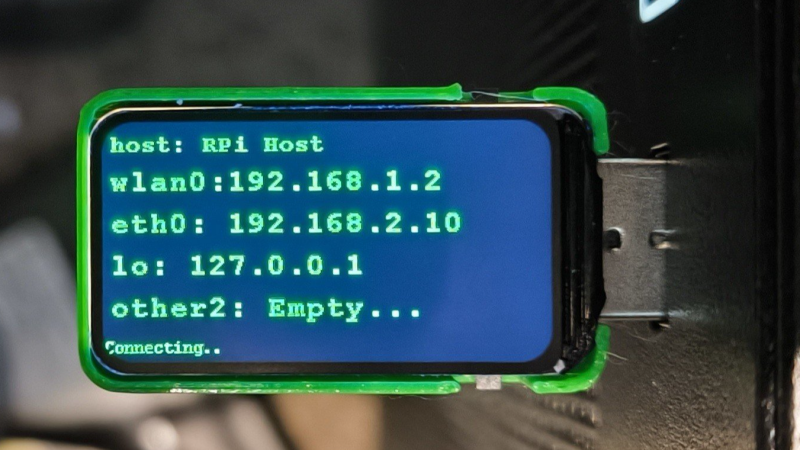
Ever wanted to just plug something in and conveniently read the hostname and IP addresses of a headless board like a Raspberry Pi? Chances are, a free USB port is more accessible than digging up a monitor and keyboard, and that’s where [C4KEW4LK]’s rpi_usb_ip_display comes in. Plug it into a free USB port, and a few moments later, read the built-in display. Handy!
The device is an RP2350 board and a 1.47″ Waveshare LCD, with a simple 3D-printed enclosure. It displays hostname, WiFi interface, Ethernet interface, and whatever others it can identify. There isn’t even a button to push; just plug it in and let it run.
Here’s how it works: once plugged in, the board identifies itself as a USB keyboard and a USB serial port. Then it launches a terminal with Ctrl-Alt-T, and from there it types and runs commands to do the following:
- Find the serial port that the RP2350 board just created.
- Get the parsed outputs of
hostname,ip -o -4 addr show dev wlan0,ip -o -4 addr show dev eth0, andip -o -4 addr showto gather up data on active interfaces. - Send that information out the serial port to the RP2350 board.
- Display the information on the LCD.
- Update periodically.
The only catch is that the host system must be able to respond to launching a new terminal with Ctrl-Alt-T, which typically means the host must have someone logged in.
It’s a pretty nifty little tool, and its operation might remind you, in concept, of how BadUSB attacks happen: a piece of hardware, once plugged into a host, identifies itself to the host as something other than what it appears to be. Then it proceeds to input and execute actions. But in this case, it’s not at all malicious, just convenient and awfully cute.












I’d really like to be able to do this without requiring the host be running a GUI and open a shell with a hotkey. I have quite a few SBCs and they’ve always been headless, it feels like a waste to give them any VRAM.
It would work more or less the same way on a headless machine that was already logged into a tty… and if you wanted to be really dangerous you could have it perform the login :D
Less terrible; if it exposed both serial and a mass storage device, you could do a pretty simple user-interactive first-time run, and just use a udev rule to detect the specific serial port and dump data on it.
Isn’t there a way to trigger a script when a USB device just connected (event based), let that script check the device ID and if it matches push out the data via said USB devices serial port?
could verify if the that specific USB device is allowed via some check or even cryptographic handshake (to mitigate MitM).
Yes, that can be done with a udev rule.
Which will require you to install that stuff and configurer it (even if its just a simpele script + rule)
My first reaction when I saw this was ‘wow how cool, how did they …’ sadly followed by a meh, useless. If you have a device with a logged in user on an active session, the chances of not having a monitor connected is … Very slim.
This guy gets it
Rubber Ducky?
Instead of rubegoldberging the resulting data through a serial port, this thing could run a python script that transmits the results back from the host via a custom HID Output Report, using libraries like hidapi, node-hid, or pywinusb.
I think this could be made to work even without assuming a logged-in desktop: an udev rule could send such HID OR for a specific vid/pod, even if the screen is locked or in fact when it is headless and or not running the desktop session.
Yes this would require a preinstallation of such udev rule, but it could be done by rubberducking such install from the initial HID connection.
This would have been useful to me quite a few times. I may build one myself.
Two features I would add:
A method to store a script to run, maybe with some common convenience operations like configuring wifi.
A button or switch to toggle select between configuration mode (for above), and active mode (for plugging into the Pi)
I could see how this might be useful is some context, but honestly, the one thing I wish I could have happen more (and would be more useful in my environment): the MAC address(es) being printed on the physical device in some way …
So many times I have to connect a device to a DMZ to grab its MAC, then disconnect it, add MAC to my rules, reconnect :| total waste of time .. why not give me the MAC on the device itself, or even on some piece of paper included with it; if someone has physical access to that device, the MAC is the least of my concerns.
Maybe I’ll create a device like this that I can connect to, either through WiFi or hardwire, to get this info without needing network access .. I see a HaD project in my future >:)
fake photo.