
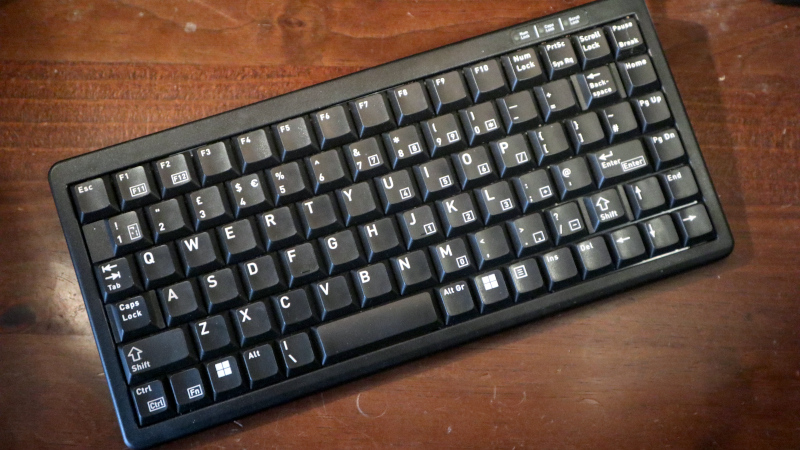
The choice of a good keyboard is something which consumes a lot of time for many Hackaday readers, judging by the number of custom input device projects which make it to these pages. I live by my keyboard as a writer, but I have to admit that I’ve never joined in on the special keyboard front; for me it’s been a peripheral rather than an obsession. But I’m hard on keyboards, I type enough that I wear them out. For the last five years my Hackaday articles have come via a USB Thinkpad keyboard complete with the little red stick pointing device, but its keys have started parting company with their switches so it’s time for a replacement.
I Don’t Want The Blackpool Illuminations

For a non keyboard savant peering over the edge, this can be a confusing choice. There’s much obsessing about different types of mechanical switch, and for some reason I can’t quite fathom, an unreasonable number of LEDs.
I don’t want my keyboard to look like the Blackpool Illuminations (translation for Americans: Las Vegas strip), I just want to type on the damn thing. More to the point, many of these “special” keyboards carry prices out of proportion to their utility, and it’s hard to escape the feeling that like the thousand quid stereo the spotty kid puts in his Opel Corsa, you’re being asked to pay just for bragging rights.
Narrowing down my needs then, I don’t need any gimmicks, I just need a small footprint keyboard that’s mechanically robust enough to survive years of my bashing out Hackaday articles on it. I’m prepared to pay good money for that.
The ‘board I settled upon is probably one of the most unglamorous decent quality keyboards on the market. The Cherry G84-4100 is sold to people in industry who need a keyboard that fits in a small space, and I’ve used one to the deafening roar of a cooling system in a data centre rack. It’s promising territory for a Hackaday scribe. I ordered mine from the Cherry website, and it cost me just under £70 (about $93), with the postage being extra. It’s available with a range of different keymaps, and I ordered the UK one. In due course the package arrived, a slim cardboard box devoid of consumer branding, inside of which was the keyboard, a USB-to-PS/2 adaptor, and a folded paper manual. I’m using it on a USB machine so the adaptor went in my hoard, but I’m pleased to be able to use this with older machines when necessary.
Hello My Old Data Centre Friend
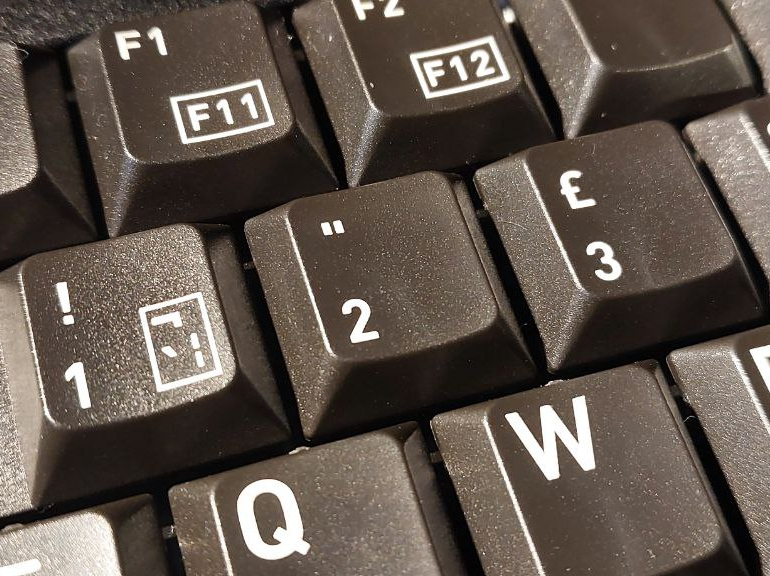
For my money, I got a keyboard described as “compact”, or 75%. It’s 282 by 132 by 26 mm in size, which means it takes up a little less space than the Thinkpad one it replaces, something of a win to my mind. It doesn’t have a numeric keypad, but I don’t need that. The switches are Cherry mechanical ones rather than the knock-offs you’ll find on so many competitors, and they have something of the mechanical sound but not the racket of an IBM buckled spring key switch. Cherry claim they’re good for 20 million activations, so even I shouldn’t wear them out.
The keymap is of course the standard UK one I’m used to, but what makes or breaks a ‘board like this one is how they arrange the other keys. I really like that their control key is in the bottom left hand corner rather than as in so many others, the function key, but I am taking a little while to get used to the insert and delete keys being to the left of the arrow keys in the bottom right hand corner. Otherwise my muscle memory isn’t being taxed too much by it.
There are a couple of little feet at the back underneath that can be flipped up to raise the ‘board at an angle. Since after years of typing the heel of my hand becomes inflamed if I rest it on the surface I elevate my wrist by about an inch with a rest, thus I use the keyboard tilt. I’ve been typing with the Cherry for a few weeks now, and it remains comfortable.
The Cherry G84-4100 then. It’s not a “special” keyboard in any way, in fact its about as utilitarian as it gets in a peripheral. But for me a keyboard is a tool, and just like my Vernier caliper or my screwdrivers I demand that it does its job repeatably and flawlessly for many years to come. So its unglamorous nature is its strength, because I’ve paid for the engineering which underlies it rather than the bells and whistles that adorn some others. Without realising it you’ll be seeing a lot of this peripheral in my work over the coming years.












Those are the worst low-profile switches in the history of keyboards, not only are they scratchy, they are wobbly. Avoid like a plague.
But Cherry as such isn’t (wasn’t) a bad company.
Over here in Germany, Cherry used to be a big keyboard maker.
Their MX key switches and the old G80 series were rivaling IBM Model Ms for a while (Cherry G80-1000 etc).
Build quality used to be fine, too.
Unfortunately, Cherry is deep in trouble right now.
Especially by the cheap, non-mechanical keyboards from the far east.
It must sell off a part of it to survive, if I understand correctly.
https://www.heise.de/en/news/Cherry-gives-up-German-production-and-wants-to-sell-core-division-11092713.html
The thing is, those were very early days for low-profile mechanical keyboards, there was almost nothing else on the market back then. The companies producing switches have learned a lot since then, and the expectations have grown greatly as well. Practically anything modern you can buy today is ages ahead in terms of quality and feel.
Hm. Maybe, maybe not. Not sure.
I’m afraid it also has to do with users being dumbed down in all these years.
Some of them living today are probably to young to even remember quality.
It’s like with home made food vs fast food/junk food.
Some people have no idea about the real thing (anymore).
Fo example, I remember how we made real bread in rectory once.
It was much better than what could be bought in a supermarket or at bakery.
And that’s it, really. Even an ordinary bakery is usually nolonger making real bread by hand,
bakeries are mostly using frozen dough pieces.
And similarily, keyboard quality has degraded, I’m afraid.
Compared to the past, I mean – not to current market.
They’re now all equally “good” or poor, I guess.
(I haven seen new “ergo” keyboards in a while, either.)
There’s nolonger IBM Model M quality and micro switches, I mean.
No heavy metal shields inside. It’s just cheap plastic, mass produced.
The old Cherry keyboards were still heavy and had “clicky” keys.
In the past (90s, early 2000s), Microsoft keyboards/mice/joysticks had featured some minimum of production quality, too.
You know nothing about lame bread.
Go to france, they stil have some good quality bakery over there (look for the ones which sells “pain au levain”). I’m pretty sure other countries still have some good bakeries too
You must have a different keyboard to mine then.
I am using Cherry G230 for 15 years by now. Great keyboard.
As most non-English I completely get that with shift-2 and the extra keys like DEL-INS location, since I’m Swedish and our layout is mostly similar to British-International, but have Å after P and ÖÄ continuing after L. And those keys on a compact international keyboard can be very moved, or even removed from the keyboard, and that is really annoying. Just try to read a text written in Swedish, and you’ll notice how often those letters are used. Heck, we have common one-letter words using those, because å means river, and ö is island, and English ‘is’ is basically ‘är’ in Swedish. Together, Å Ä Ö are 5% of written text in Swedish, each are more common than J and Y together, and Q, W, X, and Z together is about half of either J or Y).
Not having Å, Ä, Ö is crippling.
Using ¨ key pushing a and o only works for those. Having to hold alt and push the four letters on the keypad is not a working solution either. Especially when there isn’t a separate keypad, and the function key to use the remapped keys breaks that holding alt functionality.
The most common use of QWZ keys on a Swedish keyboard is on gaming keyboards, due to the common WASD pattern with extra function keys.
Indeed those letters are useful in Finnish language as well (except å). But since growing up with programming on a Swedish/Finnish keyboard layout I never quite understood how easy it is to do on US keyboard layout. No need for AltGr combos.
But the worst character for us nordics IMHO is probably the backtick (or reverse single quote, I think). Since it is also used to compose diacritics like à, which are by the way completely useless for us, tonget backtick on its own requires, if I recall correctly, Shift-‘+Space or AltGr-‘+Space. Something to avoid like a plague.
Obviously, you could remap that in say vim, or do some KDE/X magic, but being lazy and working with several different computers that is rather inconvenient. And of course the muscle memory thing, do I want to unlearn it and do some keyboard remapping magic for each computer I use, or do I just continue suffering by being lazy to not change it…
Hmm. Probably the least inconvenient would be to bite the bullet and learn the US keyboard layout blindly and simply change the whole keyboard layout each time I am programming instead of writing in Finnish.
How are other people in the nordics handling the programming special characters on non-US keyboard inconvenience thing?
There should be numpad type macrokeyboard for programming symbols :)
Or 110% swe/fin programming keyboard…
Is a review a hack?
There’s 3 other posts today that are hacks, and reviews of tangential equipment seems relevant enough.
Going by the name of the site, they’re still 2 ahead of their stated purpose.
Is an article on programming language Mumps, on nuclear power stations, a lost Mars probe, valuable ores on Earth or a cheap hotplate a hack? If you’re not interested, don’t read it. Some people do like it, even when it isn’t strictly a hack.
If it is a review of a hacking tool, why not? And while keyboards can be used for different purposes, they are at the very core of some varieties of hacking.
It’s Hack-a-day, not Hacks-a-day. Only one post each day needs to be a hack. The rest can be other stuff of interest to hackers.
But most of the time they publish more than one hack per day, which is clearly wrong… No, I think it would be best for everyone if they changed the name of the site :-P
I get complaining about the unicorn vomit rgb. But shine through keycaps are a godsend. I’m surprised it is still such a niche option, that most keyboards do not offer it. But being able to hit that one key that I want without having to assume full typing position is so freeing as a gamer or consuming media with it. And backlit keys just do not have that same visibility.
Back in the good old days it was strictly one post a day… which was also a hack!
No but they get desperate for content and really testy when someone calls them on it.
I wouldn’t say that. It’s not an amazing hack, but it’s a tool like any other of important to hackers.
I want a keyboard that requires the least amount of work to type on. That means it should have enough holding force to rest my fingers on top of the keys without actuating them, then a small extra force to actuate the key, then a minimum amount of key travel until the press is detected. After all, work is force over distance. As I understand, the amount of work per keystroke is related to the probability of developing RSI in the hands.
Then, it should have a soft bottom to avoid hard shocks, and a fast return. Also, it shouldn’t make any noise – the only haptic feedback I require is the key buckling in. Proprioception or the sensation of your joints moving is faster than hearing the sound of a key clack, so the sound of a mechanical keyboard is more about psychological satisfaction than any real efficiency.
So far the best match for these criteria I’ve found is a laptop-style scissor switch keyboard. Especially in a compact size, not those island keyboards with gaps between the keys. For some reason though, people hate these keyboards and opt for the klickety klackety mechanical keyboards with long key travel and huge distances between keys instead. I wonder why.
Mistakes that have to be corrected are costly enough to make up for a lot of “extra” travel in the normal case, particularly if that extra distance is regular enough to become part of muscle memory. I have yet to find a laptop that didn’t have at least a few keys misplaced, and a slight misalignment in at least one row. I think that is avoidable, but … In practice, it generally isn’t. Which probably makes economic sense, because people with strong preferences will be more inclined to use an external keyboard anyhow.
You always have to “acclimatize” to your keyboard, because they all have slightly different compromises. Keyboards wear out and get replaced with different ones, and you have to use many different keyboards with other computers anyways, so it’s not a very good idea to “optimize” your muscle memory for one single model. It’s better to have a feel for different ones, so you can adapt faster. My most common error is “stuttering”, repeating keys in the wrong order – not picking wrong keys.
Still, if I had the choice, I would have something close to the miniature keyboard of the EeePC 901: you hardly had to move your fingers at all to type on it. Incredibly fast and light. Only problem was the lack of numpad or separate home/end/pgup-down keys. My current keyboard has similar switches, but each key has half-a-key worth of dead space around it, stretching the whole keyboard and my fingers apart. I wanted a real compact one, but I destroyed my previous one with a misplaced drink and the model no longer exists.
I don’t have small hands, but being used to compact keyboards, normal big ones feel like those torture devices used to train pianists in the 19th century, except instead of getting your fingers splayed apart with screws, you have to do it yourself with constant muscle tension and the pain that results from it.
Try Kailh Choc Purpz or Pink switches. They are low profile, with short travel, have 40g springs, and are non-clicky. You might want to add o-rings to further shorten the travel and cushion the bottom out.
I’ve been almost exclusively typing on Purpz for the last 3 years, and I got used to it so much that any other keyboard is so much work to press a key.
There are a dizzying array of mechanical switches available now. The keywords you are looking for are “silent tactile”.
Here’s a search to start, you can refine by “pre-travel”, “actuation force” and “bottom out force”:
https://keeb-finder.com/switches?ms_actuationType=Tactile&ems_extraFeatures=Silent
If you have RSI issues, you might be best served by silent linears with a low actuation force and bottoming out provides the feedback. However, I think the more feedback you get the faster and more accurate you can type, if you don’t have RSI issues (and don’t have co-workers nearby that may be annoyed by “clicky” switches).
Either Pink mechanical switches or the new fancy hall effect ones (€xpensive) where you can set up actuation parameters to your liking (you may need some O-rings on the bottom for softening it)
Nice to see full-size arrow keys on a compact layout – the first thing I look for in a keyboard. That rules out most laptops for me these days.
But I don’t call that a UK layout – it might have a £ above the 3 but backslash and # are in the wrong place.
“Nice to see full-size arrow keys on a compact layout – the first thing I look for in a keyboard”
Exactly this! I hate what they did to laptop keyboards.
Compact keyboard with ISO layout (so the \ and | are in the right place) is what I’m looking for
I’m glad you like it but my ideal keyboard would have both F keys and numberpad.
I’m addicted to the little red pointing stick. I don’t want a keyboard without one now.
I just wish that some of these fancy new trendy keyboards would include the pointy stick.
Yes
Clitmouse.
They’re called clitmice.
You can find keyboards with them, but generally crappy ones for far too much money.
Nurple is an alternative, for people with sticks in uncomfortable places.
‘Thinkpad like pointing device’ for those with the sticks sideways.
Apparently ‘Trackpoint’ is now the trademark (stick has thorns).
Google won’t even search for ‘clitmouse’…returns ‘mouse’…fascists.
It actually has more names:
trackpoint (IBM/Lenovo)
trackstick (Dell)
pointstick (Hewlett-Packard Compaq)
touchstick (Fujitsu Siemens Computers)
finetrack/SensePoint (Acer)
accupoint (Toshiba)
All clitmice.
How many times will you have to search for it before their “AI” learns…
I tried using mechanical keyboards for a few years. RGB, cherry blue, red, brown, I tried them all
Now I’m back to using the same old dell keyboard from my childhood. Its funny, I’m using the same keyboard right now to write programs and design electronics that I did as a 13 year old writing programs in visual basic 6. That has to count for something right?
Guess I’m home haha
No gimmicks no lights and will work for years. You’ve just described about every keyboard that has ever existed outside the lowest cost categories of Amazon/Alie-express in the past decade. Keyboards from the very start of tthe USB era are still happily typing away. ..and without the annoying hipster keyboard noise.
I just reviewed my last PC purchace almost 10 years ago, which didn’t include keyboard or mice. So the Logitech K120 for €7,99 is probably 15 years old and it’s still a fine keyboard!
I love my Logitech wired optical mouse. For the HTPC I have a K400 keyboard/trackpad combo. Proper AA batteries and a dedicated dongle, no bluetooth shit. I love it so much I bought a second one just in case…. but it has been solid for close to a decade at this point, even with beer, snacks and getting dropped on the floor all the time.
I love compact keyboards, but as a touch-typist (I’m touch-typing this), keyboards that have a column of keys immediately to the right of are a nightmare, because I end up hitting PgDn or PgUp far too frequently. Like: I intend to hit return or backspace and suddenly the whole screen changes. Yet, I don’t feel I ever hit where those keys would be when I’m typing on any compact Mac keyboard.
Honestly, it’s incredibly disorienting! Hate them, literally the worst keyboard ever for touch-typists (and I had a rubber-key ZX Spectrum!)
Complaining about lights but being ok with a missing keypad, tsk tsk.
Incidentally, did you know that ‘tsk tsk’ is in the dictionary as one word?
I wonder what keyboard Kristina Panos would have recommended?
After diving down the mechanical keyboard rabbit-hole, my recommendation for someone who does not want to do the same would be “just get a Keychron”. The only problem is that Keychron has a dizzying array of keyboard models and it would be helpful to get a friend to help navigate. I’m certain they would have the UK layout that you are looking for.
The mechanical keyboard scene is rapidly evolving. Quality for a given price point is also rising. For example, aluminum cases were >$200 just a couple years ago, now there are a plethora of quality options well under $100.
Cherry was one of the pioneers, but at this point I think they are pretty far behind the current state of the art.
Cherry G84-4 $69 at Amazon?
$18/19 Arteck Bluetooth 2 AA ~10 inch keyboard works well on Lenovo/Asus <$130 Walmart/Best Buy
Lenovo/Asus Celeron N400, N5030, N6000 Windows 11 laptops also running Ubuntu and 10 1909.
We have lots of these computers used to evaluate flashing software on nanocomputers using
1 Arduino.
2 LLVM/CLANG Big Tech.
3 ESP32IF Framework.
using Ubuntu, 11, and 10 1909.
Our ~$23 Cherry works okay … but has a weird keyboards layout.
Perixx ~$25 right column end, pgup, pgdown, home keyboards match full -size Lenovo./Logitech
keyboard performance, we find.
G84-4100 , £54 on UK amazon… – UK layout