
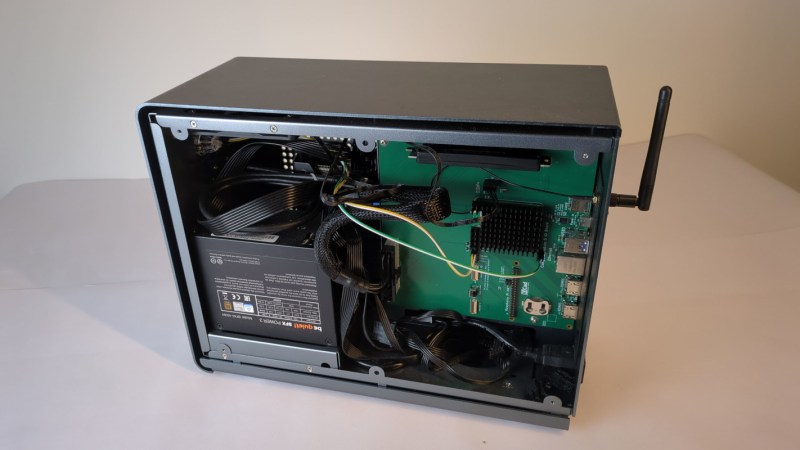
Before the Raspberry Pi came out, one cheap and easy way to get GPIO on a computer with a real operating system was to manipulate the pins on an old parallel port, then most commonly used for printers. Luckily, as that port became obsolete we got the Raspberry Pi, which has the GPIO and a number of other advantages over huge desktop computers from the 90s and 00s as well. But if you really miss that form factor or as yearn for the days of the old parallel port, this build which puts a Raspberry Pi into a mini ITX desktop case is just the thing for you.
There are a few features that make this build more than just a curiosity. The most obvious is that the Pi actually has support for PCIe and includes a single PCIe x1 slot which could be used for anything from a powerful networking card to an NVMe to a GPU for parallel computing in largely the same way that any desktop computer might them. The Pi Compute Module 5 that this motherboard is designed for doesn’t provide power to the PCIe slots automatically though, but the power supply that can be installed in the case should provide power not only to the CM5 but to any peripherals or expansion cards, PCIe or otherwise, that you could think of to put in this machine.
Of course all the GPIO is also made easily accessible, and there are also pins for installing various hats on the motherboard easily as well. And with everything installed in a desktop form factor it also helps to improve the cable management and alleviate the rats-nest-of-wires problems that often come with Pi-based projects. There’s also some more information on the project’s Hackaday.io page. And, if you’re surprised that Raspberry Pis can use normal graphics cards now, make sure to take a look at this build from a few years ago that uses completely standard gaming GPUs on the Pi 5.












very good idea for cluster. I need 12 or more raspberry pi and array disc hardware.
this is not for me
Reading the introduction, about using a PC’s parallel port for GPIO, reminded me of a few early projects – the most fun was interfacing a toy R/C car’s remote to a parallel port so I could control it over the web – I liked using the ‘Parapin’ library: https://parapin.sourceforge.net/
I wish I’d documented it!
I did something similar too.
But I also mounted a second controller to the car. When the car hit something it would send a direction back. The car side of the second transmitter was wired to the parallel port inputs.
I wrote a few small ASM programs that could talk to the car from within a batch file, making it autonomous, logging crashes when I raced or later when I added a third controller for the other four bits of lpt input, linked to motor encoders, very crudely, mapping out an area.
Definitely a fun project, also long before I ever considered documenting anything.
This write-up didn’t even include the project’s name (“Sentinal Core”), it’s written as if the project is a PC case, but that’s just a use-case: the project is clearly a carrier/motherboard for cm5 with mini-ITX form-factor, 24-pin ATX power-supply connector, and pcie port for gpu’s. (Also, with the cm5 standing in for the cpu/ram/memory in a standard pc motherboard, no-one would expect the cm5 to “provide power to the PCIe slots” automatically or otherwise. The ATX power-supply “that CAN be installed in the case SHOULD provide power”? Try this: “The ATX power-supply connector allows using a standard ATX power supply to power the cm5 and peripherals.”)
And you completely missed the half-sized proto board built-in. Seems like you did no research before writing the article. Just advertising for crowd-supply?
HAD should fire the AI they are using….
back in the early 2000s I was walking down the street in Brooklyn and found an alphanumeric fluourescent panel. i had an old PC with an ISA port on it and knew how to interface to tht using an address decoder, which was all i needed because the panel had latching inputs. so i was able to output various messages on my ewaste panel using OUT commands from the monitor program, which was cool. Buy beyond that, how exactly one got a computer to interact with the physical world seemed unnecessarily complicated. Shortly after that, though, I learned about the Arduino and I2C and then everything seemed so easy. I then wondered why PCs can’t just expose a header with an I2C port somewhere on the motherboard.
Motherboards use I2C in various ways. The most user accessible I2C is probably the one used for DDC on the HDMI/DVI ports. (Usually used for communication with the monitor.) If you for example have a dedicated graphics card and an unused onboard HDMI port on the motherboard, you can usually use a breakout board to access it. At least on Linux, not sure how easy it is on Windows.
VGA ports have DDC pins as well.
Well, I’m typing this replay “on” a Samsung display (TFT) which at one point suffered from programmed obsolescence (literally!). At some point it still worked fine ONLY until a video source was connected (or supplied a video signal) then it would go into standby.
Only a firmware update via the DDC line rescued it – which of course was a Windows executable.
So yeah, there are ways do use it on Windows – that being said, the update only worked with an Intel GPU. :-/
Actually I’m only in possession of this display because it followed theses steps:
1 – failed in an office or something.
2 – maybe they tried to fix it but failed and threw it away.
3 – a friend of mine rescued it from the e-trash container.
4 – who gave it to me after he wasn’t able to apply the FW upgrade.
I only succeeded because of a “random” comment under a YT vid about this problem where someone mention the possible limitation to Intel GPUs.
A lot of motherboards do have I2C headers, just not labeled as such. They’re used for temperature sensors and controllers for fans and RGB LEDs. It isn’t very standardized, unfortunately, but it is extremely common. There’s I2C darn near everywhere else, including the RAM slots and PCIe and by extension m.2 PCIe slots.
The downside is that Windows mandates kernel-level access to interact with them so you need to write a driver. Linux makes it a little easier, as long as you’re okay with running your application as root.
Personally, I’ve found it more convenient to plug into unused USB 2.0 headers on the motherboard.
As fondly as Windows XP is remembered by many, I also remember an undercurrent of outrage because it fully deprecated any ability for user applications to manipulate hardware directly, which immediately circular-filed nearly every special purpose peripheral ever made or sold. I had to retire an SyQuest external drive, two scanners, a multichannel ADC kit, and several other data collection and robotic projects because for practical purposes the parallel port WAS the standard GPIO for PC’s and the drivers were part of the application even if the manufacturer wanted to maintain support, which was often impossible due to timing and other practical considerations. This is why there is still a robust market for surplus and overpriced industrial PC’s capable of running DOS, because the only thing wrong with that CnC mill that cost $250K in 1990 might be that the software needs to be able to talk straight to the hardware to make it work.
Was going to mention plain vanilla DOS (no GUI), but you’ve mentioned it first : – ] The idea of bare minimum OS is now even easier than ever, I am sure with some mental elbow grease I can fork my own DOS OS targeted at some particular hardware.
I, too, remember my first feeble steps writing simple DOS program that would run in command line and trigger parallel port wires on and off. Fun times learning simple things in simple ways they should be learned, bypassing overbloated IDEs that arrived later and obscured things that should stay simple : – ]
On a topic of such, I have yet to find something as simple and straightforward as Borland C++ IDE for DOS. That simple and that well-organized and not needing entire OS towering above it just to open few windows (code, debug, variables lookup, etc).
In the late 80s/early 90s, direct hardware i/o used to be popular on GW-BASIC and QuickBASIC 4.5, too.
In many computer/electronics magazines there had been listings
and schematics in ASM or GW-BASIC to control little homebrew gadgets.
Such as a simple dialer for telephone line. Or some audio digitizer.
Here in Germany, Turbo Pascal/Borland Pascal (and QB45 or something like Power BASIC) used to be overly popular on DOS platform throughout the 90s, I think.
Most programming examples in books were provided in either one of them, if not both.
Public Domain, Freeware and Shareware applications of the time used Pascal language more than C/C++ I think.
Because it was Turbo Pascal as a high-level language what had been teached in higher education sector, such as university.
Speaking under correction, however.
i still have a film scanner from that bloodbath. but now there’s no film left to scan
yes there is, and getting more all the time. kodak doubled their workforce lately to get the rolls out of the factory fast enough. two years ago there was a shortage of kodak gold.
but someone good with fpga’s should see if there could be a open source scanner developed, so we can give all thos nice hardware some new lease on life and a connection to a modern computer
I used a program (a couple I think) I read about in one of Jan Axelson’s books (I don’t remember if she wrote it or not) called giveio.(something) that worked fine on XP. Loved her books!
Hi, thanks for the tip! I’ve found a driver of that name..:
https://web.archive.org/web/20050128170804/https://www.cs.ucr.edu/~eblock/pages/pictools/giveio.html
Here’s a newer project of same name.:
https://github.com/pali/secure-giveio
A bit more information about GiveIO:
https://littlesounddj.fandom.com/wiki/GiveIO
That’s right. It’s also why Windows 98SE was so beloved among radio amateurs for so long (up until 2006 or so).
It allowed DOS, Windows 3.x and Win32 applications to directly access data pins on COM, GAME and LPT ports, etc.
It also supported custom ISA cards that were directly being accessed by the application (no driver).
In practice, a ham radio application could control a single transistor on a data pin of a COM port that way.
To control the PTT pin (push to talk, transmit pin) of the microphone port on a radio transceiver.
Or to run a TNC in software and drive a dumb BayCom/PC-COM or HamComm circut on serial port (WinTNC for Windows 3.1x etc).
The former was a simple tone decoder/encoder circuit for 1k2 or 2k4 Packet-Radio,
the latter was a data slicer (audio to the radio was generated by PWM through a serial data pin).
Anyhow, there are workarounds for this issue, though.
a) install PortTalk driver on NT/2k/XP. It restores direct i/o to unaltered Windows 9x applications.
b) use Port.dll library (written in Delphi) to access physical ports from your newly written Win32 applications.
Handy for VB 5/6 applications, because merely the higher-end editions of VB had the COM port component included.
Beginner and Standard edition didn’t have it, if I remember correctly.
Links:
https://web.archive.org/web/20111230195819/http://www.beyondlogic.org/porttalk/porttalk.htm
https://www.b-kainka.de/portnt.htm
heh if i wanted gpio on my pc (and i do!), IMO the answer is a pico rp2040. The thing is that the pi is just not very good at GPIO…i know there’s a broad range of needs but i generally want to manage GPIO in a real embedded environment where i can completely control interrupts and scheduling. i like to bitbang using “TMR0” microcontroller-style peripherals.
And when i wanted to box my pi, i used a shoebox with holes ‘drilled’ into the side of it for the cables. Main feature is strain relief for the cables and of course falling debris protection (it’s under the livingroom tv). I was thinking about printing a case for it but i realized the cables would still weigh directly on the board and i just didn’t feel great about that. I imagine the Pi is better-constructed, but i’ve bashed too many USB connectors off of boards i guess
They make USB, HDMI, RJ45 panel adapters. So the internal PI plugs into the adapter(s) attached to say a backplate, and then you plug in USB/HDMI/etc. from the outside. So no weight directly on the board. Works better than snaking cables into the case to connect to the PI. I’ve made Lego RPI boxes this way for example. Works good.
I bought a Pironman 5 also for an RPI case. Works good with the GPIO exposed if needed..
I also use the RP20240 and RP2350 boards when I want ‘dedicated’ I/O. When I need lots of I/O I like the Adafruit Grand Central M4 Express.
It’s still possible to have DOS access parallel and serial i/o on modern PCs.
a) by using a VM software such as Virtual PC 2007.
VPC 2007 can map the emulated LPT and COM ports to their physical counterparts on the host OS side.
That way a DOS applications inside a DOS VM can talk to an USB serial converter, for example.
b) by running Windows 98SE on a modern PC and let it use VXDs to emulate the ports.
That method relies on the idea that Windows 98SE itself can access those ports somehow.
Back in the 90s, Sound Blaster emulation was provided in software that way.
USB serial converters might be accessible by DOS or Windows 3.1 applications as COM ports that way, too.
c) use PCI or PCIe cards for COM or LPT ports.
They are required to have DOS drivers, though. Some have them, many have not.
It’s also required that the legacy port addresses are available to applications (LPT on 378h rather than E010h).
That may or may not the case, depending on PCI-PCIe bridge used or the chip used on the card.
On Windows 98SE or XP, that’s not so critical because applications can accept custom port addresses via edited INI files etc.
Or, it’s possible to pick the legacy addresses from a list in device manager.
On plain DOS, however, the PCI/PCIe card should better have proper support for it.
Otherwise, trickery such as using QEMM or EMM386 is required to re-map the adresses.
d) use an native USB support for serial converters (on DOS).
There’s this product, for example: http://www.dosusb.net/
yeah LPT…speaking of things that aren’t very good at GPIO :)
It was tbe PC’s equivalent to C64 user port.. Or the simpler C64 module port, maybe. 🥲
That being said, there had been more than just one LPT port type.
There was Centronics or SPP, PS/2, EPP and ECP.
The latest type supported DMA, even and was like a miniature version of SCSI.
Also, some early Centronics ports on PC expansion cards using TTL chips had the ability to read data on the data output pins.
That wasn’t exactly good practice, though.
It involved overloading the pins forcefully, basically, so the register bits of LPT port would flip.
But that was before my time, I do admit.
Man I sure do miss the ol’ parallel port. Eight outputs on address 888 in hex on an old XT. The VIC-20 was quite forgiving as well. Built the ol’ 2n3904 transistor driver for LED’s and relay controls. Those were some good times. Now with an MCU, there’s more I/O to shake a stick at. ;)
+1
The ancient PC/XT platform is still alive, btw. Perhaps the most sound thing there is in x86 hobbyist scene right now.
It’s the C64 equivalent to the PC platform in terms of popularity.
There are so many IBM PC Model 5150 and 5160 emulators, demoscene productions,
8086 real-mode DOS ports and PC/XT hardware projects out there.
Book8088, AdLib replicas, modern Sound Blaster compatibles, 8088 motherboards in ATX form factor,
CGA replica cards, ISA add-on cards for UMB memory or EMS etc.
vy73s/55s
PS: The VC-20 motherboard is still available as a modern kit, I believe.
There’s that Vicky Twenty board, for example.
There are acrylic cases for VC-20, C64 or Amiga 500 etc.