
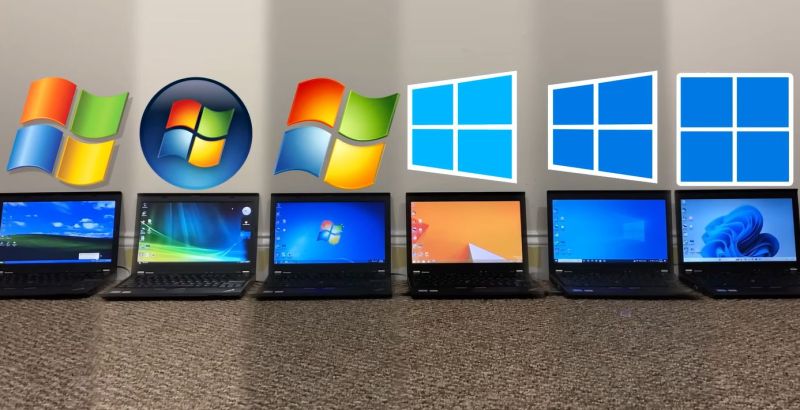
Despite faster CPUs, RAM and storage, today’s Windows experience doesn’t feel noticeably different from back in the 2000s when XP and later Windows 7 ruled the roost. To quantify this feeling, [TrigrZolt] decided to run a series of benchmarks on a range of Windows versions.
Covering Windows XP, Vista, 7, 8.1, 10 and 11, the Pro version of each with the latest service packs and updates was installed on the same laptop: a Lenovo ThinkPad X220. It features an Intel i5 2520M CPU, 8 GB of RAM, built-in Intel HD Graphics 3000 and a 256 GB HDD.
For start-up, Windows 8.1 won the race, probably due to having the Fast Boot feature, while Windows 11 came in dead last as it showed the desktop, but struggled to show the task bar. Windows XP’s install size was the smallest and also had the lowest RAM usage with nothing loaded at 800 MB versus 3.3 GB for Windows 11 in last place.
Using the Chrome-based Supermium browser, memory management was tested, with XP performing as poorly as Windows 11, while Windows 7 and 8.1 took home the gold at over two-hundred tabs open before hitting the total RAM usage limit of 5 GB. That XP performed so poorly was however due to an issue with virtual memory and not hitting the RAM limit, which means that Windows 11 is the real dunce here.
This is a pattern that keeps repeating: Windows 11 was last in the battery test, took longer to render a video project in OpenShot, took its sweet time opening the File Explorer window, and opening built-in applications like MS Paint left enough time to fetch a fresh cup of coffee. Not to mention Windows 11 taking the longest to open websites and scoring worst of all in single-threaded CPU-Z.
Much seems to be due to the new code in Windows 11, as Microsoft has opted to start doing major rewrites since Windows 7, hitting a crescendo with Windows 11. Although there’s the unhelpful fact that Windows 11 by default encrypts the storage with the very slow software-based BitLocker, its massive RAM usage and general sluggishness are such a big deal that even Microsoft has acknowledged this and added workarounds for the slow File Explorer in Windows 11 by preloading components into RAM.
All of this appears to be part of the same trend in software development, where more resources are pointlessly used due to developing for the hardware, and performance increasingly takes a backseat to abstractions and indirections that effectively add bloat and latency.










Win 7 is good but my favorite is Win 8.1 with “Classic Shell” replacing the MS START menu.
Small memory footprint and very fast. It got a bad reputation because of the stupid MS START menu.
its also where the control panel started getting schizophrenia. for its stability id have kept using it till it eol’ed if my new mobo at the time had driver support.
I am a bit skeptical of his test methodology for XP, I suspect he had some unaddressed compatibility issues runinng 64 bit XP, and on such a modern system. While it technically existed, it never really got the polish that the 32 bit version did. The virtual memory error he encountered is a classic 64 bit XP bug, he would probably have done better just installing the 32-bit version and living with the 3.5GB ram limitation.
Another obvious problem is he shows 800MB of memory usage at the desktop which is egregious. Maybe he is looking at the page file allocation (the value which is shown in the graph under the CPU usage)? A typical XP era machine would only have had 128MB of total ram (in fact, my first XP machine was running with a whopping 64MB which ran fine). Of course in those days we relied a lot more on the page file, but even the worst corperate-spyware infested XP machines wouldn’t use more than a few hundred MB of memory at the desktop.
Boot time also seems high, on that hardware a reasonable fresh install of XP should boot in sub-10s. With a SSD and decent sandy bridge cpu (i7-2700 etc) I observed about 1s at the loading bar and then 2-3s to a full desktop.
Time gilds the memory, eh? I remember that as well, and you could brew and drink a cup of coffee before the machine booted up on just 64 MB.
Windows XP stripped of all malware bundled by MS during install and with most bullshit services disabled would boot just fine on 64 MB of RAM. I know because until 2009 this was my main gaming rig on which I played Gothic 2 and SAMP (GTA: San Andreas multiplayer).
Not necessarily. The original Windows XP had similar requirements to Windows 2000.
And Windows 2000 had a minimum of 32 MB of RAM (but 128 to 256 MB recommended).
So if everything was disabled, Windows XP (SP0) could run okay on a 200 MHz Pentium MMX with 64 MB of RAM.
A fast HDD would have been recommended, though.
Say an SCSI HDD, as it was common among servers and Windows NT workstations of the 90s.
That being said, RAM expansion should always be above minimum.
Things need some headroom, system files want to be hold (cached) in RAM..
The minimum spec was always dog slow, especially with the slow hard drives of the time because it was swapping like crazy. Worse yet if you had PIO instead of DMA drivers for the drive controller, so it was extra extra slow.
I agree. SCSI was such a relief because of this, I think. 😃
But on bright side, even a slow XP was smoother and more stable running than the average Windows 98 installation.
Back then, many games and emulators that caused issues on 9x suddenly ran fine on XP, even on older hardware.
The Windows 98SE and early XP era was plagued with the capacitor plague, and a lot of badly made chipset with buggy drivers.
Linux users were gloating with high uptime and “never crashing” because they didn’t have the drivers to use any of the chipset features, functions, or peripherals that got Windows crashing all over.
I recently pulled my Toshiba Pentium 2 laptop off the shelf because I was mucking about with an old palm pilot. I had forgotten I had installed XP on it at some point (it came with 98) and was incredibly angry that it booted up faster than my new work laptop with windows 11. It only has 128mb of ram.
Nah, they were much faster than that. I booted 95 on 7mb ram with 1mb shared for the onboard video with a 75mhz pentium and a 200mb hdd in under a minute. Time seems to have alzheimers your memory. Go get a cognitive test.
conditions of booting 95 is irrelevant to anything with xp. Yea it was a much earlier operating system and had much lower system requirements.
Install size of 800MB not RAM usage.
I second that – Windows XP running on minimum RAM. I still own my Windows XP machine I bought some time late 2001 or 2002, with 128MB of RAM. It still runs, TO THIS DAY – it was my music playing machine, Propellerhead’s Reason 5.0, and works as good as it did back then, with a dedicated external soundcard.
Obviously, Reason being a major memory hog needed tinkering, and tinkering I did uninstalling everything except bare necessities, but the end result was “it still works”.
I don’t see much reason to artificially limit RAM expansion, though!
Except if it causes slow down (RAM beyond cacheable area) or compatibility issues (256 MB or less for dual-boot with Windows 98; 64 MB limit of old OSes).
Being sorta proud of running XP or any other OS on low RAM is something I never understood.
Why not give it some extra RAM, if we can? Why do let it suffer for no reason?
An multitasking OS, such as Windows NT or OS/2 needs lots of RAM in order to be able to “think” and do its memory managment.
It had been always that way, even in late 80s when 16-Bit OS/2 needed 4096 KB of RAM for proper operation (when most PCs had 512 to 640KB).
It’s not like with a C64 or a DOS PC where a program either fits in memory or not.
A real OS does cache things, wants to page things in and out etc.
It’s like a living thing, almost. Everything is very dynamic.
Windows XP SP0, yes. Maybe SP1, too!
It can run (walk) on a Pentium MMX with 64 MB of RAM and a 2 GB SCSI HDD.
You can also throw an Sound Blaster 16 ISA soundcard from 1992 at it and it will work.
At home we had a Pentium 3 PC by turn of century that shipped with 20 GB PATA HDD and 128 MB of SDRAM.
That was when Windows 98SE was still the default OS (pre-installed).
By the time Windows SP2 got current in mid-2000s,
an proper Windows XP PC should have had roughly 256 to 512 MB of RAM.
That reduced swapping a lot and it made things more responsive.
By the time Windows XP SP3 came out in late 2000s, 1 or 2 GB of RAM were common among advanced PC users in general.
It did give Windows XP another speed boost.
At the time, Windows Vista was out and they were running Vista on underpowered XP-machines with 512 MB of RAM (the lower minimum for Vista).
To make matters worse, without a Shader Model 2 capable graphics card, the GUI had to be drawn by CPU.
With a GeForce FX 5200 or better, Vista/7 could draw the GUI through Aero Glass via GPU.
That reduced CPU usage. Unfortunatelly, users thought that Aero would slow things down..
That’s basically a repeat of the same issue that XP caused to be so slow, by the way.
Many of the early Windows XP machines were in fact un-upgraded Windows 98SE PCs.
They had less than 256 MB of RAM, often.
I’m writing this as someone who lived through these times, btw.
I did upgrade many PCs in the 2000s to make them Windows XP capable.
The main issue was insufficiend RAM expansion, in my experience.
The rest of the “classic” hardware was supported by XP out-of-box often or had drivers to them available online.
I’ve seen configurations as low as 32 MB of RAM,
which even Windows 98 didn’t really satisfy (practical limit for 98 were 24 MB in my opinion, 16 the bare minimum).
About SSDs.. Yes and no, it depends.
Early SSDs with old Sandforce controller were dog slow on XP, slower than an average HDD!
Despite corrected alignment for SSD (XP setup used sector 63 for a partition by default, which is misaligned.).
I’m talking about 16 GB (no typo) models of SSDs here. From the early 2010s (XP needed 1,5 GB of HDD space minimum)..
By comparison, Windows 7 ran smoothly on same SSD.
Windows 7 was recommended, anyway, because it had TRIM support.
Early SATA SSDs didn’t have good garbage collection yet.
Windows 7 Setup (install DVD) also created correctly aligned partitions (at 2 MB boundary, I believe).
With an alternative kernel, Windows XP 32-Bit can use up to 128 GB of RAM via PAE.
Sure, it’s a trick. Comparable to using EMS on DOS, maybe. But it’s better than nothing.
The modification is useful for users of VM software. Such as VirtualBox or Virtual PC 2007.
With more than 4 GB of RAM, a VM and the host (XP) don’t have to fight for RAM anymore.
If the PC has 8 GB installed, a VM can have 4 GB being allocated to, while the XP host still has its 3,5 or 4 GB of RAM, for example.
Though software compatibility issues might occur somewhere between 12 to 16 GB of RAM.
Some N64 emulator fails to run on such a modified XP at that point.
Maybe there are other applications, too, not sure.
It wasn’t just a different level of polish. Windows XP x64 is an entirely different OS than the 32 bit version of XP, which was the version almost anyone used.
XP x64 was basically Windows Server 2003 with an XP skin and some XP functionality ported over, and had a different code base than the much more common 32 bit version. It seems Microsoft wanted an x64 version, and that was the shortcut they took. Using the 64 bit version isn’t representative of the OS most people would’ve used at the time. They’re two different OSes that were made to look the same.
Even running it back then posed various challenges, and you had to dig up Server 2003 compatible drivers when XP x64 wasn’t supported, which it often wasn’t.
Always give your developers a machine that is a couple of generations old with a minimum of memory and slow hard drive (no SSD). That will make them optimize their code so it will run fast on newer machines.
Your assuming western developers who are slaves of Jira, project managers and their cocaine-fueled time tables.
Chinese with their chabuduo philosophy might not be as concerned.
Not to mention developers from India 😂
But only for testing, not developing! There’s a catch!
An underpowered PC slows down compiling and developing as a whole!
As a developer, you can’t get things done “in time” that way.
Even back in the 80s and 90s, developers had their upgraded workstation.
The testing then was done on various differen PCs common at the time.
Bedroom programmers gave beta versions to their friends and they tested them on their hardware.
So it became clear if a game needed further optimization.
Now retest Win11 after removing all the recall and copilot BS. I’m interested to see if that adds any significant overhead.
+1. Debloated Win10 with useless services disabled is faster than win8.
These results don’t always apply to newer systems; operating‑system releases are usually better optimized for their contemporary hardware.
That said, Windows 11 is still a bit too sluggish, in my opinion.
I like to see the same test in diferent systems, start in old machine xp era to windows 11 typical machine, then we can see system-chip optimizations and a real speed compared.
I would be interested in seeing if Windows 11 AtlasOS would have any improvements in this test.
Regarding windows 11: it bugs me a lot, that I need to throw a perfectly fine computer in the trash, because Windows 11 doesn’t support it and since Windows 10 support is stopping I’m kind of forced to upgrade and discard perfectly fine hardware. Reading this article here, it doesn’t really convince me to step over to Windows 11.
Use apple… use linux… sure, but that’s bullshit, because that also forces me to throw away all my expensive software too. Which also ignores the fact that my workflow will be hugely disrupted as I will need to learn everything I am accustomed to, all over again. Then some smart ass says that I can run a virtual blabla… that doesn’t improve performance does it, that doesn’t improve user-friendliness does it.
MS has got the world by the balls and there is no way around it… and no monopoly prevention agency steps in to bring it to a halt, it’s sad and the worldwide trashheaps are growing bigger and bigger for no real reason. The mentioned safety issues appear to be valid but yet it is an illusion that this all creates the perfect solution, there is no reason to enforce it like this as it could have been introduced more gradually.
Fully agree with your points about anti trust but in 2026 you can actually just switch to Linux though. It’s not that difficult anymore.
Or… just continue to run Win10 with LTSC (or without LTSC, just don’t download everything you find on some shady website, and don’t click on every banner).
I’m on Win10 LTSC, and have absolutely no plans of Win11 ever coming near my machine… if it ever sets foot on my tower or laptop, I’ll find out if a paper shredder can eat an NVME.
It is indeed a terrible issue. But the only way to resist it is to rebuild your environment on another platform and never go back. Once you really migrated, you’ll adapt anyway and it won’t be hard to give up on what you thought was “absolutely necessary” from Windows.
However, it is true that software for professionnal work (e.g. Not video games) are usually not well supported by Wine or similar software and this can quickly become cumbersome. Then you either have to switch software (there always are alternatives) or buy a new system for your Microsoft OS.
It’s a pretty bad situation, but you have choices. I wouldn’t trust Microsoft not to follow its trend in the upcoming future, though. Which is why going free and fully open source, or picking a system with long term support makes more sense, although it may seem like it requires a lot of efforts. Then you can’t complain because you truly are the master of your system. Microsoft has you “by the balls” only as long you think you need to comply with their practices. It is often more of a psychological issue rather than a practical issue, i.e. it is much harder to think about changing everything than actually doing it. And this is why Microsoft sells (fear of change).
It would be great if you could have a *Nix environment that could install Windows software natively (the installer is just code, and (if I’m not mistaken) *Nix speaks tons of programming languages)…. even if it’s not “supported by Microsoft”, who cares?
Bravo, Rodommoc. Couldn’t have said it better! Intelligent Regards, Michele.
You are aggressively applying the sunk cost fallacy to your own life and wellbeing, this isn’t a good idea. Just as Zmar points out, the trick is actually doing it, not the actual hurdles you might face. The important thing is that this is a fallacy, but familiarity is blinding you.
Switching operating systems is not at all straightforward, so right from the start expecting your workflow to be unchanged is ridiculous. You don’t expect that with a new version of Microsoft Office, why would you expect that here?
As such, most of this is purely psychological. Part of the way you are tricking yourself is a reliance on a specific piece of software to do a job. And it’s the same for anyone you interact with that does the same. It is almost never because it’s “better”. Ever used ArcGIS? SPSS? These programs are pure garbage but they are “industry standard”, because of marketing and politics
Let’s look at a concrete example. Outside of very specific scenarios though this isn’t even necessary, but let’s say it absolutely is. In that case is there really no way to run it on “X Platform” (whatever it is, let’s say Linux as companies like Adobe love to pretend they didn’t port their software to much more difficult targets)? Does it run when launched via Wine? Have you tried using an assistive tool like Steam or Lutris? Does it run in a web browser? can it run in a virtual machine? In the most arduous case, VMs are fine once you set them up, better in many ways as you can back it up in a frozen state.
And if you are investing in something like Adobe’s cloud… find a way to stop. They use your data for training and block access at a whim. Working in an abusive situation like that is sharecropping.
“you don’t expect that from M$ office….” Gold , pure gold , exactly , willing to relearn office , but not a new OS, I call that intellectual lazyness
Baby Duck Syndrome.
I’m not sure why you describe ArcGIS as “pure garbage”. As we are taking about PCs here, I’ll focus on ArcGIS Pro, Pro is a good GIS. Yes, you can do most of the same with QGIS, but not everything, and every time I do complex stuff in QGIS I get stuck and need to work through extensions that may or may not work. Pro is also arguably better at cartography. Your mileage may vary, but calling ArcGIS garbage is hyperbolic. If your org pays for it, it’s a decent tool.
And AGOL is great, moving away from desktop, lots of stuff that’s easy to create, deployable to and usable by non GIS users, without having to get central IT to do anything, which would result in nothing as there’d be no money for a server. And if I need a website to bypass marketing control I create a storymap. And as it’s industry standard, it’s maintainable once I leave, which is an issue with bespoke open source solutions.
It ain’t garbage, is what I’m saying, it may not be the best for many reasons, and there are alternatives, but it’s a decent tool.
Mention Windows being good enough and suddenly Linux fascists jump out of the woodworks to aggresively proselytize for their failure of an OS which is based on 1960s principles, and which was designed to control stuff like telephone relays in AT&T.
If you guys are so pro-choice libertarians, then why do you want everyone to suffer under just one kind of kernel. Why not allow people to decide for themselves whether their work is better suited to be served by UNIX, NTFS or even TempleOS.
Of course you won’t. Why? Because under the guise of liberty and choice you are all just a bunch of filthy stalinists following Stallman, an autistic pedophile-enabler who got kicked out of MIT for defending Epstein.
Settle down, son. You do yourself a disservice with outbursts like that.
Meh , was a sysadmin for 32 years , M$ certified up the wazoo , also taught AD and SQL back in ’00’s , MS is good in corp for 80% of req , for average joe users , it will do the job, it will cost you but will do the job. For the other 20% of corporate ,(and power users) the real funky IT , what we geek use to prostitute ourselves to capital for , well sorry to say but that always was first on commercial Unix and then Linux. It’s like driving stick or auto, both will get you to where you want to go , but how much fun will you have had between point A and B ? Admit it , you’re just sour from being the Miss Daisy of computing , going back to my 48x Radeon VIi cluster to do fun things not on windows
Why not proselytize a perfectly good OS that allows you to pick a DE that fits your workflow? Customize to your hearts content. Easy to use. Very stable. Do everything that one needs to do. Runs every where from servers, desktops, workstatations, SBCs, super computers. Also multi-user out of the box. Can’t beat it no-how.
There is a downside for a certain segment of the population… It does require you to ‘think’ and learn something new. Linux isn’t normally installed for you out of the box, so there is some ‘work’ involved to make a bootable thumb drive and press next, next, next to install. No ‘hand holding’ here. Sigh … What’s the world coming to :) .
Hm. Do we talk about BSD or Minix 3 here? 🤔
Sure :) . Why not? If the OS meets your needs, by all means use it! Over the years, I install BSD a couple of times in a VM for kicks, but it never caught on with me. I think I even tried a bare-bones install once.
Forgot one more thing. There is no ‘account’ to create to activate Linux. Another downside of the Windows world. I just read on Tom’s Hardware where M$ silently killed off the ability to activate Win and Office over the phone. All that nonsense goes away with Linux (or BSD or Minix or …) .
Let’s not feed the troll. This conversation was educated and rational and nobody was advocating for any specific OS.
BARK BARK BARK BARK
But, please, tell us how you REALLY feel about OS “fascists.”
You know that you can install windows 11 on ‘non-compatible’ hardware with Rufus right? Bypass tpm and cpu requirements, all of that. Absolutely no reason to be throwing anything away.
That being said, I’ve moved my personal machines (and even my wife’s laptop!) to NixOS. Perfectly stable, repeatable, no dependency hell, and (most importantly) no m$ bs tracking / adware / bloat. If we need windows software / environment we rdp into a Windows VM or old physical machine in the closet.
Same here , love the single use VM, Loads up with VPN already defined, and my “good” hardware can do more then just run Redmond trackers
You can use W11 on “Unsupported” hardware anyway by using Rufus to create a W11 installation drive with the hardware checks bypassed. This is almost certainly how W11 was made to run on that laptop in the video. Thus far very few are reporting issues by doing this, because as you probably already suspect: It isn’t that windows isn’t compatible, just that Microsoft is being a b**tard and likely doing it on purpose to sell new licenses bundled with new systems and pump up numbers …
Not useful information right now as you likely just use W10 with the Extended updates as I am, but when it does happen. There is a way around!
Personally… eh. I’ll see when it happens. Though Linux isn’t as friendly. I can’t say Windows is remaining friendly either with the amount of BS that one needs to rip out and keep out to get it to just be a well-performing OS and not some bogged down billboard for whatever microsoft is peddling at that time. If there is going to be resistance and suffering anyway, may as well triple check which path gives the least.
… until MS decides to check for TPM during the next update and just bricks your machine. Dangerous game.
I doubt they want to alienate already grumpy users. In todays world, someone angry enough can manage to install and use a linux distro, it wont be pretty or fun, but you can do it.
Actually , saying that as both a 2x MCSE (2k &2k3) and also 2x VCP (4 &5) ,but yes windows runs better in a virtualized environment . I know it beats reasoning but actually verified it many times over the decades. Granted it’s a tad more work then “next next next” but if you template it first time you never have to do it again.
dumpster diving down at the retirement community is amazing these days for this reason
Sadly, MS probably does have users like yourself by the balls… but for the vast majority who do everything through a web browser? Linux is the way forward.
Linux is A way forward, not THE way. For casual youtubing and browsing, linux passes, but it is way too clunky when you want to install something that isnt in the repository of XX distro.
Windows 11 runs on pretty much any hardware that supports Windows 10. No need to trash anything. Windows 11 is easy to install on older hardware and runs just fine.
Microsoft being difficult is no reason to just throw hardware.
When my pc says it can’t run Win 11, i thank God. That mean MS Bloat won’t install it without my permission. They said Win 10 support was ending (remember when they said Win 10 was the last version?) I clicked thru and they said, “oh yeah, click here and get another year for free, which is what I did. I’ll deal with the future when I have to!
How about 3.1 & 3.11 …. You just made me want to find an ISO now .,… A ne2000 some coax… And play some DOOM over LAN with some buds
having used mac os 7 for years before i encountered Windows 3.X, I found it an unusable downgrade. Windows 95 was good enough for me to leave Macintosh forever though.
Windows 95 was very mood, too, depending on the many versions (RTM, A, B, C or OSRs) and the given hardware.
As a rule of thumb, the original Windows 95 (RTM) ran stable on Windows 3.1 era hardware,
if given some memory upgrade (8, 16 MB or more RAM).
Simply because Windows 3.1x had been the code base Windows 95 had been built upon in 93′ to ’94.
That means 386 or 486 systems without any unnecessary fluff, in short.
Plain ISA or VLB/Opti bus architectures. The old IBM PC/AT architecture, in short.
On early Plug&Play/APM/ACPI systems, obscure CPUs (NexGen, Cyrix, AMD K5 etc) or PCI/AGP buses, Windows 95 wasn’t very stable.
Windows 98SE was better here, it had more mature device drivers shipped.
Ye set a very low bar if 95 was good enough.
The WinDoom needs WinG and 386 Enhanced-Mode, maybe Win32s extension, too?
I recommended a fast 486 or Pentium, 16 MB of RAM and an S3 Trio64V+ for WfW 3.11.
The Elsa drivers had DCI support, which was useful for latest Video for Windows and QuickTime.
In an environment with heavy networking, having more than 16 MB of RAM on Windows for Worgroups didnt hurt, either.
For Windows 3.1, a 12 MHz or faster 80286 PC with at least 4 MB of RAM is recommended.
4 MB seems overkill, maybe, but we should keep in mind that the Standard-Mode kernal doesn’t support virtual memory (swap file).
Otherwise, large applications such as MS Works will run out of memory too soon.
So 4 MB make sense as a minimum, also because 4x 1 MB 30pin SIMMs were common in the 90s and well supported by 80286 motherboards.
I wonder how much of the Win11 issue is newer security stuff preventing all the preemptive-execution leaks and similar? Those older OSs were faster but less secure.
On WinXP pretty much everything runs with admin privileges which means free access to memory and stuff. When I was a teenager I wrote an undetectable malware that stole login & password data from Tibia Client memory and sent it over HTTP to my server. It was a much better solution than classic keyloggers as many AVs would detect keyboard hooks, but they mostly didn’t give a toss about ReadProcessMemory calls. It was fun and I earned so much money from selling items and gold on Allegro. For a while I was probably one of the richest players on Astera.
But it doesn’t need to. There and are perfectly fine ways to work with a normal user account on WinXP (eg. with SuRun).
Nope, you weren’t. Maybe the richest cheater/scriptkiddy/criminal on Astera. But not “player”.
“It was fun and I earned so much money from selling items and gold on Allegro.”
Ruining other people’s game by stealing from them is not fun. It’s being lowlife scum.
I do like how that by the title image’s display of Windows logos alone, you can see where it went from “playful and outgoing” (if using marketing terms) to sterile and austere.
And the screens. From rolling hills of “bliss” through intense bombardment of heavy ions causing changes to the chiller vault and the release of the blue water and paper of a chemical toilet leak.
Windows 8.1 guts with a bunch of mods and windows 7 materials made for a solid half-decade of actually good windows experience. Once windows 10 dropped, they just stopped messing with 8.1. Not getting your ui/system settings reset and intrusive new features added almost monthly every other update was very good for sanity. The last few years, not so much.
Read a comment on a different article about ReactOS progress and there said, why would you want ABI compatibility with Win 7. This presents a pretty decent argument that Win 7/8 was pretty close to peak computing.
I was using a Mac during that era at work, so never experienced either platform myself. Been Linux at home since the early 00s. Work now on a W365 Cloud PC, so my experience with Win 11 probably doesn’t match that of others (system or network causing the bottleneck ¯_(ツ)_/¯ )
Waitaminute. Win11 on a X220? That’s a 14-year old i5 machine. Positively stoneage. How?
Win11 refuses to run on my 10-year-old Lenovo i7 machine (thank goodness).
It is officially unsupported (unsurprisingly), but you can still force Windows 11 on it since it has everything that Windows 11 actually cares at the moment – x86-64-v2 instruction sets, UEFI, and enough RAM/storage.
Those X220/T420 Thinkpads are probably the oldest Thinkpads which will run Windows 11.. at least without some hardware/firmware hacks.
I thought they knew for a long time that Windows 8.1’s kernel is the fastest
Sorry, I don’t know why it replied to you instead of posting a top-level comment
If the benchmark is performed on a newer hardware, like Ryzen AI, then only Windows 11 would be able to use it to its full capabilities; that’s the reason I don’t see any value on this benchmark. Also, spectre and meltdown vulnerabilities introduced security measures which not all versions got patched; other newer security features also interfere with performance.
I had a similar feeling and left a comment to that affect when this video popped up in my YouTube feed. Win11, despite it’s problems was designed to take advantage of much more capable hardware. Shure it uses way more ram than XP, but if the ram is there why not use it? 3.5 gb at idle to hold regularly used is files when you have 8, 16, or 32 gb total. It sure does beat hitting the HDD or the even an SSD for critical common files ever few seconds.
I thought they knew for a long time that Windows 8.1’s kernel is the fastest
I am still using Windows 10, and when idle (after disabling multiple 3rd party and MS backend processes), my machine consumes <1% CPU (of a 9950x3D), and 9GB of RAM. It’s taken me 2 years to trim the fat, and I’m also very careful about checking what new processes are running after any installations, turning off all auto updates, and never minimising to the task bar etc. In fact I try to avoid .msi’s and installers and use zips to install if I can (mostly no backend processes added).
I want this because when I run any ML training or inference, or a game etc I want the entire machine at my disposal, and I dont want some process in the background doing an update. Having said that, when MS is updating windows itself I can tell immediately, as everything slows down and things start to go wrong, at that point I have to wait for the MS Win Update to complete and reboot which is roughly once a week.
That’s odd. My Win10 machine is currently using 5.3 GB of RAM, and that’s including the 0.8 GB this browser is squatting in. 27 GB free of the 32 GB installed.
I’m not exactly surprised, Windows 11 barely runs with 8GB. It’s technically the minimum required, but in truth it’s far from a satisfactory experience.
I’m more surprised by the choice to run the test with bitlocker enabled. It is enabled by default, but anyone who wants to get the best performance out of their machine is unlikely to have it on.
By the way, Parallels Desktop on Mac allocates 8 GB of RAM for a Win 11 VM by default.
A few years ago, Macs with 8 GB of RAM were said to be insufficient for running macOS, too.
The low RAM installation would cause macOS to swap to disk often and wear out the SSD, thus.
Since then, 8 GB models had been discontinued.
It’s the Windows “every other” curse. “Every other” version is always crap.
It may not be what the devs ‘intended’. But its definitely not ‘crap’ either. Its a historical fact. As they say in investing however past performance does not predict future results.
Microsoft lost the plot.
DOS, CP/M and UNIX/LINUX all understood the brief.
An OS is meant to be shallow, fast and bug free – to support I/O, UI, and file systems.
ALL applications should run on top of that. Everything.
One OS for a hardware platform, plus drivers.Everything else as an application.
Buy windows as two products – an OS, and Tools package, plus any app,suites you need..
Oh look, another UNIX fascist dictating people how they should compute to achieve total FREEDOM. How’s the GNU/Turd btw? I head after 30 years they finally managed to add CD-ROM support 😂 At this rate humans will be farming wheat and cattle on Mars before it manages to run Crysis 1.
I find this testing method somewhat odd, using 15 year old hardware I don’t find it surprising that the OSes that were around during that time where the hardware released do perform better than 11.
I think it would make much more sense to run all Windows instances virtualized on different generations of hardware but with the same base hardware configuration of the virtual machine. Even when using a modern system to just virtualize XP up to 11 would make much more sense than running everything on old hardware.
That would make it much clearer if the hardware is slowing down the OS or if the OS is just a slow mess.
Being older than dirt and farting dust, I was around back in the 1970’s when the Apple 2e was in schools.
A lot of the MS stuff is, take the core code, slap a fresh interface on it and call it a new windows version.
A lot of people these days basically go online, they’re not messing with Office or doing heavy duty stuff.
For instance, 20 some odd years ago, I bought my wife a laptop. A Compaq CQ60. It had Windows VISTA on it. When 7 came out, I got the family 3 pack install. For years, win7 worked flawlessly. It still does.
For my machine I upgraded to 10. She stayed on 7 and it worked. That is, it worked until 11 came out and everything else started upgrading. Chrome, Firefox….those got an upgrade and started getting messages from banking/shopping sites that her browser was too old and no longer supported. I’m not really a Linux person and neither is my wife. We just want to get online, do what we have to do like banking and shopping etc. without all the AI and other stuff. So now I have to go buy her a laptop and she’s going to have to re-learn a lot of stuff. Windows 7 was fine, it ran efficiently, did what we wanted and needed.
Windows 10 and 11 are the OS’s no one wanted, no one asked for, and no one really needed.
I have a friend in Nevada who runs Linux and is quite happy with it. I’ve tried a few distros but because my job depends on Visual Studio, I have to use Windows. I have an HP Touchpad that I put LineageOS on, but I haven’t played around with it much. I miss Windows 7, and the only reason I upgraded to 10 was to play Star Trek Online. If I could go back to 7 and still play my game once in a while, I would.
The machine I have now is an AMD Ryzen 7950x with 32gb of ram. Is it the latest, greatest fastest speed demon that will have Windows loaded before you can blink? No. Does it do what I need and want? Yes.
My wife’s Compaq CQ60 did what she needs and wants, but forcing people to go out and buy a new machine and learn new stuff they don’t want to is not in my humble opinion a way to keep customers.
Windows 11 with its ads, and AI and other stuff no one wants, needs or asked for is not in my humble opinion the way to go. Oh sure I could spend time de-bloating it etc. but the average person isn’t going to do that kind of stuff. I also hear that Windows 12 is in the works. I’m not the smartest tool in the shed, and never claimed to be, but when it comes to computers, I know more than the average person. Even though I do have SOME smarts, I’m old, I like things to just work, and not have to think about the new stuff passing me by (which it has). 7 was THE OS for the average and techie user and IMHO still is.
To be fair to my friend, Linux is getting to be what Windows 7 was. Easy to install and run.
MS should go back to its roots. Innovate, sure, but keep it simple, the way it used to be.
The best Windows was Windows 98SE. Yep, that’s an objective fact, not an opinion. XP is a close second and everything else is a very distant also-ran. Of course, it’s hard to use anything 9x these days what with no fully functioning browser for the present-day web. But that’s just a missing application, not the OS’s fault.
Also, on the desktop the last decent upgrade to the concept of a GUI was the scroll wheel. The last major re-design of the GUI that didn’t suck was Windows 95. Sure, the newer desktops are probably better on a handheld touch device. But for the desktop Mickeysoft should have stopped attempting major innovation after Windows 95. Tablets and desktops can be better served by switching between separate modes with the Desktop one being mostly like Windows 95 and the tablet mode being it’s own thing. Newer Windows attempting to be both at once just makes it suck.
If you hate anything modern why don’t you simply commit suicide? You’ll get to enjoy being dead for a long time.
You must remember, he was running 11 on unsupported hardware, making this a test that isn’t great, due to the fact that 11 runs poorly on unsupported hardware, especially ones from 2011-2014.