
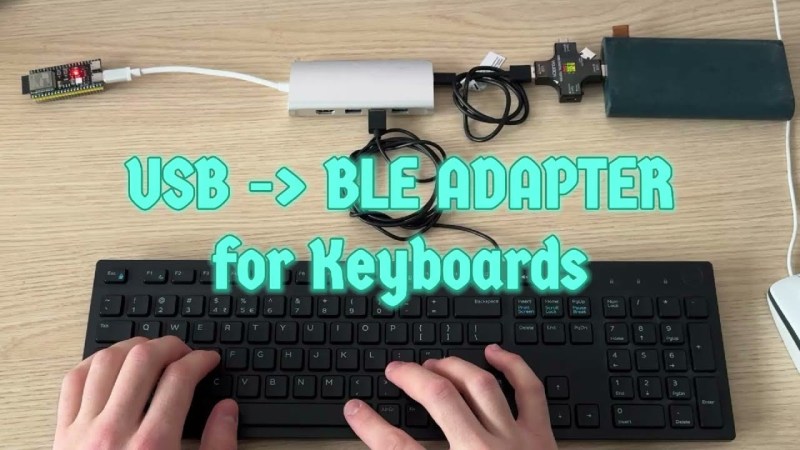
Few things rival the usability and speed of a full-sized keyboard for text input. For decades, though, keyboards were mostly wired, which can limit where you use your favorite one. To address this, [KoStard]’s latest project uses an ESP32 to bridge a USB keyboard to BLE devices.
The ESP32-S3 packs a ton of fantastic functionality into its small size and low price—including USB-OTG support, which is key here. Taking advantage of this, [KoStard] programmed an ESP32-S3 to host a keyboard over its USB port while connecting via BLE to devices like cellphones.
There are some slick tricks baked in, too: you can pair with up to three devices and switch between them using a key combo. Some of you might be wondering how you can just plug a microcontroller into a keyboard and have it work. The truth is, it doesn’t without extra hardware. Both the keyboard and ESP32-S3 need power. The simplest fix is a powered USB hub: it can be battery-powered for a truly mobile setup, or use a wired 5V supply so you never have to charge batteries.
We love seeing a simple, affordable microcontroller extend the usefulness of gear you already have. Let us know in the comments about other hacks you’ve used to connect keyboards to devices never designed for them.












definitely a hack…
i feel like the timing is right for some sort of light/not too serious ‘hacker’-themed version of McGyver.
… okay maybe not.
Awesome and useful project.
It reminds me of Evan Kale’s adapter.
what would be powerful is of I could use it to switch a mouse and keyboard between several computers. I use a wired KM switch now but I would add this to my travel setup.
“Multi-Device Switching
You can pair with up to 3 different devices (e.g., PC, Laptop, Tablet) and switch between them using your keyboard.”
Literally says it on the project readme.
Next update to support usb over tcp for usb 1.1.?
This? https://usbip.sourceforge.net/
Now if there was just a way to use all those wireless MS keyboards that are missing their dongles
I genuinely don’t understand the drive to make something like a keyboard wireless.
The monitor you are sitting in front of has wires.
So does the computer.
Having them on your keyboard is a feature, not a problem to be solved.
You gain nothing, but now have to deal with everything that comes with radio, and also batteries.
It would be different if you have a specialized need like a keyboard for living room use on ‘the big screen’.
It would also be different if the device itself needed to physically attach to you like headphones, and be usable while moving around.
But a keyboard and mouse are used in a confined area.
They get used on a desk, not while walking to the kitchen to refill your beverage.
This feels a lot like the ‘problem’ solved by putting wifi in a smart tv and gaming console.
The same tv and console that have wires plugged into wall power AND connecting the video/audio signals between them.
If they need a network connection, the CORRECT solution is just another wire.
Wireless CONTROLLERS make perfect sense.
Wireless NETWORKING for a device that doesn’t move and is already tethered with power/video cables does not.
“Because I can.” Is certainly a valid answer. But only when it accounts for the downsides of the ‘upgrade’ too.
Having a car tuned to run on 120 octane fuel, with a suspension stiff enough to break your teeth might make for a great race car, but driving it on the road means accepting that those ‘features’ make it much worse at being a non-race car.
“It looks nice” is not a good excuse for creating functional problems.
And it is rarely a good excuse for added maintenance.
I think the main utility of this is to have a keyboard you can use with a tablet, in case you’re in a situation where you don’t have the opportunity to use a desktop or laptop computer, but can use a tablet and a full size keyboard (and also the tablet doesn’t have the ability to use a wired keyboard, I guess). I think it’s silly though.
I had this exact thoughts for many years. Display should be the one where the hub for everything is, and not just hidden behind it, up front, bottom row.
(which also needs all the proper/basic controls returned, power switch, brightness, volume, also speakers should be built-in into the monitor, and not the dinky-clinky kind frequented in cheap TVs, proper deep base narrow speakers a-la-Bose, the ones that sell for $35, subwoofer and all).
Alternatively, the same display unit should have bluetooth, USB, flash read, yada yada. While at it, add LED VU meters to left and right a-la-1980s. Because.
Also, for many, many, MANY years I never understood the stubborn insistence on the mouse wire being distinctly separate from the keyboard wire. Why not add USB hub to the keyboard so one can plug everything into that including mouse? I don’t know. Were there some computers in the past that needed mouse located opposite the keyboard, ie, on the OTHER side of the monitor? That would be the only logical explanation.
This is another incentives problem. It isn’t just that losing the physical buttons saved some cost; it is a positive good. Even making the buttons invisible, or labelling them in black on black is a positive good.
Obviously, these are terrible for usability, but they do look cleaner.
People who care about usability are a smaller market to begin with. People who care about usability and have the expertise to recognize a problem before they buy are a much smaller market, and more likely to be satisfied with what they already have. People who care mostly about looks are more likely to be frequent repeat customers.
That I agree with – we are not larger enough market to bother with.
I already solved one of these – bought powered USB hub that bolts to the bottom of the monitor. Works as intended, all the wires easily organized and not snaking every which way. The other item on the list will be addressed soon (good speakers with a subwoofer bolted to the back of the monitor, not sure where the volume dial will be – probably behind the monitor still).
Actually, I should not be dumb and just design and build a control panel/USB hub myself from spares and then bolt it to the bottom of the screen. Things like brightness and whatnots will be a bit of a doozie, but the power button will be present, scavenged from an old 1980s stereo (JVC, btw).
A lot of things could be reused from the 1980s stereos, now that I think of it. Even analog dial with the analog VU meters. I am pretty sure I can come up with a use for that.
As far as retrocomputing goes, tiny FabGL VGA32 can run bunch of emulators, and it is so small, I cna probably fit into the mentioned powered USB hub AND it has PS/2 keyboard/mouse ports facing the right way (VGA is on the other side – excellent idea!). SDA card is on the side, which is unfortunate, but Its okay – the PS/2 ports are more important.
My PC sits several feet away from my desk along with my router, printer and other stuff in a cabinet.
I wished wireless DP would be possible!
That, too was my observation – printer, being the bulkiest item that absolutely cannot be flattened, is what keeping the rest of the items moored somewhere near, computer cabinet, etc. Printer almost always calls for a dedicated table with printer paper, etc. Might as well call for a small wheeled cabinet, IMHO, and yes, wireless.
Which makes me thing this brilliant hack is the answer – turn any wired printer into the wireless kind : -]
It’s very handy when you have to clean the desk. (no joke)
I’m reading this on my phone; a larger screen would be nice, but it isn’t worth going over to a desk and waiting for a computer. (That has been true for long enough that my “computer” is generations behind my phone anyhow.)
But when I do decide to enter something, it is a pain. Sometimes I switch to a computer; sometimes I procrastinate for months; sometimes I just put up with the phone’s soft keyboard. I would gladly walk to another room to get a functional keyboard as a halfway step to switching to a desktop or laptop (and laptop keyboards are already compromised anyhow).
Back when I normally used a desk, I didn’t usually much mind the cord … But it was sometimes awkward, and it was a pain if I wanted to enter a serial number off some equipment just out of reach, and I have seen computers pulled off the desk by a cord, and I have seen people tripping over cords. (The keyboard is more likely to be set on a chair or further from the monitor than the CPU or storage are.)
So yeah, when I am at a desktop, wired is a 99% solution, but that other 1% will hit some people way more than others.
Speech recognition is really good these days, and if the standard speech to text still isn’t good enough for you, there are clever AI in-between like wispr flow, that write what you intend instead of what it hears. We all switched to typing some 25 years ago, it’s curious that we’re having such a trouble switching back to speech.
Even when I am in a place both private and quiet, I am not in the habit of talking aloud, and when I do talk to myself, I mumble. So that would always be an explicitly awkward input step. When I receive a text message dictated by speech to text … “Really good” is not my typical evaluation. It may be preferable to some of the phone keyboard auto-corruption, depending on what sort of things you want to say/write, but the worst of keyboard auto-corrupt is from such obviously bad implementation choices that I expect it to improve.
It’s handy if you do other things at the desk not just type
Yep, that, too. I don’t have a good solution for that except get larger desk.
My desk is wide enough so that I can flip open a three-hole binder next to the mouse and still have enough space for all three, keyboard, mouse and a binder. Captains logs go into a binder, hand scribbles and whatnots.
My daily use case is that I use a Meta Quest 3 VR headset as my display. I can remote in directly from it to my work Azure Virtual Desktop (or to a local computer in my wifi network). I then connect a bluetooth keyboard to the Quest 3 and now I can work remotely from anywhere in my house (or really anywhere with Wifi) without needing even a laptop. This project lets me find a high quality keyboard/trackpad combo to use for this setup. Believe or not, many if not most of the commercially available bluetooth keyboards are not very good so this project greatly expands the range of keyboards I can use.
I’ve long waited for the civil version of the military pilots’ helmet. None exist so far – and the ones that do are rather proprietary uberexpensive kinds that run in parallel to my real needs and regularly stop their R&D frozen dead in order to milk for profit.
I’ve looked into all kinds of VRs, Ocular, Google, etc, and they seem to be rather limited in scope. What I need is BOTH, projector into my retina AND pico-projector on a screen, because depending on the situation I need either or or both at the same time.
Of course I use my wired keyboard without a BLE bridge on my computer for regular use. I created the project so that I can use the keyboard on a Smart TV mainly, with potential usage on iPad as well. The demo was purely focused on the functionality, but could have shown on the TV for clarity.
If you use one keyboard and mouse for one computer, sure. But for those who are using more than one computer/tablet/etc, wireless keyboards and mice that connect to more than one device are way simpler than having a KVM with wires running everywhere (and additional dongles for tablets).
Ian, I genuinely apologize for turning your reply into my comment’s pedestal : – [ This was not intended.
I should have went with my own comment.
Just because you don’t have a use for it, is not a good reason someone else won’t
Kill two birds with one stone, PS2 or DIN in to use a massive model M instead of that slab shown.
I want the opposite of this. Basically a Logitech Bolt adapter that will pair with any Bluetooth HID device and bridge it to be a USB HID device.
Original IBM PC keyboard with the big 5 pin connector to adapter that converts to skinnier PS/2 style connector to adapter to USB to this laptop that I’m typing on.
I don’t usually use the keyboard because, while it’s got great feel, it’s huge compared to a contemporary keyboard.
I suppose I could do the same as this article and do bluetooth, but there’s no point.
What I want to do is get an old rotary phone and convert that to a bluetooth handset for my cell phone.
RE: “old rotary phone as a bluetooth headset for the cell phone”.
Five Below sells that – literally, a headset that looks like a 1950s rotary phone, that’s actually a bluetooth – the stand is merely empty box that serves no purpose other thatn look retro. I owned one – kept it in my car for emergency calls (the only issue was – the sound quality was meh).
Project author here, thank you for sharing in Hackaday!
Handheld Scientific BT-500 is a ~$50 product you can buy that does this. I got it so I can talk to my Steam Deck with my wired keyboard, even when I have a VR glasses or a monitor plugged in. I did kind of want to DIY with a Radxa Zero 3W, with it’s RK3566, but ended up just getting the product.
Handheld Scientific BT-500 is a ~$50 product you can buy that does this. I got it so I can talk to my Steam Deck with my wired keyboard, even when I have a VR glasses or a monitor plugged in. I did kind of want to DIY with a Radxa Zero 3W, with it’s RK3566, but ended up just getting the product. Major props for DIY’ing this!!!
With the help of IA I modified this project to use
-esp-idf
-usb-switch (up to 2.0, 3.0 doesn’t work)
-joypad ps3 usb
-mouse
… forgot to post the url https://github.com/dpeddi-iot/ESP32S3-USB-Keyboard-To-BLE
Well done getting this working. I’ve tried so many boards/connectors/libraries and still no luck.