
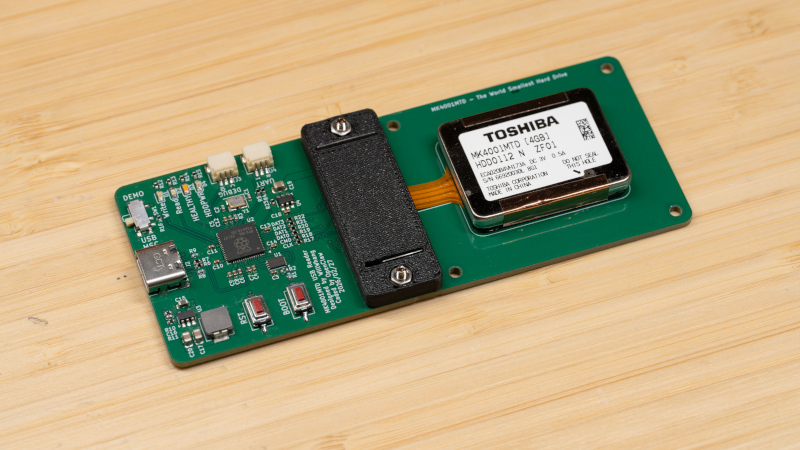
You have a tiny twenty-year-old hard drive with a weird interface. How do you read it? If you’re [Will Whang], by reverse engineering, and building an interface board.
In many of our portable, mobile, and desktop computers, we’re used to solid-state storage. It’s fast and low power, and current supply-chain price hikes notwithstanding, affordable in the grand scheme of things. It wasn’t always this way though, a couple of decades ago a large flash drive was prohibitively expensive. Hard drive manufacturers did their best to fill the gap with tiny spinning-rust storage devices which led to the smallest of them all: the Toshiba MK4001MTD. It crammed 4 GB onto a 0.85″ platter, and could be found in a few devices such as high-end Nokia phones.
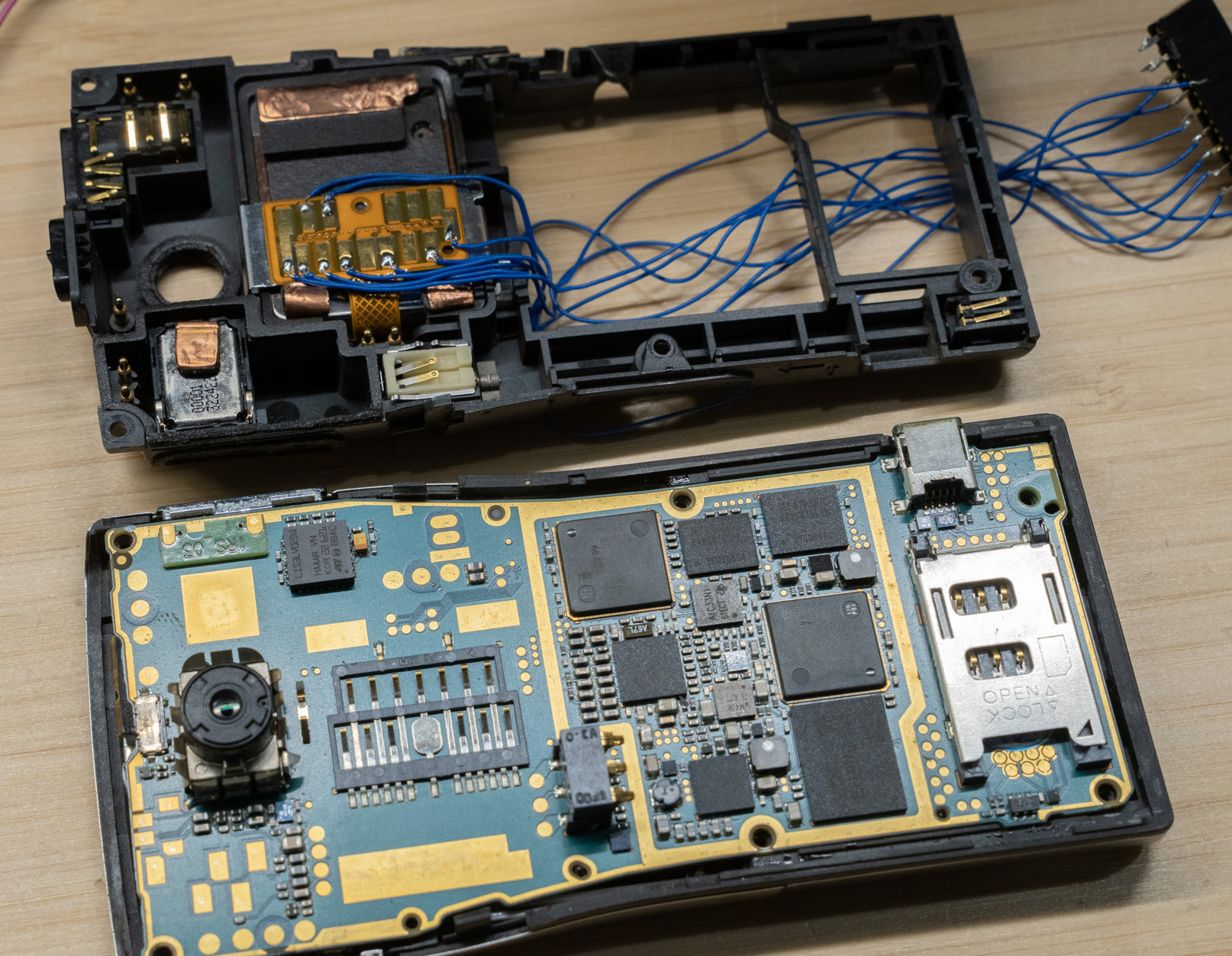
The drive’s connector is a pattern of pads on a flexible PCB, one he couldn’t help noticing had a striking resemblance to an obscure SD card variant. Hooking it up to an SD reader didn’t work unfortunately, so a battered Nokia was called into service. It was found to be using something electrically similar to the SD cards, but with the ATA protocol familiar from the world of full-size hard drives.
The interface uses the PIO capability of the RP2040, and the board makes a tidy peripheral in itself. We’re guessing not many of you have one of these drives, but perhaps if you do, those early 2000s phone pics aren’t lost for good after all.
These drives are rare enough that this is the first time we’ve featured one here at Hackaday, but we’ve certainly ventured into hard drive technology before.












I had a Lacie Carte Orange (https://news.softpedia.com/news/LaCie-Introduces-Credit-Card-Sized-8GB-USB-Key-8914.shtml) an 8GB credit card sized thing with internally a 1″ hard drive.
That drive was then touted as being the smallest in the world, it was also made in CF format, but the thicker 5mm type-II that did not fit in most consumer devices.
I never realized that drives were made that were even 27% smaller!
If it is CF sized, it is probably type-II CF aka microdrive. I think they stopped at 8GB due to cheaper flash drives.
I remember one of those surplus houses in the 90s or early 2000s had similar sized HP hard drives, possibly with an ATA laptop interface, but on it’s side instead of it’s end. I believe they were about the size of a matchbox. Also, in my data recovery days I came across a CF drive. From memory, it was easier to put the platter into a different drive, rather than replace the heads. I could be wrong, but recall one of the earlier MP3 players having a CF or proprietary hard drive instead of flash.
A few different mid-2000s mp3 players used internal CF-sized hard drives, like the Rio Carbon and the iPod Mini. Meanwhile, the regular-sized iPod used 1.8″ hard drives. (Incidentally, I’m fairly sure that the 1.8″ form factor was originally developed to fit inside PCMCIA slots, making it sort of a longer, older sibling of the CF-compatible microdrives).
We used to shuck iPod minis for their Microdrives because the iPods were cheaper than the street price of the Microdrive itself… ah, good times.
I have an IBM Microdrive cf card. It came with a Canon camera I bought off the auction site. I don’t know the platter size but saved it after switching to a solid state cf drive.
I do have one of these drives in one of these phones, it partly corrupted and photos of the cat my wife had back when we first met are locked in there.
So happy to finally see someone hase made an interface.
Next project in the reverse direction?
A board to allow use of SD card in the nokia N91?
https://www.youtube.com/shorts/HuduWLs6N2k
I came here to reply with this very tasteless video.
I find it really despicable to destroy old hardware just for views.
And I’m very happy the featured article proves that some are better than others and try to preserve history.
The person doing this used OpenClaw AI to vibecode the interface software. I’m going to give this one a pass, and this sort of blatant copying makes it really hard to want to post my own stuff.
if you make the ai do the work for you, you’re not learning anything and I’m definitely not learning anything reading about it.
I’d argue most hacks are not done for the learning experience but for the result. YMMV.
But don’t blame others for having less lofty aspirations and just wanting to get things done.
You’re learning nothing when someone else does the work for you.
I’m sure you built from scratch the machine you’re writing from. But I mean really from scratch, soldering every component on PCBs you made yourself, etc.
If using tools means ‘you’re not learning,’ then most of modern engineering doesn’t count. We’ve always traded depth in one layer for leverage in another. The interesting part isn’t whether AI was used—it’s whether the person understood and validated what it produced.
@Susu @Ostracus spoken like a pair of true armchair commentators who are content to never do anything.
i’ve definitely done hacks where the result mattered more than the learning experience. for me, usually control comes first (i want to do it my way), result second, and learning third. But practically, that’s inverted because learning is triply important…for its own sake and also because it enables the other two priorities. I don’t want just to learn for this hack, i want to learn to enable more control and result in the next hack too.
But this is hackaday so the more typical reason is ‘for the clicks’. though this is at least a good write up, not mere youtube.
Why should I care to read someone’s 2nd hand account of the most interesting work being done for them? Past the initial RE lead-in there’s nothing of value here, and that would have been useful to know before reading it.
It’s hardly a big deal to plainly state that something is a waste of time, but people insecure about public disapproval never fail to call it “virtue signalling” in a desperate attempt to uno-reverse the feeling.
The contact pin pattern looks like it is for a SmartMedia card (Fujifilm) or perhaps XD Picture card (Olympus). Neither format is exactly obscure, but they are obsolete. I still have a 1990s Fuji camera which uses those cards. I believe the maximum density of the cards was 16 MB. One of the neat accessories is a 3.5 inch floppy disk size card containing circuitry which could hold a SmartMedia card and allow it to be read and written in a standard floppy drive.
It would make sense for Nokia to leverage an existing storage ecosystem rather than inventing something new. If the camera flash cards had developed further they could have replaced the miniature hard drive.
Also note that early iPods had small hard drives. I believe those used a CF card interface. I still have a Chinese knock-off 4G CF hard drive which was marketed for DSLR cameras. With an adapter, it could be inserted in a laptop card slot.
16 MB SmartMedia cards are still listed on Amazon. I don’t know if the floppy card drivers have been ported to newer versions of Windows. I’m guessing “no” due to the general lack of 3.5 inch drives these days,
I think it is a CE-ATA drive, which is electrically compatible with MMC card but with the ATA-Style commands