
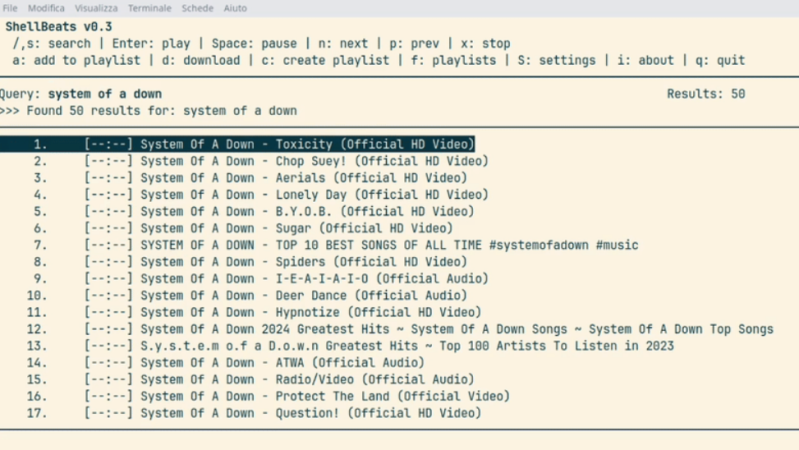
Generally, one opens a web browser or an app to use YouTube. However, if you’re looking to just listen to the audio, you can actually do that right from the terminal. You just need Shellbeats from [lalo-space].
Shellbeats is primarily intended for playing music from YouTube, and is well equipped for this task. It allows searching YouTube directly from the terminal, as well as streaming tracks or entire playlists from the command line interface. You can also make and edit playlists from within the tool, and even download the whole lot as MP3s if so desired. It’s all keyboard-operated and nicely lightweight. The overall experience isn’t dissimilar from operating a simple LCD-based MP3 player from 20 years ago.
There’s plenty of other fun stuff you can do in the terminal, too, as we’ve explored previously. If you’re working on your own media player hacks, be sure to notify us on the tipsline!












Additionally, if you only want to listen to a single URL, installing yt-dlp and mpv work very well. I wrote a bash function to make it even easier:
ytmusic(){ # Stream the audio from a YouTube video
echo
echo “Connecting to YouTube and opening audio stream…”
mpv –no-video “$1”
echo
}
Playlists work too. You can also use several other players, but mpv is the simplest and in my experience the most reliable.
I just realeased 0.5 version works a lot better!!
Now I can get adverts directly to my terminal, what a time to be alive
It uses yt-dlp under the hood, so I assume there are no ads.
Why aren’t you using Firefox with uBlock Origin ad blocker? Kills ads dead. I never see ads on YouTube or most of the internet.
People are always bitching about ads everywhere and I’m like “What ads? Oh, yeah. All the ones I never see.”
It seems like people would rather complain than do something about it.
Didn’t you hear? Firefox is dead. All the cool kids are using (insert browser flavor of the month here).
Meanwhile, Firefox remains the better alternative.
They all have pros and cons. I use Firefox with AdBlock (another falsely maligned app) 99.99% of the time and have few issues. Some websites, especially news outlets, don’t like it, so I switch to Brave for them.
I would switch to brave too if they left us tab scroll flag. I don’t know what those monkeys at google were thinking when they removed it from chromium.
uBlock Origin and a hosts file from Steven Black. On the odd occasion I do see an ad, it suprises me. Those ads are usually hard-coded into a site’s html. I’m one of those people who use an odd browser. Waterfox.
Why are there ⬛⬛⬛⬛⬛⬛⬛⬛ people who don’t get that if everybody used adblock then they would find a way to disable adblock or block you if you had it. And why do you want every person to be the same?
Try thinking just a little bit harder, take a few weeks off or something if it is an effort.
We understand that they would find a way to stop it but do realize where you are commenting, this is HaD where the technologically inclined gather to solve problems. Ads are just one more problem. High an mighty people say if we block all the ads that their businesses would collapse and frankly, that’s what I want to happen because the internet was more interesting before ad supported websites.
Some of us don’t want to use Firefox. I use a browser that doesn’t even support plugins, because that’s my choice. I don’t want to be forced into someone else’s paradigm in order to not be swarmed with ads… so I do it my way: qutebrowser + invidious + blacklisting ads on my DNS server. Doing it on the head end and altering my habits makes more sense than relying on plugins. To me at least.
Nobody is forcing you to use plugins, that you are against them for such a misplaced reason is very strange.
Reading comprehension isn’t your strong suit, is it? Further, I never GAVE a reason… just that it’s my choice to not use plugins. Try and keep up.
I am a CLI newbie on macOS X. Please forget my CLI ignorance.
I ran: brew install mpv yt-dlp
And it seemed to install properly.
What do I do next?
I tried running shellbeats and I get this error:
zsh: command not found: shellbeats
I see these on the shellbeats github page (but I’m not sure how to run them properly):
Build:
make
make install
Google or ask ChatGPT how to clone a repo from GitHub. I could give you detailed steps but I’m on my phone- message back if you still have trouble doing this plus the following steps:
Go into the directory where you cloned it. Run those two commands from there: make && make install. If those don’t exist you may need to brew install them. This builds the program. After it is done it says it copies the binary, or runnable file to start the application into /usr/local/bin, which should already be on your path so you should be able to just type: shellbeats from anywhere. I’ll install this later today and confirm if works.
Once you go command line you never go back. I figure that probably isn’t true and just sounds good but it is certainly true for me. I live in the command line, on Mac and a few Debian boxes:)
i love yt-dlp but i’m afraid that as these tools get more capable and easy to use, google will be more incentivized to kill them
@Greg A
It is already killed from me, if I use it these days I get 403 forbidden error.
Some goddamn EU thing? Or all non-US locations?
Have you updated to the latest version? I get those 403 forbdden errors now and then. Doing yt-dlp -U will update if needed and that usually fixes the problem. At least until YT tweaks something else.
Shellbeats v0.5 fetches(at startup) every time you run it the last youtube-dl version.
Youtube broke one of the APIs that yt-dlp was using several days ago. Yt-dlp was updated yesterday to fix that.
Heavy use of yt-dlp will get you a temporary IP ban and you will be unable to watch youtube without signing in or accessing it from a different IP. Setting up yt-dlp to use a PO token will make it less likely to get banned, but that requires installing more software.
Have you looked at invidious? We switched to it exclusively in my household. Easy to spin up dockerized, big community and very active at bugfixes and the Google cat-and-mouse. Not for everyone I guess, but it has become indispensable here. Tube Archivist is pretty rad too.
Have you updated recently? I get the 403 error occasionally. Doing yt-dlp -U will cause an update to happen if one is available. Once I get the latest version, it fixes the 403 problem, at least until YT does another tweak.
When I first got the issue I did an update, but it did not help as it used to.
It is possible I’m missing something, and it has lots of options; but those aren’t all usable for me.
I have a theory that companies like Google are very scared competing AI developers use the material and that made them more reactive in attempts to block those.
I’ve just been using myt + fzf for my own hackery. But this is awesome. Going to package this up for Gentoo immediately. Motivations much like the shellbeats author: tiling WM exclusively (sway, for oh… eight years now) and I got tired of bloated junk/distractions.
Total vintage would be on a blue background with yellow fonts, like midnight commander/DOS style:
https://www.both.org/wp-content/uploads/2024/05/MC-04-1.png
You can chage your terminal theme and Shellbeats will take your favourite colors.
Wow, an AI slop C program that just wraps yt-dlp.
once again i am saying this comment could drop the word ‘just’ :)
i love yt-dlp but i do use a wrapper. come to think of it, i have another program that wraps the wrapper. i don’t use AI slop, but each level of wrapper does make it much more useful for me.
OK, so I saw the comment that called it AI slop but decided to give it a chance, maybe see if I could give it some improvements and the commenter wasn’t wrong, it’s AI slop top to bottom.
The entire concept of code reuse is lost in this project and it has obvious shortcomings like it will shit the bed if the title exceed 255 characters.
If you like this concept, look at what commands they invoke and just write your own version because if there was such a thing as diarrhea code, this thing is it.