
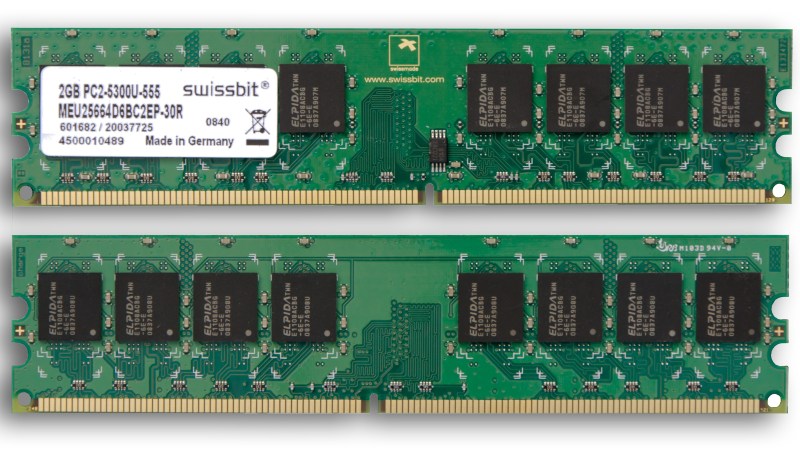
You’ve probably heard — we’re currently experiencing very high RAM prices due mostly to increased demand from AI data centers.
If you’ve been priced out of new RAM you are going to want to get as much value out of the RAM you already have as possible, and that’s where today’s hack comes in: if you’re on a Debian system read about ZRam for how to install and configure zram-tools to enable and manage the Linux kernel facilities that enable compressed RAM by integrating with the swap-enabled virtual memory system. We’ve seen it done with the Raspberry Pi, and the concept is the same.
Ubuntu users should check out systemd-zram-generator instead, and be aware that zram might already be installed and configured by default on your Ubuntu Desktop system.
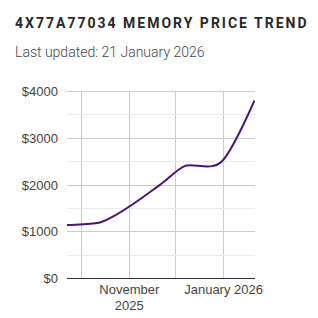
If you’re interested in the history of in-kernel memory compression LWN.net has an old article covering the technology as it was gestating back in 2013: In-kernel Memory Compression. For those trying to get a grip on what has happened with RAM prices in recent history, a good place to track memory prices is memory.net and if you swing by you can see that a lot of RAM has gone up as much as four times in the last three or four months.
If you have any tips or hacks for memory compression on other platforms we would love to hear from you in the comments section!












Reminds me of RAM Doubler on System 7 or SoftRAM/MagnaRAM on Windows 3.1! 😂
Linux world these days really is 90s all over again! 🤣
If only. Bring back the 90s! :)
Oh God no, it was horrible. Net neutral at best. Tried, tested, trashed. Everyone hoped it was going to be like SMARTDRV except for your RAM, but…no.
Windows 10/11 does exactly the same, it even shows it in taskmgr.
I was thinking the same thing. And here we are again, thanks to AI. I said I’d never miss ram compression, and am not happy to see it return.
Of course, drive compression was big in the 90s, too.
Is not better to remove the sh*t from the kernel? is not normale that the kernel use all this space… Then you can optimize it with memory compression, but what the point to have a lot of unused stuff in the kernel?
Welcome to the fun/rabbit hole of compiling your own kernel!
Thanks, now im having flashbacks to installing Gentoo Linux from Stage 1.
Like what? You’ve heard of kernel modules, right? What “unused” stuff are you thinking of?
The kernel takes up a relatively tiny portion of the system memory, and is modularized anyway. The point of zram et al is to compress user-space application memory. You know, like the GB’s of memory that Firefox eats up just existing, much of which is highly-compressible.
I have zram enabled on all my systems, so much unused CPU power it just makes sense…
Especially on embedded systems, with overlays to reduce/eliminate flash writes
Just a heads up for Pi users with Pi OS, In trixie a recent update has added rpi-swap.
this conflicts with zram-tools. Zram-tools service fails to load, I found out the hard way
Why would you do that when you can simply visit downloadmoreram.com
This is what I usually try to do, but always get distracted by the Hot Girls in my area who want to talk to me.
Damn, I never found any in My area…
Don’t even use the RAM I have. No need for compression. The only thing the RAM prices have done is stop any upgrades.
for real!
This article reminds me of a similar hack i used back in like 1996. Used an ‘after-market’ patch to Linux 1.2.13. I “needed” the compression because i had 4MB of RAM and it simply wasn’t enough. A year later, a summer internship paid for 32MB of RAM and i never worried about RAM ever again.
Anecdote about the kernel hack…back then, the kernel stack was one 4kB page and the compression code would sometimes blow that, eating the 0xdeadbeef magic bytes at the end of the stack and causing an Oops. That really amused me, but it was an easy fix to just use two pages for the stack. I was sure glad to get rid of the hack though.
You’d think with ssd using page files and disk cache
Itd be actually more useful than even with a 10k rpm hdd
1TB ssd?
64GB of page memory…why not?
I mean ssd speeds can be similar to some ram
Nvme and m.2 now instead of just SATA
And at least you can shutdown the computer and hibernation uses zero power
Since it just restores ramdump and registers from ssd
Not even close. DDR5 is around 40GB/s or even more. And the latency difference is an order of magnitude slower.
Well wit the kinda of money ai got to inflate dram
Just use sram, nobody going to complain about sram prices, if anything they go down
Can’t get faster than sram that can run at CPU clock
Back of the napkin, MRAM would be interesting, and available. Ships from Taiwan.
Mram downside is like a HDD, strong magnetic fields will corrupt and flip bits, but are resistant
But you’d need a strong magnet like a neodymium
50x stronger than ones you find in HDD
Even smartphone give ya 8GB of ram and 8GB of nand space for “RAM boost”
Works great with 8 core CPU, and emulation
They can afford the several grand per GB cost…
And asynchronous and no memory refresh cycles to waste clock cycle
Just spit an address get some data, limiting factor is propagation delays
How much 86_64 runs without wait states for memory…
RAM price squeeze is a nice way of putting anticonsumer monopolistic megacorporate market fixing. What the AI boom is doing to the PC market is criminal. Huang is a pos
Heh, I seem to remember practically everyone complaining about how fat and inefficient programs were. Now is the time to put that complaint into some action and put programs on a diet.
Agree.
I right now checked 3 programs in windows task manager:
mspait.exe – consumes 29MB of RAM (with a picture size of 1×1 pixel) – Windows XP required 64MB.
notepad.exe – consumes 16MB of RAM – despite being absolutely most basic (almost feature free) text editor it consumes 5MB more than notepad++.
I’m not using ram definitely
But you used some RAM to post this comment though
For me it’s WOM…
Every comment they’ll ever make, stored in ROM. Nothing new under the sun.
It’s getting expensive because the corporation’s of AI are not wanting anyone with a computer…think to the movie the fifth element…they want to control us and take our customers computer’s away. No let us have then … everyone plugged in to one big system that they control…that’s the idea here in the news lately… Peace Re$oundologist over And out
This is the wrong approach. On any system that can have swap on disk, Zswap is superior to zram in every case. The only time swap on zram makes sense is things like diskless nodes that network boot, or embedded systems running on low endurance storage.
Using swap on zram us trying to hack together an optimization from several discrete subsystems instead of using the purpose built one the kernel engineers deliberately designed and engineered for that specific thing.
I haven’t tried ZRAM with modern computers that have decent amounts of RAM, but it noticably helps with older setups like my 20 year old ThinkPad that is limited to 3 GB. Still, even in that case, it’s not a solution if you truly need more RAM.
I would say it IS a solution in the case where you have CPU cores to spare.
Someone using a modern store-bought PC may have 16 hyper threads and ~8 GB of RAM. During normal office work you will be spilling to swap but barely using half the CPU. Might as well tap the unused CPU capacity to prevent some of the swaps.
That’s just not the situation on a 20 yr old Thinkpad.
It’s called swap. It’s a good thing. Swap to SSD works very well, since the latency is often 1000 times lower than for HDs.
Sure, thrashing is bad, but zram doesn’t help that at all – even makes it worse, since compression and decompression is more expensive cycle and joules-wise.
But Zram IS a swap implementation. Zswap makes it even more explicit. Frequently used data resides in memory. Infrequently used data is swapped to compressed memory. Rarely accessed data is swapped to disk.
The flexibility to swap to compressed memory OR disk is good for system latency AND reduces ssd write wear.
I use zswap rather than zram. I added memory compression staristics for both to Mission Centre, it was merged so hopefully will be in the next release.
I’m so happy that I can finally download more deditated WAM for my Minecraft server!