
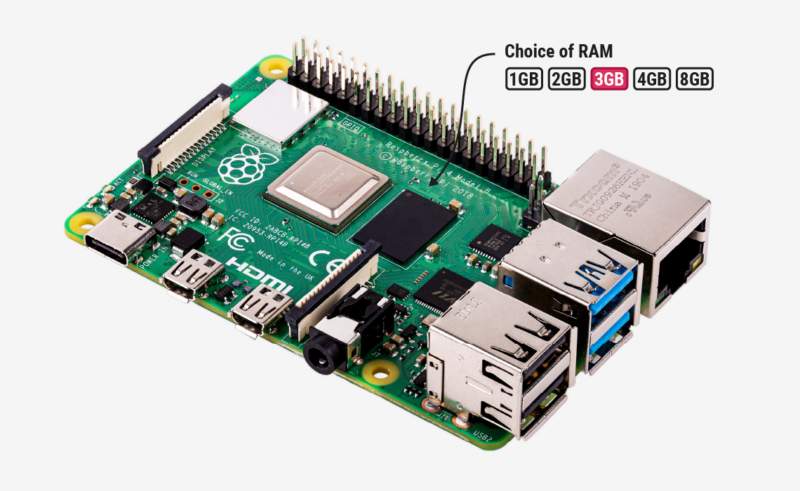
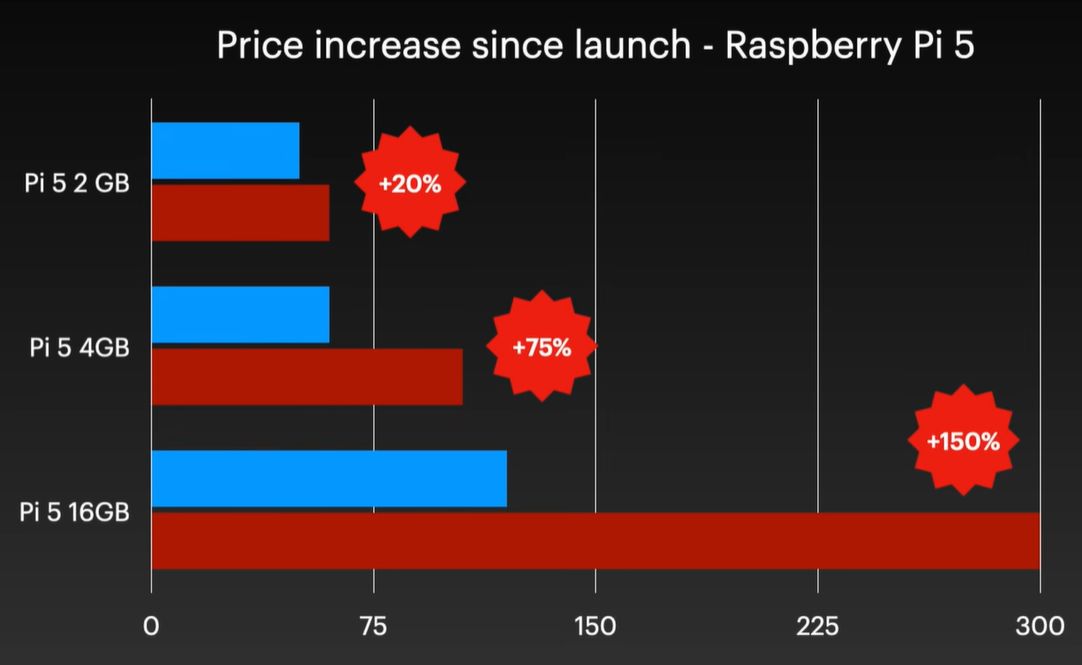
Although easily dismissed by some as another cruel April Fools joke, Raspberry Pi’s announcement of a new 3 GB model of the Raspberry Pi 4 along with (more) price increases for other models was no joke. Courtesy of the ongoing RAMpocalypse, supplies of LPDDR4 and LPDDR5 are massively affected, leading to this new RPi 4 model with two 1.5 GB LPDDR4 chips, as these are apparently cheaper to source.
Affected in this latest price increase across RP’s product range are RPi 4 and 5 models with 4 or more GB of RAM, with price bumps ranging from $25 on the low end to $150 for the Raspberry Pi 500+. If you wanted a Raspberry Pi 5 with 16 GB of RAM, you’re now paying $300 for the privilege.
Obviously, this news has got people like [Jeff Geerling] rather down in the dumps, essentially stating that using SBCs like the RPi is now beyond the means of many hobbyists. While you can still use SBCs that use e.g. LPDDR2 RAM, such as the older RPi Zero, 2 and 3 models, [Jeff] himself is now moving more towards wrangling with snakes on MCUs, as these boards are so far not significantly affected in terms of price.
With current projections in the RAM market being that this year will still see more price increases, it remains hard to tell exactly how ‘temporary’ this situation will be. That said, using readily available, powerful and cheap MCUs like the ESP32 variants for projects isn’t a bad idea if you really don’t need to be running more than perhaps FreeRTOS.












hahah i certainly enjoyed the punchline “save money by using a smaller computer if you don’t need a bigger one.”
Cold day in Hades!
For $299 one can get an exceptionally nice USED notebook PC. Yes, a bigger form-factor but a far more useful device.
$295: Lenovo ThinkPad X13 FHD Laptop Computer Windows 11 Pro, AMD Ryzen 5 PRO 4650U, 32GB RAM, 256GB SSD, HDMI, Thunderbolt, Ryzen Notebook Win 11 (Renewed)
$287: Dell Latitude 5420 14″ Notebook – Full HD – 1920 x 1080 – Intel Core i7 11th Gen i7-1185G7 Quad-core (4 Core) 3 GHz – 16 GB RAM – 256 GB SSD (Renewed)
$284: Lenovo ThinkPad X13 Gen 2 Laptop, 13.3″ FHD Notebook, Intel i5-1135G7, 16GB RAM, 256GB SSD, Windows 11 Pro (Renewed)
-$150: Acer Chromebook 311 CB311-9H-C12A Laptop Computer, Intel Celeron N4000, 11.6″ HD, 4GB LPDDR4 RAM, 32GB eMMC Storage, Chrome OS, Wifi, Bluetooth, SD Card Port, Computers for Office or School (Renewed)
Please stop informing the general public how reasonable used/refurbished lenovos are. I don’t want to panic buy one at the end of the year when the supply chain impacts have materialized.
Lenovo are junk computers anyhow. Don’t buy them if you want something that lasts. I bought one for my oldest girl as a school computer. Died after 2 year+, just a few months out of warranty.
Thinkpads are rock solid. You have a sample size of one, and it was very likely not a Thinkpad.
You might find many of these systems do not meet secure boot, approved cpu (i5 is not officially supported by win 11, the seller is not OEM certified and is scamming people), and TPM 2.0. Best advice, absolutely do not buy a new PC until i8 and up, and DDR5 comes down significantly. I suggest this because people like you might buy a PC which loses Win 11 suddenly, and these dealers are quite disreputable.
I think most people buying a used PC instead of a Raspberry PI would run Linux
“PC instead of a Raspberry PI would run Linux”
+1
Although some may wish to run Raspberry Pi OS for x86 (formerly PIXEL) which is a Debian OS in the Raspberry Pi GUI flavor.
$299 for a Raspberry Pi is simply robbery…
An Orange Pi 5 with 8gig RAM is under $140 at Walmart!!!
http://www.walmart.com/ip/Orange-Pi-5-motherboard-Ruixin-Micro-RK3588S-processor-8-core-8GB/16185108659
Huh? The i5-1135G7 is an 11th generation Intel CPUs, just like the others, which are all windows 11 compatible.
“i5” was intel’s midrange CPU designation across multiple generations; it tells you nothing about compatibility or performance beyond that it’s presumably better than the i3 and worse than the i7 of the same gen.
Or you might find that these are ex-govt or ex-corporate lease machines, less than 3 years old, business-grade, TPM+Win11 compliant, etc, etc. Like the three Lenovo laptops I currently use. Haven’t bought a new laptop for years, why should I when I can have them for 1/3 retail of current models? An i7-8550 with 12Gb, an NVMe boot AND an SSD for AUD$600 ?
i5 not officially supported by Win11, where are you getting that anecdote?
“I hope you step on legos.”
Whew! You tell ’em 😃
I’ve had pihole and Deluge running on a Raspi 3 for years. Doesn’t even tax the Pi. The advantage to me is the ease of management because of the familiarity with Debian. That Pi owes me nothing, it’s paid for itself long ago in the absence of ads in my internet browsing, and the blocking of telemetry to various manufacturers.
I have no use for a Pi 4 or Pi 5.
I consider losing Win 11 suddenly a feature, not a bug
A year or so ago, I was going to spend I think $159 on a RPI5 and I decided instead to buy a Lenovo mini PC for $140 instead, it came with 16GB of DDR4, a Ryzen 5 3400GE, and a 500GB NVMe refurbished.
I can’t even fathom who beyond the bloated education market or youtube content creators would ever justify paying $300 for one of these.
Completely different job though – a SBC like a Pi you can embed into you projects with so much freedom, usually won’t even need to work hard to keep it cool enough in comparison, has all that GPIO, and at least for the Pi family they are long term available so your project is replicable.
Your second hand AMD/Intel machine has always had the price/performance advantage if all you want is a computer, in laptop form it comes with built in screen, UPS, etc, but its darn nearly useless for a great many things the Pi type form factors are ideal for! Plus that AMD/Intel is likely to use more power at idle than the SBC does running flat out – obviously some laptops chips in particular do have very aggressive power saving built into the silicon, but as a general rule…
I agree. I stuck a Pi 4 to the back of my TV during the first lockdown and it’s been running quietly almost 24/7 doing its job ever since. Try that with an old laptop.
I use “old cheap computers” for all kinds of stuff, but there’s a Venn diagram of uses for old computers and uses for a Raspberry pi. There’s some overlap, but not 100%.
The pi is and was for attaching your own hardware. The pi IO header. How accesible is SPI or I2C on your used notebook?
For desktop use, any used business class pc has always been better, certainly in the last decades. But that is not the main purpose of the pi. Its just a secondary use.
you can just plug Pico or any other $5 microcontroller into USB and have SPI or I2C easily available in many ways
i am just absolutely in love with the $150 laptop market. i just checked and my temu rnruo laptop has increased in price to $160, presumably because of the 8GB of RAM they include. still an insane bargain, since i remember what it was like to buy laptops before about 2015.
You’re correct, but getting an older office micro PC was already better before the RAM prices went up. The bigger PIs have lost the sweet spot for a few years now.
There is a narrow band of battery powered projects where the PI might make sense.
I think the home assistant ecosystem has taken away a lot of former PI use cases… thinks like a smart cat door camera. The “smart” can just run on your home server, processing the stream of a cheap camera.
Psssst… you can still get a used “slim client” mini pc on ebay in the $50 range that is comparable to the raspberry pi (other than size).
I’m partial to the Dell Wyse 5070 (preferably with the j5005 cpu). It’s fanless, quad core x86 cpu, up to 16gb DDR4, sata ssd, wifi (which can be swapped out for a NVME drive), USB B and C ports, hardware video transcoding, etc. It will do anything other than 3d gaming.
If you want 3d, get a Lenovo ThinkCentre M715q with a Ryzen 5 2400GE cpu. The APU is powerful enough to do a little bit of actual modern gaming.
They are cheap on the used market because enterprise users are dumping them to recyclers in large quantities.
Thin Client. They are called thin clients. No one has ever called them a “slim client”. A few years ago a lot of people started to do this as replacements for Pis. I have done it too. Now I got 3 of them.
Wyse 5070 (Pentium Silver J5005, 8GB DDR4 RAM, 64GB M.2 SATA SSD) got for under $40 this year.
HP t640 (AMD Ryzen R1505G, 8GB DDR4 RAM, 128GB M.2 SATA SSD) got for under $50 fall of 2025.
HP t630 (AMD GX-420GI, 4GB DDR4, 16GB M.2 SATA SSD) got for under $40 around 2022.
I had the HP t630 upgraded to 16GB RAM and a 500GB SSD, now its 8GB with and swapped the 500GB SSD with the 128GB SSD from the HP t640 and threw the RAM into a ThinkPad.
Hm. By Thin Clients I’ve used to think about DOS and Windows 98 compatible systems.
With IDE, SVGA, SB16 or AC97 on-board sound, serial/parallel ports, NE 2000 style NIC, maybe USB 1.1 ports. And 64 to 512 MB of RAM, at very best.
You know, with the standard components needed for WinCE or an embedded Linux.
Something like VIA C3, AMD Geode, Transmeta Crusoe based motherboards..
Cute little hardware that’s equivalent to a Pentium/Pentium II PC or an netbook, at best. Intel Atom, etc.
Something like a Wyse Winterm Sx0 or an HP Thin Client t5710.
The thin clients specs I read here in tje comments are better than what my last Windows 7 PC had! It’s insane to me. 🤯
Not classic, low-power thin client hardware that runs an RDP software or an X11 display server.
Sure. I remember the same PCs and even older too. I get it, everything looks like overkill today. You could build a thin client with far slower hardware than what is produced today. But hardware has also become more power efficient. That old stuff is better used as a space heater.
This will be the year of recycling. I just got two ASUS mini PCs with 11th gen i5 for 150 EUR each. I’m not sure what I need them both for, but the price was too good to miss. I shudder to think they could even be cheaper than Raspberry Pis.
It’s not a question anymore of waiting for the AI bubble to crash, we need to be proactive about it.
And where exactly is the IO header on those things for directly connecting you hardware? The pi was never meant to be a desktop first. So you replacement does not even cover its primary use case.
Nothing wrong with using thin client and older business desktops. I do so to, but they are not true pi replacements.
Some Raspberry Pi’s can be setup to use small amounts of power. A 4 core Raspberry Pi Zero 2W typically uses 150 mA to just over 600 mA with all 4 cores maxed out. This is helpful if you want to run it on battery power https://www.cnx-software.com/2021/12/09/raspberry-pi-zero-2-w-power-consumption/
A mini PC uses much, much more power.
The Zero’s aren’t affected by the price increase afaik because they use older ram
Raspberry can not get their stuff sorted when it comes to supply chain things since covid.
I never got the idea of raspi and other SBCs
They’re weaker than you average intel NUC or other mini PC, they’re not even cheap (compared to a refurbished laptop), and their IO is also much limited than what you would get if you connected a raspi pi pico using USB and running circuitpython on it
They used to be cheap. I bought the original when it came out for $25 (or was it $35…I’m old). Used it as just a browsing/tinkering/shop machine, had another for a mediacenter.
I bought every generation up to an including the Pi 4. By that time though the prices had gone up substantially, and I thought really hard if I really wanted a Pi 4. For multiple reasons including price I skipped the Pi 5 (hw decoding gone??).
I would not buy one today. The value proposition is not there, especially not at these prices, and not really even at the original Pi 5 prices. Plus you gotta get cooling for them, ssds, etc.
They still are cheap if you don’t want huge performance – the Pi 4 and 5 are rather more desktop replacement class CPU but you don’t have to buy the more powerful machine if you don’t need it. The cheaper you need more than a microcontroller, but not a full computer type Pi’s are still available, and still cheap, even cheaper in comparison now.
For instance I still have the original pre memory bump Pi 1 playing as a wireless speaker, media player type thing built into the shell of an old Bose waveguidey radio thing that let out the magic smoke. One audio card with amplifier so it sounds nice and many years of service (with i think 2 disruptions for cheap SDcard failures), no need for anything more.
So should I have to do the project again any time I’d probably pick the Pi zero family – might add my old low res DLP projector and a socket for the power tool batteries I happen to use one day too, as even the OG pi is a perfectly fine video player and as the workshop ‘radio’ having a screen projected on the wall showing whatever reference material I’m working too could be nice.
Model B in 2012 costed 35$ which is around 47$ today. So how 25$ dollars today (around 18$ in 2012) is expensive today?
@shinsukke I suspect the reason you don’t get the idea of SBCs is you don’t know what they were built for.
Raspberry Pis kicked off the SBC market and they were initially designed to act as an educational computer to help kids learn how to code. The design makes sense for this purpose, they were cheap uniform devices with an interesting mix of IO to help students make projects that engage with the real world, to keep them interested, while being affordable enough that if they broke through misuse they wouldn’t be expensive to replace.
What happened after this is hobbyists and industrial users started using SBCs for their own purposes. You could argue various pros and cons around the devices that were produced for these purposes, but the core mission or the Raspberry Pi has always been the same, which is to enhance computer education.
Second hand gear is always going to give you better value for money than new gear, and I’m all in favour of repurposing second hand gear for personal use, but it’s never going to be a good solution for producing a mass education program where there are big advantages of having a stable, predictable platform.
As the years have gone on, a range of higher end SBCs have been developed for the hobbyists and industrial users that wanted them. These are less useful for the education market, the only reason they were produced is because potential customers said they were willing to pay more for higher spec SBCs and were willing to pay for them. So I would suggest instead of focusing on why these higher end boards exist, you should be thinking about why people are willing to pay for them. There are multiple reasons I can give, but it’s better if you think about this for yourself.
Yah… I never got that.
I would think for teaching kids an educational based distro with a simple install and good hardware detection meant to be installed on old scrap PCs would make more sense. So… Basically Raspbian x86.
And for I/O… back in the day when the Raspi was released… a cheap Arduino clone hanging off a USB port of course.
Today I would go with a Pi Pico so they can use the same Python language for both apps and things.
Old PCs are cheap and plentiful. The family TV is usually occupied. And the cheap old displays at the thrift shop are still VGA.
Further… a cheap, separate micro-controller is easily replaceable when the pins get blown. That seems like a very good feature for an educational device does it not? And of course… real-time access as opposed to waiting for an OS to get around to reading your button press.
But… I am very grateful to the Raspberry Pi foundation to making inexpensive SBCs a thing! It’s much better than trying to hack an old thrift-shop router!
For me the only reason its the CSI camera interface and all the image sensor you can Connect something is not possible with a mini computer. Maybe yo can remote a mirrorless camera or some arducam USB sensors and get similar result but not cheaper and not so reliable since this option is less versatile.
IMO raspi or its competitors make a ton of sense in a few narrow niches…but i agree a lot of people who are buying them would be better off with something else…for TV / media / workstation, a NUC or even sometimes an ‘android tv’ sort of box. For cyberdecks (ugly laptops), a used low-end laptop is a huge upgrade in every way. For most embedded, RP2040 / ESP32 is a million times better. There is a real use case for these, it’s just not where most of them wind up.
I’m using two of these SBCs as MP3 players in my house, and i think that’s a pretty stupid use for them but they were very handy for it because i had already bought them anyways. The first one because i was curious about the concept, and the second just because i was curious if a rockpro would be a lot less closed than a raspi. (it is much less closed, but truthfully i don’t have the free time to hack either one, hah)
Oooh ouch, though if you consider the majority of these decks ugly oh boy so many of the default laptops must be even more hideous, as while there are some ugly decks out there most of them really do look good. Many of them are even rather practical ergonomically too.
Also push back on the low-end laptop as a huge upgrade in every way – actually fitting such a thing to your desired form factor, or adding the hardware you want, that might well be why you made a cyberdeck in the first place can be rather tougher. But the big one is a Pi is long term available, and keeps the same footprint between generations most of the time, so almost certainly upgradeable – turning your cyberdeck into something like a framework laptop, quite possibly remaining relevant and lasting ‘forever’.
First off, budget laptops aren’t ugly. Second off, they’re cheaper than and work a million times better than the best raspi cyberdeck…even if they are ugly, so what?
There’s no “desired form factor” in the cyberdeck craze. No one actually wants to use a neck-breaker, or lug around enormous fatness in the dimensions that don’t have to be fat, or suffer a severe shortage in the dimensions that ought to be big. The thing they desire is clicks. Yay clicks.
When i said that raspi has great utility in a narrow use case, i didn’t mean anything half as derogatory as saying it’s got great utility for generating clicks. But, ok, yeah, it does.
Missing the point entirely – As I though I was clear that I agree laptops are not ugly (as a rule anyway), but compared to the usual visual quality of the published cyberdeck, even if its a style that doesn’t speak to you as it actually has some…
As those are really quite artistic as a rule. With so much effort being put into the design including in how they look, rather than just being cheap flat nearly featureless slab boxes that happen to fold with a screen on one side and keyboard on the other!
So why would you want to use a laptop then!??!?! As those are exactly that. They really are ergonomically pretty darn terrible, especially if actually used on your lap as the name implies they should be. Simply a somewhat required design compromise with the ergonomics of use being sacrificed somewhat as you can’t yet at least have the screen magically floating up at the right height with the keyboard expanding to minimise wrist deviation etc without needing rather more setup and packing up time.
SO many of these decks very very clearly have a desired form, that often follows the function it was built for! No single unified design goal for them as a collective, but very clearly a goal existed individually – some are more pocket sized with a real buttons thumb keyboard, some have very unique screen aspect ratio for some reason – perhaps lots of HAM gear built in and a nice waterfall display is wanted. Perhaps the designer hates laptop keyboards enough to wish to avoid them or even needs something more post RSI recovery like the split keyboards.
Plus if you are trying to shove a laptop into your project its almost certainly vastly fatter than a Pi style SBC would be in that project – the original laptop almost certainly wasn’t, but as soon as you want to actually change anything the usually vastly larger and more awkwardly shaped motherboard and higher cooling requirements will make the laptop based system rather hard to fit, so forcing vastly chunkier design to compensate.
They’re weaker than you average intel NUC or other mini PC – but much cheaper, smaller, consume less power and have tons of peripherals build inn.
they’re not even cheap (compared to a refurbished laptop) – so are new laptops. But still – SBC consume less energy, have more GPIO.
their IO is also much limited than what you would get if you connected a raspi pi pico using USB and running circuitpython on it – but this is basic difference between SBC and microcontrollers. While Pico (or any other development board with ARM, ATmega,, PIC, MSP, ESP etc.) give you low level access to hardware but little less computing power, SBC gives you more computing power but less low level access. So if you do a PID controller for a valve you better go for any cheap micro. But if your control relies on bigger data sets and complex computation even Pico might not make it. You could to it with Pico connected to PC but than you need both of them.
Take your political bs elsewhere
Take your butthurt elsewhere
I hope you step on legos.
There are plenty of political spaces to discuss politics. This is not one of them.
I also hope you and rand are banned for trying to shoehorn politics where they don’t belong.
The majority of people at a political themed site will be completely clueless and without care regarding the issues which affect our hobbies. If we cannot discuss them in technical places where the people with similar interests exist then we cannot get the word out and we will lose everything.
It’s not political it’s supply chain analysis. So it’s as political as the article is.
That’s a crazy fact that i wish was more widely appreciated. Everything is closely related to the economic situation. In this technical blog, we mostly focus on a few specific bubbles financial in technology, AI and cryptocurrency. But it’s part of the same overall economic picture that influences everything from housing / healthcare / employment to foreign trade / currency / war. Economy is the glue that binds everything together and there’s no human endeavor where it isn’t germaine.
Bull. It wasn’t a “with fuel prices increasing so will consumer product prices” it was “Orange man bad”
Don’t act like you don’t know the difference.
Is the orange man not responsible for the strait closing and driving up petrol prices?
Aww widdle burger got his feel-feels ouchie
I will never understand the opposition to political speech here. I mean sure.. there are plenty of political topics that have no business on this site. But with states attacking open source OSs and 3D printing and political actions threatening the supply chains that provide us with the parts and tools we use… Some politics are very much on topic!
If hackers, makers diyers or whatever we each prefer to call ourselves cannot discuss these issues in the very places that cater to our technical interests then where should we go? How will we organize any resistance to the destruction of our hobby?
How is that resistance going? Has the NSA stopped spying on people? Have all the Flock camera’s been taken down? Have FISA warrants gone away?
No? Ok so loud mouths banging on in the comments do nothing except irritate those of us looking to get away from politics and focus on something interesting.
Dude you clicked the supply chain article; not us.
Remember MCUs or better yet 555s are not affected by the AI bubble
You can get a brand new N150 powered desktop with 3x HDMI, 12GB of RAM, 512GB of SSD storage for 150 euro’s with taxes and tariffs paid. At least, that’s what I paid two months ago and I checked last week and it was still the same price, from China. Came with Windows 11 but I put Linux on it.
A bit of additional historical context on the background to the origins of the pi. Like the columnist Jenny, I went through the ZX81 and Amiga route. I bought my ZX81 as a kit for the princely sum of £49.95. It had 1K memory and I’m not even sure it had a psu since I remember having to make one in a die cast box. At the time I was living away from home so fifty quid was worth about one hundred pints of beer or about one and a half months of rent. A lot of money at the time. Nevertheless the practical experience gained with it as well as a second hand amateur radio propelled my career into R&D so I consider the investment to have been worthwhile. During the eighties when I was working for one of the large British engineering conglomerates we used to interview potential engineering graduates each year on the ‘milk round’. As this was era of the BBC micro and other 8 bit micros a fair number of the students were computer hobbyists and these tended to be the better choices since they already had practical experience of the development lifecycle through their hobby. Roll forwards into the 90s and this well started to dry up as the last of the 16bit home computers faded away. It became quite common to interview final year students whose only practical experience was their project and the number of graduates who went through a practical electronics or computing hobby dwindled to almost none on our rounds of interviews. When my own kids went through the UK secondary education, they had no computing lessons at all in stark contrast to the heyday of the eighties when it was commonplace. It is this shortfall that the pi was developed for, and that can be achieved with the lower end zeros and 3As, you don’t always need the top end units. The ram price hikes are extremely unfortunate and driven by AI data centre expansion. As those of us who work in the industry will know ram is not the only component suffering from price hikes and very long lead times. It’s going to get worse before it gets better.
Sure glad I bought one here, and there over time when prices were stable. I have seven RPI-5s now just waiting for projects and five that are in use 24×7. Several 1s, 2s, 3s, 4s also in a box… So I am good until the AI bubble breaks. Also a 500 and a 500+ (currently being used). Not sure how RPI can stay in business now as purchases must be plummeting. Maybe the corporate side will hold them together.
I was going to spring for a new AM5 MB/RAM/CPU this spring for fun (you know, just to kick new hardware around), but no longer. Until things get more normal, no upgrade for me. Sad really, as I am sure I am not the only one putting an upgrade on hold. Now, if something breaks, then maybe I’ll bite the bullet…
The economics have changed so much now with the RAM price increases.
You are buying RAM and then you choose what other peripherals to put with it including a CPU. Using that law check, I would rather buy a high-end AMD CPU to accessorize 8 GB of RAM then a low-powered raspberry pi one.
The used computer documents hold up. Yeah, most people have a used old computer and there are very few things that I want to do that can be done in a VM on old hardware. 16 GB of DDR 3 or 4 from in a PC I’ve had several years goes a long way for projects.
Edit: Very few things that cannot be done with a VM
Very true. That is one reason I maxed out my AM4 workstation with 64GB of DDR4 when ram was affordable, and 12/24 threads…. More for using VMs than any other use. Ie. I can give my VMs several cores and 8/16/32GB of memory to work with. Unfortunately, 64GB of DDR5 is no longer in play for buying on a ‘whim’ in an upgrade…. So sticking with current AM4 systems.
The RPI platform has the advantage of size for small projects and of course all the hats, and sensors that can be attached. But for a PC, it has lost that market (unless really small footprint is needed). Or one just ‘likes’ ’em … like I do.
Can be tricky with real world hardware interfacing – that serial port device pass through etc. Though in many cases its also tricky trying to run that old gear ‘native’ on a system many decades newer too.
I do agree though, however it is also a good reason to have a pretty high Ram count Pi 4 or higher, even with the price changes – Most of the VM things you’d want it can handle pretty well and you are then not wasting 95% of the very expensive probably buy you at least one Pi just with the ‘high end AMD’ cpu potential or stuck with this ‘idle’ machine not really able to drop power states so pulling rather a lot from the wall in comparison! For a long time the Pi4 built into my desk had that handful of VM running often all at once – little overclock for more performance and still no need for a fan with a giant tower cooler strapped to it. Was great, silent and energy efficient.
Though I did also overlapping that time have the 2 CPU, multi GPU workstation with 128GB? (I think its been a while since the magic smoke got out) that handled the heavier VM tasks and everything else I’d want. And since that machine passed I really haven’t needed VM much at all – picked up a pair of steamdeck pretty cheap, the upgraded NAS handles a few things, and while my replacement desktop is far less crazy (as I was pretty broke at the time) it isn’t a bad system really – so who needs VM when you have spare hardware, especially if you can pretty trivially boot of the easy to change SD card?