
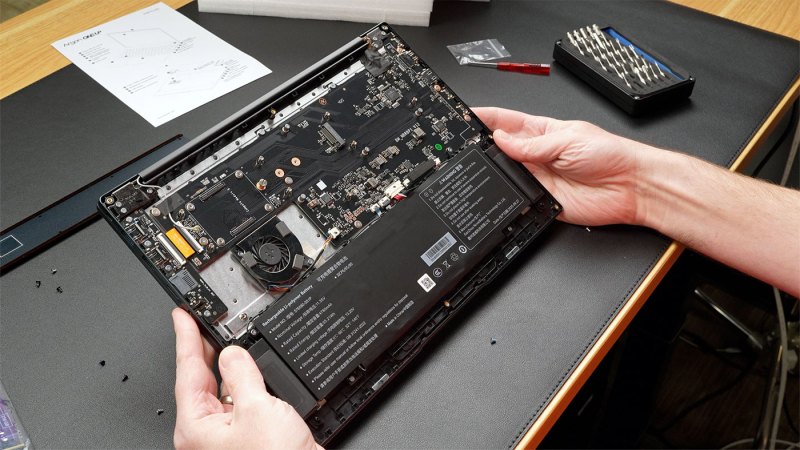
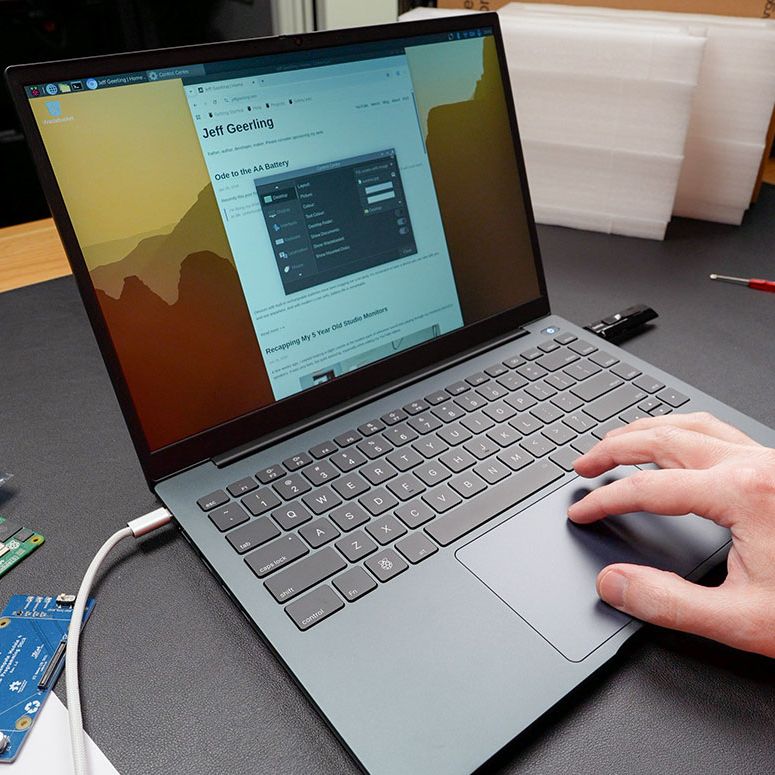
The Raspberry Pi Compute Module form factor is a tantalizing core for a potential laptop, with a CM5 module containing a fairly beefy SoC and RAM, with depending on the exact module also eMMC storage and WiFi. To turn this into a laptop you need a PCB to put the CM5 module on and slide it into a laptop shell. This is in effect what [Argon40] did with their crowdfunded ONE UP laptop, which [Jeff Geerling] has been tinkering with for a few weeks now, with some thoughts on how practical the concept of a CM5-based laptop is.
Most practical is probably the DIY option that [Jeff] opted for with the ‘Shell’ version that he bought, as that meant that he could pop in one of the CM5s that he had lying around. The resulting device is totally functional as a laptop, with all the Raspberry Pi 5 levels of performance you’d expect and with the repair-friendliness of a Framework laptop.
If you’re buying the Core version with the 8 GB CM5 module and 256 GB NVMe SSD included, you’re looking at €475 before shipping or the equivalent in your local currency. This puts it unfortunately in the territory of budget x86 laptops and used Apple MacBooks, even before taking into account the current AI-induced RAMpocalypse that’d push [Jeff]’s configuration to $600 if purchased new, with prices likely to only go up.
Even if this price isn’t a concern, and you just want to have a CM5-based laptop, [Jeff]’s experience got soured on poor customer support from [Argon40] and above all the Raspberry Pi’s arch nemesis: the inability to do sleep mode. With the lid closed it runs at 3.3 W idle, but that’ll run down the battery from 100% to flat in about 17 hours. Perhaps if Raspberry Pi added sleep states to their systems would it make for a good laptop core, as well as for a smartphone.










If it was fanless it could have served as a good workshop machine. I have a pinebook in my workshop, and while slow, it is great because dust gets everywhere and there is no fan to clog.
I love my pinebooks, i have 1 of each. Any idea why they killed it entirely?
J
it is sort of fanless, they said in the forum that fan is not needed for normal usage and they added it there just in case and to use the space, basically they overengineered it because it is a prototupe.
fanless comment/explanation here https://forums.raspberrypi.com/viewtopic.php?p=2305826#p2305826
There are lots of fanless mini PCs available. They are typically in an extruded aluminum case that acts as the heatsink.
I get we’re hackers, but that price I have a hard time seeing the appeal.
The big boys can make laptops by the millions, it’s almost impossible to match the cost benefits that brings.
I don’t have a particularly good idea of how they could have avoided this without turning it into something much less recognizable as a laptop; but rPis in general get rapidly less exciting if you put them into pure ‘normal computer’ situations.
It’s nice that they have the punch to do it if you have a situation where you need to drive a display or two and some GPIO and MIPI DSI/CSI things; but if you are just using it as a desktop/laptop the BCM2712 is merely OK and not actually all that low power compared to bottom-of-range Intel(which will have deeply unspectacular, but less weird than videocore GPU; and also relatively mature power management and PCIe root complex).
I can’t really hate on Argon for running into that problem; since ‘laptop’ rather than ‘slightly portable dev board’ really pushes you toward ‘normal computer’ use; but that doesn’t make it any more cost effective.
It’s not necessarily something this unit could solve(at least without some sort of slightly gross interposer adding reliability issues and connector costs); but it really doesn’t help that CM pinouts aren’t 100% compatible between versions and so this is a more or less dedicated CM5 shell; not a framework-for-rPi thing(unless it gets suitably lucky with what the CM6 does with the subset of pins it makes use of).
It also only kinda brings out the GPIO; and doesn’t appear to bring out the camera interfaces(or ethernet, for some reason); so while it is theoretically modular it’s pretty much just a not-terribly-fast ARM laptop; of the sort that you could get as a chromebook or faster as an M1/M2 mac; and if you aren’t interested in architecture it also overlaps with the cheap seats of x86 laptops pretty well: the N150 or similar has less interesting peripherals; but as a just basic laptop CPU it’s not significantly different in power envelope and has significantly better power management.
I absolutely don’t hate it or anything; they even went a step above on things like 1920×1200 rather than 1080, seemingly decent build quality, etc. but fundamentally rPis don’t bring all that much to the table if you are just going to dress them up as normal computers; and “competent laptop that will run linux” is a brutally competitive field.
This will never be a cost competitive option. A small-batch, self-assembled, self-supported device? If you want inexpensive then get any one of the budget devices from major manufacturers or buy a good condition used device. The economics strongly favor that.
This only makes sense if there’s something those mainstream offerings don’t have: maybe you want a Pi specifically (gpio?) or maybe you want the joy of building itself. Those are fine reasons if that’s your thing.
Perhaps due to the fizzle-of Moore’s Law, we seem to have entered a period where laptops really are just appliances, and it’s been that way for over ten years. I am writing this on a MacBook built in 2013. It works great for most of what I use a computer to do, so there would be no reason for me to get rid of it. The RAMpocalypse makes this even clearer (though I am glad I installed the 16 GB of DDR3 this laptop contains years ago!). Thus I think the need for an upgradeable, detachable CPU unit is becoming less and less necessary. Newer CPUs don’t really change the laptop experience by a noticeable enough amount. The limited availablity of GPIO and inability to actually sleep are deal breakers for me. If I am going to hack around with a Raspberry Pi laptop, I’d rather get a used PiTop contrivance off eBay (I have a couple of those, and they actually do help organize the Raspberry Pi experience, though they only work with Pi 3s.)
I don’t see the big deal with sleep. When at home the laptops are plugged in. When in a hotel room it is plugged in. When I travel I turn ‘off’ the laptop and fire it up when needed. Only takes a few seconds to power on, enter password, and your in.
it does take more than few seconds (few is <5 for me) and then after it boots you can’t easily continue with all the apps you had started before going to ‘sleep’. It is not just sleep (=suspend to ram) it is also hibernation (suspend to disk) that is very useful. You don’t need to shutdown and kill your applications and it does not draw any power when hibernated and resumes back to previous state, perfect when traveling.
You are right, maybe 20 seconds or less? No big deal before getting the login prompt :) . Doesn’t sound secure if you can just open your lid and your are ready to resume working (this may be ok at home, not so much on the road). Assume you must at least lock the screen before you close the lid.
As for me there is only a couple apps running anyway. If not in use, apps are shutdown to reduce clutter.
Well you typically resume to lock screen unless you disable it. As for me I reboot my laptop only when system needs it for updates and have many started apps arranged on multiple monitors. That would take some time to put back. It is also great that both windows and macos remember this across different setups (home and work) and put app windows back where they were before in that setup.
Great! So it’s basically a Macbook-look-alike that can run RISC OS?! Cool! 😁
PS: ARM compatibility might be a thing to keep an eye on, though. Better double check.
“Additional incompatibilities were introduced with newer ARM cores,
such as ARMv7 in the BeagleBoard and ARMv8 in the Raspberry Pi 3.
This includes changes to unaligned memory access in ARMv6/v7 and removal of the SWP instructions in ARMv8.”
Source: https://en.wikipedia.org/wiki/RISC_OS
This puts you in the range of a used Lenovo flagship with the equivalent of a Z1 Extreme. Tough competition.
My M1 MBA only pulls 0.4W with the lid closed during SSH. We really need an SBC with a modern mobile SoC. MediaTek?
If the sleep problem is a major impediment, then surely we have a Hackaday challenge, be it soft or hardware.
I like the idea of a RPi laptop, especially if access to the SSD was immediate. I had a PiTop but it was too clunky and it was a few RPis ago.
A laptop with the ability to swap RPi boards and SSDs would be a lot of fun for the experimenters amongst us.
I don’t care about the so called lack of power. With regard to the functionality, well that is perfectly adequate for what most people use a laptop for. Those with more ‘professional’ needs are going to have something far more powerful than RPi or its equivalents in the SBC category.
yeah there must be something we can do as a community. We don’t need to get down to nanowatts or anything. How about underclocking it drastically when the lid is closed? Is something like 50MHz possible? Then kill power to the storage, turn off the wifi etc…
Ordered one never received one. Getting a response from argon one is like pulling teeth.