Process 4 Billion Pixels Per Second From 16 DIY Cameras For The Best V-Tubing Rig Ever

[Dennis] is on YouTube with his channel “Made By Dennis,” but for the record he is a maker, not a V-tuber. On the other hand, his latest project– creating a profesisonal-level tracking rig with DIY IR cameras and a whole lot of moxie–does mean he’s now equipped to make the move to the prestigious, high-status world of pretending to be an anime girl.

That is of course not why he did it. Like most projects around here, the motivation was more a case of “I wonder if I can…”– in this case [Dennis] wondered what it would take for him to pull off the same sort of optical motion capture, or MoCap, that is used in Hollywood studios. Optical mocap has the advantage of being very precise, able to track things at high speeds, and not being in any way limited to the human form like the slew of AI-assisted methods hitting the market right now. The disatvantage is that you need to place markers on any part of your subject you want tracked, film them from all angles, and process a whole lot of pixels. In [Dennis]’s case, it ended up being about four billion. Keeping in mind that actually locating those points in 3D space is dependent on knowing exactly where your cameras are: if you want sub-millimeter precision, your cameras need to be fixed with sub-millimeter tolerance. It’s a big project, hence a long video, which is embedded below.

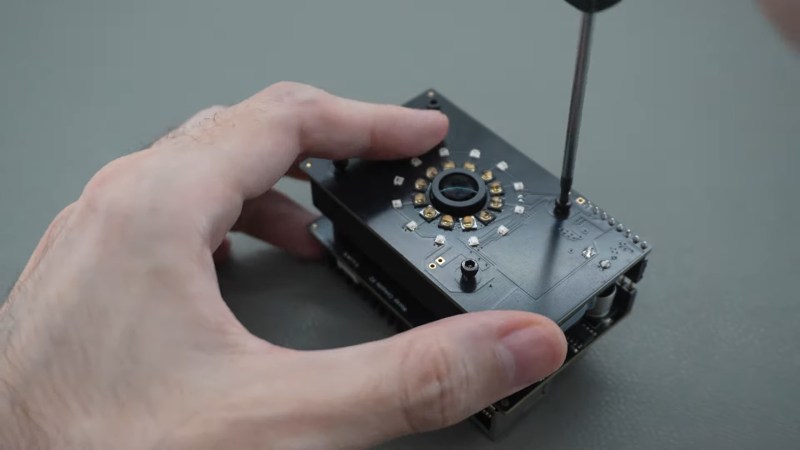
The DIY cameras use a AR0234 MIPI camera on a custom PCB with M12 lenses and IR filters. To improve the signal-to-noise ratio on optical MoCap, it’s standard to use near-IR light. The camera boards, as you might expect given the MIPI interface, hook into Raspberry Pi compute modules– the cheapest CM4 should work, though he’s using CM5s. The compute modules sit on custom boards that provide PoE, and some other niceties– like a small microcontroller driven by the pulse-per-second pin to help trigger the cameras in sync.

Each camera gets a ring light of near-IR LEDs that pulse at 160 W, which would be way more than PoE is specced to provide, but since the LEDs are only on when the camera is taking a frame, the average power is well within allowable limits. With 16 cameras each having their own ring light, that’s a lot of near-IR photons. Don’t forget your safety squints!

Rather than process the images with OpenCV, he has his own custom solution optimized for this use-case that [Dennis] reports is 300x faster. Luckily, he’s put his implementation on GitHub, along with the rest of the project. Even if you don’t have any v-tubing ambitions, this project is very impressive and worth checking out in its entirety.

Optical MoCap isn’t the only game in town, of course. If you want to do this cheap and easy, you can strap a bunch of IMU sensors to yourself– just don’t expect the same precision.

Thanks to [Dennis] for the tip!

Continue reading “Process 4 Billion Pixels Per Second From 16 DIY Cameras For The Best V-Tubing Rig Ever”

Argon ONE UP: Test-Tasting A Raspberry Pi CM5 Based Laptop

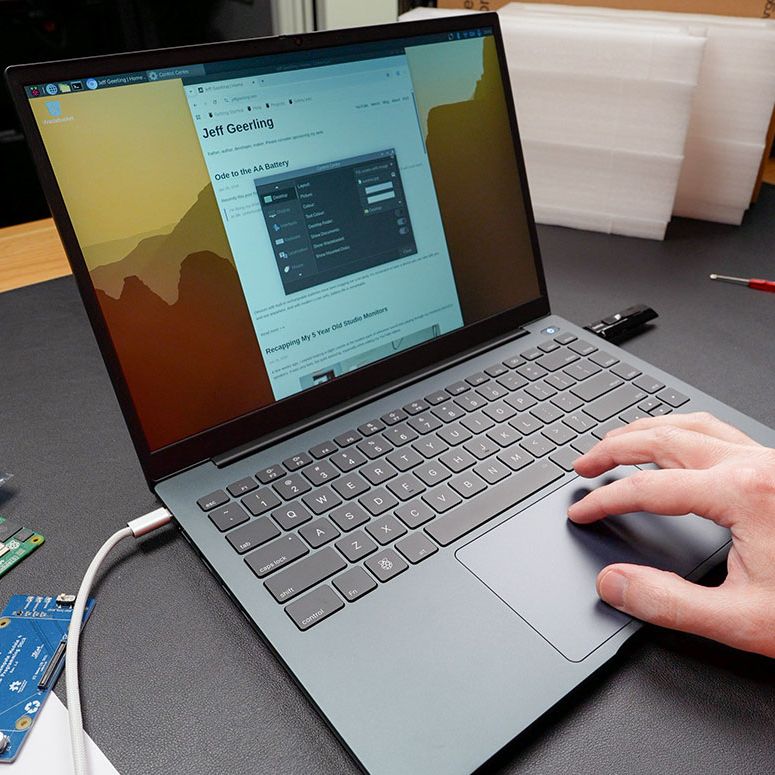
The Argon40 ONE UP unsurprisingly looks like a laptop. (Credit: Jeff Geerling)

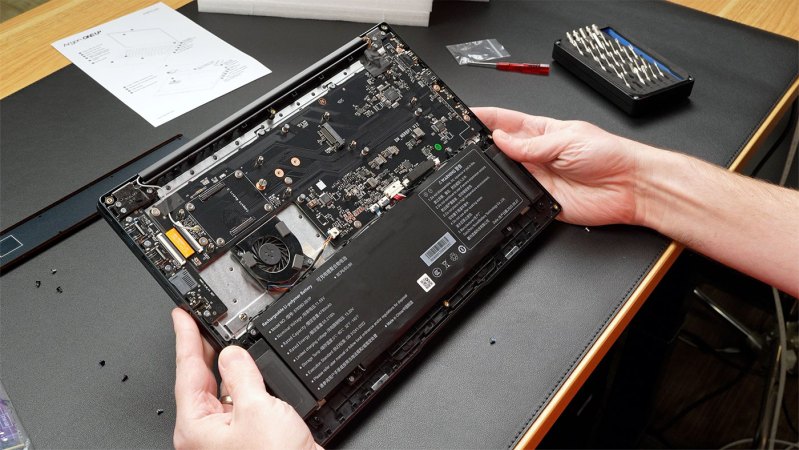
The Raspberry Pi Compute Module form factor is a tantalizing core for a potential laptop, with a CM5 module containing a fairly beefy SoC and RAM, with depending on the exact module also eMMC storage and WiFi. To turn this into a laptop you need a PCB to put the CM5 module on and slide it into a laptop shell. This is in effect what [Argon40] did with their crowdfunded ONE UP laptop, which [Jeff Geerling] has been tinkering with for a few weeks now, with some thoughts on how practical the concept of a CM5-based laptop is.

Most practical is probably the DIY option that [Jeff] opted for with the ‘Shell’ version that he bought, as that meant that he could pop in one of the CM5s that he had lying around. The resulting device is totally functional as a laptop, with all the Raspberry Pi 5 levels of performance you’d expect and with the repair-friendliness of a Framework laptop.

If you’re buying the Core version with the 8 GB CM5 module and 256 GB NVMe SSD included, you’re looking at €475 before shipping or the equivalent in your local currency. This puts it unfortunately in the territory of budget x86 laptops and used Apple MacBooks, even before taking into account the current AI-induced RAMpocalypse that’d push [Jeff]’s configuration to $600 if purchased new, with prices likely to only go up.

Even if this price isn’t a concern, and you just want to have a CM5-based laptop, [Jeff]’s experience got soured on poor customer support from [Argon40] and above all the Raspberry Pi’s arch nemesis: the inability to do sleep mode. With the lid closed it runs at 3.3 W idle, but that’ll run down the battery from 100% to flat in about 17 hours. Perhaps if Raspberry Pi added sleep states to their systems would it make for a good laptop core, as well as for a smartphone.

Continue reading “Argon ONE UP: Test-Tasting A Raspberry Pi CM5 Based Laptop”

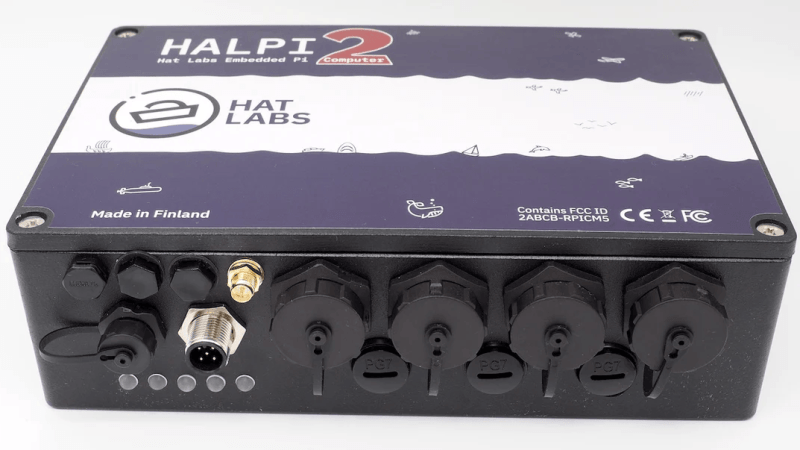
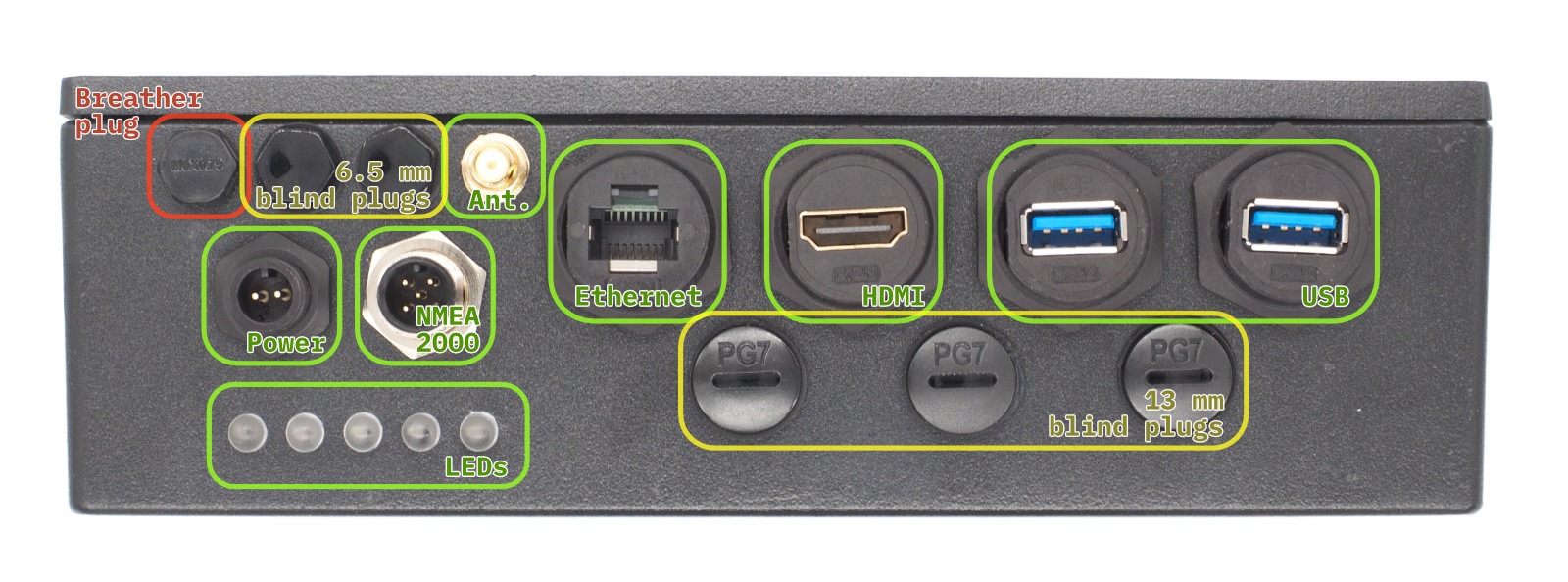
A black, rectangular box is shown, with a number of waterproof screw connectors on the front.

A Ruggedized Raspberry Pi For Sailors

Nautical navigation has a long history of innovation, from the compass and chronometer to today’s computer-driven autopilot systems. That said, the poor compatibility of electronics with saltwater has consequently created a need for rugged, waterproof computers, a category to which [Matti Airas] of Hat Labs has contributed with the open-source HALPI2.

Powered by the Raspberry Pi Compute Module 5, the electronics are housed in a heavy duty enclosure made of aluminium, which also serves as a heat sink, and closes with a waterproof seal. It has a wide variety of external connectors, all likewise waterproofed: power, HDMI, NMEA 2000 and NMEA 0183, Ethernet, two USB 3.0 ports, and an external WiFi or Bluetooth antenna. The external ports are plugged into the carrier board by short extension cables, and there are even more ports on the carrier board, including two HDMI connectors, two MIPI connectors, four USB ports, and a full GPIO header. The case has plugs to install additional PG7 or SP13 waterproof connectors, so if the existing external connectors aren’t enough, you can add your own.

Besides physical ruggedness, the design is also resistant to electrical damage. It can run on power in the 10-32 volt range, and is protected by a fuse. A supercapacitor bank preserves operation during a power glitch, and if the outage lasts for more than five seconds, can keep the system powered for 30-60 seconds while the operating system shuts down safely. The HALPI2 can also accept power over NMEA 2000, in which case it has the option to limit current draw to 0.9 amps.

The design was originally created to handle navigation, data logging, and other boating tasks, so it’s been configured for and tested with OpenPlotter. Its potential uses are broader than that, however, and it’s also been tested with Raspberry Pi OS for more general projects. Reading through its website, the most striking thing is how thoroughly this is documented: the site describes everything from the LED status indicators to the screws that close the housing – even a template for drilling mounting holes.

Given the quality of this project, it probably won’t surprise you to hear this isn’t [Matti]’s first piece of nautical electronics, having previously made Sailor HATs for the ESP32 and the Raspberry Pi.

Future Brings CPU Modules, And The Future Is Now

Modularity is a fun topic for us. There’s something satisfying about seeing a complex system split into parts and these parts made replaceable. We often want some parts of our devices swapped, after all – for repair or upgrade purposes, and often, it’s just fun to scour eBay for laptop parts, equipping your Thinkpad with the combination of parts that fits you best. Having always been fascinated by modularity, I believe that hackers deserve to know what’s been happening on the CPU module front over the past decade.

A Youtube thumbnail showing a Thinpad in the background with "Not Garbage" written over its keyboard, and one more keyboard overlaid onto the picture with "garbage" written on that one.
This “swap your Thinkpad keyboard” video thumbnail captures a modularity-enabled sentiment many can relate to.

We’ve gotten used to swapping components in desktop PCs, given their unparalleled modularity, and it’s big news when someone tries to split a yet-monolithic concept like a phone or a laptop into modules. Sometimes, the CPU itself is put into a module. From the grandiose idea of Project Ara, to Intel’s Compute Card, to Framework laptop’s standardized motherboards, companies have been trying to capitalize on what CPU module standardization can bring them.

There’s some hobbyist-driven and hobbyist-friendly modular standards, too – the kind you can already use to wrangle a powerful layout-demanding CPU and RAM combo and place it on your simple self-designed board. I’d like to tell you about a few notable modular CPU concepts – their ideas, complexities, constraints and stories. As you work on that one ambitious project of yours – you know, the one, – it’s likely you will benefit a lot from such a standard. Or, perhaps, you’ll find it necessary to design the next standard for others to use – after all, we all know there’s never too few standards! Continue reading “Future Brings CPU Modules, And The Future Is Now”

Motherboard on the desk, with a CM4 plugged into it, and all kinds of wires connected to it for purposes of debugging

Hackaday Prize 2022: A CM4 Upgrade For Your Old IPad

There’s no shortage of nicely built tablets out there, but unfortunately many of them are powered by what are by now severely outdated motherboards. Since manufacturers releasing replacement motherboards for their old hardware doesn’t look like its likely to be common practice anytime soon, the community will have to take things into their own hands. This is where [Evan]’s project comes in — designing a Raspberry Pi CM4-powered motherboard for the original iPad. It aims to have support for everything you’d expect: display, touchscreen, audio, WiFi, Bluetooth, and even the dock port. Plus it gives you way more computing power to make use of it all.

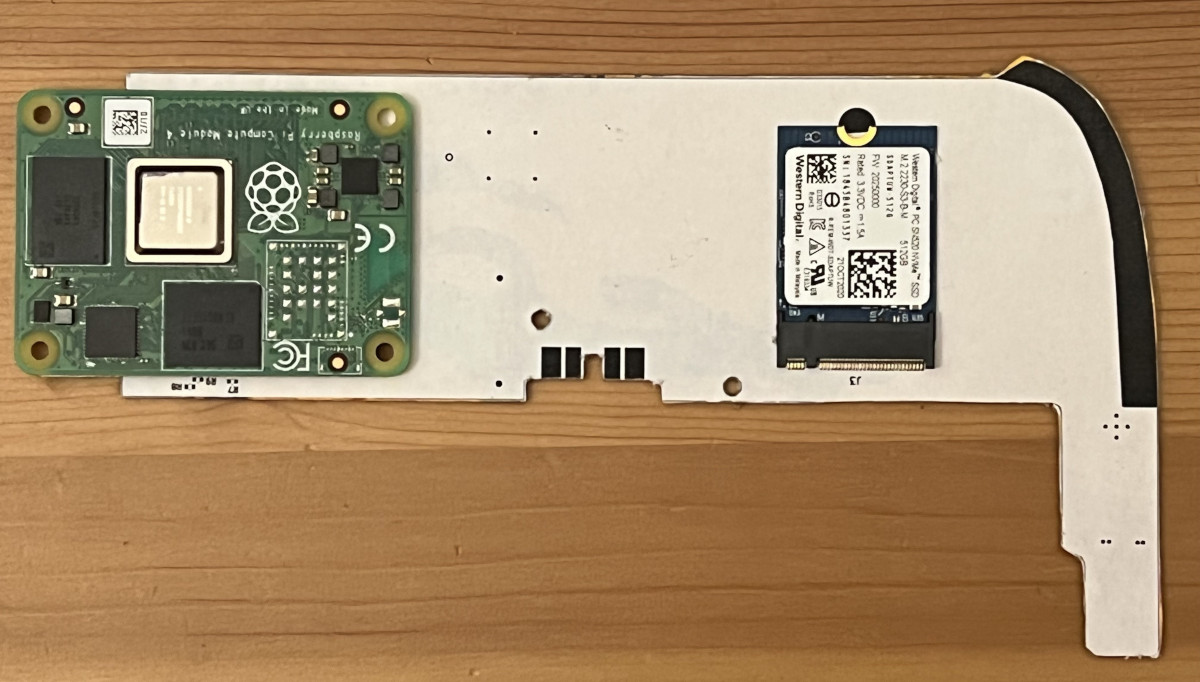
Testing part fitment with some cardboard CAD.

The original iPad got a lot of things right, a factor definitely contributing to its success back when it was released. [Evan]’s high-effort retrofit works with the iPad’s plentiful good parts, like its solid shell, tailored lithium-ion battery, eye-friendly LCD, and reliable capacitive touchscreen. You’d have to fit the new motherboard inside the space available after these parts all come together, and [Evan] has shaped his PCBs to do exactly that – with room for CM4, and the numerous ICs he’s added so as to leave no function un-implemented.

This project has been underway for over a year, and currently, there’s fourteen information-dense worklogs telling this retrofit’s story. Reverse-engineering the capacitive touchscreen and the LCD, making breakouts for all the custom connectors, integrating a custom audio codec, debugging device tree problems, unconventional ways to access QFN pins left unconnected on accident, and the extensive power management design journey. [Evan] has a lot to teach for anyone looking to bring their old tablet up to date!

The hardware files are open-source, paving the way for others to reuse parts for their own retrofits, and we absolutely would like to see more rebuilds like this one. This project is part of the Hack it Back round of the 2022 Hackaday Prize, and looks like a perfect fit to us. If you were looking for an excuse to start a similar project, now is the time.

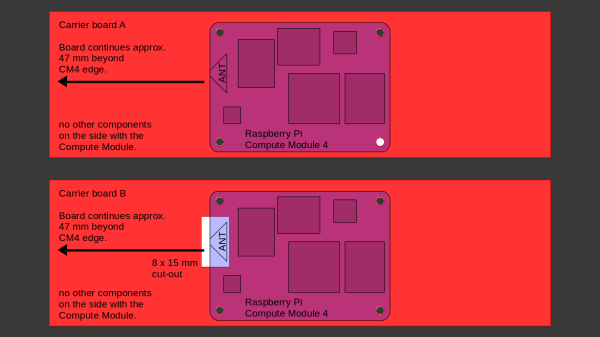
Sketch of the two proprietary carriers showing their differences - one of them has a cutout under the antenna, while the other one does not.

Design Your CM4 Carrier With WiFi Performance In Mind

The Raspberry Pi Compute Module 4 has a built-in WiFi antenna, but that doesn’t mean it will work well for you – the physical properties of the carrier board impact your signal quality, too. [Avian] decided to do a straightforward test – measuring WiFi RSSI changes and throughput with a few different carrier boards. It appears that the carriers he used were proprietary, but [Avian] provides sketches of how the CM4 is positioned on these.

There’s two recommendations for making WiFi work well on the CM4 – placing the module’s WiFi antenna at your carrier PCB’s edge, and adding a ground cutout of a specified size under the antenna. [Avian] made tests with three configurations in total – the CMIO4 official carrier board which adheres to both of these rules, carrier board A which adheres to neither, and carrier board B which seems to be a copy of board A with a ground cutout added.

Graph plotting WiFi RSSI for each of the three carriers in each of the six locations. CMIO4 consistently outperforms both, while carrier B outperforms the carrier A, but by a more narrow margin.After setting up some test locations and writing a few scripts for ease of testing, [Avian] recorded the experiment data. Having that data plotted, it would seem that, while presence of an under-antenna cutout helps, it doesn’t affect RSSI as much as the module placement does. Of course, there’s way more variables that could affect RSSI results for your own designs – thankfully, the scripts used for logging are available, so you can test your own setups if need be.


If you’re lucky to be able to design with a CM4 in mind and an external antenna isn’t an option for you, this might help in squeezing out a bit more out of your WiFi antenna. [Avian]’s been testing things like these every now and then – a month ago, his ESP8266 GPIO 5V compatibility research led to us having a heated discussion on the topic yet again. It makes sense to stick to the design guidelines if WiFi’s critical for you – after all, even the HDMI interface on Raspberry Pi can make its own WiFi radio malfunction.

It’s Almost A New Raspberry Pi Compute Module 4. But Not Quite

We know that readers are familiar with the global chip shortage and its effects on product availability. The Raspberry Pi folks haven’t escaped its shadow, for even though they’ve managed to preserve availability of their RP2040 microcontroller, it’s fair to say that some of their flagship Linux-capable boards have been hard to find. All of this has had an unlikely effect in the form of a new Raspberry Pi, but unexpectedly it’s one which few end users are likely to get their hands on.

The Raspberry Pi Compute Module has been part of the range since the early days, and in its earlier versions took a SODIMM form factor. The last SODIMM Compute Module had a Pi 3 processor, and this unexpected new model is reported as having a very similar hardware specification but featuring the Pi 4 processor. It seems that the chip shortage has affected supplies of the earlier SoC, and to keep their many industrial customers for the SODIMM Compute Modules in business they’ve had to produce this upgrade. As yet it’s not surfaced for sale on its own and there’s a possibility it will stay only in the realm of industrial boards, but as the story develops there’s a Raspberry Pi forum topic about it for the latest and you can find the pertinent info in the video below the break.

Of course, the Compute Module of the moment remains the CM4 in its newer form factor, which we see as possibly the most exciting of all the Pi products of the moment. Meanwhile this is not the first custom industrial Raspberry Pi to be seen in the wild.

Continue reading “It’s Almost A New Raspberry Pi Compute Module 4. But Not Quite”