
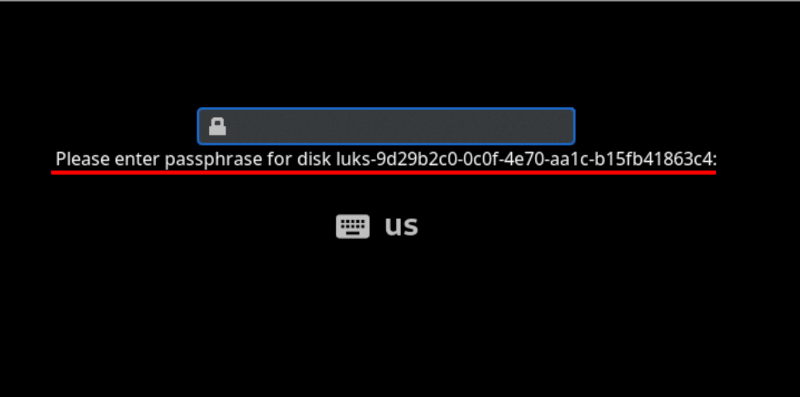
Can you remotely unlock an encrypted hard disk? [Jyn] needed to unlock their home server after it rebooted even if they weren’t home. Normally, they used Tailscale to remote in, but you can’t use tailscale to connect to the machine before the hard drive decrypts, right? Well, you can, sort of, and [Jyn] explains how.
The entertaining post points out something you probably knew, but never thought much about. When your Linux box boots, it starts a very tiny compressed Linux in RAM. On [Jyn’s] machine using Arch, this is the initramfs.
That’s not news, but because it is an actual limited Linux system (including systemd), you can add tools to it. In this case, adding dropbear (an ssh server) and Tailscale to the limited boot-time Linux.
Doing this in the most straightforward way presents several issues related to security. However, using a few configuration items, you can limit it to showing the unlock screen and nothing else.
The only limitation is that the setup, as written, will only work with an Ethernet interface. WiFi should be possible, but getting the wireless network up in this environment would likely be challenging.
You could probably set this up with WireGuard or even an ssh tunnel if you were adventurous.











Would a remote KVM work for this?
Really interesting question, I suppose this is in a way more secure it’s a time limited software KVM.
I have a few nanoKVM at home mostly for convenience and they are constantly accessible (but password protected).
Given how cheap nanoKVM is it’s hard to argue against them although people don’t like that they aren’t bespoke locked down hardware.
Yes, because the e remote KVM is not dependant on the system you are booting. It is it’s own device, with is own network. As long as you have video stream to the KVM then you can remote to the KVM and enter your disk pass through that.
A replay to myself: If you’re using a laptop that doesn’t bother to initialize external keyboards or video during this time, then this won’t work.
This is pretty cool!
Also look at Tang and Clevis for network luks key management for critical systems.
I was just about to say this. And you do not need systemd!
Thank you! Related case: https://www.cyberciti.biz/security/how-to-unlock-luks-using-dropbear-ssh-keys-remotely-in-linux
The correct way to do this is to provide a separate device to manage the “raw input/outputs” like a KVM , also known as an ILO controller, or iDRAC. This is a novel solution, but only solves the problem in a very niche way. I wouldn’t recommend it because it makes a number of assumptions.
Definitely a hack.
iLO and iDRAC aren’t KVM though. They are BMC – they are far more powerful and integrated to the host than a KVM is. They have direct hardware control, where a KVM doesn’t.
That’s why we have iLO in our HPE servers. We use ssh to access them.
https://jyn.dev/remotely-unlocking-an-encrypted-hard-disk/
https://korben.info/deverrouillage-disque-chiffre-distance.html
Isn’t this why we run Tang?
I just call my wife.
The same!!! And after long explanations (including what is the difference internet vs ethernet (and others like that) for a thousandth time) we manage… Now after some time she is able to manage some aspects of Pfsense (kids firewall rules :) )
Wonder if you could just netboot it instead
Depending on the threat model, it may actually be better to have some kind of setup with an intrusion switch to clear out storage where the encryption key is kept. Like some battery-backed RTC chip hooked to I2C.
If you just remotely enter encryption keys whenever the system reboots, for all you know, the system could have been locally compromised to capture your keys. After all, local access is usually the scenario you try to protect against when using full disc encryption, though capturing the keys is admittedly more complex than just stealing the drives.
The problem of recursive LLM plagiarism is key details are often lost. YMMV
The whole point of remote unlock was to keep password encrypted LUKS keys off of local persistent storage, and use IDS tripwires on the hardware. Some use boot partition binary signatures, kvm tripwire check, and sending predicted s.m.a.r.t. run time, power cycles, and spin up count to client. Thus, someone dropping 10000 GPUs to brute force LUKS is less of an issue, side-channel drive cloning by colo rat$ is less frequent, and tampered hardware is more obvious with modded TPM.
It may be wise to look for the original publisher. HaD seems they can’t be bothered to do that for people. Good luck =3
Threat modelling is crucial, agreed.
I successfully “bypassed” the disk encryption on an ATM (running Linux on an OrangePi SBC!) by interrupting the u-boot process, setting “init=/bin/sh”, gaining my shell, then starting the processes required by the boot manually. It stopped, waiting for an external process to unlock the drive via ssh, which happened automatically, at which time I had a shell on the fully unlocked ATM.
The point being that if your threat model includes someone with physical access, ideally you’d like to know when that physical access has happened, and not unlock in those cases. This is probably a job for secureboot and attestation/root of trust.
“This is probably a job for secureboot and attestation/root of trust.”
This is broadly how Windows does it’s BitLocker encryption
Another serious hack, 2 in 1 week. I do appreciate how the author frames this as a practical exercise but if you read between the lines… There are some really nefarious things malware or otherwise could do with this. I bet most people assumed networking wouldn’t be happening at this stage of boot, but here we are running ssh hahaha.
I had no idea how the boot screen worked. I probably still don’t but at least now I know what it is!
This is an entirely common design for deployment of a VPS with an encrypted root filesystem. Using dropbear for the ssh service in the initrd is a common way to do it.
This should only be done with actual ssh keys and with passwords disabled unless you are truly insane. (In case it’s not obvious – it’s a good idea to use a dedicated key pair for just this purpose.) I usually see a forced reboot after 3 failed auth attempts as well.
This seems conceptually similar to the distinction on Android systems between ‘direct boot’, which is the state a device finds itself in after reboot but before user authentication, and the after-login state where credential encrypted storage is also available. Used to ensure that alarms and receiving SMS and so on work even if you haven’t signed in yet.
Obviously a different distinction being drawn because this is a server rather than a handheld; but the same principles in play.
Did something similar last year on a bare-metal box I use for client staging environments, dropbear in initramfs is honestly one of those “why isn’t this default” setups once you have it. One gotcha worth mentioning: if you’re on a VPS that exposes the serial console (Hetzner, OVH), you can skip the Tailscale layer entirely and just unlock via SSH to the rescue console, saves you from shipping credentials into the initrd. Been meaning to write this up on studiojae.fr at some point, the post linked here covers it way better than I would have though.