
If you need a VPN gateway to access your home network, the fastest and most cost-effective way is probably by using a Raspberry Pi Zero. But in [Samir Makwana]’s view, an ESP32-S3 is just as capable for moderate use, and in some respects even superior.
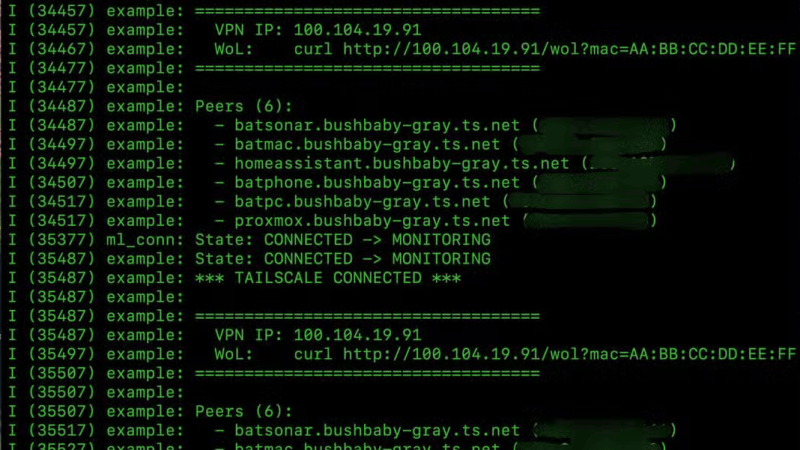
This was possible thanks to the MicroLink project, which is a full implementation of a Tailscale client for the ESP32 family. In some ways the ESP32 worked better than a Raspberry Pi: it boots in two seconds rather than thirty, draws 0.5 Watts rather than 1.5, and there’s no chance of it failing due to a corrupted SD card. Compared to a Raspberry Pi, however, which can be set up as a Tailscale client in a few minutes, this took several hours to get running. The biggest issue was making sure that there was enough memory available for TLS handshakes, which was solved by enabling the ESP32’s PSRAM.
Once the VPN client is running, the ESP32 can be used as an SSH jump machine to access other devices on the home network, without needing to expose those machines to the open Internet. The ESP32 also hosts an HTTP server which can send a wake-on-LAN magic packet to another device on the local network, letting unused devices sleep without impairing their availability.
The ESP32 doesn’t provide much bandwidth — streaming video would cause issues — but it works well enough for lightweight applications. If you’re wanting to stream video from an ESP32, though, it is technically possible.












If you trust the Chinese code running on it, of course. All my Espressif devices live in a DMZ — I don’t want to hand the Cylons unfettered access to my internal network.
You mean the “chinese” code, developed by “Malone Technologies” (USA) with sourcecode fully available on github to vet, presented through an article by “Samir Makwana” (India)?
Insert derogatory sentence about your comment here.
I think the reference is to Espressif’s binary blobs for WiFI (Bluetooth, etc). It is unclear at best and disingenuous at worst.
Alright, thats fair I guess.
you mean the binary blobs that send packets over wifi that many people (including me) have gone over at length and not seen any packets we haven’t sent ourself?
Are you expecting a secret incoming call to turn it on? I suppose that’s possible, but then again it would have to be on the open internet (and not behind a firewall that didn’t allow incoming calls to get to it..)
If you are really worried about wifi blobs in embedded hardware chips – as distinct from finished products like wifi cameras..) you probably can’t be on the internet at all, with any device..
We should fix that. I wonder if we could build an AI agent and just throw tokens at it? Maybe donating tokens could be the new crowdfunding?
Sure, it’s much better to trust the Magaist companies ending in com. It’s not like there is a law in their country forcing them to capture and share any data if the government asks for.
Jup it’s all a matter of what totalitarian regime you prefer.
Sheesh! Where do you even begin with a comment like this?
Time to take off the tin foil hat.
tds again…
Where do you begin?
You read the first sentence, then you go look up ‘FISA Court’ and the laws that enable it.
Then you go look up the obvious abuses that it has caused… If you can wade through the redactions, because everything involving the court is heavily classified or otherwise gagged. The court is officially acknowledged though. And there have been several instances of people breaking gag orders if you want to research what goes on there.
There is active work to RE the wifi blobs and replace them. Already it’s possible to stop using them entirely after the initial calibration of the radio, and from that point on run only open source code.
Only ppl who doesn’t know better use such code. You code your own ok?
With the sheer amount of scrutiny these chips are under by everyone from hobbyists to security specialists and even Intelligence agencies. If those binary blobs had any backdoors or a tendency to phone home i would honestly assume we have long heard by now. There was that issue last year. But that wasn’t so much a case of it having a door in that it could open them for you…
That said. I do employ caution when it comes to the version. For if for whatever reason a compromised blob enters rotation it could spread and cause damage before its nefarious nature gets caught. So i try to avoid brand new blobs most of the time.
Not sure if this is an SSH tunnel or a VPN or a Tailscale setup.
All his devices sit in his home network why setup Tailscale for VPN-Mesh?
Why setup VPN at all if you already have SSH, you could just tunnel into the target network with SSH ?!?
This is a weird article and the motivation is unclear. He probably already has a Router somewhere in his home network, installing ( or activating ) SSH server on it would already give him all the benefits of this setup and would waste 0 Watts of power additionally and probably already is implemented, with near to zero setup time. Also you can make SSH access more secure than VPN, and add something like port knocking on top to even get more obscurity.
Anyone understands why all the mess of technologies on top of eachother?
One use case is deployment to other less technically capable people, or just rapid deployment at “non home” networks also under your control.
Tunneling IN to another network is less ideal (if possible at all) compared to it reaching out.
That of course needs somewhere for the tunnel to reach out to, and one can argue having it be your own network needing an open port is less ideal than to a 3rd party system/service dedicated to the task. Although yes your port knocking suggestion works perfectly fine too.
I’ve done similar things in the distant past and have learned a) I want to be able to break my homelab at will, without others depending on it, and b) becoming remote tech support is bad enough as-is without describing commands for someone else to type over the phone :P
“the fastest and most cost-effective way is probably by using a Raspberry Pi Zero”
Nope. The fastest and most cort-effective way is to dig up that Raspberry PI first generation, that has been lying unused in your drawer, dust it off, install Raspberry Pi OS Lite on it, and use PiVPN to turn it into a headless VPN server. I did it in about half an hour (after spending 2 hours digging to find where I stashed my old obsolete Raspberry PIs ;)). And that Raspberry PI cost me $35 in, I think, 2013, is already long past its economic end-of-life, and basically cost $0 now. A Pi Zero costs $5, so is more expensive.
:)
Nope. Already have a Fritzbox from your provider and turn on VPN in its settings.
Cost is debatable, because included in subscription, but it takes less than five minutes.
wait, I don’t have the password for my Fritzbox! I really want to know how I can turn a VPN option on! Recently tried putting a VPN on a wifi router connected to the Xfinity box, and Netflix and other streaming service providers would randomly throw “You seem to be using a VPN or proxy”. If I ask Comcast nicely will they give me the password for the router? I assumed part of the deal is they have to make any and all changes from their end.
okay, I feel dumb because I just had to unmount the router and read admin and psswrd on the bottom, just like any consumer router. But then the CenturyLink(Quantum Fiber is now part of the AT&T family!) firmware doesn’t allow for a VPN, there are no settings for it. (you’ll notice my previous efforts were with a different provider) This ESP32 thing in the article doesn’t do streaming video, so that’s out.
I need mesh wifi, global mesh wifi on esp
Sounds like a nice project. Let us know how it goes.
It’s a goal iir of the people RE-ing the ESP32 wifi stack.
That’s just lazy engineering. I’ve ran TLS connections (via mbedtls) on the ESP8266 – without any heroics, just a bit of care. ESP32 has four times the RAM. If that’s not enough, you’re doing something wrong.