
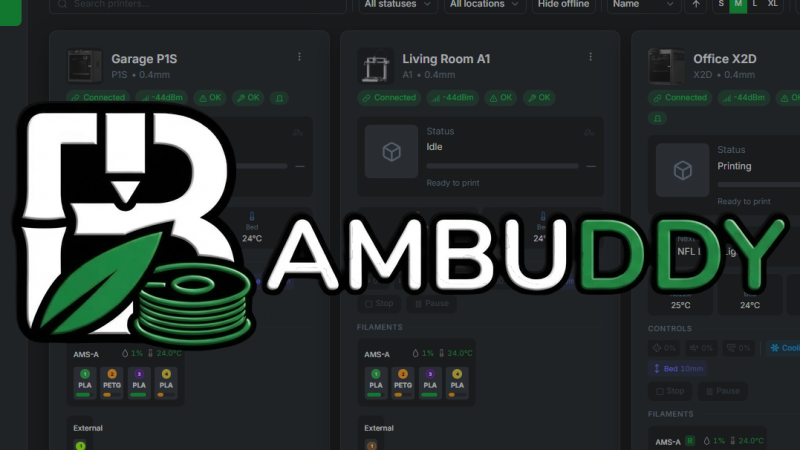
If you have a Bambu Labs printer and aren’t keen to send your files to Bambu’s servers with each print job, then check out Bambuddy, an open-source, self-hosted, cloud-free central command that offers a local alternative for managing Bambu Labs printers. It acts as a replacement for the official cloud services, allowing you to slice, print, and monitor with full local control and zero reliance on Bambu Labs’ servers.
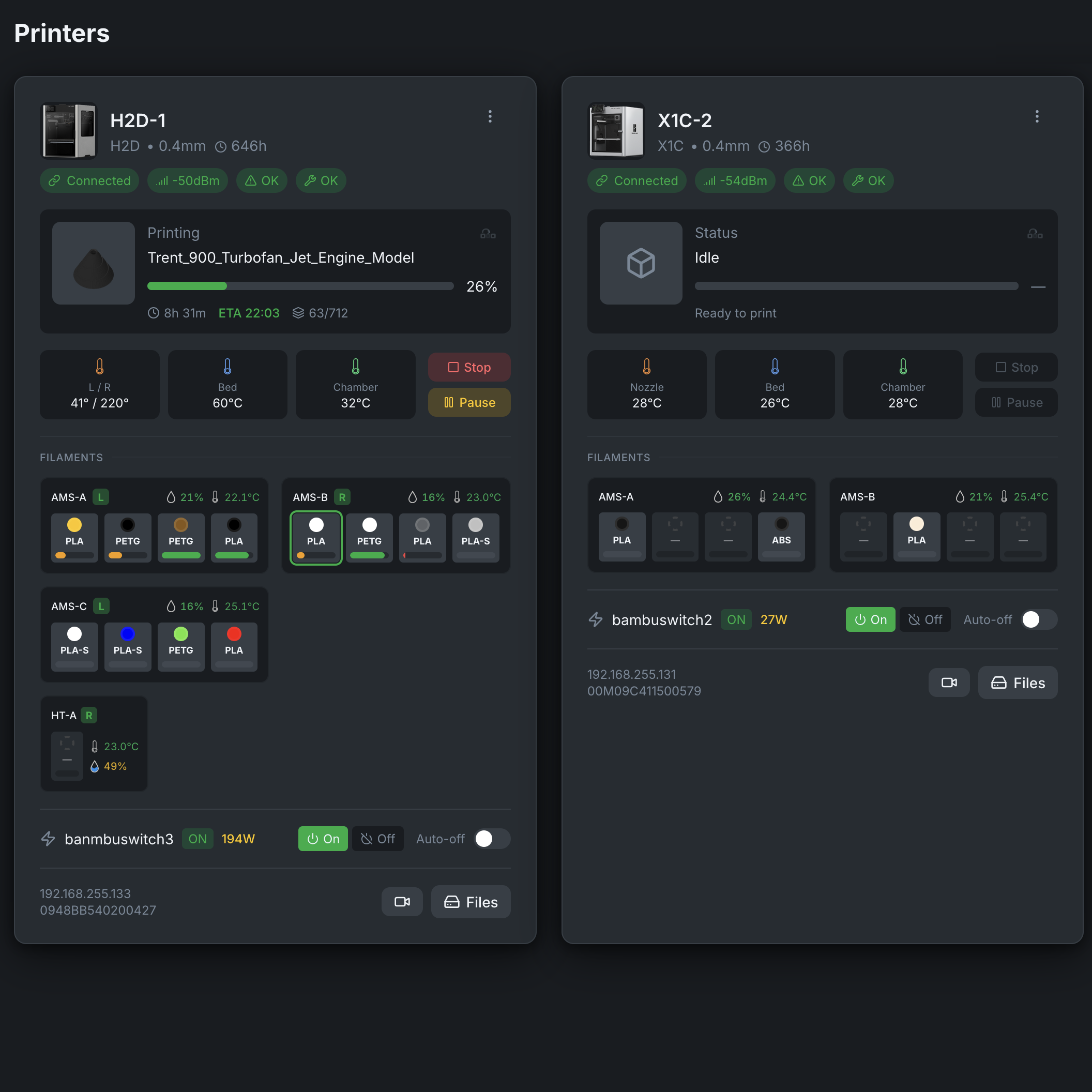
To use it, one installs Bambuddy, then puts their printer(s) into LAN-only mode. Doing this disables cloud functionality, including remote access. Then one enables Developer Mode, which allows external software to control printer functions via a machine API. Once that’s done, the printers can be added to Bambuddy.
Bambuddy then acts as a full-featured control panel and management center for anywhere from one to forty printers. It runs on Linux, macOS, or Windows, and a Raspberry Pi is a common install target.
Bambu Labs makes indisputably high-quality printers, and using their software and official app is certainly convenient. But the fact that every print job goes through Bambu’s servers, and a software architecture that frustrates home-grown solutions? Not so much. Add AGPLv3 violations and some heavy-handed legal behavior to the mix, and it’s easy to understand the motivation for an alternative to the factory software.
Bambuddy has a huge number of features — including an integrated slicer and proxy mode for remote access — and it may look a little intimidating at first. Fortunately, the project’s website offers a live sandbox demo with simulated printers, which should be right up the alley of those who prefer to learn by clicking around in a consequence-free environment.












“Developer Mode is a security risk, so we will be disabling it” in 3..2..1.
I have never understood why the public has so willing embraced the mentality of “cloud servers” with the necessity for everything you do to be stored and or processed on someone else’s severs, when local side computing works just fine.
Its mostly for the convenience of easy access.
Its much harder to get a self-hosted setup that will let you use something away from your home network or have near no setup within network.
I would accept that argument if we were talking exclusively about devices that have to be controlled remotely—or at least where it makes sense to control them remotely—but we have dishwashers and mattresses with cloud connectivity that stop working if AWS goes down.
Possibly because it’s simpler for most people to set up with cloud using some app. Running things locally would mean extra networking config, remote access (port forwarding, DDNS), and keeping a server running
“Running things locally would mean extra networking config, remote access (port forwarding, DDNS), and keeping a server running”
Yeah thats the “justification” that cloud advocates use,
and it might have been valid back in the dialup days,
but lets be real, if you have a home PC its most likely ALWAYS on and ALWAYS online, so really, a well designed piece of software SHOULD be able to manage just fine.
Your nickname is my response to this. Your experience is not universal — plenty of people, even in the 3d printer-owning target demographic, do not have an always-on computer. Lots of people only have laptops — which may not be online, because it could be closed, slept, or even out of the home because they’ve got it on their person. Some other people literally do everything on tablets now. Others still do have a “home computer” but it’s a gaming rig, and they let it hibernate or shut it down on the regular because they don’t want to pay a big power bill. Sure, some of us do — either we have a computer that runs Plex, etc, already, or we have a NAS to run services (like this!) on.
But “its most likely always on and online” is so, so far from the average-user case, and even if it was… plenty of people don’t want to run something like this, exposed to the internet, on that. I have a VLAN for IoT devices because I don’t trust that kinda shit with access to a real machine on my network, and none of those devices have direct access anyway — it’s always proxied through the cloud providers anyway, not serving traffic directly. Wouldn’t trust that past the “dangerous” VLAN, definitely wouldn’t trust an embedded firmare to get exposed through port forwarding, etc. Otherwise, for more trustworthy things that are internal services, I use Tailscale — nothing gets into my network/past my NAT through port forwarding, so I don’t have to trust the vendors behind that software to be hardened against public-internet traffic.
Even if the Bambu printers had a local-accessible server (which they should!) it’s an absolutely terrible idea to expose that to the outside world through an open port. A cloud service CAN (though is not always, and I don’t trust it to) be architected in a way that limits exposure to only people who successfully get through an auth layer, and still limits what can be done remotely (so nobody, hopefully, can crack X device and log in directly.) That is, absolutely, a value proposition for a lot of people, even if companies should also let you run things locally.
Local-only operation mode should be standard for anything that has a cloud integration, and it should 100% be a priority when making a purchasing decision, but saying that cloud services/bridges/access features are pointless is just absolutely disjoint from the reality that people live in. I say that as someone with decent-enough infosec chops to know that the first rule is that you have to meet the users where they’re at; sticking your head in the sand to the users’ needs and priorities will only ever burn you down the line.
“if you have a home PC”
“plenty of people, even in the 3d printer-owning target demographic, do not have an always-on computer. Lots of people only have laptops”
So none of what I said applies to them.
” but saying that cloud services/bridges/access features are pointless is just absolutely disjoint from the reality that people live in.”
Nothing i said implies that.
All I said is that a properly written piece of software SHOULD be able to be installed, and run without the “extra networking config, remote access (port forwarding, DDNS)” and that anyone with an always on Home PC or even a pi, should be able to RUN and DONE if the developers werent banking on the captive audience/income the cloud provides them
There are few applications that NEED the cloud, that MUST be run on some corporations server. Feel free to throw your money at companies and products that may or may not brick at any moment when they fold, or just kill their support for the model you own, if thats your jam.
It’s funny how before Bambu printers came alone, the 3D printing community was thriving without being forced to use a cloud service.
“Even if the Bambu printers had a local-accessible server (which they should!)”
They do. It’s more of a direct low-ish level server (MQTTS, FTPS), not a website.
It’s always available, even simultaneously while the printer uses the cloud. But the catch is that they restrict this to only their official slicer, unless you completely give up cloud functionality by using LAN mode.
You’re missing the point.
It shouldn’t need to phone home for anything, period.
It should be entirely self contained.
There is no good reason why it needs to phone home. There are just marketing excuses.
You hit the nail on the head with convenience AKA laziness.
Think printer becoming network printer.
Back in the day. Needed a PC, then you got built in cards.
Now they have wifi speaking to the cloud server and your print goes up to come back down.
Internet outage it doesn’t work.
How is this progress? It’s just customer enabled side scanning.
Perhaps one out of my ten closest friends could setup DDNS and port forwarding or some VPN connection to home in order to use something like this while away. I bet nine out of ten could install an app and register an account.
Most of them don’t have computers that just stay on. At least a couple only have a laptop which doesn’t even stay home.
You do. I do. But the readers of Hackaday don’t represent most people. And as 3D printers become easier to operate and gain popularity (which Bambu played a not insignificant role in doing), you can no longer rely on 3D printer owners being computer nerds, either.
Yes, cloud stuff can be money grabs or info grabs or to impose control, sure. But for the vast majority of people it’s just way easier. Both things can be true.
I love what Bambuddy has done here, and none of my printers are Bambu for a reason. I use Home Assistant and I’m on a personal mission to get/maintain local control of everything I can. But that doesn’t blind me to the fact that it’s not for everyone.
Agreed! And/or, you only have an ISP like I do that uses CGNAT and no IPV6. Yes Tailscale and Zero Tier exist, but that’s another layer of complexity that end users don’t want to struggle with. Vs signing into a cloud account and it just works.
I’m all for being in control, but it comes at a cost in some way.
Tailscale.
I would guess most people see a Bamboo Labs somewhere running a demo print and think it’s cool and never consider a “cloud” is involved. In fact, I already had a 3d printer (Creality) and I thought the BLs were nice and even mentioned them to a friend who was in the market. This is before I’d heard about the issues with the company and their enshitification. Wish I’d known because he bought one. I guess it works for his purposes, though.
Is it possible to run a Bambu printer offline and just move the files to it with a USB thumb drive or SD card?
Yes, I’ve been transferring print jobs to my X1C via the SD card slot since day 1.
Yeah and you can put it in lan mode and send the files from any slicer to it over the lan too.
I don’t know… I mean since they can bypass the servers people can print guns without worrying about being caught.
oh good grief. Nobody is printing a gun on a bambu labs or any other filament printer unless they have a death wish. And even if they are, in the United States, it is not illegal to build your own firearm for person use. You just can’t sell it. Do you know how many firearms I can make with just a trip to the hardware store? Not to mention using the scrap laying around my yard. Get out of here with that bullshit excuse.
I don’t disagree with your take on the insanity of trying to stop people from printing firearms. Both the technical aspects and the stupidity part.
But let’s not act like someone pushing a button and getting an awful part from a printer is anything at all like buying parts at a hardware store and somehow having the skill to turn them into a functional weapon.
There is a good reason no one freaked out and started trying to ban people from building receivers on milling machines or barrels on CNC lathes.
Joe iPhone isn’t pushing a button on Friday and taking a cruise missile out of their printer on Saturday morning.
However, they absolutely can download a .22 zipgun and print it today.
But that still isn’t a good enough reason to regulate against it unless LOTS of people start getting hurt over it.
“There is a good reason no one freaked out and started trying to ban people from building receivers on milling machines or barrels on CNC lathes.”
Until now. The proposed legislation I’ve heard being read includes subtractive manufacturing machines.
“The proposed legislation I’ve heard being read includes subtractive manufacturing machines.”
Name the state. Id love to read the poorly conceived legislation that attempts that measure.
Yeah but how do you ban “man turning wheels to control spinning blade that cuts metal”?
You can heavily restrict the finished product. Supressors are an example of that.
But you can’t just watch people who buy materials and say “oh! q ton of ammonium nitrate prills and a kilogallon of diesel fuel? Are they a farmer or making bombs?”
It’s a chunk of metal and machining tools…
New York, Oregon, California.
They are all cut and paste jobs from Bloomberg’s gun grabber group.
Yeah, they are that dumb, but at least they F’d with industries with money this time.
“in the United States, it is not illegal to build your own firearm for person use. You just can’t sell it. ”
This is not entirely true. It is legal to build your own firearm. Its legal to sell your Privately Made Firearm (PRF).
But its NOT legal to make firearms with the express purpose of selling them. Private sales are allowed if you are selling from your personal collection. If you manufacture or acquire firearms with the primary intent of making a livelihood or profit, you are legally considered a dealer and must obtain an FFL.
State laws vary, but under federal law, a private individual may sell their PMF to another private individual so long as they are not a prohibited person (convicted felon, anyone under indictment, fugitives, controlled substance asers/addicts, Anyone who has been adjudicated as a “mental defective” , anyone who has been committed to a mental institution in the past, Anyone in the country illegally, Anyone dishonorably discharged from the military, and Anyone subject to a restraining order).
While a few states have laws requiring serialization of ALL firearms, federal law only requires PMF to be serialized if they come into the possession of an FFL dealer. That said, even in states where it is not required, expect a BAD TIME during ANY interaction with law enforcement if you are in possession of an unserialized firearm. Unfortunately knowing and understanding the law is NOT a requirement for enforcing it in the USA.
https://legislation.nysenate.gov/pdf/bills/2025/S9005B
“Digital firearm manufacturing code”means any digital instructions in the form of computer-aided design files or other code or instructions stored and displayed in electronic format as a digital model that may be used to program a three-dimensional printer or a computer numerical control (CNC) milling machine to manufacture or produce any firearm, rifle, shotgun, ghost gun, unfinished frame or
receiver, firearm silencer, rapid-fire modification device or major component of a firearm.
All of the states pulling this unConstitutional bullshit uses the same language.
Yeah thats about what I thought…..
““Digital firearm manufacturing code”means any digital instructions in the form of computer-aided design files or other code or instructions stored and displayed in electronic format as a digital model that may be used to program a three-dimensional printer or a computer numerical control (CNC) milling machine to manufacture or produce any firearm:”
So the laws proposed ban distributing files.
“The proposed legislation I’ve heard being read includes subtractive manufacturing machines.”
This read as they were angling the law against the machines used, rather than the code run.
Did you read that bill, or any of the others?
I didn’t quote everything. Perhaps this will help
https://stateofsurveillance.org/news/new-york-3d-printer-censorware-surveillance-budget-bill-2026/#scope
What about turning them in at gun ‘buy backs’?
Specifically, If ‘someone’ made a batch of Sten gun knockoffs ($25 cost) and turned them in for $1500/machine gun no questions asked gun grab, Would bringing 10 cause issues?
It’s just not profitable enough to only make one…barely cover the tooling, theoretically.
Yes. Of course:
“Wont somebody think of the children”
Because the largest segment of any group is the indifferent.
At least for me, I wanted a bambu printer because I didn’t want another project just getting the printer working well and the cloud thing is the default.
Personally I don’t like it and TBH I could do just fine with lan only, but the bigger reason is there hasn’t been comparable FOSS hardware that is simple to setup. Again I don’t want another project, I have plenty, I just want to print the thing I designed.
This has potential, but I am not a fan of docker stuff. If it has a simple setup I will for sure give it a try.
I think everyone here is misunderstanding my intention. 3d printers don’t NEED to be online for anything. My Tevo Tarantula; both of my Elegoo Mars’; and my Centauri Carbon wort just fine without having ANY network access at all, as do all of my laser engravers. With the exception of the Tarantula that I implemented an OctoPi server for remote viewing, but only because it was my first and I wanted to watch it. I slice the models (or create the laser files) on my laptop and hand deliver them to the machine via usb stick. I mean, you have to load filament or cutting material physically anyway. And if the average Joe WANTS a remote setup, it’s nothing for the hardware to sport it’s own basic local area network web server. But there is no reason a laser engraver should EVER be run remotely off site and 3d printer … I mean, I guess you might want to monitor it once you got the print started, but even that would be simple using local servers built in to the hardware itself.
Because it only works, if you have the knowledge and time for managing it locally. Even professionals use “cloud servers” a lot, because they are often worth it for the price. You don’t have to deal with anything, you only have to pay and payments are automatic. No maintenance, at all, except the money income, which most people have either way.
Let me simplify that. Laziness. Have you ever watched Wall-E? That is the human race on the path we are on.
I wonder how quickly this will get nuked by bambulabs
That “how quickly” does depend on where people put their money.
“Never” would be my guess.
The printers have always been able to be switched between cloud operation and LAN mode, so ‘LAN mode but you have a VPN to your LAN’ is not some fanciful new jailbreaking technique, but merely turning on the official function and then handholding you to set up something you could set up yourself instead.
Basically, if you can already handle Octoprint with a VPN for remote operation, you already have all you need to run a Bambu printer cloud-free, and have been for years.
If you never need to print remotely, then Bambuddy is redundant – you’ve always been able to print locally by switching to LAN mode.
I believe the Bambuddy project has been mostly, if not entirely, vibe-coded. I’d say that with a 95% certainty.
That’s from looking at the commit info, the frequency and size alongside the contributors and their overall histories, as well as sampling the code and the code comments.
Is that a bad thing?
Well, it’s a little early doors for knowing whether people who vibe-code out these projects will stick at maintaining them – especially as the cost of coding assistants go up. The author[‘]s knowledge of how the code in the project is actually working is probably shallow. So it’ll come down to a question of will they (or anyone else) pay to fix the issues that’ll inevitably crop up?
They do have a fund me plea at the bottom of the website and the GitHub page which so far has attracted $265/month income. Which also raises the question of whether people will contribute to the open-source code-base if someone else is [maybe] financially benefiting from it.
Interesting times for open source and altruistic coding in general [?]
Very Early commits have comments suggesting the work can be attributed to copilot. But usually the emoji spam in documents is a big enough hint.
I do agree that vibe-projects remaining active is a large issue once the shiny wears off and the realisation of maintenance for code you didn’t actually write sets in.
Granted the maintainer is trying, and there are many security patches, and a bunch of “.ignores” to stop AI CVE reporting on things in the code, like J2K and ffmpeg CVEs.
[blockquote]
Fix critical security vulnerabilities (GHSA-gc24-px2r-5qmf)
## Summary
Address two critical security issues reported via GitHub Security Advisory:
1. Hardcoded JWT secret key allowing token forgery
2. Missing authentication on 77+ API endpoints
[/blockquote]
So, I don’t want to put a fly in his ointment for trying. If he can pull in help, form the team, this can work. And it is needed. And I hope the app becomes a huge boon to the maker community with my heartfelt hope he can make this happen properly.
But as far as myself alone after so much work in my career with legacy code bases written back in the 1990s and all the headaches they cause; I find the risk to much for me personally, so speaking only for myself prefer not to head into apps that started with Vibe for the “do they really understand the core code enough to maintain it in 1, 2, 5 years as it becomes more complex” reasons.
Depends on the person doing the vibe coding. These days if you’re prepared to put the effort in to vet what the agent is producing and act as a critical project manager you can get decent results which get better the more deeply you can review the code. Someone who just throws a prompt into claude and then calls it good is the opposite of that, and the results are also.
There’s a lot of things people want or need that simply couldn’t be created with their skillset or would take a lot of time and money if contracted out. Now we’ve got the deluge of these projects where people finally had a way to astonishingly cheaply produce their ideas. And then they go out and proudly announce the amazing thing they have… which isn’t exactly amazing now that everyone has the ability to do the same thing.
and i kind of feel like a lot of projects like this have been effectively vibe-coded since long before LLMs were a buzzword. for me, the characteristics i look for are all signs that the ‘developer’ didn’t really understand what they were doing…using complicated high-level frameworks to achieve simple tasks, including a lot of unrelated garbage, copy-pasting from stackoverflow, etc. And it really bums me out…i can’t stand it. The resulting project is usually hard to read, hard to get the interesting information out of, hard to update, hard to debug, and usually also slow and buggy to boot.
i’m talking about, for example, websites that use jquery to justify text. or literally anything written in python :P
So my tendency for a couple decades now is whenever i get that ‘this is slop’ feeling, i write it from scratch and try to find out what the actual simple interface at the core of it is. and sometimes that’s a lot of work or a little but i always get something clear and simple at the end. if i succeed at all, i mean. obviously, i’m describing a mental disorder i have, right?
so the fact that this project is slop is kind of an SSDD revelation imo
It’s good to see this sort of project, not just from a privacy perspective but also for future proofing. Sooner or later cloud services are switched off, functionality is reduced or put behind a paywall of ever increasing cost.
Preemptive decoupling seems like a good idea to me, rather than a scramble or wait to re-enable functionality of an otherwise inevitable expensive paperweight. Although frankly I don’t think I’ll ever have the funds or time to have a dozen printers. For me, automatic fire suppression would ba nice addition for remote 3d printing peace of mind.
Prusa sells a variant of one of these “BlazeCut” cords https://blazecut.com/news/blazecut-t-series-for-3d-printers/
They do have a version that acts as an estop when triggered. IMO it is interesting if your printers are enclosed
It is mind bogling how AGPL violations by Bambulabs, is driving people to develop more open source solutions for Bambulabs printers, potentially benefiting their sales.
This project was created seven months ago, long before the AGPL issue received widespread publicity.
If anyone is interested in a non-vibe coded app, Octoprint 2.0 will have a BambuLab connector.
eh… the octoprint UI and UX is really clunky
Everytime I said I don’t want a Bambu because I don’t want my designs to end up in China I’ve only been received with contempt and moquery. Well, they suck in all creativity, all know how. Occident is stupid and naive.
I’ve been 3D printing for about 14 years. I witnessed the enshittification of MakerBot. I don’t fully understand the issues around what BL is doing, but in the 14 years I have been printing, I’ve gotten used to sneaker-netting a memory card to the printer. Over the years I resisted the encouragement of other to put my printers on a network. I have to physically go to the machine to ensure the desired filament was loaded, that there was enough filament on the spool for the project (weigh it!), prep the bed, and to remove the print when it’s finished. Why would I need to network the printer? While I’m there doing that other stuff, I insert the memory card with the print file.
Ah! The camera that lets me monitor prints remotely! That can be done without networking the printer, and I have done it. And I got over it. Who cares? You’ve seen one 3D print, or one time-lapse 3D print, you’ve seen them all.
As far as I could tell, networking the printer was primarily a benefit to those who wanted to show their buddies that they could start and watch a tugboat printing from anywhere. BFD. If you have a printer farm, and I’ll never understand the economics of that, I can see the value of having all your printers on a network.
I have an H2C with the 4 spool AMS and the single spool HT AMS. With 5kgs of filament available to the machine, and if it’s BL filament with the RFID tags, the slicer knows the filament type and even approximate quantity remaining, it can be convenient to start print jobs without going to the printer. This only works because Bambu Studio talks to the printer. I don’t know if it’s possible to print without the slicer talking to the printer and I have no idea why my print projects need to be sent to BL’s cloud servers. I don’t do anything commercially with my printer, so I really don’t care as long as the printer works. I haven’t tried sneaker netting a thumb drive to the printer.
If BL goes out of business and their servers shut down, will I still be able to print? Is that what this is all about?
If BL goes out of business and the servers shutdown you can still enable lan/Dev mode and should be able to use any slicer to send files only over the lan to the printer.
The only thing you lose is the ability to use the phone app, and monitor/print over the internet.
I’ve been trying this out for the past couple days, and I think it’s pretty cool. Lots of nice features, plus it’s a decent way to avoid vendor locking by Bambu Labs.
“If BL goes out of business and the servers shutdown you can still enable lan/Dev mode and should be able to use any slicer to send files only over the lan to the printer.
The only thing you lose is the ability to use the phone app, and monitor/print over the internet.”
This is the answer. FDM printing was a turbulent (and often disappointing) mess for some time, but innovation has slowed quite a bit, cost/quality are very much better and the industry is somewhere in the neighborhood of “plateau of productivity” as the new innovations add speed and accuracy plus a wider range of materials and lower costs.
https://en.wikipedia.org/wiki/Gartner_hype_cycle
It’s roughly at this point where various flavors of “freeware” start to pop up and implementation starts to move into everyday use along with copycat/3d party producers, while the “top end” products keep trying to prop up their profit margin based on features, very few of which are needed (and those will penetrate quickly into freeware).
Personally I think I spent ~$130 for a bottom-level Ender and some filament – about the same as a midlevel cordless drill – and have been happily producing missing widget parts (fittings/bearing holders etc.) for projects for some time – the printer is just another tool in the box.
The question for me is, what functions of the printer is provided by the cloud. If it’s only about sending files to the printer, I would prefer leaving the cloud. But the Bambu printers quality is because their uncomplicated use. You simply hit print, and that was it. No fiddling with print parameters because the cloud knows the filament’s exact parameters and setup the print acccordingly.
I don’t own a Babulab, so I don’t know how Bambulab printers achieve that. I have a Voron and correct calibration took some days for me. Then I had to change the nozzle and everything is gone. Print quality is bad now. And hey, before I calibrate again for days, I would prefer buying an Bambu.
I did a test run of Bam buddy recently. Setting it up was a bit challenging. Getting the settings from my P1S to print involved logging into BambuLabs which would seem to be cross purposes to the goal.
The biggest issue I ran into was when I tried to print from Orcaslicer and it couldn’t find the printer. It seems the printer can only be connected to one “thing” at a time and as Bam buddy is on all the time it’s it.
I also couldn’t figure out how to print more than one body at a time.
YMMV
i have a good feeling about ‘chinese crap’, like products on temu or whatever…i feel like they don’t usually lock the thing down. like, i have an absurdly inexpensive tablet that came with factory-installed supersu. so when my old ipcam died after 15 years, i bought a new one on temu. And it only works with some garbage cloud server. Unlike the old one, it doesn’t have like an easy afterthought mjpeg-over-CGI or RTSP or whatever.
So it was kind of a lot of work but i found the typical way to hack these is you put in an sdcard with a magical file, and there’s some step in the boot process that replaces the proprietary garbage with your magic file. Everyone else’s cameras used like /Factory/config.sh, but on my camera i eventually figured out you have to make /debug.ini and then it will run /anyka_ipc_nostrip. And then i found enough example code to figure out the pidgin variant of video4linux that it uses to grab frames, and i can do everything i want on the camera now so that’s pretty cool.
So it had a little incidental security through obscurity, is what i’m saying. But i’m confident that i’ll never want anything else from them. i’ll always be happy without letting it talk outside my local network. It’ll never update and break my hack. So i’m pretty happy!
But Bambu will break this hack. You may be able to win the game of cat-and-mouse but you will play it. They want to own you. They’ve got a brand and a model and they intend to screw you over.
I’m still happier with ‘cheap garbage’.