

If you’ve done much networking, you surely know the frustration of trying to connect to something, say a Raspberry Pi, that lives behind your consumer router. There are a number of solutions for this, ranging from opening ports on your router along with dynamic DNS. Or, you can operate a VPN server on your network. Modern Linux has a facility called Wireguard that lets you create secure network tunnels very easily, but it is a little difficult to set up. But there are tools like Tailscale that can do most of the work for you. There’s only one problem: Tailscale is sorta-kinda free, but not really. But it turns out, you can build your own Tailscale network, and it is easier than you might imagine.
In all fairness, Tailscale’s free tier is good and recently got even more generous, allowing unlimited nodes and up to six users. That’s plenty for most hackers. However, as we’ve seen before, what they can give they can also take away. Besides, there are some extra services you still have to pay for if you want them, but overall, the free tier is more than enough for most people.
On the other hand, no matter how great the free tier may be, some people don’t want to run things on other people’s hardware. Or you need that 7th user. Or you need paywalled features. No worries. Headscale is a self-hosted service that can do nearly everything the cloud portion of Tailscale does, and if you have a place to host it, you can be your own Tailscale server.
For the client side? That’s the best part. Headscale works seamlessly with the existing Tailscale clients. You simply have to point them to your server instead of the defaults.
The Original: An Overview
WireGuard itself is wonderfully simple. Each peer has a public/private key pair and a list of networks reachable through the peer. The difficulty isn’t WireGuard’s cryptography; it is managing a useful network of machines that move around. Each node gets a 100.x.x.x IP address and a DNS name that allows you to talk to it over an encrypted tunnel directly (at least, usually).
Suppose your laptop is at a coffee shop, your Raspberry Pi is behind your home router, and a server is sitting in a VPS somewhere. None necessarily has a convenient fixed public address. Both of them may be behind carrier-grade NAT. Their addresses may change. Somehow they need to discover one another, exchange enough information to establish secure connections, and update that information as circumstances change.
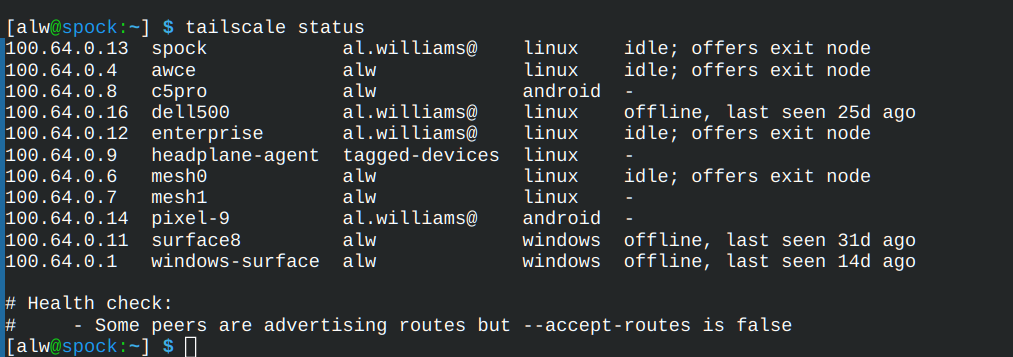
Tailscale operates what is usually called the control plane. The clients register with it, authenticate, learn which other machines they are allowed to see, and how to reach them. This distinction is important: your actual traffic does not flow through the Tailscale control server. The clients attempt to establish direct WireGuard connections to one another. Under normal circumstances, your data doesn’t go anywhere else.
If NAT or firewalls make that impossible, Tailscale can fall back to one of its DERP relay servers. DERP stands for Designated Encrypted Relay for Packets. The relay can pass your encrypted packets along, but it can’t decrypt them.
This architecture explains why Tailscale works so well. You get a private address for every participating machine and, with MagicDNS, convenient names instead of addresses. You can also designate a machine as an exit node (that is, route all network traffic through the remote node), advertise an entire LAN through a subnet router, control access with policies, SSH into a remote node, and do several other tricks.
With generous free limits, why bother standing up your own server? Most Hackaday readers can already answer that question. You can make any number of justifications for why you want to run your own DNS, mail server, or Git servers. Privacy. Extra features. Total control. But the truth is we just want to, and that’s ok.
Enter Headscale
Headscale describes itself as an open source, self-hosted implementation of the Tailscale control server intended primarily for self-hosters and hobbyists. It supports the basic things you’d expect, including MagicDNS, IPv4 and IPv6, subnet routers, exit nodes, tags, ACLs, Tailscale SSH, and file sharing. It doesn’t reproduce every commercial Tailscale feature, so checking the compatibility list is worthwhile if you depend on something exotic.
You’ll also need somewhere to put it. The official documentation expects a Linux or BSD server with a public IP address and recommends making Headscale available over HTTPS on port 443. That sounds more intimidating than it is. A tiny VPS is ideal. If you already have a public server doing other jobs, Headscale can sit behind a reverse proxy such as Apache, nginx, or Caddy.
If you are really on a budget, consider using something like Oracle’s OCI Free Tier. Of course, now you are trading one free plan for another. And, in all fairness, Oracle just cut some free limits in half this month. But it is easy enough to change servers quickly if the need arises. You can just as well use a local machine with dynamic DNS and a port forward.
There is one wrinkle: the Tailscale control protocol uses a somewhat unusual WebSocket upgrade, so don’t assume that every arbitrary HTTP proxy configuration will work. The Headscale documentation provides working configurations for the usual suspects.
Installation is straightforward, particularly on Debian or Ubuntu, where official packages provide a user account, default configuration, and systemd unit. The important file is normally:
/etc/headscale/config.yaml
A basic installation will use SQLite, so no need for a big database package. You’ll need to create your first user:
headscale users create hackaday
The trick to connecting a client is to tell it to use your coordination server. For Linux:
tailscale --up --login-server https://your-server-url
Usually, it will bring up your browser for you to log in. You might notice you haven’t provided a password. To log in, you’ll get a command you have to run on the server. However, you can also create keys to preshare if that’s not feasible. There are also options to set up SSO with something like Google.
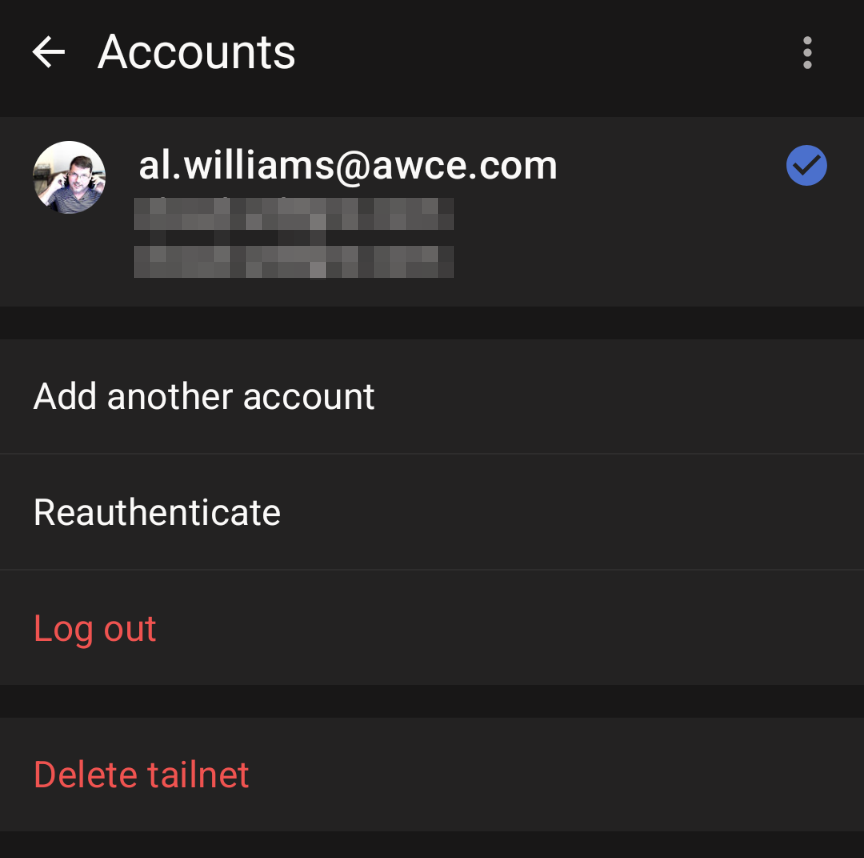
Even the Android client can take an alternative server, although it is tricky to find. In the accounts page, you have to open the “three dot” menu to reveal “use alternative server.”
What About DERP?
Even with this set up, you are still using the public DERP servers, or, at least, you might be. If you look at the status of an active connection, you’ll see something like this:
active; offers exit node; direct 158.61.222.64:41641, tx 428 rx 348
The direct keyword means your computer and that node are directly connected. In that case, you aren’t using any DERP server at all. It is possible to run your own DERP server, but that may or may not be a performance problem. If your cheap VPS is running halfway around the world, pushing packets back and forth could get slow. Keep in mind, the DERP servers only handle encrypted packets they can’t read, so for most people, you are probably better off at least starting with the public servers.
HeadPlane
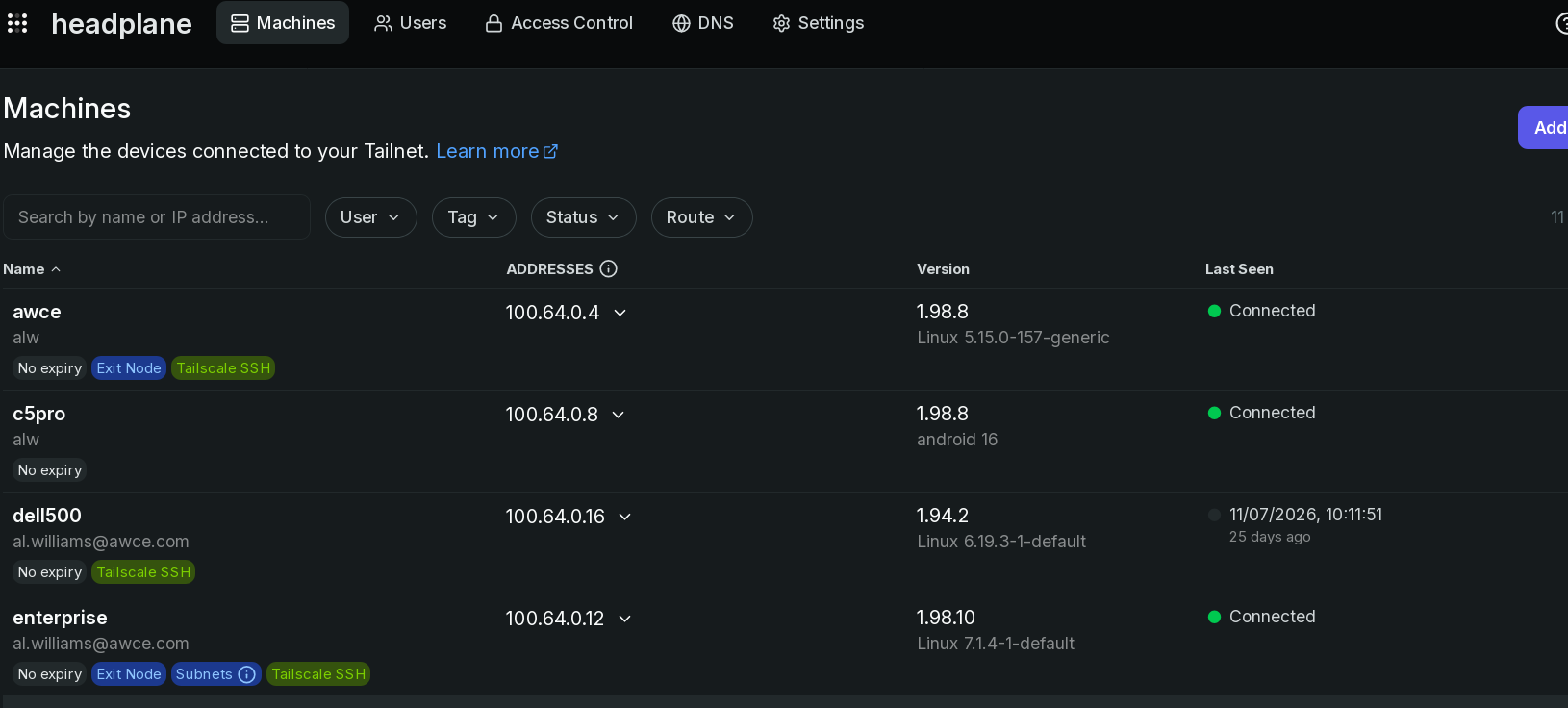
Headscale itself is unapologetically server software. Administration is primarily through configuration files and the headscale command.
I don’t mind that, but Tailscale’s web dashboard is undeniably convenient. Headplane offers something similar. It is a separate open source project that provides a web administration interface for Headscale. It can display and manage machines, routes, users, ACLs, tags, DNS settings, and other parts of the network. It also supports OpenID Connect for authentication and can even provide browser-based SSH access.
If you’ve used the official Tailscale administration interface, Headplane makes a self-hosted installation feel much more familiar. The usual deployment is in a container. Headplane talks to Headscale using an API key, which you can generate as part of the install process.
Exactly how you set it up depends on how you have Headscale deployed, so the exact steps I took may or may not help you. And, of course, you probably want to secure the interface either behind https or keep it accessible only via the Headscale network.
One thing that Headplane can do is allow you to have a tailscale ssh session into a machine via the browser. This turns out to be a pain to set up, but it does work. If Headplane doesn’t suit you, there are other options.
Summary
If you want to experiment, I’d suggest this order. If you haven’t used Tailscale before, get a free account and try it out for a bit. If it isn’t for you, you’re done. If you don’t mind the free tier limits, you are, again, done.
But if you are like me, you’ll get the itch to do your own setup. Get your public server ready and install Headscale. Administer it with the command line. Make sure it is working for a bit. The biggest thing that I appreciated was having better control over my DNS setup, but there are other features you might appreciate if you use, for example, ACL security.
Then, if you don’t like the CLI, try headplane. Once you are bored, you can work on single sign-on and your own DERP servers, if you like.
Headscale a nice example of something Linux has always been particularly good at. Start with an application that hides a complicated technology behind an easy interface. Pull back one layer. Discover that the complicated part is actually composed of several understandable pieces. Replace one of those pieces with an open source implementation.
We’ve looked at wireguard and tailscale before.












If you are comfortable with networking and Linux in general, and have a linux host somewhere at an ISP (can be a VM, but must have a public IP address), then you can use SSH to set up a reverse tunnel into your home network. One-or-two extra firewall rules, a script-or-two to automate things, and you are on your way…
Of course you don’t get all the bling like DNS names, etc…but you can do this on any Linux distro…just need SSH installed, and preferably a firewall as well.
jup done that and its super convenient. I found out my router is behind multiple networks so cant do port forwarding (tons of users share the same public IPv4 – which regularly gets blocked) but I get a real IPv6 adress and my router properly support IPv6 forwarding and whitelist, so now I can SSH into my home Pi with that. IPv6 has some very nice features.
Take a look at netbird too.
Just came here to say the same NETBIRD NETBIRD NETBIRD!!! I personally still use wireguard for simple setups but anything that requires any complexity at all or additional users, etc, Netbird is the answer. Easier to setup in my experience than the scales as well and it just works, rock solid, too!!!
Sure, ok for home use, but considering the welcome mat that is provided should a vuln be found, it’s too hard to trust Tailscale for serious production infrastructure.
like TS-2026-006
Tailscale SSH allowed users to be addressed by numeric UID, bypassing root user restrictions in ACLs …. A user with non-root SSH access who addressed 0@host would have been able to access root in violation of ACLs.
or TS-2026-009
if a user connected with the username -i [tailscale] would have printed the entire passwd file contents starting with the root user, causing Tailscale to open an interactive root session.
Iceberg says there will be a lot more unknown, and Tailscale is a huge frictionless doormat to your entire network.
Disclaimer: I am but a hobbyist, and I am absolutely not a computer security expert.
I had been looking into setting up something like this a few months ago. At the end of the day I opted not to use Tailscale or Headscale primarily because a compromise of the coordination server (which, in the case of Headscale, is still likely being hosted on someone else’s computer) could allow an attacker to add other clients to your network. Yes, Tailnet Lock is a thing, however AFAIK that has not been implemented in Headscale yet (https://github.com/juanfont/headscale/issues/1307), seems more of a workaround for a design flaw of Tailscale, and requires manually enabling it. In a hypothetical situation, a malicious actor within Tailscale would be able to add a rogue device into your network and launch attacks to your internal devices from there. Headscale itself has not added any way to mitigate this attack surface. This question regarding possible server compromises to Headscale has been open for at least 3 years, with no answer from the developers after the latest comment in the thread from 2 years ago (https://github.com/juanfont/headscale/issues/1432).
I also looked at NetBird, ZeroTier, Pangolin, and some other solutions but pretty much all of them had the same basic vulnerability: A compromise of the control server (from something besides the VPN service itself, say another insecure service (i.e. a webserver), a malicious actor physically present in the server room, breaches or backdoors in your hosting provider, etc.) can lead to an attacker entering your network. I, with my ample qualifications (see above), feel that this approach to networking is fundamentally flawed.
I ended up self-hosting Nebula. As far as I’m aware it’s completely open-source. Nebula seems to be made by Slack, who publishes the server (yes I’m aware that the company been criticized for various reasons) and another company called DefinedNetworking, who publishes the Android/IOS app and provides their own free/paid server. The only server that you need to host on a public server for this are what Nebula calls “lighthouses”, and you can prevent it from accessing your networked devices by using the firewall Nebula provides on each device’s configuration file to limit the ports that are accessible. Thus if the lighthouse is compromised, assuming the Nebula firewall works as intended and you set it up like above, no access into your internal network should be possible. It seems to me that the only failure points for Nebula would be a vulnerability in the software itself, having your Nebula root certificate compromised, or flaws relating to the certificate generation such as (https://github.com/slackhq/nebula/security/advisories/GHSA-69×3-g4r3-p962). The setup is probably more involved then Tailscale as you need to generate certificates for each device though, and you don’t get a centralized hub to manage everything if you are self-hosting it. Also you’ll need to rotate the certificates every so often, depending on how long you set them to be valid for.
Disclaimer: I am but a hobbyist, and I am absolutely not a computer security expert.
I had been looking into setting up something like this a few months ago. At the end of the day I opted not to use Tailscale or Headscale primarily because a compromise of the coordination server (which, in the case of Headscale, is still likely being hosted on someone else’s computer) could allow an attacker to add other clients to your network. Yes, Tailnet Lock is a thing, however AFAIK that has not been implemented in Headscale yet (https://github.com/juanfont/headscale/issues/1307), seems more of a workaround for a design flaw of Tailscale, and requires manually enabling it. In a hypothetical situation, a malicious actor within Tailscale would be able to add a rogue device into your network and launch attacks to your internal devices from there. Headscale itself has not added any way to mitigate this attack surface. This question regarding possible server compromises to Headscale has been open for at least 3 years, with no answer from the developers after the latest comment in the thread from 2 years ago (https://github.com/juanfont/headscale/issues/1432).
I also looked at NetBird, ZeroTier, Pangolin, and some other solutions but pretty much all of them had the same basic vulnerability: A compromise of the control server (from something besides the VPN service itself, say another insecure service (i.e. a webserver), a malicious actor physically present in the server room, breaches or backdoors in your hosting provider, etc.) can lead to an attacker entering your network. I, with my ample qualifications (see above), feel that this approach to networking is fundamentally flawed.
I ended up self-hosting Nebula. As far as I’m aware it’s completely open-source. Nebula seems to be made by Slack, who publishes the server (yes I’m aware that the company been criticized for various reasons) and another company called DefinedNetworking, who publishes the Android/IOS app and provides their own free/paid server. The only server that you need to host on a public server for this are what Nebula calls “lighthouses”, and you can prevent it from accessing your networked devices by using the firewall Nebula provides on each device’s configuration file to limit the ports that are accessible. Thus if the lighthouse is compromised, assuming the Nebula firewall works as intended and you set it up like above, no access into your internal network should be possible. It seems to me that the only failure points for Nebula would be a vulnerability in the software itself, having your Nebula root certificate compromised, or flaws relating to the certificate generation such as (https://github.com/slackhq/nebula/security/advisories/GHSA-69×3-g4r3-p962). The setup is probably more involved then Tailscale as you need to generate certificates for each device though, and you don’t get a centralized hub to manage everything if you are self-hosting it. Also you’ll need to rotate the certificates every so often, depending on how long you set them to be valid for.