
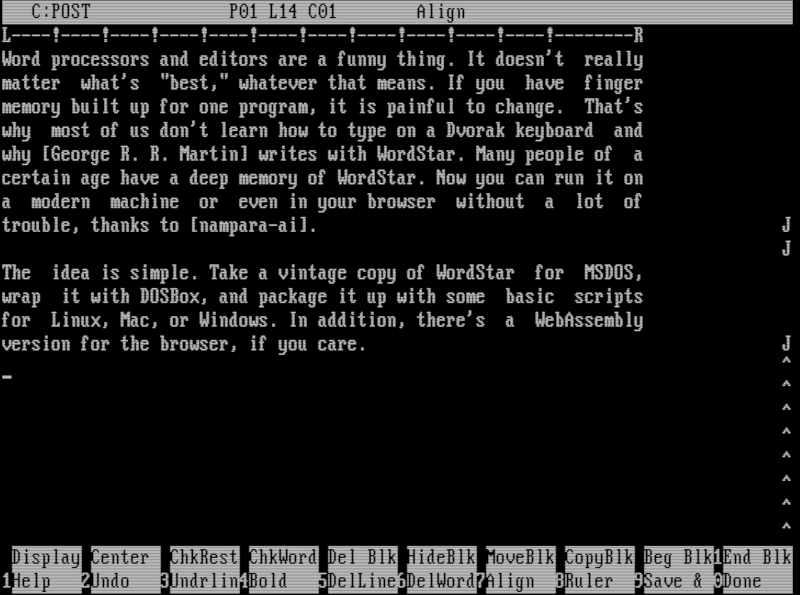
Word processors and editors are a funny thing. It doesn’t really matter what’s “best,” whatever that means. If you have finger memory built up for one program, it’s painful to change. That’s why most of us don’t learn how to type on a Dvorak keyboard and why [George R. R. Martin] writes with WordStar. Many people of a certain age have a deep memory of WordStar. Now you can run it on a modern machine or even in your browser without a lot of trouble, thanks to [nampara-ai].
The idea is simple. Take a vintage copy of WordStar for MSDOS, wrap it with DOSBox, and package it up with some basic scripts for Linux, Mac, or Windows. In addition, there’s a WebAssembly version for the browser if you’re into that sort of thing.
On Linux, the wordstar.sh file grabs the current directory and sends it to launch.sh. This script makes sure everything is ready, builds a DOSBox config file from a template, and launches everything. The only problem is that it doesn’t correctly resolve symlinks if you want a link on your path. Luckily, that’s easy to fix:
#!/usr/bin/env bash
#Run me to launch WordStar 4.0 on Linux:  ./wordstar.sh
DIR="$(realpath "$0")"
DIR="$(dirname $DIR)"
cd "$DIR"
DIR="$(pwd)"

#DIR="$(cd "$(realpath "$(dirname "$0"))" && pwd)"
"$DIR/native/lib/launch.sh"
Practical? No. Irreplaceable? Not really. You could run WordStar under RunCPM or set up DOSBox yourself. You can even find a sort of modern version to run, if you prefer. But for just a quick way to get it running easily, it is hard to beat. If you want to play with the web version, it is easy to navigate to the web subdirectory and run Python:
python3 -m http.server 5309
Then you can point your browser to http://localhost:5309, and you are in business. Or, get a flavor for it from [TigerClawTV]’s walk-through video below.












DOSEMU, Dosemu 2 or Merge used to be other *nix solutions here.
https://en.wikipedia.org/wiki/DOSEMU
https://en.wikipedia.org/wiki/Merge_(software)
You meant “George R. r. Martin wrote “
/s
I remember using Wordstar as my first text editor running in CP/M on a Z80 card in my Apple II clone. What a victory over the typewriter and having tongues tippex to correct the many mistakes i made.
Why not use LaTeX like a normal human being? Commercial software only helps already fat CEOs get fatter.
Like a ‘normal human being’ definitions vary.
That’s why it’s funny
I don’t think anyone is still making money off WordStar.
George R. R. MArtin, maybe.
Oh. You meant by selling the software.
Oh…Wordstar
all those fights between drunks I camcordered were for naught.
I love using LaTeX but companies exist and it makes our world better.
Normal human beings use TeX. LaTeX is for n008s.
I found Wordstar’s dot commands for formatting easier than Word, LibreOffice etc today, particularly conditional page breaks that tell it where it can put a page break if it needs to without splitting a paragraph.
And block marking was more intuitive – today the cursor marks the end of the block you have marked and you have to decide there and then whether to delete it, copy it to an invisible buffer (clipboard) or a combination of both. In Worstar you mark your block, go elsewhere in the document and then decide whether to copy it, move it, or delete it.
But the Wordstar I used was only for monospaced fonts (on a dot matrix printer) maybe when you introduce true wysiwyg and proportional fonts dot commands don’t really cut it.
THis is why I moved from *roff (with all of the fun accessories like eqn and pic) to LATeX. I HATED when I was forced to used MSWd or GoogleDs at work, as both were painful for technical writing. Or anything where formatting mattered (though at least MSW**d made it possible to set up useful templates; Would have been nice if any of my coworkers or management had bothered to do so, rather than wing it with tabs, space blocks, and whatever else made it “look right’, until it didn’t)
Wordstar absolutely dod pagebreaks and numbering better than MSW**d, which STILL managed to f*** up page numbering, thirty years in….
I also preferred Wordstar for a long time. Wordstar’s formatting was always predictable and just worked. While Word had lots of problems and quirks. Page breaks being one of them. I didn’t care much about WYSIWIG, and Word never was able to convince me that it was so much better. Mainly because of its bugs.
And Like Cliff Craven says: some bugs in Word have never been solved even 30 years later, even while they are there right in the user’s face.
Nowadays I use Libreoffice for everything. It might not have so many features as Word, but Libreoffice just works. And to be honest, development in Word has been standing still for a long time, while Libreoffice is just evolving, and getting better and better.
For Linux, I use joe – It is an equal to WordStar
Plus FWIW, joe comes standard with Slackware Linux :)
Joe has a Wordstar diamond keyboard mapping. jstar is the Linux program. “apt install joe”
The SemWare editor, TSE, is a much more capable editor. https://www.semware.com/ TSE started out as an MS-DOS, Wordstar clone 30 or 40 years ago. Now, versions run under Linux, Windows command line, and Windows GUI.
In my CP/M days, I vaguely recall a port of WordStar to use Cyrllic characters, called WordTsar. Really.
The WordStar experience is best to be enjoyed on an amber monitor, I think.
Say, on an IBM PC compatible with an MDA/MGA card and an 18 KHz TTL monitor.
Or on an CP/M computer with an 15 KHz mono video monitor.
Those sad souls with a modern Lunix rig can run “cool-retro-term”.
But the settings must be adjusted for something more realistic.
By using two USB serial converters and a null-modem cable (with handshake lines), a serial output of a DOS emulation can be sent to minicom (either via direct application support or CTTY command).
The only problem is to make sure that the terminal emulation can handle the escape sequences used by WordStar.
Maybe WordStar setting has to be altered for the correct terminal type, too.
The CPM version had terminal types, but I do not think that the DOS version did.
I’m not sure right now. However, there might been different versions out there.
An IBM PC version and versions for non-IBM PCs, maybe.
Let’s remember, there was a time of so-called “MS-DOS compatible PCs” that were not IBM PC compatible.
But even if it’s an CP/M exlusive feature of WordStar, there are workarounds.
It’s possible to use CP/M-80 emulators (DOS or Linux) or boot CP/M-86 or DOS Plus in an DOS emulator and use CP/M-86 version of WordStar.
That being said, I’m not sure how to use CTTY on those latter OSes.
Maybe the emulator itself has to input/output as serial data instead of providing a graphics card.
Back in the CP/M days, there were serial terminals and CRT devices.
Some non-official versions of DOSBox might have text i/o, too.
That’s how I do it: https://hackaday.com/2023/08/23/linux-fu-the-old-school-terminal/
Forget wordprocessors, I want to run Empire and Hack…¹
Probably run great on freedos, I might have to spin it up.
I still have a license for Wordstar somewhere. Paid for and all. Don’t know which version, but it ran on ms-dos 3.21. :)
There was also something called wordmark, it could print greek symbols but couldnt display them without changing the eprom of the graphics card so we built a pcb with a switch to switch between display character sets. That was in 1987 I think. What a delight when wordperfect 5.0 arrived eventually.
Ah, that makes sense! Both CGA and MDA/MGA had a font ROM.
Interestingly, CGA’s font ROM was not accessible from PC side (not in memory space).
To have text in CGA graphics mode, say for mixing text+graphics,
the PC BIOS had to use its own integrated copy of the IBM CGA font.
The Herc.., err, MGA card was more or less similar here, I think.
– It also used an 6545 CRTC, hence the existance of CGA+MGA combo cards with a switch.
Though the role model of the MGA (aka HGC), the IBM MDA had no graphics mode, so PC BIOS needed no copy to support it.
The software that came with the original HGC maybe had a TSR or something
or MGA software had to use its own font when in graphics mode.
The Hercules Plus, Hercules InColor and EGA had introduced a soft font feature as we know it.
It allowed the graphic card’s character generator to load a different font from RAM, as well.
That made it easier to localize fonts.
Early 90s DOS software such as PC-Tools 7/8/9 used a TUI using custom font characters when run on a VGA card.
Edit: About switches and ROMs.. An old trick was to drag an address pin (A15 on 2764 etc) to either +5 or GND (via pull up/down resistor?) to select upper or lower half of the ROM.
So by burning two evenly sized ROM images (or merged into to one) into an EPROM, it was possible to select one of them.
The C64 or Amiga folks did similar stuff for switching Kernal and KickStart, I think.
I learned Vim a quarter century ago and Emacs some 5 years ago. I can’t cope with another set of keyboard shortcuts to do basic editing. Either of these great editors seem to be able to offer a similar experience for writing long texts (with or without markup).
What about Notepad++?
I’ve been using VIM since the late 90’s so I’m used to it, but I have very fond memories of Wordstar. It was my first text editor.