
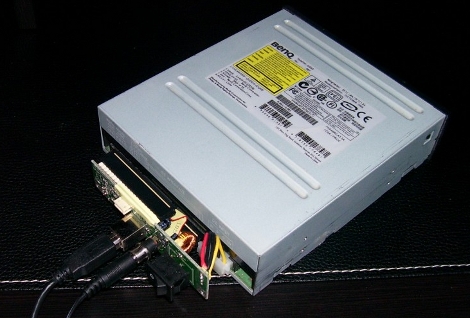
This is a “why didn’t I think of that?” idea. [Alec] needed a way to connect an IDE DVD drive using USB. Rather than order a connector he pulled the circuit board out of an old USB hard drive enclosure and connected to his DVD drive. Bang, recognized and running.
This will prove extremely handy if you have a netbook without an optical drive. We’ve used Unetbootin to move Linux ISO images to a thumb drive in the past. In addition to getting around the lack of an optical drive, this saves burning the data to a piece of plastic. But, you should be able to use this with a Leopard retail DVD instead of a 16GB thumb drive for a Hackintosh conversion. That means you could install Leopard on a netbook without needing a Mac to transfer the disk image to your thumb drive first.













Done this many times, both at home and at the office. I’m surprised that other people are surprised at this…
I did that for my EEE PC 701, used it to install windows and other software easily.
i mean its ide, im using an old usb dvd drive connector as hot swap ide device and it works too
Are you kidding me?
Next can we post my hack where I plugged an optical drive into an IDE cable where a hard drive used to have been? Hint: that works too.
Jesus hell.
Next on hackaday: how to connect a PC fan
hey, i gots a 4 port KVM I HACKS GOOD
Wow, why didn’t I think of this about 4 years ago….oh wait. My disassembled external enclosure has been used like this for some time now. Actually that’s how I image netbooks….among other uses.
A chimpanzee stacking crates on top of one another to reach the banana tied to a string is more hack-worthy than this.
:facepalm: x 1,000,000
lol, I like how everybody posts a comment on things like this, but nobody says anything on really cool/complicated posts. and all of the comments after the third one are saying the same thing.
Preaching to the choir, but this ain’t new…It’s only unknown because it’s so simple – nobody who’s tried it has reported it simply because they figure it’s been done before.
…I personally prefer the ~$5 hong-kong special adapters, I’ve yet to have a compatibility issue with any of several brands. Then only issue I’ve encountered was with one particular DVD drive (all cd-rom drives that I’ve tested worked) that would be recognized at boot on a thinkpad, but then locked up and refused to read properly after several minutes…It worked fine when used “properly,” the converter just didn’t like it…
@Odin84gk
its not doing anything different that what it was intended to…therefore not repurposed…just disrobed and relocated.
Go ahead guys keep adding comments to a post that apparently few find new and note-worthy.
Hackaday should’ve at least reorder the feed so this doesn’t look like its the lastest and greatest hack found by the editors.
I lifted the second lid on my toilet! Now I have a urinal WHAT A HACK!
Been there done that. How is this not obvious?
done this and the opposite(usb cdrom enclosure with a hdd)
got a few little usb to sata/ide/ide2.5 dongles for roughly $15 each, they are 1 of the most useful usb devices i own
anyone know what i can do with 50 pin ide laptop cdroms?
i have a external laptop burner that works fine but it cant burn dvds
i also have a laptop dvd burner but it takes too much power for teh enclosure(i hate my cell phone, i cant type teh, it autocorrects it) to burn a dvd purely with usb power
Are you serious? This is the most obvious thing ever.
whatever guys. read the post or don’t. i always find something interesting here everyday. every post can’t be groundbreaking. relax .
Oldie but a goodie… I’ve done the reverse also, ripped a dvd burner out of it’s usb enclosure to put a hdd in temporarilly…
Why don’t you dumbasses just load your OS onto a flash drive, every linux distro can do it, windows 7 can do it, os x can do it. Optical drives are a think of the past.
Yes I know, it’s not a hack. Merely trivial to make ends meet and I’ve been running this for years. BUT it doesn’t bring the writeup justice if there isn’t a link to it! So, here it is: http://ubermodder.com/usb-ide-hdd-to-cd-dvd-drive-conversio/
I’ve done exactly this on numerous occasions with an old 3.5″ HDD-to-USB adapter and a DVD burner. I never realized it was anything special, it just worked! I just balanced the drive on the open enclosure, sometimes swapping for a longer IDE cable and connecting a molex splitter (as an extender) because the included ones were quite short. The only problem I’ve come across seems to be related to overloading the power circuitry… mine enclosure uses a standard 12-volt input, and seems to convert that to 5 volts on-board (through a linear converter I think). I’m pretty sure I’ve nearly killed that chip by at this point, because it won’t work more than a few seconds unless I power the connected drive with an old ATX PSU. Burning DVDs does seem to eat more power than your everyday harddrive :P
cath0de-
“whatever guys. read the post or don’t.”
Quit yer whining. Read the comments or don’t.
WTF. Why don’t you have a post about how ta hack a donut by reheating it inthe microwave?
seriously? I think my soul just shriveled a little bit.
Call that a real hack? there’s not even a single Arduino or blinking LED!
I’m not one to jump on the “not a hack” bandwagon but… really? Using an IDE to USB adapter to use… AN IDE ODD IN USB? :O!!! That is magic!
I don’t even think this is clever or anything. If you think this is a hack because they repurposed a 3.5″ enclosure… man I’m hacking a damn lot while building computers. I’ve used a box once to sit my motherboard on for testing…
I did this to load multiple OSs on a HP T5710 Thin Client. Great quick fix for a pc with no optical drive.
And now ripley believe it or not will announce the winner of 2010 for scoring highest in category “The most technology illiterate”. The medal goes toooo!… Mike !!! Lady and genteelness what a touching moment, look the tear of joy
Argh! But I did think of that:
http://www.mydellmini.com/forum/general-mac-os-x-discussion/10764-no-external-dvd-drive-no-problem-my-makeshift-external-dvd-drive.html
By the way here is “why didn’t I think of that?” idea, you can use tobacco pipe to smoke weed! no more wasting time on rolling joints, just pick up pie at any grocery store
painfully obvious, not a hack, I want my money back, etc
This is dumb HaD. Why did you post this? You can buy bare-board USB/IDE or SATA converters for next to nothing, no need to strip one out of a perfectly good HDD enclosure. Even baby “hackers” have done this.
This is a neat little trick i have been doing for years. Please note that it doesn’t come without its small quirks. Cd burners don’t suffer from this as much, but dvd burners tend to stop burning sometimes, its not a problem with the drive, just that your trying to use somthing that was originally made for a hard drive. Also, sata versions are really weird if your connecting sata burner drives. The opposite of this, using an external ide cd/dvd burner board to hard drive, will only support up to so much in hard drive capacity (the limits of the ones i have came across is 160 gigs.) you can still use the drive, but only so much space. These are just things to be aware of so you don’t think your hardware is bad. it may happen to you, may not…but this lil trick has saved me many many times! i dont even run any internal dvd/cdrom/etc drives in my desktop anymore, usually i just boot off usb or plug one of these in if i need to burn a cd or somthing.
BOOM!!!!!!!!!!!!!!!!! and my inbox kills me in a horrible glass shattered sheared metal sort of way.
I’ve done this before in multiple combinations (IDE CDRW adapter to HDD, HDD adapter to DVD drive, etc) It rarley works with pre-assembled stuff from companies like HP or Dell. It worked the best with an enclosure I bought without an HDD inside.
i cleaned something other than glass with glass cleaner… can you post an article if i write it up?
this is silly
Ive been using my old external in the same way with my netbook, cdrom, dvd burners and bluray. heck I installed win7 on this thing with a psp….
“This will prove extremely handy if you have a netbook without an optical drive.”
Are you f-king kidding me?
I do have a netbook without an optical drive, and instead of ripping two perfectly good drives to pieces, I just went out and spend £20 on a USB DVDR/CDRW drive which is perfectly designed to fit in my netbook bag.
honestly, this is not worthy of being on hack a day.
This is not a hack. If you know the ATA standards, you’d see that ATA Packet Interface (ATAPI) is just the same as the IDE for hard drive.
This really, really isn’t a hack. This is something I’ve been doing for years with laptops that have defective optical drives.
I use this with Wxripper to backup my xbox 360 games. Just unscrew the chassis and you can easily swap the movie dvd after finding the magic number. The only downside would be that it takes about 1min to make the drive stop spinning via usb. Other than that… its perfect. Even got a name for it: The ripbox.
Slow news day? Is there anyone who hasn’t done this ‘hack’ already?
i’ve done this around hundred times with different adaptors… it works as well with sata-to-ide-ide-to-usb or somewhat. this is lame
tomorrow: how to connect a usb mouse to ps/2 via usb-to-ps/2 adaptor
hacking for dummies??
Hack a day Fail …
I use two of these at work for data archiving.
like the name of an mp3 encoder….
lame…
i think you’re getting more dude! wtf?! responses than a cheers, publishing very common (i might even say household grandma in the kitchen style) sense ususallly gets these kinds of replies..
been there, done that (also with a crappy parallel interface ), like most of the posters here…
Come on HAD any real computer hacker or geek has done this for years!!!
i will have to say thank you for posting this — im sure that every day there is a computer geek hacker or nerd born that will need to know this info —
we wont harp you too much!!!
keep them rolling in
@nubie:
“On a side note, when will we get thumb drives that act like bootable CD drives? I hate burning CD’s for no reason. ”
Also already done: Just get a U3 drive and put your own ISO on it with U3 Customizer. U3 sticks emulate a USB CD-ROM drive and a mass storage device.
I use a U3 stick all the time to reinstall Windows XP on test computers: While many motherboards have trouble booting from USB memory sticks, most will boot from the emulated CD-ROM. Also, while it’s impossible to install Windows from a USB CD-ROM if you use the XP ISO, it’s possible to boot WinPE or BartPE from CD-ROM and start the XP installer from there.
Booting WinPE takes a minute or so depending on the motherboard, and installing XP Pro from a directory on the mass storage part of the U3 stick takes about 10 minutes with /makelocalsource. All you need to know is how to Google for “WAIK” and “winnt32 command line”.
===Jac
I’ve been doing this in my dorm room for ages now. Everything from eSATA to SATA, IDE/USB to IDE dvd drives, and internal SATA to eSATA.
Grow up. They didn’t buy new hardware, they reused stuff, they DID IT THEMSELVES. Their hardware did not come out of the box like this, they had to hack it up.
Nerds stop fronting and do something.