
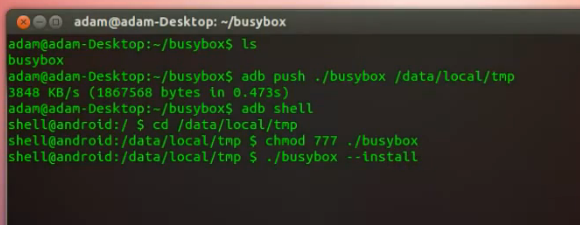
[Adam Outler] shows us how to expand the Linux tools available on Android without rooting the device. He does this by installing BusyBox. The binary is copied to the device using the Android Developer Bridge. He then opens an ADB shell, adds execution permissions to the binary, and runs it. BusyBox calls itself the Swiss Army Knife of Embedded Linux. It provides a set of very common tools which you’ll find useful in your tinkering. The one that [Adam] shows off in his video is the vi editor, but the basics that make a shell work are all there like: ls, mkdir, grep, dmesg, mount… you get the point.
So what are you going to do with your unrooted device now that you have these commands at your disposal? That’s really for you to figure out. [Adam] continues his demonstration by installing a package that does require root access. It’s BotBrew Basil, which adds apt-get and a few more complex packages. He then uses vi to write a C++ Hello World program, then compiles it and runs it. So if you’re looking to do some development on your phone this is one way.













That is really sweet :-).
I doubt it’d fit on a phone, but on my tablet I have Terminal IDE from the Play Store, which is a full development suite, including Busy Box.
Awesome! Thanks for this!
I’ve definitely been missing out on some Linux tools while mobile, especially the network-related ones. And I haven’t really been wanting to root.
@AndroidCat – What do you mean? My GS3 has 8.3GB available space on internal phone storage. Total internal storage is reported as 11.95GB.
Reblogged this on Critical Security.
busybox is fairly limited though. i’m surprised that android doesn’t actually ship with it. get GNU tools on a phone and I’m interested again (speaking as a former N900 user)
Nope. Google used their own, stripped down busybox-like tool for Android instead. Google seems to prefer everyone to stay out of the shell.
Forgot to add: I’m STILL a N900 user, soon to switch to a Nexus4, as soon as it gets here!
You just can’t beat the N900, as far as hacking, freedom, Linux tools, etc.
I still have mine handy, thought without a SIM. That went into my GS3 this year.
I’m actually considering keeping the N900 plugged in to USB power somewhere tucked away, and have it authenticate VPN connections for me. It’s on the WiFi the whole time, and I’ve got EasyDebian, so it should work.
“He then uses vi to write a C++ Hello World program, then compiles it and runs it.”
He needed vi to write hello world? If he had half a beard, he would have typed the program directly into the compiler.
Real programmers use butterflies… http://xkcd.com/378/
I’ve saved time and bought ZShaolin for a couple bucks, its a neat app and under active development
Awesome, use busybox a lot on my phone but didn’t know about botbrew, looks awesome! On a side note, how dare you impersonate me, for adam@adam-desktop has long been MY machine! (and adam-laptop, adam-server too)
I recently jalbroke my ipod touch 4thgen, It’s awesome. I got python, lighttpd (web server), weechat (irc client), and heaps of libs. It’s an awesome little unix device.
Woah, didn’t know you could do that!
Busybox comes preinstalled on Cyanogenmod.
Hey, I believe I just found an application that can do this on your phone: https://play.google.com/store/apps/details?id=burrows.apps.busybox
What would be way cold is if someone had compiled User Mode Linux (UML) for ARM. UML is an executable, like busybox. It does not require root. Once running, UML is a linux kernel running as an executable in userspace. When started UML “boots” up and runs /sbin/init which kicks everything off like a normal distribution.
https://en.wikipedia.org/wiki/User-mode_Linux
(Sorry, 2nd post — added [x] Notify me of follow-up via email.)
hey, there is an that does this now: https://play.google.com/store/apps/details?id=burrows.apps.busybox
I’m trying this on a GS4 i9505. I get “Operation not permitted” when I try chmod. Could they have changed the required permissions for it?
that return an error
like
busybox: /system/bin/which: Invalid cross-device link

busybox: /system/bin/who: Invalid cross-device link

busybox: /system/bin/whoami: Invalid cross-device link

busybox: /system/bin/xargs: Invalid cross-device link

busybox: /system/bin/xz: Invalid cross-device link

busybox: /system/bin/xzcat: Invalid cross-device link

busybox: /system/bin/yes: Invalid cross-device link

busybox: tem/bin/zcat: No such file or directory

busybox: tem/sbin/zcip: No such file or directory
Of course. I don’t know why the autor said that about –install. That command just creates symlinks in /system/bin and others folders that are not accesible for non-root. The same reason that avoids you to install busybox normally and to to push the binary into the rigth place is the same reason that avoids to create symlinks to system folders. TLDR; you cannot create symlinks into system dirs without root, but lucky you still can push binaries to /data/local/tmp and make them executable.
Hey Mike,
It’s really interesting. I recently bought a Pixel mobile and I am trying this on it. I get an error like “Operation not permitted”. Could you help me overcome this error? And also I need to know whether I can root my Redmi Note 3 with this tool?
Thanks in advance.
Busybox is not a rooting tool.
Will your tips cause of losing warranty or technical errors such bootloop and soft brick?
It is really interesting method, not sure about its safety if applied on other Android models, but it is interesting.
What Android version supported by your recommended method. I am using Android 7.0 Nougat sir can I apply your method on my Nougat based smartphone.