
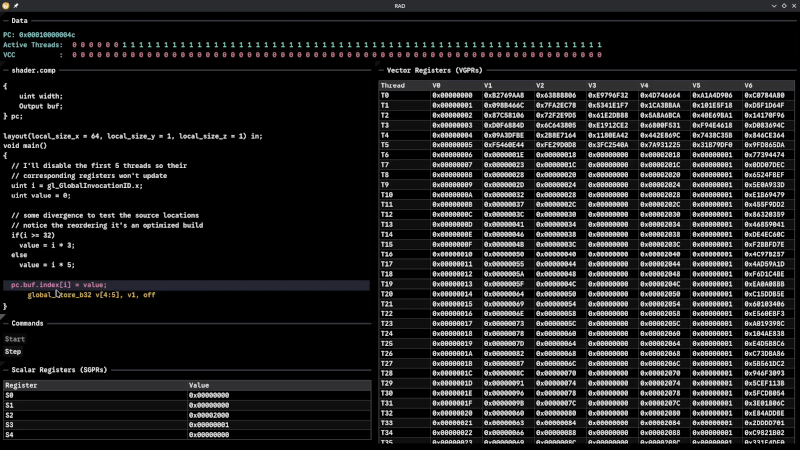
Although Robert F. Kennedy gets the credit for popularizing it, George Bernard Shaw said: “Some men see things as they are and say, ‘Why?’ I dream of things that never were and say, ‘Why not?'” Well, [Hadz] didn’t wonder why there weren’t many GPU debuggers. Instead, [Hadz] decided to create one.
It wasn’t the first; he found some blog posts by [Marcell Kiss] that helped, and that led to a series of experiments you’ll enjoy reading about. Plus, don’t miss the video below that shows off a live demo.
It seems that if you don’t have an AMD GPU, this may not be directly useful. But it is still a fascinating peek under the covers of a modern graphics card. Ever wonder how to interact with a video card without using something like Vulkan? This post will tell you how.
Writing a debugger is usually a tricky business anyway. Working with the strange GPU architecture makes it even stranger. Traps let you gain control, but implementing features like breakpoints and single-stepping isn’t simple.
We’ve used things like CUDA and OpenCL, but we haven’t been this far down in the weeds. At least, not yet. CUDA, of course, is specific to NVIDIA cards, isn’t it?












The GPU debugger on the orginal XBox was amazing. You could click on any pixel and get the full history of a pixel. All the shaders and primitives that caused it to change. Amazing bit of kit.
Since the topic is GPU’s and people knowing about GPU’s I wonder if someone that knows about GPU’s can tell me why all those AI that needs tons of RAM can’t use the feature of modern GPU to use normal RAM as an offload by mapping it in.
Would that not work for some reason? I mean it would be slower yeah, but i mean aren’t there trick they can use, ‘blit’ the actively used segment to VRAM maybe, something like that.
Same for games incidentally, they added the function to MMU normal RAM into the VRAM address space exactly because of RAM issues in games surely.
Talking of RAM, I saw a site that now recommends systems with DDR4 due to the price issues of DDR5, we are actually walking backwards in time due to the AI mania.
I expect that soon Sony/Nikon/Panasonic/Canon will release 640×480 pixel cameras because they sold all the sensors to AI companies for some reason. No worries though, they will make up the image for you in 8K using AI, and it will look similar of the thing you took a picture of, just like you phone camera in 2025/6, very real-like (mostly).
Inference speed is usually memory-bandwidth limited, there’s plenty of software to self-host an LLM where you can set a near-arbitrary VRAM/RAM allocation and the speed starts to rapidly fall off when you start allocating RAM.
But regular RAM gets faster and faster though – or it did when you could still purchase it.
And doesn’t Apple use unified RAM where the regular RAM and VRAM are the same thing? I’m not an Apple person so I’m not sure, I though that was what I heard they did. Anyway it seems plenty fast.
And I think there must be some solution, I mean if you give an AI a query it should be able to predetermine what sections will definitely not be applicable and perhaps then unload that to regular RAM and only have sections that it needs in VRAM. There would be an initial small delay but seeing most of the time goes to the processing that should not be too bad.
Of course you’d first have to create a system of sections, and logic to determine relevant sections, if such is possible.
I’m just not convinced you need 500GB preloaded in VRAM at all times.
But maybe I’m wrong.
Perhaps my suggestions also would require some special RAM interface between regular RAM and VRAM that is more specifically designed for AI. (Even though they nowadays hate DMA because of the security issue with it.)
Mind you they already have RAM modules now that don’t need an external refresh, it does that itself, on the module so there is effort underway to improve the behavior of RAM and to make the whole thing less.. clumsy.
Incidentally, I just saw a headline that even NVIDIA now has a bleak outlook regarding the availability of GDDR7 and its pricing, so maybe we (normal consumers) all have graphics card with DDR4 ram in the end…
nvidia’s jetson series such as orin nano only has one type of memory that is shared between both, cpu and gpu loads. and why stop there, you can just as well offload everything to disk. take a look how vllm or even ollama is batching
What you are suggesting already exists and is often used with integrated graphics systems and can be used with discrete GPUs too if the software supports it. Some systems like Apple’s just decide to stick with unified RAM and so does Nvidia Jetson systems, even things like the Nvidia dgx spark.
The downsides of this approach is that you are limited to standard ddr RAM which is slower than gddr RAM which is optimised for bandwidth rather than latency. So unified memory will be faster than a discrete GPU using system memory because it is better integrated but it will still be a lot slower than a GPU using its own gddr memory. The best option is a discrete GPU with a lot of memory but that isn’t practical or is very expensive.
As an example for reinforcement learning on my 4060 ti in windows 11, training was relatively fast when I stayed within the 8 GB of VRAM and it could utilize all of the GPU, but as soon as it exceeded 8 GB and started spilling into system memory the speed decreased substantially, I don’t have exact numbers but I would say it was at least 10x slower. Now that could be due to windows or it could just be because of the overhead and lower speeds of accessing system memory. This was on a system with 96 GB DDR5 6800 MT/s with a ryzen 7950x, so the RAM and CPU are fast but the overhead just makes it impractical.