
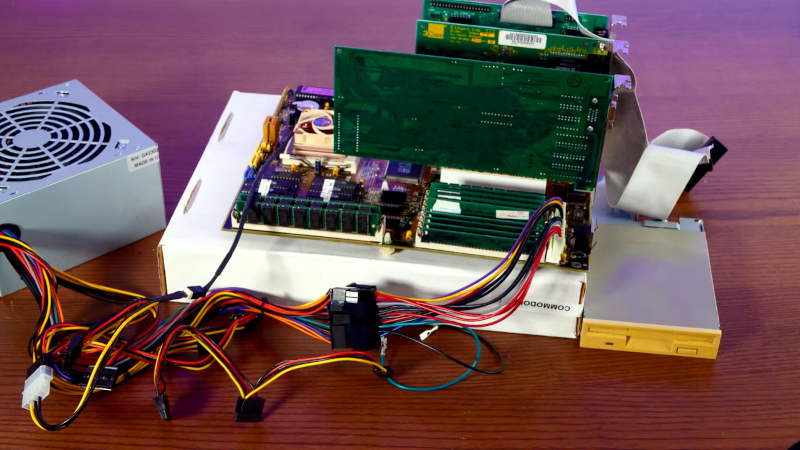
Back in the early days of Linux, there were multiple floppy disk distributions. They made handy rescue or tinkering environments, and they packed in a surprising amount of useful stuff. But a version 1.x kernel was not large in today’s context, so how does a floppy Linux fare in 2025? [Action Retro] is here to find out.
Following a guide from GitHub in the video below the break, he’s able to get a modern version 6.14 kernel compiled with minimal options, as well as just enough BusyBox to be useful. It boots on a gloriously minimalist 486 setup, and he spends a while trying to refine and add to it, but it’s evident from the errors he finds along the way that managing dependencies in such a small space is challenging. Even the floppy itself is problematic, as both the drive and the media are now long in the tooth; it takes him a while to find one that works. He promises us more in a future episode, but it’s clear this is more of an exercise in pushing the envelope than it is in making a useful distro. Floppy Linux was fun back in 1997, but we can tell it’s more of a curiosity in 2025.
Linux on a floppy has made it to these pages every few years during most of Hackaday’s existence, but perhaps instead of pointing you in that direction, it’s time to toss a wreath into the sea of abandonware with a reminder that the floppy drivers in Linux are now orphaned.












In the late 90’s I had an iptables firewall running on a floppy 486 machine between my home network and Internet. Slackware based, if I remember correctly.
https://en.wikipedia.org/wiki/Fli4l
Possibly one of these? (there were 2 or three… I can’t remember which was slackware based)
Hey, they are still alive!
https://www.fli4l.de
Depends what was popular with your local LUG, and the ISP service options: https://sourceforge.net/projects/freesco/
We learned a lot about stripped dependencies, network ISO/OSI, and Windows shenanigans. Fun times.
My first foray into Linux, was in 1999, with Slackware on a stack of floppies 😁
I had tried out SuSe Linux 6.x back then, when it was still of German heritage.
And it came on a big set of CD-ROMs. About 7 or 10 of them..
But that was okay, because these CD-ROMs held the whole collection of packages, the whole repository! 😄
So you had access to everything, without requiring any internet access!
Sure, it was a momentary snapshot only and not up-to-date anymore.
But nowadays it’s a time capsule. These old Linux distros with the many CD-ROMs are fully independent.
They don’t rely on servers that are now shutdown.
I really wished modern Linux distros would be available as Blu ray “ISOs”.
So you would download a 25, 50 or 100 GB image once (for the major release) and have about everything you need, without relying on slow repository servers.
You can do this already with apt-mirror or similar.
Yes, but I do imagine it’s not as user friendly.
On a ready-made CD-ROM release, all of the included packages are known to be good/working, their depencies are met and they have the correct permissions.
Servers, by contrast, are always a bit of a moving target.
Something might been updated and broken every 14 days or so.
In general, most packages have fairly wide compatibility, should have already been tested upstream long before it hits LTS.
Patch level updates that are usually safe to automate:
sudo apt-get update
sudo apt-get upgrade
Version updates that on rare occasion may jump/break some services:
sudo apt-get update
sudo apt-get dist-upgrade
Something that is usually full of surprises if your system has a lot of customization, Desktop fragility, or older GPU drivers:
sudo do-release-upgrade
A clean install to a new ssd every 2 years from a usb is usually wiser, and import your old /home file data once everything has proven stable. Keeping the old OS SSD intact during a major upgrade can be nice if something goes wrong 2 weeks later. And always bet something will go wrong eventually.
The more obscure hardware tends to get nastier surprises. The Desktops + gpu drivers seem to have a lot more issues jumping major OS releases. CLI Servers have lot less surface area for upgrade bugs… but it does happen, and usually on a Friday for extra annoyances. We all learn this the hard way at some point. =)
Problem was though, …. always seemed to be ordering a new set of CDs…. I had a shelf full of them as Linux was moving so quickly. So the internet did solve that problem for better or for worst. I’ve since shredded all those old CDs.
Yeah, I can imagine that. That fits you. Did you burn any books/manuals, too, by any chance? ;)
There is something to be said about an operating system with so little software that it would all fit on one bluray disc.
Back then a single CD held about 650 MB of data and the box shipped with 10 of them.
That was about 7 GB of data and contained most if not all packages of the repository.
Nowadays, a single BD can hold 25 GB of data and it’s nolonger enough?
That’s not exactly a good sign.
Because unless an enormous number of new applications had been written,
it means that modern Linux applications must have become bloatware.
I mean, let’s see it this way: Most popular, full-size applications such as GIMP or OpenOffice (ex StarOffice) had been available since the 90s.
And they did fit on the CD-ROM bundle of the past.
Yep, and I highly suspect that most of that bloat are empty 64 bytes padding for the underlying 32 bytes programs.
I also remember how we’ve converted one of the first 16 bytes to 32 bytes programs way, way, WAAAY back (1990s) and very suddenly it bloated into hodgepodge of unclear merit, mostly due to the “conversion routines” doing exactly what? I still don’t know well, but I suspect the same, padding zeroes.
I had SuSe 6.3, that was good everything was there. I had very limited dial up at the time and these CDs were very useful. What I remenber is that the shipped kernel, 2.2.13, had a bug on unmounting floppy disks. It wouldn’t flush the buffers and you would be unable to mount any other floppy. Maybe there was a workaround, I just didn’t know and compiling a new kernel was outside my possibilities. My machine would crash when compiling with optimizations, bad RAM was ist, worked most of the time though.
You can literally do this.
It just isn’t as easy as a 1 click download, because who is to say what else YOU want from the repository above and beyond what you can get from an already crammed full iso like the +6.4GB Debian ones.
Debian has a tool for custom iso creation, and instructions on how to use it.
The other option is to put a local apt repository on a separate Blu-ray. Apt supports local repositories. You can simply point the mirror tool to a directory and tell it to grab the packages you want and it will grab them all into the correct folders with dependencies. Then you write the folder to disc.
Install with a stock iso.
Apt install from the Blu-ray.
Mine too. Downloaded over a modem no less…. Then hoping all the floppies didn’t have a problem being read after the fact…
That said, I am not going ‘back’ to that. Prefer the ‘new’ load from a USB thumb drive.
Funnily, in my experience, physical CD/DVD installation media have had better compatibility than USB pen drives most of times.
More than often, booting an “ISO” (or UDF etc) from USB device failed while the real thing just worked (unless the optical disc had scratches or there was an old drive).
For once I don’t blame the Linux, though. Problem is a mix of bad BIOS support and bad bootloaders.
I remember that QNX floppy demo: A whole real-time Unix with GUI running on a floppy.
Or the first Blender versions (from the C-Card code liberation time) on a floppy too…
There’s a review at Toasty Tech site about QNX.
Please let’s note its reasonable system requirements (386, 8MB RAM)..
http://toastytech.com/guis/qnxdemo.html
By the turn of the century, QNX (QNX 6.1) was also used as a base OS for Amiga OS (AmigaXL for QNX).
http://www.bambi-amiga.co.uk/amigahistory/emulators/amigaosxl.html
https://www.amiga-news.de/de/news/AN-1998-11-00050-EN.html
Years later, QNX continued to be used as an embedded OS in cars, industry and other use cases.
Too bad QNX had remained niche. In my opinion using it was less of a pain compared to other *nix systems.
I ran our home network in the 90s on LRP( Linux Router Project ) when there weren’t home routers and DynDNS was around. Floppy disk in Read-Only mode.
That’s what Linux was meant to be, that’s where it belongs to. IMHO.
The specs are fine and any classic network router based on a 486SXL or 486SX can run it (if RAM expansion is up to it).
I just hope people in charge won’t forget that original purpose,
while they continue to maintain all other “fun stuff” Linux ports for toasters, washing machines etc.
… desktop computers…
In your dreams?
Yep, desktops, workstations, laptops, servers, SBCs, super computers, etc… Linux fits very well in all these roles as well. Scale up, scale down. Load the software you want, or build the kernel and build from scratch and then add. Pick a distro and DE that fits your work flow. Doesn’t get any better.
It fits best in cases where no user interaction is required.
Servers, mainframes, routers, fridges, etc.
Anything that has the character traits of a cage from an user’s point of view.
I often think that Linux is the kind of creature being sung about in Hotel California.
Linux was NOT meant to be an embedded router OS and it has been that and so much more including all the way up to the top 10 super-computers. The UNIX design philosophy allows it to scale very well. It’s been my primary desktop since the late 1990s.
I think that the real usefulness of freeware *nixes used to be to run servers such as Apache.
That’s what they were relevant for on a large scale (in the 90s).
Both Linux and BSD are working best if they’re being left on their own, without any user interaction. Never touch a running system.
Also, professionally operated servers had an UPS, uninterruptable power supply.
And that was a requirement, because in that dreamworld Linux was living there was never an unexpected power loss.
That’s why during an actual power loss, the EXT/EXT2 filesystem was toast (lost i-nodes etc).
But again, servers had their own dedicated UPS to shield Linux from the cruel real-world.
Beginning with EXT4 and Journaling, Linux reached the maturity of Windows NT 3.5x or NT4 with NTFS (has Journaling).
On Mac OS X (BSD based), MacOS Extended filesystem (aka HFS+) got optional Journaling beginning with Mac OS X Server 10.2.2 (2002) and Mac OS X 10.3 (2003).
That was by the early 2000s, about 10 years after Windows NT 3.x and NTFS were around (’93; or let’s take OS/2 and HPFS as example instead if you want).
That was a couple of years before Linux supported it, still.
Anyway, better late than never. Beginning with EXT4 (usable between 2006 and 2008),
Linux finally got a reliable filesystem that could be trusted under real-world conditions.
That’s when it started to be sorta useable on the mainstream desktop, I guess.
Too bad Linux never had the ability to boot from reliable known-good filesystems such as NTFS or HPFS in the 1990s.
Before anyone complains: There also was EXT3, true. It’s from late 2001 or so.
Not sure what to make of it, though. It feels like an early beta version of EXT4 to me (I’m no Linux die-hard).
Also, the modern/improved EXT4 filesystem driver can mount EXT2 and EXT3 volumes, too. That’s good, I think. 🙂
QNX and Photon still working
It’s hard to build an old kernel on modern gcc, but it’s super easy to use QEMU to install an ancient version of debian on your supercomputer and use it to build an old kernel. For floppy linux, that’s the direction i’d go.
dis tri bution s
Man, I remember installing MCM Interim and SLS Linux… 10 boxes of floppies each. heh But you did the install booting off floppies until you bootstrap the HDD enough to go.
If I’d (naively/amateur) go that routine I’d go with the “bare minimum source code in plain vanilla ASCII zip-compressed, to be expanded and compiled on the target architecture ONLY”. I am pretty sure I can figure out all the basics for some kind of modern computer equivalent that can accomplish that, even some kind of ESP32-based (say, Cardputer or Tab5).
Reverse can probably done, too, maybe for storing some kind of data that’s not terribly advanced (amateur/naive weather station raw data). I am also sure the slow speed writing/reading won’t be a problem either.
The trouble with floppies is about the same as any magnetic media – will it hold the data long enough or not. Coincidence has it, I still own Omega Zip Drive, and another coincidence has it, half of the disks are still readable (not sure what went wrong with the other half). Zip Drive was quite a step forward from floppies, and if I am to descend into that rabbit hole (this weekend is too busy), eventually I’d try to use both, since Zip has faster read/writes, and there is no shortage of spares floating over ebayz.
Usually Linux is made to run on platforms never before supported. Running Limux from media it stopped supporting on a platform it stopped supporting is somehow new idea.
Many years ago I needed to leave an easy way for a non Linux expert to replicate a server I left them in the case of hardware failure. My answer was a tarball on a CD with a bash script that would partition and format the hard drive, untar the tarball and install the bootloader.
But that wasn’t quite automatic enough.
I wanted them to be able to just boot the CD and have all that happen with zero input.
Looking into bootable CDs, the way it was done then (not sure about now) was to first make a bootable floppy then to create an image of the floppy and finally, that floppy image was added into the CD burn process.
After a couple failed attempts to modify then-current rescue floppy images to run my script I ended up following a set of instructions for creating my own bootable floppy that was part of the Linux Documentation Project.
Everything was from scratch, a very minimal compiled kernel, a custom BusyBox build, everything. I don’t remember what it did for a bootloader. I don’t think Linux itself went in the boot sector did it? Maybe it did…
That was as close to “Linux from Scratch” as I have ever been.
In the end it worked! It was kind of a dangerous disk actually. Any PC booting it became a perfect copy of that server losing whatever had been on it before. No prompts, no questions, nothing needed to be known by the user.
I think I still have a LS-120 drive and media around here somewhere. Should be cake with 120mb of space, right?
Eventually, CD burners got cheap & all PCs came with a CD-ROM drive and you could boot from it. I used Knoppix for a while. Sometimes all I had was a Windows PC and needed Linux w/ X11. I could boot from the Knoppix CD and get a full Linux system w/o touching the PC’s hard drive.
There were others making CD Linux on mini-CDs as well.
Nowadays, we have USB which you can write to. And boot from (you couldn’t boot USB on older systems).
Just went through my 3.5″ 1.44MB floppy disk collection (archiving old data), along with my SuperDisk LS-120 120MB floppy disk collection, last known usage was ~1999. Floppies traveled and stored within the constant heat of southwestern US to the constantly cold Alaskan Arctic, and back to the crappy humid freezing/thawing Midwest US over the past 20-25 years. All 3.5″ Imation 1.44MB floppies work. All OEM SuperDisk and Maxwell Superdisk 120MB were readable, except for one font file. Only 3 or 4 cheap no manufacturer named floppies were dysfunctional, almost all cheap no-name floppies fail within months. My Panasonic SuperDisk floppy drive still works like new, and just purchased a MAC SuperDisk USB 120MB floppy drive. If a common floppy drive is having trouble, the SuperDisk with laser/infrared can usually read the floppy. Between the OEM Imation and SuperDisks, I’d say I have a good 98-99% success rate with floppies.