
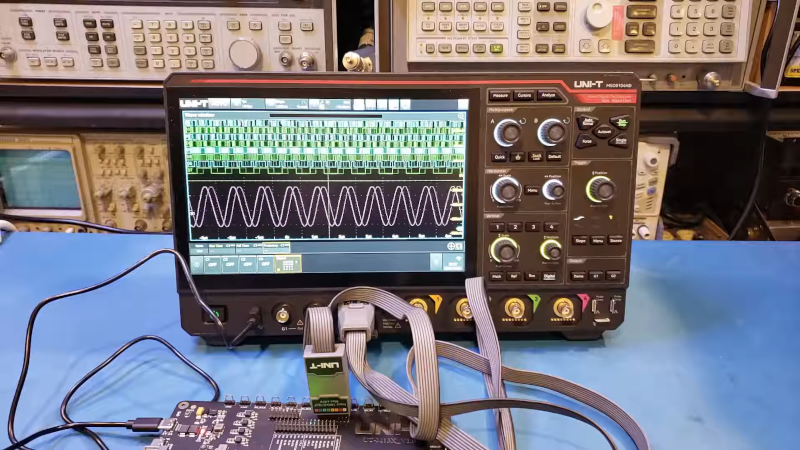
[Kerry Wong] points out that the Uni-T MSO oscilloscopes have a logic analyzer built in — that’s the MSO, or Mixed Signal Oscilloscope, part — but you have to add the probes. He shows you how it works in a recent video below.
He’s looked at the scope’s analog capabilities before and was not unimpressed. The probes aren’t inexpensive, but they do unlock the mixed signal capabilities of the instrument.
Although simple logic analyzers are very affordable today, having the capability integrated with your scope has several advantages, including integrated triggering and the simple convenience of being able to switch measurement modes with no problem.
In many cases, being able to do things like decode UART signals without dragging out a laptop and firing up software is a nice feature. If all you’ve used are the super-cheap USB logic analyzers, you may find some of the features of a more serious instrument surprising.
Is it worth the extra expense? That depends on you and what you are doing. But if you ever wondered if it was worth splurging on digital probes for a UNI-T scope, [Kerry] can help you decide.
Not that simple logic analyzers aren’t useful, and they certainly cost less. Some of them will even work as a scope, too.










Stille gotta finish mine for the rigol https://gitlab.com/riglol/lapod when the components crisis hit it was really head to get some chips, so I parked the project. .
I must first say this is not exactly Hackaday project… Feels more like a sponsored article.
Regardless, I really like the ones from PicoScope (RS online used to sell some licensed clones as well)
Even with just the analog probes it can decode the digital signals.
Super super useful when you’re using level shifters and thus outside the typical 0-5V (or 0-3.3V) range required by most MSOs.
I must say this comment feels more like a sponsored article.
I find that an MSO is useful only when it has cross triggering and conditional triggering. If these aren’t included, you might as well use a separate o-scope and logic analyzer.
“… was not unimpressed. The probes aren’t inexpensive …”
Two double-negatives in adjacent sentences… is someone hoping to hit a personal record?
My new years resolution is to not underuse double negatives.
I got in trouble many years ago in a college English class where the instructor was talking about how many languages consider a double negative a positive but no language considered a double positive a negative. I said (in the right tone): yeah, yeah.
She was not amused.
I’m not opposed to this.
Overly purple prose makes technical articles not unchallenging to parse.
my cheapo 2-channel scope (no mixed signal / logic analyzer feature) can decode UART with one channel to spare :)
recently got an Agilent 16702B plus 1250Mhz card for 250 shipping included. the card was nonfunctional but with some microsoldering I was able to fix it. works great now! runs HP-UX on PA-RISC and supports remote VNC access on its onboard Ethernet.
I also ordered a 2gsa/s oscilloscope card so I can correlate measurements. I tried it yesterday with the LA’s output triggering the scope and it was pretty cool
there is also a third type of card for this, the pattern generator one. though I haven’t thought of any use for it yet.
anyways, wild that you can get a far more capable instrument if you’re willing to home a boatanchor and fix small issues… for $250
Welcome to the club – I have a 16550 plus various cards. It displays X-windows over the Ethernet (AUI, so I have an adapter)
I’ve got a Siglent SDS 1104X-E wit some Logic Analyser functions. And although it’s a pretty nice scope, I find it’s logic analyser functions very cumbersome to use.
I usually grab my Saleaeaeae clone with Sigrok / Pulseview because of a lots of reason.
It costs EUR 10. (I’ve got a few spares, so I can leave each connected to different projects).
It’s small. You can just clip it to a PCB, which greatly improves reliability of probe connections.
Sigrok / Pulseview has many protocols, and stacked protocols which add more meaning.
My 4k PC monitor has a much higher resolution then my scope screen.
I’ve got a normal keyboard for adding labels and signal names.
It’s more convenient to make screenshots for documenatiion etc.
Mouse and scrollwheel work better for scrolling and zooming.
More available channels (Monitoring I2C, Serial and some other (sync / debug) signals simultaneously.
Natural interface is with “Dupont” wires which fit in a breadboard. Much more convenient then scope probes.
Also: If you want to probe “difficult” signals. Just forget about all those miniature IC pin grabbers. The cheap ones don’t work, the expensive ones are sort of adequate, but that is assuming they have something big enough to grab on to. What works quite well is to use a (90 degree) male IDC header and glue it to the PCB. For example with a little spot of hot snot. Then you can solder enameled wires between that connector and whatever signal you want to probe. Even if my soldering iron is not hot, the JBC clone I have heats up in about 5 seconds. And then, in between the Logic Analyser and the IDC connector, you can either use a piece of flat cable, or individual dupont wires. This probing is sufficient for most signals, and certainly everything that can be probed with the USD 10 Logic Analyzer.
There are a few situations where the analog inputs of the scope have an advantage. A clear example is with I2C, where a logic analyser can’t see the rise time determined by bus capacitance and pullup resistors. So often I use a two step approach. I fist check signal integrity with the oscilloscope. and then do all further signal analysis with the logic analyser.
I’ve also bought a Kingst LA2016 and it also works with Sigrok / Pulseview. It’s got 16 channels and a higher sample rate and is a nice upgrade for the Saleaeaeae clone. But the Salaeaeae clone is plenty good for starters.
I also love my Seleae clones. It’s often impractical to capture more than a fraction of a second of output on an oscilloscope, but you can let the logic analyzer grab multiple signals over more than a minute and zoom in on the relevant events. They’re a game changer for such a low price.
Quite a while ago I quite liked the reviews from Kerry Wong. I was interested in a small handheld scope, and he did a quite nice comparison between the Owon and Hantek versions. I nearly bought a dual channel Owon handheld based on Kerry’s review, but then I discovered that the user interface is atrocious. To adjust the timebase, you don’t push the (available!) left / right buttons, but you have to go into some menu and then use the up / down buttons. Yuch! Him failing to mention such an obvious and irritating design flaw in those scopes mostly killed my interest in seeing further reviews from him.
Bold of you to say “simple logic analyzers aren’t useful”
Also i disagree