
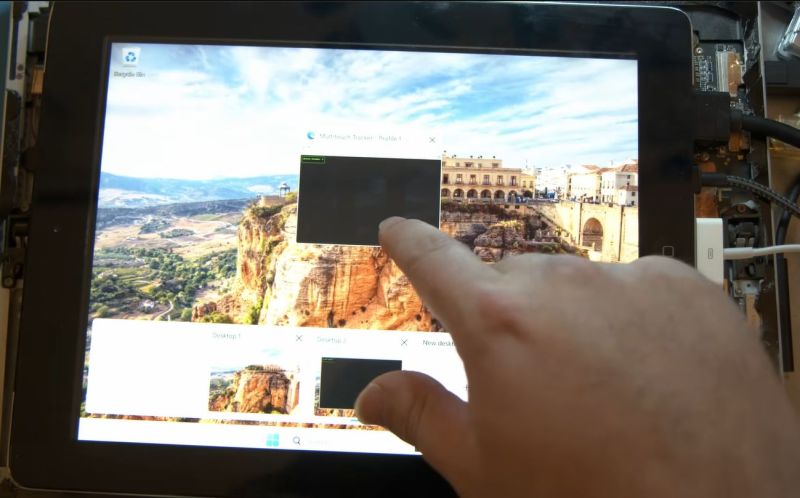
Although generally iPads tend to keep their resale value, there are a few exceptions, such as when you find yourself burdened with iCloud-locked devices. Instead of tossing these out as e-waste, you can still give them a new, arguably better purpose in life: an external display, with touchscreen functionality if you’re persistent enough. Basically someone like [Tucker Osman], who spent the past months on making the touchscreen functionality play nice in Windows and Linux.
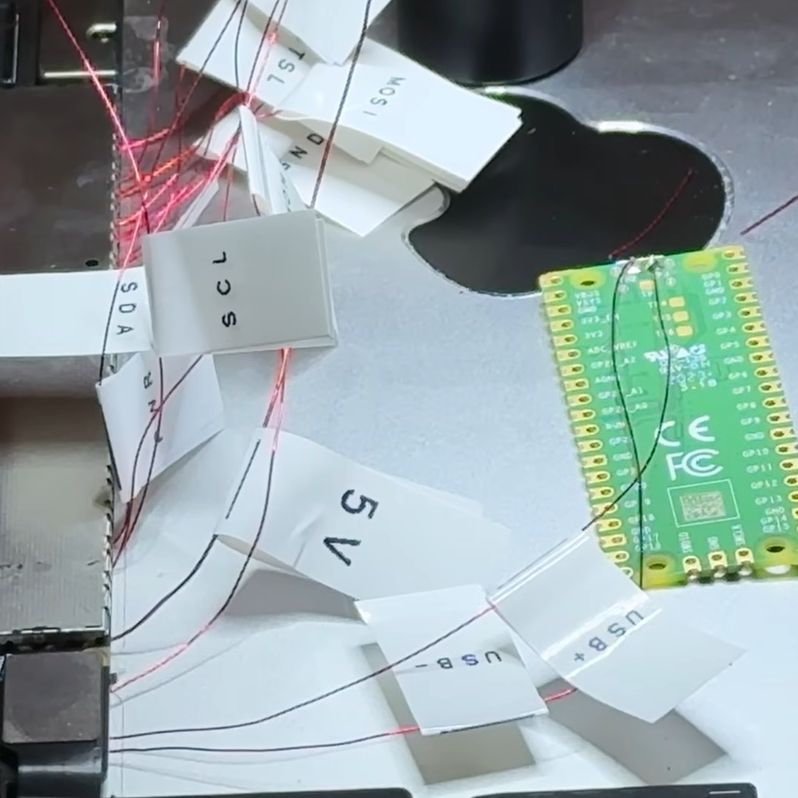
While newer iPads are easy enough to upcycle as an external display as they use eDP (embedded Display Port), the touch controller relies on a number of chips that normally are initialized and controlled by the CPU. Most of the time was thus spent on reverse-engineering this whole process, though rather than a full-depth reverse-engineering, instead the initialization data stream was recorded and played back.
This thus requires that the iPad can still boot into iOS, but as demonstrated in the video it’s good enough to turn iCloud-locked e-waste into a multi-touch display. The SPI data stream that would normally go to the iPad’s SoC is instead intercepted by a Raspberry Pi Pico board which pretends to be a USB HID peripheral to the PC.
If you feel like giving it a short yourself, there’s the GitHub repository with details.
Thanks to [come2] for the tip.












I’m no editor but sheesh this is tough to read.
Nah, not really. Just give it another short.
Holy crap was it ever!
Most of the time was thus spent on reverse-engineering this whole process, though rather than a full-depth reverse-engineering, instead the initialization data stream was recorded and played back.
What does this even mean? “Most of the time was spent on the touch component. Instead of fully reverse engineering each component, the initialization data stream was recorded and played back”
After getting through that the very next sentence begins with “This, thus”.
It’s wild how poorly edited the articles/posts are on HaD. Been a reader for years and years, and for some reason I’m still surprised to see so many grammatical, or even spelling, errors.
while i tend to agree this link might help:
https://github.com/lemonjesus/ipad-touch-screen
Maybe it was just not made for your specific tastes? Reminds me of the old adage: if you don’t have anything nice to say, maybe just don’t say anything.
I personally did find it entertaining, as well as informative. Seeing the journey, including the obstacles and wrong paths taken, makes it feel somewhat more approachable for me, and highlights that you can spend a lot of time struggling with a project, but the obstacles are not insurmountable.
I really enjoyed it! Good level of detail and I can’t blame the guy for sharing frustrations along the way. I don’t think I could have stuck it out as long as he did…
I agree with Rogan. Is not my favourite format but, being a person who what this kind of content, it is nice to have different formats. I would be very boring if all content creator make the same style of videos, so, congrats for this guy not only for made an incredible task of reverse engineering, but also to share its results, its failures and to add a little of fun.
The only thing that makes me suspicious is how he got so many ipads with iCloud lock… I’m sure that the most probable scenario is he bough them somewhere, but how an ipad gets being sold with iCloud lock? Here in Argentina, at least, if you find an Apple product published in Facebook Marketplace with iCloud lock, there is no doubt that is a stolen device.
It would be nice if he made a comment about that. It is good to invite to people to think about some kind of fundamental stuff of the things that we do as makers / hackers. It is a lie that there are no political responsibilities in this areas. But also, it is beautiful that this guy decided to share his process and result and not to develop a paid solution after all the time that he invested.
Anyway, great video and better reverse engineering work! Thanks for the sharing.
Like with cellphones, you have someone set the thing up for you, and they create a fresh icloud account, that you later never (consciently ) use for anything. After a year, you forgot about it and reset the device … Tadaaaa….an iApple device you cannot use anymore. Only use for it is to sold for parts.
Yeah…no.
Staying silent about things that are wrong is a whole different issue.
That ‘old adage’ comes from a time when ‘not rocking the boat’ was more important than social change.
Further, that ‘content’ isn’t just ‘not for us’ the individual.
It’s ‘not for us’ humans in general.
It is algorithm chasing trash.
It is designed to catch people, any people, regardless of whether they are interested in the topic, because the ‘topic’ of the video isn’t the point.
Reminds me of someone over EEVBlog replacing their Agilent scooe display with the iPad screen
If, on the other hand, you have a Mac, you can just use the iPad as a second screen wirelessly via Continuity. Won’t work on the oldest iPads, but ours is pretty old and it works. I believe the iPad just needs to be “locked” (to use the author’s pejorative term) to the same iCloud account as the Mac, and within WiFi range.
How is ‘locked’ a pejorative?
The hardware is literally locked to it.
Which is also the whole point of the mod.
Even if you have a Mac, a locked ipad cannot be used as a screen, because you aren’t ALLOWED to use it at all.
These locks should be prohibited by law.
They are so wasteful.
You want to discourage theft? Fine.
Put a statute of limitations on it.
I think he should have put more details, but I can’t say it’s unfunny. It’s just the way many casual engineering/making videos are presented, because it’s less dry. It’s not an expert channel.