

When it comes to electronic gadgets, I’m a sucker for a good deal. If it’s got a circuit board on the inside and a low enough price tag on the outside, you can be pretty sure I’ll be taking it home with me. So a few years ago, when I saw USB external hard drives on the shelf of a national discount chain for just $10, I couldn’t resist picking one up. What I didn’t realize at the time however, was that I’d be getting more in the bargain than just some extra storage space.
It’s a story that I actually hadn’t thought of for some time — it only came to mind recently after reading about how the rising cost of computer components has pushed more users to the secondhand market than ever before. That makes the lessons from this experience, for both the buyer and the seller, particularly relevant.
What’s in the Box?
It wasn’t just the low price that attracted me to these hard drives, it was also the stated capacity. They were listed as 80 GB, which is an unusually low figure to see on a box in 2026. Obviously nobody is making 80 GB drives these days, so given the price, my first thought was that it would contain a jerry-rigged USB flash drive. But if that was the case, you would expect the capacity to be some power of two.
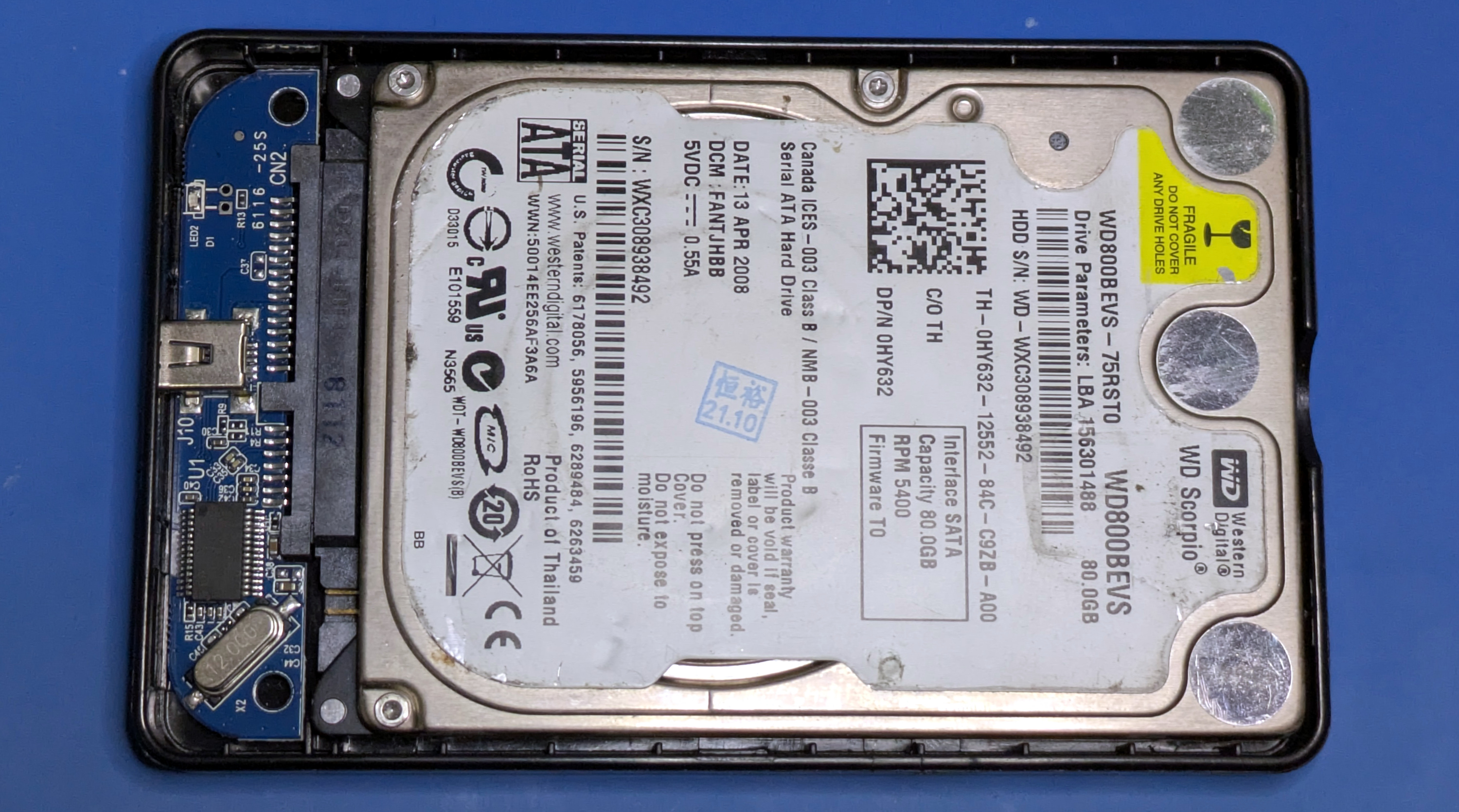
Upon opening up the case, what I found inside was somehow both surprising and incredibly obvious. The last thing I expected to see was an actual spinning hard drive, but only because I lacked the imagination of whoever put this product together. I was thinking in terms of newly manufactured, modern, hardware. Instead, this drive was nearly 20 years old, and must have been available for pennies on the dollar since they were presumably just collecting dust in a warehouse somewhere.
Or at least, that’s what I assumed. After all, surely nobody would have the audacity to take a take a bunch of ancient used hard drives and repackage them as new products…right?
Certified Pre-Owned
Once I saw that the drive inside the enclosure was older than both of my children, I got curious about its history. Especially given the scuff marks and dirt on the drive itself. A new old stock drive from 2008 is one thing, but if this drive actually had any time on the clock, that’s a very different story. Forget the implications of selling used merchandise as new — if the drive has seen significant use, even $10 is a steep price.
Fortunately, we can easily find out this information through Self-Monitoring, Analysis, and Reporting Technology (SMART). Using the smartctl tool, we can get a readout of all the drive’s SMART parameters and figure out what we’re dealing with:
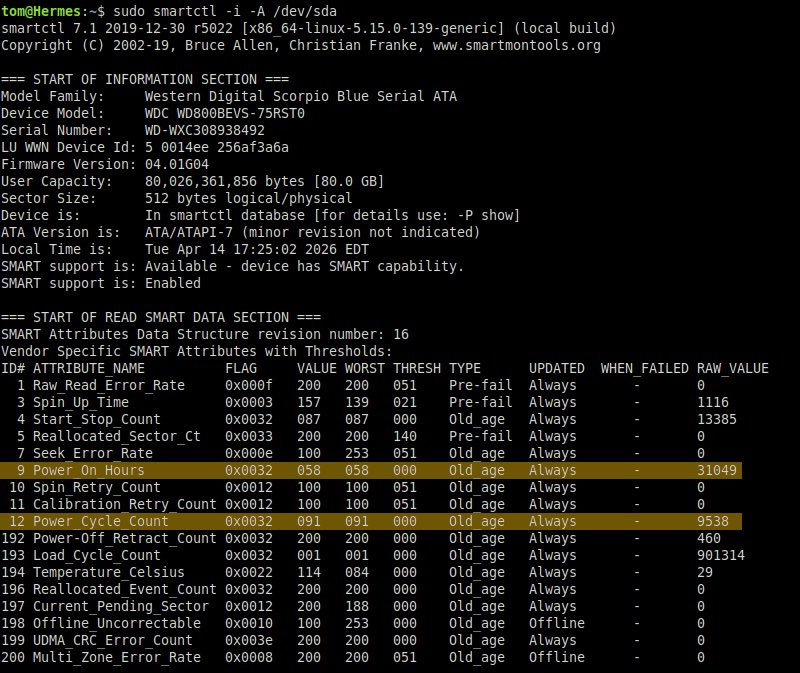
Well, now we know why these things are so cheap. According to the SMART data, this particular drive has gone through 9,538 power cycles and accumulated a whopping 31,049 hours of total powered on time. I’ll save you the math, that’s a little over 3.5 years.
The term “used” barely covers it, this drive has been beat to hell.
Buried Treasure
It’s a fair bet that anyone finding themselves regularly reading Hackaday possesses an inquisitive mind. So at this point, I’m willing to bet you’re wondering the same thing I did: if this drive has been used for years, could it still contain files from its previous life?
 Obviously it was formatted before getting boxed up and put back on the shelf. But frankly, anyone who’s unscrupulous enough to pass off decades-old salvaged drives as new probably isn’t putting in the effort to make sure said drives are securely wiped.
I was willing to bet that the drive went through nothing more than a standard quick format, and that even a simplistic attempt at file recovery would return some interesting results. As it so happens, “Simplistic Attempt” is basically my middle name, so I fired up PhotoRec and pointed it at our bargain drive.
It only took a few minutes before the file counters started jumping, proving that no effort was made to properly sanitize the drive before repackaging it. So not only is this drive old and used, but it still contains information from wherever it was for all those years. If it came from an individual’s personal computer, the information could be private in nature. If it was a business machine, the files may contain valuable proprietary data.
In this case, it looks to be a little of both. I didn’t spend a lot of time poring over the recovered files, but I spot checked enough of them to know that there’s somebody in China who probably wouldn’t be too happy to know their old hard drive ended up on the shelf in an American discount store.
For one thing we’ve got hundreds of personal photographs, ranging from vacation shots to formal portraits.


The pictures show fun in the sun, but the DOC and PDF files are all business. I won’t reveal the name of the company this individual worked for, but I found business proposals for various civil engineering projects within the Minhang District of Shanghai worth millions of dollars.
Once is Happenstance….
I know what you’re wondering, Dear Reader. If the first drive I pulled off the shelf happened to have a trove of personal and professional information on it, what are the chances that it would happen again? Perhaps it was a fluke, and the rest of the drives would be blank.
That’s an excellent question, and of course we can’t make a determination either way with only a single point of data. Which is why I went back the next day and bought three more drives.
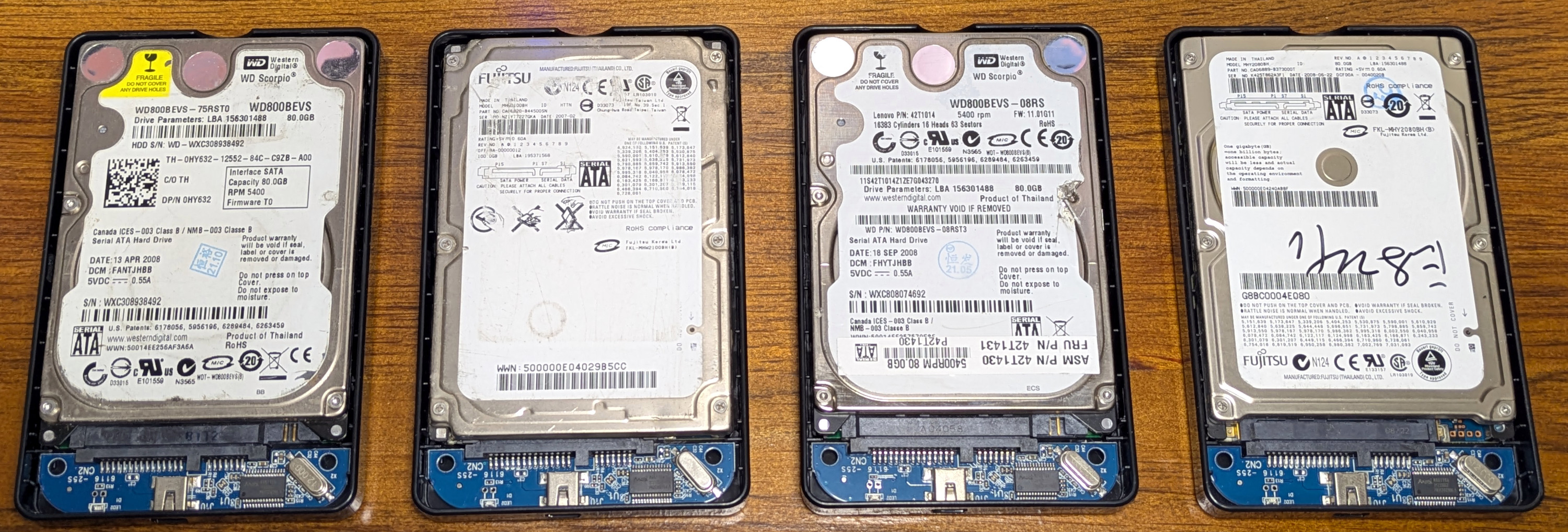
Right off the bat, it’s worth noting that no two drives are actually the same. Two are Western Digital and two are Fujitsu, but none of them have the same model number. The keen-eyed reader will also note that one of the drives is 100 GB, but it has been partitioned to 80 GB to match the others.
Three of the drives were manufactured in 2008, and one is from 2007. I won’t go through the SMART data for each one, but suffice it to say that each drive has several thousand hours on the clock. Although for what it’s worth, the first drive is the lifetime leader by far.
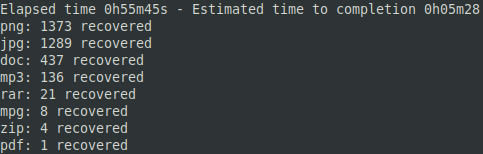 In terms of file recovery, each drive gave up several gigabytes worth of data. In addition to the one we’ve already looked at, two more were clearly the primary drives in Windows boxes, and each contained a mix of personal data and technical documents such as AutoCAD drawings, datasheets, bills of materials, and schematics. Given their contents, I would guess the drives came from off-lease computers that were used by engineering firms.
The fourth drive was different. It contained more than 32 GBs worth of Hollywood movies, the most recent of which was released in 2010. I imagine this drive came out of somebody’s media center. Now I haven’t sailed the high seas, as it were, since my teenage years, but even if I had wanted to add these titles to my ill-gotten trove of films, it was a non-starter. Given the time period they were downloaded in, most of them were below DVD resolution.
Plus, they were all dubbed in Chinese. Not exactly my idea of a movie night.
A Cautionary Tale
Admittedly, given that they were being sold in a home electronics chain-store, the likelihood that these drives would be purchased by somebody with the means to extract any meaningful data from them isn’t very high. But since you’re reading this, you know the chances clearly aren’t zero. I didn’t have any malicious intent, but the same can’t necessarily be said for others.
So what can we take away from this? To start with, if you’re planning on selling or giving away any of your old drives, make sure they are properly wiped. In the dusty past, the recommendation would have been to use the Linux-based Darik’s Boot and Nuke (DBAN) live CD, but the project was was acquired back in 2012 and development was halted a few years later. Luckily, the GPLv2 tool that DBAN actually ran against the drive was forked and is now available as nwipe.
But as mentioned earlier, I get the impression that these drives were from businesses that unloaded their old machines. In that case, the users can’t really be blamed, as they wouldn’t have been able to wipe the drives even if they knew ahead of time their work computers were getting swapped out. But they certainly could have made an effort to keep their personal data off of company property. It’s one thing to have some corporate secrets stolen down the line, but you don’t want pictures of your kids to be in the mix.
In short, nobody cares about what happens with your personal data more than you do, so make sure it doesn’t get away from you. Otherwise some bargain-hunting nerd might be pawing through it in a few years.












Keep in mind that a writing the disk one time with zeros is not enough to wipe the data. Actual magnetic content on the platters can be easily read back with magnetic electronic microscope. US government procedure for agencies like the CIA requires any hard disk to be erased 35 times for data to be considered likely unrecoverable with currently available technology.
No normal person is going to go thru all that trouble. If the drive has important secrets then just destroy it. That’s what we were required to do with drives that had government classified information..
Drilling SSD drives might result in a failure.
https://www.reddit.com/r/therewasanattempt/comments/1bdhcff/to_destroy_ssds/
I just copy my library of scifi to fill the (cleared out earlier) space…
I built one of those crushers with big ass teeth, chews up drives, and anything else, including cars. 😆
Thermite is easy and cheap. Powdered iron can be found at local auto shop that resurface brake discs and drums. Aluminum would have to be bought as it’s not commonly found in powdered form. Do it outside and on fireproof surface before lighting up thermite to melt the drive.
Warning: thermite burns very hot and will be hard to put out if you made a mistake
Most machine shops have a dumpster full of aluminum chips.
They will likely sell you some for scrap value.
Don’t be a tweaker, pay them.
They’re all sick enough of scumbags to beat you if you don’t.
There are two kinds of machinists:
Those that made thermite on purpose.
The dumb ones that find out by accident.
Rusty table, cut some Al, then something throws a hot spark, fun!
Thermite? Not worth the trouble. For SSDs a sledge hammer does the trick; for HDs I salvage the highly useful magnets then melt the platters with a “flame saw”. For those who lack oxy/acetylene equipment, a barbecue grill or a nice hot wood fire will do the job.
In modern world, if You zero-ed HDD ( but truly zero-ed ), even once – You need high end progam to recover it. that program will cost so much, that basicly only goverment is able to buy it… and they already have most of your data… not worth the hassle to waste time for 35 passes, if You’re not doing anything You shuldn’t. there is program like PC3000 but i doubt that it will “jump” left and right of remains of old track’s to search for “ghosts” to recover anything, not to mention to compile actual data from collected garbage. ( remember that old drives have sectors reused many, many times ) again. program that is able to do that will cost humongous amount of $$
Has anyone outside government agencies demonstrated data recovery from zero-wiped hard drives made in this century? AFAIK “easily” stopped being true when GMR technology came into use in late 1990s.
As for government agencies, maybe they have the means, but are you interesting enough?
Not even three letter agencies have.
In the early days with macroscopic domains on the platter in theory it would be possible with an electron microscope.
It alway the height of the cold war they were crazy ideas all around.
Easily read back hahahaha. Maybe a few bits as a proof of concept in the research wing of a university.
Why don’t you try and find a single instance of someone recovering data from a zeroed magnetic drive?
For what it’s worth the recommended sanitation is with degaussing. Maybe 50 years ago they recommended repeated overwrites on various patterns but not because data had been recovered as a precaution incase the KGB had managaed it. But then again precautions were also taken against KGB psychics and communist Martians.
What is an issue is that these are SSDs and SSDs don’t necessarily erase blocks marked for delete.
The article specifically says ‘HDD’. The picture above shows four of them…
Neither do HDD. You have to overwrite them for physical delete. And restore might still fail, because a block has gone bad and was “moved” (marked as bad and another one named as it).
Degaussing?
Nope!
20 some years ago I worked in a radio station.
We had a big degausser for open reel tapes.
By the time I got there no one was using those anymore but they did use it on carts all the time. (A cart is very similar to an 8-track tape)
Anyway, we decided one day to test the theory that it would work on a hard drive.
It grabbed the drive and moved it to it’s “favorite” spot.
It made the drive vibrate like it was possessed!
I waved it back and forth across the thing for over a minute.
All the data was still there. It was like nothing even happened.
I’m actually surprised, the way it shook that it didn’t break the heads! I guess they must be all nonferrous material.
That is not correct. Intelligence agency storage devices must be sanitized according to the NSA/CSS 9-12 Policy Manual and many other USG policy manuals reference the 9-12 Policy Manual. This Policy Manual has no software techniques available in it, only degaussing, disintegration, incineration, and melting. The second revision of NIST SP 800-88 also deprecates the old DoD policy manual that specified x number of overwrites. For commercial and personal use, it is recommended to follow IEEE 2883 and to perform a single overwrite with representative sampling verification. If you can perform cryptographic erase using a self encrypting drive, then that would be faster, but there are known vulnerabilities with self encrypting drives related to firmware implementation, so it might be hit-or-miss.
Writing to the drive won’t erase all data.
The drive keeps a region of blocks to swap out when blocks have read errors.
Blocks marked as bad won’t be overwritten. They may still have readable data. I’m sure it would be possible to remap them back as good with proprietary commands.
It all depends on the risk level of your data. Do you expect someone to use advanced laboratory attacks to retrieve information from bad blocks? If so, you shouldn’t be overwriting in the first place.
It’s amazing how many people like to talk like they have ever been in a TEMPEST rated room, much less know what we are talking about.
Built and been in enough SCIF for a few lifetimes.
While that used to be true, the quest for increased data density has literally squeezed the slop out of the drive. Where there was once room for remnant data along the edges of the tracks, they improved the head accuracy to turn that into usable storage space.
Drives today can be wiped effectively with a single pass. Being a little superstitious about such things I’d still personally wipe it with a random bit pattern, but otherwise that’s all it needs.
There is no proof that it works. If you were a three-letter agency (like FBI) interested in recovering intimate details of one’s life would you tell them to erase their hard drive securely? Nope. My brother works in tax enforcement and he knows a trick or two about recovering illegal data.
1 thats not my comment, WordPress freely allows anybody comment using anyones credentials
2 its bs, one pass wipes magnetic media effectively
At an old job, some tech took hundreds of old hard drives to the shop, and blasted holes through them with an oxyacetylene cutting torch. These were IBM Deathstar drives that had all failed that month, and the intense uneven heating shattered the glass platters. No recovering data from those (tbf, they were IBM Deathstars, so probably no recovering data from them even without bothering with physically destroying the drives).
long ago I’m sure there was a British TV documentary were a university in an Eastern country had one of those microscopes which was mysteriously always book up?
Odd… there is another Senile Data Systems… and he/she writes pretty much exactly what I would have written… and I’m certain I’m not that Senile yet that I’ve forgot I commented that. I’ve just now read the article for the first time.
That’s a myth. I work in that exact area, and it’s never been done for any reasonably modern disk drive.
https://linux.die.net/man/1/shred
cat /dev/urandom >/dev/diska few times.Yah, sure. If you have national security secrets on your hard drive. Or maybe some really valuable corporate data. Are you by any chance the keeper of the recipes for Coca Cola or KFC’s chicken batter? Did you go to Mar a Lardo and digitize Dumpty’s bathroom files?
For the rest of us… I think I would go with random rather than all 1s or all 0s. If you really feel like being thorough go ahead and do it a few times. But come on. No one is going through my crap with an electron microscope. And I am 99% sure they aren’t going through yours with one either. Not now. Not ever!
Wipe before discarding is great advice. But scaremongering results in people drilling holes through hard drives or taking them out back and shooting them. We only have one Earth. Let’s be a bit less wasteful please!
This is somewhat incorrect. On modern drives, a single zero wipe is already sufficient to destroy most data for all but the most absurdly rigorous of data recovery practices. Unless you’re spending thousands to try to recover data, it’s already secure.
So why write this article and not name the retailer that sold these drives?
Is it a big secret?
I can think of a couple of reasons not to name the retailer.
First, if a bad actor reads this article, they might well go buy a bunch of the drives to sift for PII and account numbers.
Second, you don’t want the legal department of a big corporation to notice you. Ever.
The legal department of a big corporation doesn’t want to make national news either. Spill here and your local thirsty TV news outlet. The news will be thrilled to get the scoop on something before most of the internet has already reported it, and Chain Store may have to mend their ways (lol, but maybe).
As far as bad actors grabbing stock, that’s why you grab the TV news: by the time they finally air, Big Box has already been contacted for a statement, knows it’s coming, and started damage control
This. We need to know what chain is selling used-as-new products.
Tom should chime in on this, but I think the real reason is that this took place a while ago, and is probably not relevant anymore?
Although I’ve only gotten around to writing the article now, the drives were purchased a couple years back and are no longer being sold at the retailer (or anywhere else that I can find).
But who was selling them was never the point. There’s always going to be used drives floating around, doesn’t matter if they were resold in off-lease machines, picked up off the curb, or sold at the local flea market. The take away is that your data can end up in all sorts of unexpected places, potentially at no fault of your own.
So be proactive: securely wipe drives when you can, and keep your personal info off them when you can’t.
“securely wipe drives”
Like, with a center punch and hammer?
It pained me greatly, but a few months back I destroyed a loitering stack of old SCSI drives pulled from decommissioned corporate file servers. I no longer had a machine with a compatible controller to assure they were clean, but they had to go. Seems like I might have made a few bucks if I’d held on to them until now.
Right, I think we need to know what chain is selling these. If they’re buying off-the-back-of-a-truck merch then they a) have no insight or control over their supply chain, b) have no problem with shady merch as new, c) have a nonzero chance they have already or are currently pulling the same shenanigans with other products, or d) any or all of the above.
My data wipe is simple. Remove the platters from the drive. And toss the drive parts. Done. Anyone that wants to go to the trouble of stealing the platters and building a new drive around the platters … have at it. I have a large stack of perfectly flat platters now for some use in the future :) .
Looks like the ‘bargain’ price worked as the OP did buy several :) . Ha!
This.
For larger quantities I have a metal-cutting band saw in the garage – section the disks and they’re gone forever (be careful of the glass ones though). The disks have quite a few good uses, and pet birds adore the shiny ones.
Just hard for me to imagine seeing an 80GB drive and throwing it in my shopping cart. I have a pile of drives of that era and size sitting in the basement that i am already not using.
And that’s the other side, hard to imagine getting rid of an old drive like that. Usually i retire a drive when it starts giving trouble, so it has no re-use value. And at the same time, it’s usually still marginally functional and can serve as a last-ditch backup (though only of old files).
Old_age and Pre-fail doesn’t mean what you think. Otherwise, great find!
A Pre-fail counter tracks unexpected events like error rates, mechanical failures, or retried hardware actions, and will cause the drive to fail SMART health testing if a normalized WORST value falls below that counter’s THRESH level.
An Old_age counter is one that’s expected to increase over time, either regularly through normal use (like Power_On_Hours or any of the read/write/erase activity accumulators) or irregularly due to exceptional but expected events (like power-cycles, communication failures, or software errors), and won’t cause a failed health assessment even if they fall to below the THRESH value. (Assuming THRESH isn’t 00, which it is for many Old_age counters.)
For anyone who understands that, Pre-fail and Old_age mean exactly what they think.
My main drive has 106891 power on hours and 88 power cycles and is still doing fine. Drives usually fail very early or very late.
This made me check my drives in the good old nas. 108721 on-hours. Almost 12.5 years. And still going.
Ah btw, HDD don’t like the usecase as a external monthly backup drive via SATA adapter. Too much cold starts.
Yeah, my fileserver has three drives in it.
A small boot SSD (like, 128GB small) with 66,712 hours (7.6 years) of uptime and 74% of its life left , because it’s only ever written to by software upgrades and logging, so it has only 17596 GiB of flash writes and the cells’ Max Erase Count is a paltry 280 (average 254).
A 2TB spinning-rust drive with 108,997 power-on hours (12.45 years), running at a cool 38°C with only 292 power cycles and 7237 start-stops, because I never shut the fileserver off and BitTorrent assures it’s constantly hitting that drive.
My newest drive, a 6TB stack of platters with only 18,264 hours (2 years, 1 month) on the clock, a mere 14 power cycles and corresponding 14 stop-starts, but with the current temp registering at a worrying 50°C, I think simply because of bad case placement. I should look into that.
The 6TB drive (relatively-)recently replaced a 3TB drive that was even older than the 2TB, and probably had over 120,000 hours (14 years) on it before I retired it to a storage closet. The 2TB is effectively a scratch drive, I’m very deliberately running it into the ground. Someday it will fail (taking nothing of consequence with it), at which point I’ll replace it with another cheap, relatively-small drive that I can subject to the same BitTorrent-driven stress test experiment.
This happened to me 10 years ago ,I bought off eBay a few two and a half inches drives and at least one of them had been used by a Chinese real estate company , full of docs photos , etc
.something weird is that I saw some photos that they were standing outside the company and maybe they were singing the anthem or something before work??
It’s certainly not something you should be seeing on a drive that was just sold as new.
$10 for a 2.5″ case with a USB to SATA interface? At that price, I’d recycle the 80GB hard drive and put something a bit more modern inside.
That was my thought as well, until I realized they were mini USB…
Let alone USB 2.0
OK, so either look for USB3 equivalents or wait until these things go on the clearance rack.
You know it’s old because it has a regular IDE/PATA or SATA style interface. Modern USB portable drives have the USB interface on the drive board itself so you can’t use them as hard drives. It likely has the onboard SATA but it’s not brought out.
I’ve had this USB RAID storage thing. The disks in it were SATA but had extra pins on the underside.
Drives don’t “wear out” because of time or usage. Mechanical or environmental abuse will kill a drive but a normally functioning drive can last decades of constant use since there’s no wear in drives built in this century. Platter bearings have no mechanical contact and the drive’s heads float above the platters on a cushion of air. If you get a low level drive access tool, you can look at de-allocated sectors and know more about the drive’s health than you can by looking at the age of the drive or hours of use.
That being said, I think it’s actually illegal to sell used products as new and the store that sold them should be told of the findings.
One final thing. If you don’t want your data stolen from an old drive, smash the platters with a hammer. You will be rewarded with one or two really strong magnets that are very useful.
Spinning-rust drives do “wear out” from usage, but it’s not as simple as looking at numbers. A drive running 24/7 for 10 years that is spun up but “idle” will have relatively little wear and tear. The same drive that spins down after a minute then spins up 5 seconds later will have more wear and tear on the motor. The same drive that constantly reads from the outside of the drive then the inside of the drive on infinite repeat will have problems long before the 10-year mark. A drive sitting in a desk drawer for 10 years may have issues with lubrication failure.
There is wear in hard disk drives but it is much more complex what and when exactly. Reasonably modern HDDs can last for decades without notable degradation.
Spin-up and spin-down does not at all cause wear in the (brushless) motor but can cause wear in fluid dynamic bearings while the fluid wave is not yet established. And so on and so forth – you could fill a book.
It’s hard to come up with absolutes like “does not at all”. Energizing an electromagnet causes vibration, which will eventually fatigue-crack the copper. Transistors and insulators and magnets all age in different ways. “Solid state” is much more durable in many ways than what came before, but it still isn’t entirely impervious.
Which is just to say, HDDs do generally last very well (I have a 16 year old laptop HDD i use every day) but you can’t ever point to any component and say “this component is 100% immune to wear or aging.” I guess it’s interesting to me because we see this pattern over and over in technology…something comes along that is so much better than the status quo that we think of it as perfect…but no, it is limited too. And as it becomes the new status quo, we become more conscious of its limitations.
Had a security camera system complain about its drive a few months back. Been running for 8 years 24/7, cheerfully reading and writing data all that time.
Best is to use an encrypted filesystem, even with an obvious password. The password unlocks the underlying encryption key, so if you need to wipe, you just need to overwrite that and the entire disk becomes garbage. In this case the “threat” is not someone cracking your storage specifically, so you don’t need a super secure double password, just something not like “12345”.
Nah, hardware based encryption is always only 2 of the trio “cheap”, “fast” and “secure”. And HDD vendors usually choose 1. priority “cheap” and 2. “fast”.
Obviously don’t use hardware encryption. Software encryption, and specifically LUKS on Linux, is the only trustworthy encryption method. I’m surprised no one else has mentioned encryption. It is the only safe method to store data.
Good idea to wipe any used drives you get, too. You are unlikely to have law enforcement descend and take your stuff away for inspection – but if they do, you really don’t want 100s of gigs of pirated movies recoverable.
I’ve always recycled my old drives with an 8 lb splitting maul and hauled the produced waste to a metal recycler.
Quick, easy, and very therapeutic.
I at least keep the magnets. You just never know when you might need a magnet. :-)
I didn’t say in my post above, but I also save the strong magnets as well as pulling the platters. Toss the other parts.
SECURE ERASURE ALGORITHM:
If you are afraid of a determined adversary getting your data, physically destroy the drive, preferably down to subatomic particles. You are done.
If it’s an SSD drive that supports a reliable quick-secure-erase tool like what your computer’s firmware provides, hdparm, nvme, or a similar tool, use it. You are done.
Use ddrescue, dd, or some similar overwrite-once utility. You are done. Secure-erase tools might also work but they won’t be any faster than a one-pass overwrite.
—
The “overwrite 7 or 30 times depending on need” available in DBAN may have been real in the early/mid-1990s but it became less and less relevant as hard drive densities grew tighter.
Today what we have to worry about is if a sector “goes bad” the drive’s firmware may map it as bad and make it inaccessible to the computer, and therefore not erase-able unless the firmware exposes that function. That’s why “if you are afraid … physically destroy the drive” is at the top of the list. Removing the platters on an unencrypted drive isn’t good enough, you will need to demagnetize or destroy them. Removing chips on an unencrypted SSD isn’t always going to be good enough, you will need to either make sure the erasure was successful or destroy the chips.
I personally use badblocks in read/write mode on any disks I come across for reuse. It has the added benefit of occasionally throwing block error notice, at which point I reject the drive.
Almost correct. I totally agree that single pass overwriting of a reasonably modern hard drive is good enough to render the sectors actually overwritten unrecoverable. There’s a big caveat for all modern drives, be it HDD or SSD: the translation layer pretends it wrote to the numbered sectors BUT LBA address accessed through the drive’s interface is NOT a one-to-one relation to a physical sector or memory address. Sectors with the same LBA “address” are written to very different locations, especially in SSD and SMR HDD devices. Seemingly filling the entire drive can still leave you with almost all of the previously written data retrievable if one has the knowledge and tools to retrieve it.
As far as I know no one has written a public study or book about the details and implications of modern storage devices yet. Maybe I’m going to write one once I’m retired from my current assignment.
Reminds me of the time I bought a 500gb portable HD at Value Village filled with tax documents and hard core gay porn! Really people, please think before you toss.
that last sentence got me! :-D
In Linux there is also shred. It’s designed to overwrite files, but it should also be able to do partitions and whole drives.
Sledge and burn. So easy a caveman could do it
Couple things…
1) years, and years, and years ago… There was a place near where I grew up that would buy ‘unclaimed freight’ and resell it in a retail setting, usually at a very slight discount. Years later, through various employments, I’d come to learn the secrets of how they function…
One of my times in there, they had a fancy stack (overlapping rings of square boxes in circle layers, about waist high of 3-inch tall boxes, so probably a few hundred, maybe?) of these at-the-time ubiquitous USB external drive enclosures that would take optical drives or 3.5″ drives. Saw the stack, saw the price, assumed them to be the empty enclosures but immediately knew otherwise when I picked one up. …see, the people setting the prices would do a quick Google search then move on to the next thing in their stack. The person that did those took one out of the box, used the model number on the enclosure and not on the one on the box.
I bought 35 at $20 each.
I harvested a bunch of drives for my first megaNAS and put salvaged optical drives in a bunch of those empty enclosures, sold them on craigslist, made more than I’d spent on the whole batch, used a couple, and still had, like, 15 left.
I was giving 250g external hard drives as Christmas gifts for years after that.
-and (2)- I once had a job where these guys bought pallets of those cheap early cell phones that had the direct push-to-talk function- they were like if a cell phone and walkie talkie had a baby… Anyway, these guys would buy pallets of them, pay us to strip the insides out, power and test the bare electronics, then re-house them in new shells from China because legally, they could sell them in Mexico as New. Like, legally speaking, they could sell them advertised as ‘New’. My point being- there can be some weird legal classifications based on essentially trivial factors.
So about 3 hours per power cycle. Too short for a main disk (expecially in a company) and too long for a backup disk. Wonder what the usecase was?
I’d guess it was in a laptop, 3-hour stretches of use seem pretty reasonable.
A few years ago, I bought an external drive. It was “factory” sealed in film, with the company name on it. I needed an internal drive, the case and USB connector were just free extras.
Upon opening the case, I see lots of dust and smudges on the drive, even though the outside of the case is spotless.
I attached the drive and checked, it still had files on it. Nothing good, but they seem to have been data from some doctor’s office.
Also, the drive was 8-10 years old, and much less capacity than labeled. Not a new drive at all, not even “refurbished”.
I don’t know how a dirty, old drive was able to get into a factory sealed box and onto the store shelf, much less why it wasn’t even wiped of patient data.
I added it to my NAS and it is still working, so not a complete loss, really.
Another external drive I bought, also “sealed”, had an old SCSI drive inside, but the connector had been ripped off so it would fit, so I couldn’t even get an adapter to use it. That was a definite loss.
If I am buying anything anymore, I ask the front desk to verify that it at least shows the correct capacity and works.
So many people say to just destroy them.
Well, if you go to buy storage for a low budget project and can’t find it cheap… don’t be surprised.
If you are carrying state secrets or multi-million dollar corporate IP I’m not talking about you.
For all else, dd if=/dev/urandom of=/dev/sdb
Go do something else while that runs
Repeat if you are paranoid
Nice Old school article, the kind of thing I used to see daily on HAD when I first discovered the site. Keep up the good work.
i have never thrown away or sold or otherwise lost possession of a hard drive. i neve wipe them securely either. some are considered “deep backup” in case a file i desperately need got corrupted or was otherwise lost on the copy to a drive i am now using. but really old hard drives are eventually disassembled and their aluminum platters used to make functional objects like lamps (those platters are very reflective and have a nice minimalist aesthetic). true, someone could somehow put those art platters back into a hard drive and read them again, but that’s a risk i am willing to take.
This is why I am the sole owner of any hard drive I ever own. I disassemble and destroy when I’m done with it and tell everyone I know to do the same.
Thoughts of Chairman Joe: The lesson that only costs money, in any amount, is a cheap lesson indeed.
1/2″ drill through the pcb/case/platters and then into the trash. State sponsored recovery might be possible for some of the data. Not a concern as my data is boring.
I just leave the old platters in my chicken yard. The birds peck the bits off :D
This ^^^