
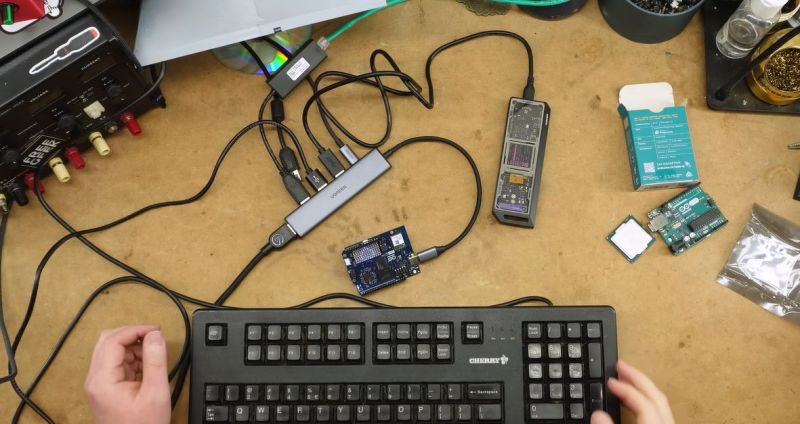
After Qualcomm’s purchase of Arduino it has left many wondering what market its new Uno Q board is trying to target. Taking the ongoing RAM-pocalypse as inspiration, [Bringus Studios] made a tongue-in-cheek video about using one of these SoC/MCU hybrid Arduino boards for running Linux and gaming on it. Naturally, with the lack of ARM-native Steam games, this meant using the FEX x86-to-ARM translator in addition to Steam’s Proton translation layer where no native Linux game exists, making for an excellent stress test of the SoC side of this board.
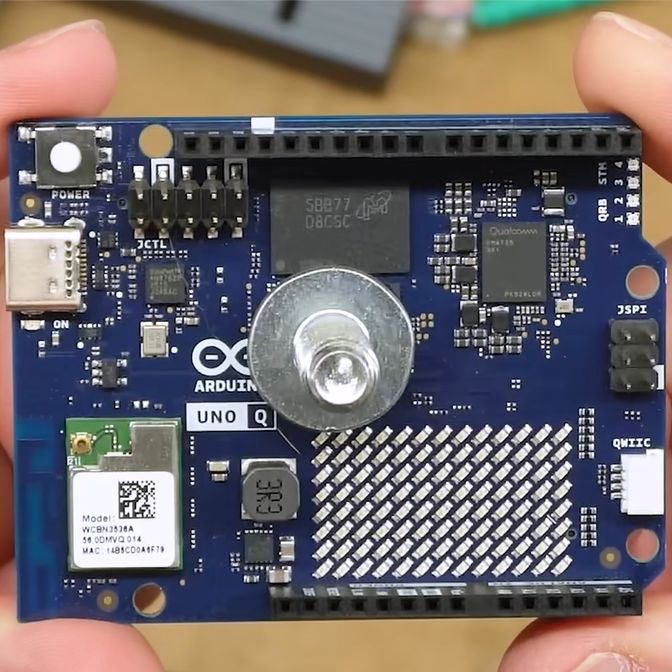
We covered this new ‘Arduino’ board previously, which features both a quad-core Cortex-A53 SoC and a Cortex-M33 MCU. Since it uses the Uno form factor, all SoC I/O goes via the single USB-C connector, meaning that a USB-C docking station is pretty much required to use the SoC, though there’s at least 16 GB of eMMC to install the OS on. A Debian-based OS image even comes preinstalled, which is convenient.
With a mere 2 GB of LPDDR4 it’s not the ideal board to run desktop Linux on, but if you’re persistent and patient enough it will work, and you can even play 3D video games as though it’s Qualcomm’s take on Raspberry Pi SBCs. After some intense gaming the SoC package gets really quite toasty, so adding a heatsink is probably needed if you want to peg its cores and GPU to 100% for extended periods of time.
As for dodging the RAM-pocalypse with one of these $44 boards, it’s about the same price as the 1 GB Raspberry Pi 5, but the 2 GB RPi 5 – even with the recent second price bump – is probably a better deal for this purpose. Especially since you can skip the whole docking station, but losing the eMMC is a rawer deal, and the dedicated MCU could be arguably nice for more dedicated purposes. Still, desktop performance is a hard ‘meh’ on the Uno Q, even if you’re very generous.
Despite FEX being a pain to set up, it seems to work well, which is promising for Valve’s upcoming Steam Frame VR glasses, which are incidentally Qualcomm Snapdragon-based.












Just want to say I absolutely ABHOR the “Arduino style” pin headers. They serve no purpose, they are NOT a standard. I don’t understand why so many companies insist on making dev boards of their products with these accursed pin headers? Most of the times they aren’t even implemented correctly. Is “Arduino header compatible” such a big deal? I have never cared, never used it, ever.
I find the D2, D3, D4, A1, A2 pin naming scheme equally dumb and infuriating. Sure, “Arduino” can work on an AVR or STM32 but WHY are we pretending the two are similar in any way? Does it make any sense to impose the D1, D2, D3 pin naming scheme on EVERY SINGLE MCU family. In the end you still have to google what the D12 pin actually is for the particular MCU. It doesn’t help that the silkscreen is printed with this garbage instead of GPIOC13 or something that can be actually cross referenced to the datasheet of the chip.
I don’t understand.
It’s not so hard to understand. Arduino labeled the pins D0 to D12 (not sure on the max) and A0-A8 (for ADC pins).
BUT, the problem is multifold. A0-A8 are also D13-D20 (or something, not sure on the numbers)
But, the chip also has names for the pins, for the AVR pins, those are something like PD2 and PA3 and PE2.
Why is that important as well? Well, depending on the pin and the chip, different peripherals are available. And if you want speed, using the Arduino functions that use their numbering isn’t an option as they are dog slow.
And it’s worse with an arduino based RP2 board, as that chip just numbers the GPIOs, so you have two different numbering schemes and you never know which any API is requesting.
Any other dev board in the universe doesn’t use this scheme, and just puts the chip pin naming on the board, which makes life a lot easier.
Well it’s because what was an introductory device became the mainstream for hobbyist.
It was always intended that you graduate away from Arduino even if still on avr.
I would suggest that really it only matters that you know the reference for the boards you use. And so long as you don’t chop and chance between boards and MCUs you’re fine
It’s funny how, even if the goal is for people to migrate from the Mickey-Mouse option, people never do, and the training-wheels version ends up a standard mastered by professionals. This has happened with Arduino, of course, but it’s also happened with Javascript, BASIC, the Raspberry Pi, the Macintosh (a cost-reduced Lisa for the kids!), ‘microcomputers’ generally, etc.
After 20 years of working with Arduino, I still find it more comfortable environment that raw avr-gcc. (I only recently moved to working in avr-gcc when I needed an I2C bootloader I could flash from an Arduino master; you cannot bootloaders in Arduino.)
That intent was superseded by the point of selling more Arduinos. What was a mild inconvenience that should have been remedied in later versions (if the point was to teach embedded stuff in general) became a hurdle to cross – so if you learned the Arduino system you would be confused by what was really going on behind the curtain. A lot of the poor design choices and omissions were never addressed because of this. They “help” people stay on the platform rather than move on.
That’s why the arduino documentation still says you shouldn’t do direct port/pin addressing, because it might break a lot of other stuff that was made to assume that things are addressed in a certain way. What that is suggesting is, you should not learn what things are really doing, you should keep doing Arduino.
No system ever evolves to make itself unnecessary, because the first aim of any system is to survive to accomplish its goal. If the original point is to act as a stepping stone to something better, the better thing becomes your worst enemy. In the case of Arduino, more people learning actual embedded development means there would be more people who can teach you the important lessons directly without the training wheels of Arduino. If the thing you’re teaching is how to use AVRs and other MCUs in general, the goal isn’t to use Arduino for the rest of your life, yet for Arduino to succeed the people must not learn how to move away from Arduino.
I know right, infinitely worse than other SBCs say the RasPi which errr doesn’t label its header at all, requiring one to consult a guide to find what pins are what.
I’m willing to state that that is better. Because there is no API confusion. Especially with chips like the RP2 and ESP32 family, which also just uses numbers for the GPIO pins.
So, if an API asks for a pin number, is it the Arduino or chip number?
You can always prefix to D for digital or A for analog, and you’re guaranteed the Arduino pin number. (I.E. D13 is digital 13, A1 is analog 1)
Amazing that we’re here 15+ years on and people are complaining about this with the same intensity as 2011.
It’s because of conflicting interests. The origins of Arduino was an introductory teaching platform into embedded development, which was taken up by commercial interest and transformed into a “maker” system aimed at people who aren’t interested not so much in learning but accomplishing more direct goals at least effort.
It became an ecosystem, like a course on woodworking transformed into IKEA flat pack furniture. Buy the kit, follow the instruction and you get a cabinet or a shelf, just on a slightly more technical level. The compromises and design choices support the latter, while the popular narrative as an educational platform is still the former.
So the people who are interested in embedded technology find the design choices inconvenient and distracting from the point, yet their complaints continue to fall on deaf ears as the real money is in hooking people up with the system and keeping them there by teaching people to repeat the lesson, not the thing that the lesson is supposed to be pointing at.
Gonna have to disagree here. This is an official Arduino offering in the Uno series, so not including the same pins would make it incompatible with every shield already made for the ecosystem. At the end of the day though, its a slightly underpowered Rasberry Pi with a permanently connected Arduino Uno thats a but more complicated to plug in. Not bad for a first offering in the space but I’d like to see where its at in a couple years.
Boards like these are the reason that old OSes like Windows CE, Symbian and Palm OS should be brought back to life. I would of course favor Palm OS for it’s very small footprint and huge library of software, but just imagine the possibilities! Also imagine being able to build a custom Palm OS device to your liking, oh what a dream come true that would be!
Have you seen rePalm?
the question on everyone’s mind about these boards is not answered in this article either — does it have any power save features? like if you do execute HALT (on arm i think it’s pronounced ‘WFI’) on all of the cores at once, does it stop generating heat? i know Qualcomm makes a bunch of chips capable of that but i have no idea about this one.
Funky keyboard :D
No shit at the article, but I do not understand the appeal of this device.
The Arduinos,,sure; the Rpi (and relatives), sure; I’m a huge fan of the Raspberry picos. But, this particular device seems to be stuck in the mud between them.
When you play with Arduinos and then you want to move up, you don’t move up to larger toys, you switch to a more feature rich ecosystem entirely. Why higher in the playground?
Arduino Community?
There are many sketches and library for Arduino IDE.
Just like there are many runtimes and Win32 samples for Windows eco system.
Oops, bad example, maybe! 😅
That is exactly the answer. It’s a product aimed at a community that is locked in to the Arduino ecosystem, to provide a product that means they don’t have to move beyond it.
Even if it means running your embedded code as python scripts on ridiculously overpowered and inefficient hardware for the purpose, providing the option means your customers don’t have to learn a more suitable system and can keep buying your products.
Hi, thanks fir reply. The Arduino Uno isn’t just a product, I think, though.
The AVR based model, I mean. Uno R3 and before.
The schematics are published and there are homebrew versions.
I’ve often built my own Arduinos from Scratch using ATmega328p or the older ATmega168. ^^
Has the advantage that I can use a real RS-232 port on a DOS PC (via level converter)
or use my favorite USB-serial chip model (to make it work on my iBook G3 running OS X Tiger, for example).
The Optiboot boot loader is Open Source, too. Just like Arduino IDE.
https://docs.arduino.cc/retired/boards/arduino-serial-single-sided-3/
https://github.com/Optiboot/optiboot
PS: The Arduino platform was derived from Wiring.
The AVR-based Arduino is similar to an older Wiring board.
https://arduinohistory.github.io/
It definitely is a product. It’s what they’re selling.
The rest is just window dressing.
Hi again, some more information about Arduinos.
Here’s the breadboard version:
https://docs.arduino.cc/retired/hacking/hardware/building-an-arduino-on-a-breadboard/
The ATMega8 was used in some boards (Arduino NG) before ATMega168/328, btw.
The pinout is about same thing, though. The Mega8 has less memory.
https://nirzaree.wordpress.com/2012/03/07/make-a-standalone-atmega8-circuit/
First Arduino board:
https://blog.adafruit.com/2019/10/12/photos-of-the-first-arduino-2005-adafruit-ohm2019-oshwa-ohsummit-opensource-opensourcehardware-opensourceorg-arduino-arduino-wiringproject/
it’s the answer to the question none and never will ask, just like that other Intel wanna be arduino
What can one do with THAT much gpios ?
Still waiting for the carrier for the down conectors…